
CTkDeb


The easiest way to create a DEB of your CustomTkinter project! You can create a small DEB without deep packaging experience.
Install
pip install CTkDeb[gui]
Packaging requires the dpkg-deb tool (it is pre-installed on most Debian-like systems, so you probably won't need to install it separately).
Run
Run this in the project folder (relative to which the paths in the config are specified)
ctkdeb-gui
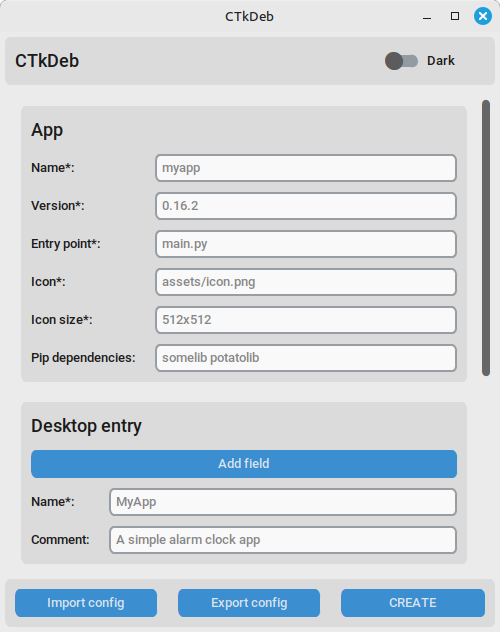
GUI
CLI
ctkdeb config.json
View all arguments:
ctkdeb --help
Python
from ctkdeb import Packager

packager = Packager("config.json")
packager.create_deb()
Arguments:
| Argument | Type | Description |
|---|---|---|
| json_path | str or dict | Path to the JSON config (or its dict), required |
| project_folder | str | Path to the project folder (if the command is not executed from it) |
| desktop_entry | str | Path to the custom desktop entry (or its text) |
| output_folder | str | Path to the output folder |
FAQ
- Do I need to specify Tkinter and CustomTkinter as dependencies?
No, CTkDeb has already taken care of that; just specify third-party dependencies, if any.
Other
App icon: Claude Sonnet 5.
1 maintainer

Metadata
1 maintainer
Release files for CTkDeb 0.4.0
For a detailed explanation of source distributions (sdists) and built distributions (wheels), please see the package formats documentation.
Source distribution (sdist)
| File | Size | Uploaded | |
|---|---|---|---|
| ctkdeb-0.4.0.tar.gz | 34.6 kB | Details |
Built distribution (wheel)
| File | Interpreter | ABI | Platform | Reset |
|---|---|---|---|---|
| ctkdeb-0.4.0-py3-none-any.whl | Python 3 | none | any | Details |
Total release size: 68.4 kB
Release files / ctkdeb-0.4.0.tar.gz
| Download URL | ctkdeb-0.4.0.tar.gz |
|---|---|
| Size | 34.6 kB |
| Tags | Source |
|
SHA-256 checksum How to use checksums |
ccd10f93b38c12971982d1ab8ab379ceff66d1293ab76f9197e03307ab50eadf
|
|
BLAKE2b-256 checksum How to use checksums |
ba97fdf08ab5ee088d190ee144572235136064930c7c8f6534883e5bdf779bc1
|
| Upload date | |
|
Uploaded using Trusted Publishing? What is trusted publishing? |
Yes |
| Uploaded via |
twine/7.0.0 CPython/3.13.14
|
Provenance
Provenance describes where a file came from. On PyPI, provenance is shared via attestations, which provide a verifiable record of the build or publishing details. View details, limitations and caveats.


PyPI Publish Attestation
PyPI verified that this artifact, at this checksum, originated from the publisher listed below.
Signed by GitHub Actions, verified by PyPI on Aug 28, 2026.
Transparency logRelease files / ctkdeb-0.4.0-py3-none-any.whl
| Download URL | ctkdeb-0.4.0-py3-none-any.whl |
|---|---|
| Size | 33.8 kB |
| Tags | Python 3 |
|
SHA-256 checksum How to use checksums |
54d13c5343a663eb7e156062b610597009b16a481e07408195cac73c5551d197
|
|
BLAKE2b-256 checksum How to use checksums |
ab79fc7a20d78f6fb1cdb6412ca1062e34181f8d893d38c7dcbcfa199395d7d1
|
| Upload date | |
|
Uploaded using Trusted Publishing? What is trusted publishing? |
Yes |
| Uploaded via |
twine/7.0.0 CPython/3.13.14
|
Provenance
Provenance describes where a file came from. On PyPI, provenance is shared via attestations, which provide a verifiable record of the build or publishing details. View details, limitations and caveats.
PyPI Publish Attestation
PyPI verified that this artifact, at this checksum, originated from the publisher listed below.
Signed by GitHub Actions, verified by PyPI on Aug 28, 2026.
Transparency log













