
CTkMenuBarPlus
Modern menu bar widget library for customtkinter with enhanced features.
Quick Navigation
- Installation
- CTkMenuBar — Arguments
- CTkTitleMenu — Arguments
- CustomDropdownMenu — Arguments
- CustomDropdownMenu — add_option() and add_submenu() Parameters
- ContextMenu — Arguments
- Keyboard Accelerators
- Theming
- Error Handling
- Advanced Features
Features
- Custom dropdown menus with full customization
- Menu bar integration - add menus to window top or title bar
- Keyboard shortcuts/accelerators - layout-independent key bindings
- Icons in menu items - PNG, JPG, or PIL Image support
- Checkable menu items - toggle states with visual feedback
- Context menus - right-click dropdown support
- Scrollable menus - automatic scrollbars for long option lists
- Dynamic menu control - enable/disable items programmatically
- Platform support - cross-platform (Windows title menu Windows-only)
Installation
pip install CTkMenuBarPlus
Menu Types
1. CTkMenuBar
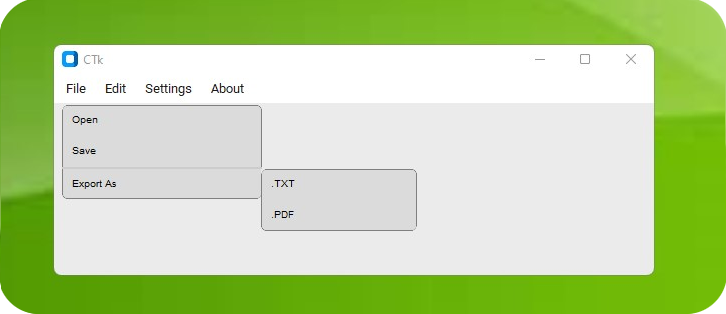
Usage
from CTkMenuBarPlus import *
import customtkinter as ctk

root = ctk.CTk()
menu_bar = CTkMenuBar(root)
file_button = menu_bar.add_cascade("File")
edit_button = menu_bar.add_cascade("Edit")
Methods
- .add_cascade(text, postcommand, kwargs): Add new menu button to the bar
- .configure(kwargs): Update menu bar parameters
- .cget(param): Get configuration parameter value
- .show(): Show the menu bar (if hidden)
- .hide(): Hide the menu bar
- .toggle(): Toggle menu bar visibility
Arguments
| Parameter | Type | Default | Description |
|---|---|---|---|
| master | Widget | - | Parent widget (root or frame) |
| bg_color | str/tuple | ["white", "black"] | Background color (theme tuple or string) |
| height | int | 25 | Menu bar height in pixels |
| width | int | 10 | Menu button width in pixels |
| padx | int | 5 | Horizontal spacing between buttons |
| pady | int | 2 | Vertical padding |
| postcommand | callable | None | Function called before showing dropdown |
| *other_args | various | - | Additional CTkFrame parameters |
2. CTkTitleMenu
Windows Only - integrates with window title bar
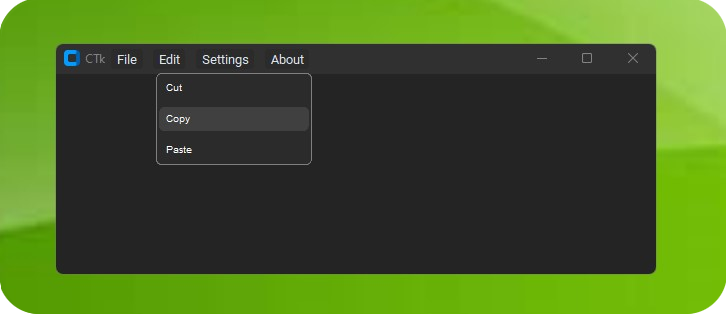
Usage
from CTkMenuBarPlus import *
import customtkinter as ctk

root = ctk.CTk()
title_menu = CTkTitleMenu(root)
file_button = title_menu.add_cascade("File")
Methods
- .add_cascade(text, kwargs): Add menu button to title bar
- .show(): Show the title menu
- .hide(): Hide the title menu
- .toggle(): Toggle title menu visibility
Arguments
| Parameter | Type | Default | Description |
|---|---|---|---|
| master | CTk/CTkToplevel | - | Parent window (root or toplevel only) |
| title_bar_color | str/int | "default" | Title bar color |
| padx | int | 10 | Spacing between menu buttons |
| width | int | 10 | Width of menu buttons |
| x_offset | int | None | Horizontal position offset |
| y_offset | int | None | Vertical position offset |
3. CustomDropdownMenu
Core dropdown menu class with enhanced features - used by both CTkMenuBar and CTkTitleMenu.
Usage
from CTkMenuBarPlus import *

# Attach to any widget
dropdown = CustomDropdownMenu(widget=my_button)
dropdown.add_option("Option 1")
dropdown.add_separator()
submenu = dropdown.add_submenu("Submenu")
submenu.add_option("Sub Option")
Enhanced Usage with New Features
# Keyboard shortcuts
dropdown.add_option(
    option="Open",
    command=open_file,
    accelerator="Ctrl+O"
)

# Checkable items
dropdown.add_option(
    option="Word Wrap",
    command=toggle_wrap,
    checkable=True,
    checked=True
)

# Icons in menu items
dropdown.add_option(
    option="Save",
    command=save_file,
    icon="assets/save.png",
    accelerator="Ctrl+S"
)

# Disabled items
dropdown.add_option(
    option="Advanced Settings",
    command=advanced_settings,
    enabled=False
)

# Dynamic state control
option_button = dropdown.add_option("Toggle Me", checkable=True)
option_button.set_checked(True)  # Set checked state
option_button.set_enabled(False)  # Disable item
Methods
- .add_option(option, command, kwargs): Add menu option with enhanced features
- .add_separator(): Add visual separator line
- .add_submenu(submenu_name, kwargs): Add nested submenu
- .configure(kwargs): Update dropdown appearance
- .cget(param): Get configuration parameter
- .toggleShow(): Show or hide the dropdown menu
- .destroy(): Clean up resources and destroy menu
- .clean(): Remove all options, submenus, and separators, resetting the menu
- .remove_option(option_name): Remove a single option or submenu by its display text
Arguments
| Parameter | Type | Default | Description |
|---|---|---|---|
| widget | Widget | - | Widget that triggers this dropdown |
| master | Widget | None | Parent widget (auto-determined if None) |
| border_width | int | 1 | Border width in pixels |
| width | int | 150 | Menu width in pixels |
| height | int | 25 | Menu item height in pixels |
| bg_color | str/tuple | None | Background color |
| corner_radius | int | 10 | Corner radius for rounded corners |
| border_color | str/tuple | "grey50" | Border color |
| separator_color | str/tuple | ("grey80", "grey20") | Separator line color |
| text_color | str/tuple | ("black", "white") | Text color |
| fg_color | str/tuple | "transparent" | Foreground color |
| hover_color | str/tuple | ("grey75", "grey25") | Hover color |
| font | CTkFont | ("helvetica", 12) | Font for menu text |
| padx | int | 3 | Horizontal padding |
| pady | int | 3 | Vertical padding |
| cursor | str | "hand2" | Cursor type on hover |
| max_visible_options | int | 10 | Options before scrollbar appears |
| enable_scrollbar | bool | True | Enable scrollbar for long menus |
| scrollbar_width | int | 16 | Scrollbar width in pixels |
| scale | float | 1.0 | Single number to uniformly scale the dropdown and its options |
add_option() and add_submenu() Parameters
| Parameter | Type | Default | Description | Parameter of add_submenu() or add_option()? |
|---|---|---|---|---|
| option | str | - | Text to display for this option | Both (submenu_name in add_submenu()) |
| command | callable | None | Function to call when selected | add_option() |
| accelerator | str | None | Keyboard shortcut (e.g., "Ctrl+S", "Alt+F4") | Both |
| icon | str/PIL.Image | None | Icon file path or PIL Image object | Both |
| icon_size | int | 16 | Size (px) to render icon at; defaults to menu's scaled icon size | Both |
| checkable | bool | False | Whether item can be checked/unchecked | add_option() |
| checked | bool | False | Initial checked state (if checkable=True) | add_option() |
| enabled | bool | True | Whether item is initially enabled | Both |
| max_visible_options | int | 10 | Maximum number of visible options before scrollbar appears (inherits from parent if None) | add_submenu() |
| enable_scrollbar | bool | True | Whether to enable scrollbar for this submenu (inherits from parent if None) | add_submenu() |
| scrollbar_width | int | 16 | Width of the scrollbar (inherits from parent if None) | add_submenu() |
| *kwargs | various | - | Additional CTkButton styling options | Both |
4. ContextMenu
Right-click context menu with full dropdown functionality.
Usage
from CTkMenuBarPlus import *

# Create context menu for any widget
context_menu = ContextMenu(my_widget)
context_menu.add_option("Copy", copy_function, accelerator="Ctrl+C")
context_menu.add_option("Paste", paste_function, accelerator="Ctrl+V")
context_menu.add_separator()
context_menu.add_option("Delete", delete_function, accelerator="Delete")

# Right-click will automatically show the menu
Methods
Same as CustomDropdownMenu - inherits all functionality plus:
- Automatic right-click binding to target widget and children
- Cursor-position display - appears where you right-click
- Full feature support - accelerators, icons, checkable items, submenus
Arguments
| Parameter | Type | Description |
|---|---|---|
| widget | CTkBaseClass | Widget to attach context menu to |
| *kwargs | various | All CustomDropdownMenu parameters supported |
Theming
CTkMenuBarPlus automatically adapts to customtkinter appearance modes:
# Light/Dark mode support
ctk.set_appearance_mode("dark")  # "light" or "dark"

# Custom colors (theme tuples)
menu_bar = CTkMenuBar(
    root,
    bg_color=("white", "#2b2b2b"),  # (light_mode, dark_mode)
)

dropdown = CustomDropdownMenu(
    widget=button,
    bg_color=("white", "#1a1a1a"),
    text_color=("black", "white"),
    hover_color=("lightblue", "#3a3a3a")
)
Error Handling
The library includes comprehensive error handling:
from CTkMenuBarPlus import MenuWidgetBindingError, MenuCommandExecutionError

try:
    dropdown.add_option("Test", invalid_command)
except MenuCommandExecutionError as e:
    print(f"Command error: {e}")
Custom Exception Classes:
CTkMenuBarError- Base exceptionMenuWidgetBindingError- Widget binding issuesMenuCommandExecutionError- Command execution problemsMenuToggleError- Show/hide toggle failuresMenuOptionError- Menu option operationsMenuIconError- Icon loading/processing errorsMenuPositioningError- Menu positioning failuresMenuScrollError- Scrollable menu issues
Advanced Features
Scrollable Menus
Large menus automatically get scrollbars:
dropdown = CustomDropdownMenu(
    widget=button,
    max_visible_options=5,  # Show scrollbar after 5 items
    enable_scrollbar=True,
    scrollbar_width=16
)
Keyboard Accelerators
Layout-independent shortcuts that work across keyboard layouts:
# Supports: Ctrl, Alt, Shift, Cmd (macOS), CmdOrCtrl (Cmd on macOS, Ctrl on others)
# Keys: A-Z, 0-9, Function keys, special keys
dropdown.add_option("Open", open_func, accelerator="CmdOrCtrl+O")
dropdown.add_option("Save", save_func, accelerator="Ctrl+S")
dropdown.add_option("Save as", save_func, accelerator="Ctrl+Shift+S")
dropdown.add_option("Quit", quit_func, accelerator="Alt+F4")
Supported keys and modifiers
Modifiers
- Ctrl / Control
- Alt (Option on macOS)
- Shift
- Cmd (macOS only)
- CmdOrCtrl (Cmd on macOS, Ctrl elsewhere)
Keys (common to all platforms)
- Letters: A–Z
- Digits: 0–9
- Function keys: F1–F12
Special/navigation keys (platform-specific keycodes):
| Platform | Keys |
|---|---|
| Windows | Delete/Del, Insert/Ins, Home, End, Page_Up/PageUp/PgUp, Page_Down/PageDown/PgDn, Up/Down/Left/Right, Tab, Enter/Return, Escape/Esc, Space, Backspace, punctuation: plus (+), minus (-), equal (=), comma (,), period (.) |
| macOS | Delete/Del (Backspace/Forward Delete), Insert, Home, End, Page_Up/PageUp/PgUp, Page_Down/PageDown/PgDn, Up/Down/Left/Right, Tab, Enter/Return, Escape/Esc, Space, Backspace |
| Linux/X11 | Delete/Del, Insert/Ins, Home, End, Page_Up/PageUp/PgUp, Page_Down/PageDown/PgDn, Up/Down/Left/Right, Tab, Enter/Return, Escape/Esc, Space, Backspace |
Notes
- Punctuation shortcuts are limited: on Windows we support +, -, =, ,, . as accelerator keys. Other punctuation (e.g., /, ;, etc.) are not currently mapped.
- Accelerators are layout‑independent: physical keycodes are used under the hood, so shortcuts work consistently across keyboard layouts.
- Use CmdOrCtrl in strings to automatically map to Command (macOS) or Control (Windows/Linux).
Dynamic Control
Control menu items programmatically:
option = dropdown.add_option("Toggle", checkable=True)

# Later in your code:
option.set_checked(True)    # Check the item
option.set_enabled(False)   # Disable the item
option.toggle_checked()     # Toggle check state
Support & Issues
- GitHub Issues: Report bugs or request features
- Discussions: Community support and questions
Authors
- Original Author: Akash Bora (Akascape) - CTkMenuBar
- Enhanced Features: xzyqox (KiTant) - Accelerators, icons, checkable items, context menus, etc
- Base Dropdown: LucianoSaldivia - Original dropdown implementation
License
This project is licensed under the MIT License.
1 maintainer

Download files
Download the file for your platform. If you're not sure which to choose, learn more about installing packages.
Source Distribution
Built Distribution
Filter files by name, interpreter, ABI, and platform.
If you're not sure about the file name format, learn more about wheel file names.
Copy a direct link to the current filters














