
CtkRatingStar
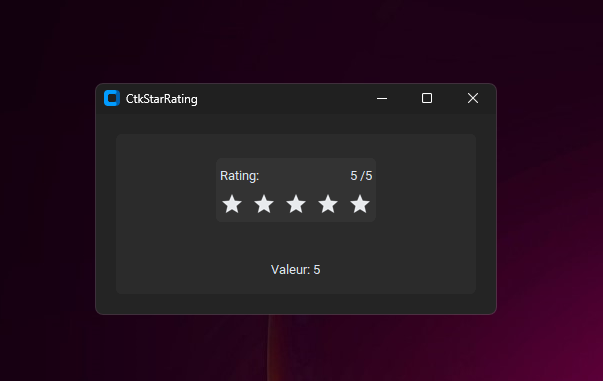
A customizable star rating widget for CustomTkinter applications. This widget provides an intuitive and visually appealing way to implement rating functionality in your CustomTkinter projects.
Features
- Customizable number of stars
- Smooth hover effects
- Current value display
- Optional title and rating label
- Easy integration with existing CustomTkinter applications
Installation
# Clone the repository
git clone https://github.com/ZachVFXX/CtkRatingStar.git

# Navigate to the project directory
cd ctk-star-rating

# Install required dependencies
pip install customtkinter Pillow
Usage
Here's a simple example of how to use the CtkStarRating widget:
import customtkinter as ctk
from ctk_star_rating import CtkStarRating

class App(ctk.CTk):
    def __init__(self):
        super().__init__()

        # Create the star rating widget
        star_rating = CtkStarRating(
            self,
            number_of_stars=5,     # Number of stars to display
            current_value=3,       # Initial rating value
            title="Rating:",       # Optional title
            current_value_label="/5" # Optional value label
        )
        star_rating.pack(pady=10)

        # Get the current rating value
        value = star_rating.get_value()

if __name__ == "__main__":
    app = App()
    app.mainloop()
Customization Options
The CtkStarRating widget accepts the following parameters:
number_of_stars(int): Number of stars to display (default: 5)current_value(int): Initial rating value (default: 1)title(str, optional): Title text to display above the starscurrent_value_label(str, optional): Label to display after the current value
Required Assets
The widget requires the following image assets in the assets directory:
full_star.png: Filled star imageempty_star.png: Empty star imagefull_star_hover.png: Filled star hover statehover_star.png: Empty star hover state
Contributing
Contributions are welcome! Please feel free to submit a Pull Request.
- Fork the repository
- Create your feature branch (
git checkout -b feature/AmazingFeature) - Commit your changes (
git commit -m 'Add some AmazingFeature') - Push to the branch (
git push origin feature/AmazingFeature) - Open a Pull Request
License
This project is licensed under the MIT License - see the LICENSE file for details.
Author
Acknowledgments
- Built with CustomTkinter
- Uses Pillow for image handling
1 maintainer

Metadata
1 maintainer
Release files for CTkRatingStar 0.0.1
For a detailed explanation of source distributions (sdists) and built distributions (wheels), please see the package formats documentation.
Source distribution (sdist)
| File | Size | Uploaded | Provenance | Actions |
|---|---|---|---|---|
| ctkratingstar-0.0.1.tar.gz | 17.1 kB | Without provenance | Details for ctkratingstar-0.0.1.tar.gz |
Built distribution (wheel)
| File | Interpreter | ABI | Platform | Actions Reset |
|---|---|---|---|---|
| CTkRatingStar-0.0.1-py3-none-any.whl | Python 3 | none | any | Details for CTkRatingStar-0.0.1-py3-none-any.whl |
Total release size: 34.6 kB
Release files / ctkratingstar-0.0.1.tar.gz
| Download URL | ctkratingstar-0.0.1.tar.gz |
|---|---|
| Size | 17.1 kB |
| Tags | Source |
|
SHA-256 checksum How to use checksums |
74edea6d3f29d380f9edf78bec159cc5d345c97644e76946856ba10a3acb0dea
|
|
BLAKE2b-256 checksum How to use checksums |
be5f905f48171642ae3b3007bba6f11fce1b0e2aadca1824c30dd2b95cb36a0c
|
| Upload date | |
|
Uploaded using Trusted Publishing? What is trusted publishing? |
No |
| Uploaded via |
twine/5.1.1 CPython/3.13.0
|
Release files / CTkRatingStar-0.0.1-py3-none-any.whl
| Download URL | CTkRatingStar-0.0.1-py3-none-any.whl |
|---|---|
| Size | 17.5 kB |
| Tags | Python 3 |
|
SHA-256 checksum How to use checksums |
d38f1fe41fe4cd4b9c245f14e9e7e4653324e660db1764b29ca2feefef7347da
|
|
BLAKE2b-256 checksum How to use checksums |
ebe1e870a71a9403ed9dfb9400ebb74ca8979dae5b5f260404dd3cc61109bce0
|
| Upload date | |
|
Uploaded using Trusted Publishing? What is trusted publishing? |
No |
| Uploaded via |
twine/5.1.1 CPython/3.13.0
|
Security for CTkRatingStar 0.0.1
Provenance
Provenance describes where a file came from. On PyPI, provenance is shared via attestations, which provide a verifiable record of the build or publishing details. View details, limitations and caveats.
No provenance found
None of the files in this release were uploaded with provenance metadata.
A note on package security
PyPI is a repository for distributing packages, not a service for auditing them. While third-party security researchers and our staff do their best to detect and remove malicious packages, PyPI cannot guarantee the quality, security or suitability of any given package.
To learn more about protecting yourself from malicious actors, visit our package security documentation.













