
This release is a pre-release and may not be stable for production use.




Paladin stops AI coding agents from reintroducing known CVE patterns. It tells the agent what the problem is and how to avoid it; the agent writes its own fix.
- Prevention cards for 524 Python web CVEs, searchable by the agent over MCP
(e5 + BM25 hybrid). 501 are checked against the fix diff; 23 remain
candidate. - Edit-time hook for Claude Code and Codex, with no model or network call:
125 rules drafted from the cards block the turn when their CVE is MEDIUM,
HIGH or CRITICAL (104 rules), advise for LOW (7;
hook install --block-lowmakes those block too), and advise for 14 broad rules that showed no real risk in sampled real code; two exact CVE rules also block. Each block names the CVE, line and fix. - Dependency check (
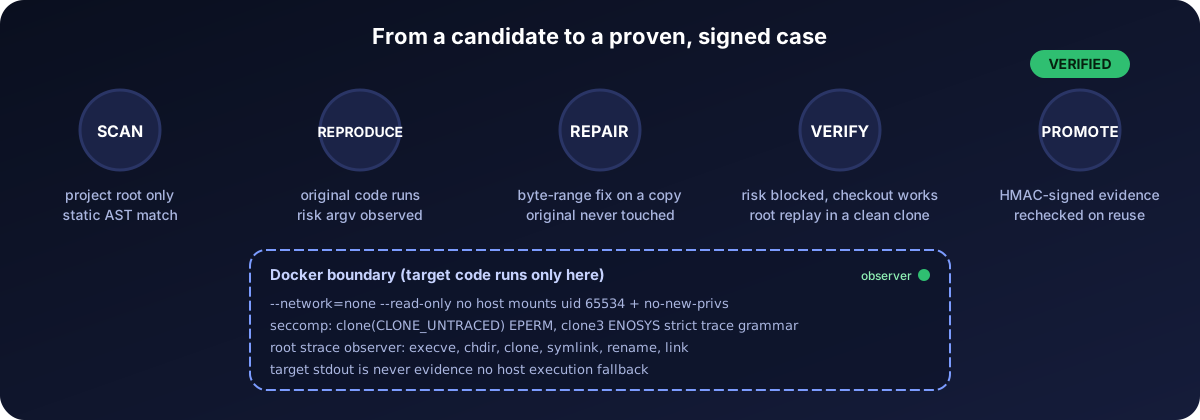
paladin deps check, MCPcheck_dependencies, and the hook when an agent edits a dependency file): pinned versions against the PyPI affected ranges of 520 collected CVEs, most of which are library-internal and have no code rule. - Proof loop: reproduces a CVE and verifies a repair inside an isolated Docker observer before a case is recorded.
Tested
| Test | Result |
|---|---|
| Proof loop on real CVEs (Cookiecutter CVE-2022-24065, pip CVE-2023-5752) | reproduced, repaired, verified; 0 false alarms on fixed versions |
| Claude Code and Codex sessions, ported vulnerable code | blocked, agent fixed it |
| Search, fresh held-out questions (hit@5 / MRR) | 0.831 / 0.697 and 0.873 / 0.736 |
| Unit tests | 384 pass |
How it works
Quick start
Windows, Python 3.12, uv and Docker Desktop.
1. Install and build the search database (once per machine)
uv tool install CVEPaladin
paladin setup --json           # starts a local Milvus in Docker
paladin model prepare --json   # downloads the search model (487 MB)
paladin patterns index --json  # loads the CVE cards into Milvus
The package has no database. setup starts Milvus in Docker under
%USERPROFILE%\.paladin and patterns index fills it; every project shares it.
Only search needs it: the hook and the checks work without Docker. Run
patterns index again after upgrading Paladin. To work on Paladin itself, clone
the repository, run uv sync --locked and use .\.venv\Scripts\paladin.exe.
2. Add Paladin to Claude Code and Codex (once per user)
paladin mcp install --user                 # Claude Code
paladin mcp install --user --host codex    # Codex
Open any project in a new session and run /paladin (Claude Code) or $paladin
(Codex). It checks the whole project and its pinned dependencies, explains each
finding and edits nothing until you ask. It runs only when you call it.
3. Optional: block unsafe edits in a project
paladin hook install --workspace C:/projects/app                # Claude Code
paladin hook install --host codex --workspace C:/projects/app   # Codex
The hook checks every edit the agent makes in that project and blocks known CVE
patterns. Codex runs it after you trust it with /hooks. Remove the user install
with paladin mcp uninstall --user (add --host codex for Codex).
Limits
Card rules block by CVE severity on the lines an edit writes; they are static pattern matches, so a block can be a false positive. Single-file static checks. Patch checks are model reviews, not human review. A clean result is not a security verdict. Project text is English ASCII.
Docs
Hook | Case loop | MCP | Setup | Plans
License
Apache-2.0. Bundled CVE records, patches and advisory data keep their own licenses: data/THIRD_PARTY.md, NOTICE.
1 maintainer

Metadata
1 maintainer
Release files for CVEPaladin 0.2.0a1
For a detailed explanation of source distributions (sdists) and built distributions (wheels), please see the package formats documentation.
Source distribution (sdist)
| File | Size | Uploaded | Provenance | Actions |
|---|---|---|---|---|
| cvepaladin-0.2.0a1.tar.gz | 3.1 MB | Without provenance | Details for cvepaladin-0.2.0a1.tar.gz |
Built distribution (wheel)
| File | Interpreter | ABI | Platform | Actions Reset |
|---|---|---|---|---|
| cvepaladin-0.2.0a1-py3-none-any.whl | Python 3 | none | any | Details for cvepaladin-0.2.0a1-py3-none-any.whl |
Total release size: 7.5 MB
Release files / cvepaladin-0.2.0a1.tar.gz
| Download URL | cvepaladin-0.2.0a1.tar.gz |
|---|---|
| Size | 3.1 MB |
| Tags | Source |
|
SHA-256 checksum How to use checksums |
e52d5cbd7f2068e1629138613a52de69ef446a19f474e2ec04a5abe2904a6476
|
|
BLAKE2b-256 checksum How to use checksums |
1d7670f907b3d5fc949e3d41f1a4d2826cc6d05dd605aea282676d53185572cd
|
| Upload date | |
|
Uploaded using Trusted Publishing? What is trusted publishing? |
No |
| Uploaded via |
uv/0.12.1 {"installer":{"name":"uv","version":"0.12.1","subcommand":["publish"]},"python":null,"implementation":{"name":null,"version":null},"distro":null,"system":{"name":null,"release":null},"cpu":null,"openssl_version":null,"setuptools_version":null,"rustc_version":null,"ci":null}
|
Release files / cvepaladin-0.2.0a1-py3-none-any.whl
| Download URL | cvepaladin-0.2.0a1-py3-none-any.whl |
|---|---|
| Size | 4.4 MB |
| Tags | Python 3 |
|
SHA-256 checksum How to use checksums |
3730c44229c30f5888105dffae250bd836fa63d6d11b9c2f885ff25cc0ebc30c
|
|
BLAKE2b-256 checksum How to use checksums |
828b611736f2317c85f28ee483258a2a74cf27ade38aaadd997e7342b4192d0d
|
| Upload date | |
|
Uploaded using Trusted Publishing? What is trusted publishing? |
No |
| Uploaded via |
uv/0.12.1 {"installer":{"name":"uv","version":"0.12.1","subcommand":["publish"]},"python":null,"implementation":{"name":null,"version":null},"distro":null,"system":{"name":null,"release":null},"cpu":null,"openssl_version":null,"setuptools_version":null,"rustc_version":null,"ci":null}
|
Security for CVEPaladin 0.2.0a1
Provenance
Provenance describes where a file came from. On PyPI, provenance is shared via attestations, which provide a verifiable record of the build or publishing details. View details, limitations and caveats.
No provenance found
None of the files in this release were uploaded with provenance metadata.
A note on package security
PyPI is a repository for distributing packages, not a service for auditing them. While third-party security researchers and our staff do their best to detect and remove malicious packages, PyPI cannot guarantee the quality, security or suitability of any given package.
To learn more about protecting yourself from malicious actors, visit our package security documentation.













