
A dynamic, high-performance cheminformatics framework integrating 6 distinct molecular embeddings into a robust unified latent representation.

Project description
Chemical Dice Integrator (CDI)
CDI (Chemical Dice Integrator) is a high-performance deep learning framework designed to unify heterogeneous chemical representations into a single, high information rich latent space. By fusing six complementary molecular embeddings, CDI produces a consolidated vector optimized for large-scale cheminformatics, bioinformatics, and AI-driven molecular discovery tasks.
Overview
CDI extends the Chemical Dice Integrator featurization ecosystem by performing unsupervised integration of six distinct molecular embeddings:
- Quantum Descriptors
- Bioactivity Signatures
- Language Model Embeddings
- Graph-Derived Representations
- Physicochemical Profiles
- 2D Molecular Image Features
Each compound’s six feature types are combined to create a single latent embedding that captures chemical, structural, and biological semantics. These embeddings can be directly used for tasks such as QSAR modeling, virtual screening, drug-target interaction prediction, and bioactivity clustering.
Installation
1. Prerequisites & System Requirements
- Python (version 3.8 or higher)
- RDKit (v2022.3.1 or higher) — https://www.rdkit.org/
- pandas (v1.4.3 or higher) — https://pandas.pydata.org/
- numpy (v1.20.3 or higher) — https://numpy.org
- tqdm (or v4.65 or higher) - https://pypi.org/project/tqdm/
- requests (2.32.4 or higher)-https://pypi.org/project/requests/
2. Install Python Dependencies
Open terminal or jupyter notebook run the following command to install all required python packages.
pip install numpy pandas rdkit tqdm requests
3. Install the ChemicalDice Python Package
pip install -i https://test.pypi.org/simple/ ChemicalDice
Usage
Feature Extraction from a CSV File
The primary function, smiles_to_embeddings, processes a CSV file containing SMILES strings, validates and canonicalizes them, and streams the data to the ChemicalDice API to generate molecular embeddings.
Step 1: Prepare Your Input CSV
Your input file must meet the following requirements:
- Column Name: The file must contain a column named exactly
SMILES. - File Size: The input file size must not exceed 20 MB.
Example smiles.csv:
SMILES,Compound_ID
CCO,Ethanol
Cc1ccccc1,Toluene
C1CCCCC1,Cyclohexane
Step 2: Run the Feature Extraction
from ChemicalDice import smiles_to_embeddings

# Generate embeddings from CSV
CDI_embeddings = smiles_to_embeddings.collect_features_from_csv(
    filepath="smiles.csv",
    convert_to_canonical=True
)

# CDI_embeddings is a pandas.DataFrame;
# Save to CSV
CDI_embeddings.to_csv("CDI_embeddings.csv", index=False)
Function Details: smiles_to_embeddings.collect_features_from_csv
- Purpose: Processes a CSV file to generate molecular feature embeddings.
- Input: Path to a CSV file with a
SMILEScolumn. - Process:
- Validation: Uses RDKit to validate each SMILES string. Invalid entries are flagged and skipped.
- Canonicalization(Optional): The original
SMILEScolumn in your input CSV is converted to canonical SMILES. In case you do not want canonicalization you can set convert_to_canonical argument to False. - Feature Extraction: The CSV is streamed to the ChemicalDice API, which returns a data frame of molecular features.
- Output: A dataframe where the first column contains the input SMILES, other columns correspond to the extracted features, and rows correspond to successfully processed molecules.
This standardized output can be used directly for downstream tasks such as QSAR modeling, clustering, virtual screening, or integration into machine learning pipelines.
Troubleshooting & Notes
- Backup Your Data: The input CSV file is modified in-place. Always work on a copy of your original data to prevent data loss.
- Invalid SMILES: Molecules with invalid SMILES will be skipped during processing and will not appear in the output feature dataframe. Check the function's messages or your overwritten CSV for details on which entries were invalid in column
is_valid. - Network Connection: A stable internet connection is required to communicate with the ChemicalDice API.
For technical issues, please ensure all prerequisites are met and your configuration is correct. For API-related problems, contact the ChemicalDice service administrators.
CDI Bot
Chemical Dice Integrator — Conversational Molecular Embedding Platform
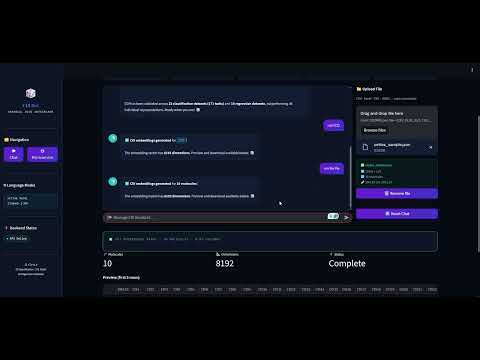
CDI Bot is a fully containerised, LLM-powered web application that gives researchers and chemists a natural-language interface to the Chemical Dice Integrator (CDI).
[!TIP] Watch the CDI Bot in action:
For all other detailed information, please visit our complete documentation.


Download files
Download the file for your platform. If you're not sure which to choose, learn more about installing packages.
Source Distribution
Built Distribution
Filter files by name, interpreter, ABI, and platform.
If you're not sure about the file name format, learn more about wheel file names.
Copy a direct link to the current filters
File details
Details for the file chemicaldice-1.0.3.tar.gz.
File metadata
- Download URL: chemicaldice-1.0.3.tar.gz
- Upload date:
- Size: 223.5 kB
- Tags: Source
- Uploaded using Trusted Publishing? No
- Uploaded via: twine/6.2.0 CPython/3.10.20
File hashes
| Algorithm | Hash digest | |
|---|---|---|
| SHA256 |
3b1e1bc9a00bf161504540551c3f12f4147b2ca8bae324443e78645b81ad606e
|
|
| MD5 |
57840c71c75a3d26540c42aa25f4ace5
|
|
| BLAKE2b-256 |
8ee5a6e2c66aaf85f3a770a44535f09c32d7589e20cdd1d2f9612a6a72bf2607
|
File details
Details for the file chemicaldice-1.0.3-py3-none-any.whl.
File metadata
- Download URL: chemicaldice-1.0.3-py3-none-any.whl
- Upload date:
- Size: 264.5 kB
- Tags: Python 3
- Uploaded using Trusted Publishing? No
- Uploaded via: twine/6.2.0 CPython/3.10.20
File hashes
| Algorithm | Hash digest | |
|---|---|---|
| SHA256 |
d04aa9cc51fe82be63facfadc2342629684e0e66b055813daf7c019536482308
|
|
| MD5 |
02d26a2251480c2ce75a0d6b205fc60a
|
|
| BLAKE2b-256 |
f4e997eee4dcf31a8f91026ebd4b0726daa9298766998b2f213bd8b4c5c88f4e
|






