
Process reviews data, apply text preprocessing, and generate a chord plot visualization showing word co-occurrence patterns and sentiment analysis.


Project description
Chord Reviews
Overview
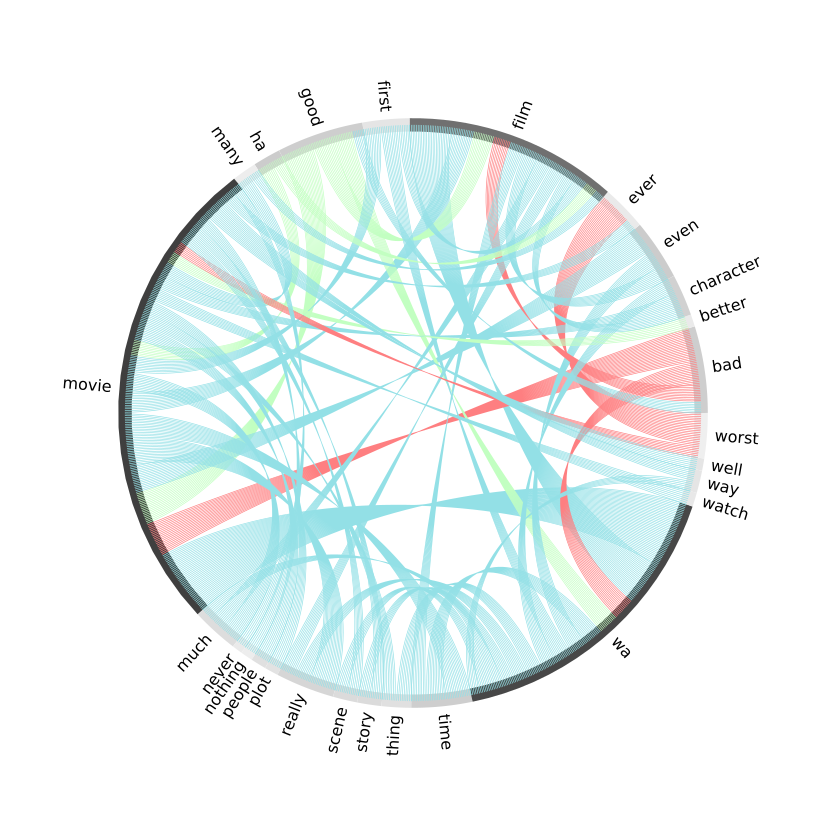
ChordReviewsVis is a Python package designed to process and visualize review data by generating chord plots. These visualizations illustrate word co-occurrence patterns and sentiment analysis, providing insights into the textual data. For this, the visualization relies on the following features:
- Labels for each node: The top nouns and adjectives extracted from the reviews were displayed around the graphic.
- Label bars: Below the labels, there is a bar whose color illustrates the words' overall frequency in reviews. The darker the color, the more frequent the word.
- Edges: The line connecting the words that occur together.
- Edge thickness: This characteristic shows how often the connected words appear in the same sentence. The more often they are together, the thicker the line is.
- Edge color: The color shows the overall sentiment of the words that are being connected. Red was used for negative sentiments, blue for neutral ones, and green for positive sentiments.
This package was developed by Felix Jose Funes as part of his master's dissertation at Universidade Nova de Lisboa, which was supervised by Prof. Nuno Antonio, PhD.
Installation
To install ChordReviewsVis, use pip:
pip install ChordReviewsVis
Usage
First, import the necessary libraries and the ChordReviews function:
import pandas as pd
from ChordReviewsVis import ChordReviews
Prepare the DataFrame with a text column containing review data. Then call the ChordReviews function:
# Load DataFrame
df = pd.read_csv("filepath")

# Generate chord plot
ChordReviews(df, 'review')
Some datasets that can be used for this purpose are:
Function Parameters
- df (pandas.DataFrame): DataFrame containing review data.
- text_column (str): Name of the column containing the text data.
- size (int, optional): Size of the output chord plot. Default is 300.
- stopwords_to_add (list, optional): Additional stopwords to include in the stop words set. Default is an empty list.
- stemming (bool, optional): Whether to apply stemming to words. Default is False.
- lemmatization (bool, optional): Whether to apply lemmatization to words. Default is True.
- words_to_replace (dict, optional): A dictionary where keys are words to be replaced and values are the replacements. Default is an empty dictionary.
- label_text_font_size (int, optional): Font size for the labels in the chord plot. Default is 12.
Returns
- hv.Chord: A chord plot visualization of word co-occurrence patterns and sentiment analysis.
Examples
Basic Usage
# Import necessary libraries
import pandas as pd
from ChordReviewsVis import ChordReviews

# Load dataset
df = pd.read_csv("https://github.com/felix-funes/ChordReviewsVis/raw/main/Test%20Dataset%20-%20IMDB%20Movie%20Reviews.csv")

# Generate chord plot
ChordReviews(df, 'review')
Custom Parameters
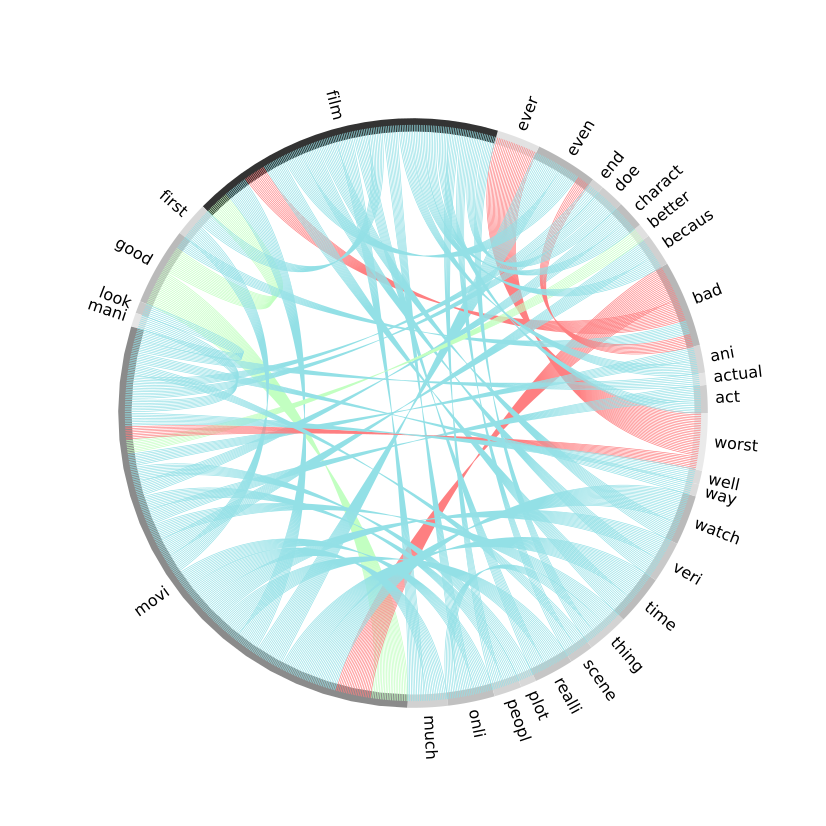
Though lemmatization is used by default, users have the possibility of using stemming.
# Import necessary libraries
import pandas as pd
from ChordReviewsVis import ChordReviews

# Load dataset
df = pd.read_csv("https://github.com/felix-funes/ChordReviewsVis/raw/main/Test%20Dataset%20-%20IMDB%20Movie%20Reviews.csv")

# Generate chord plot
ChordReviews(df, 'review', stemming=True, lemmatization=False)
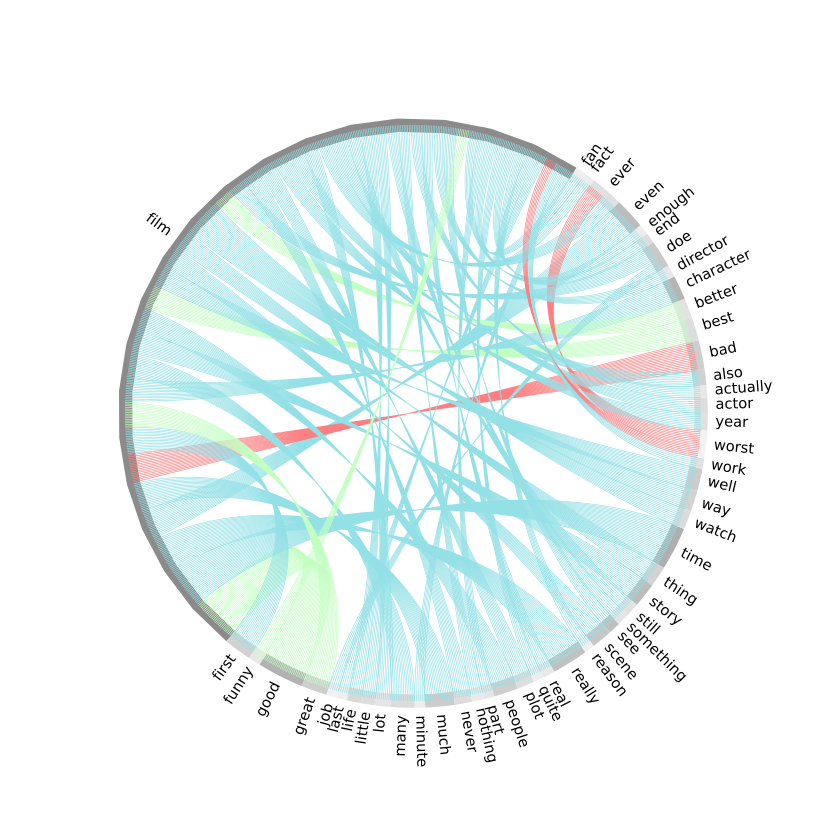
To refine the visualization, it is possible to use the "stopwords_to_add" parameter to remove irrelevant words and "words_to_replace" to unify terms with the same meaning.
# Import necessary libraries
import pandas as pd
from ChordReviewsVis import ChordReviews

# Load dataset
df = pd.read_csv("https://github.com/felix-funes/ChordReviewsVis/raw/main/Test%20Dataset%20-%20IMDB%20Movie%20Reviews.csv")

# Generate chord plot
chord_reviews(df, 'Review', stemming=False, lemmatization=True, stopwords_to_add=["wa", "ha"], words_to_replace={"movie": "film"})
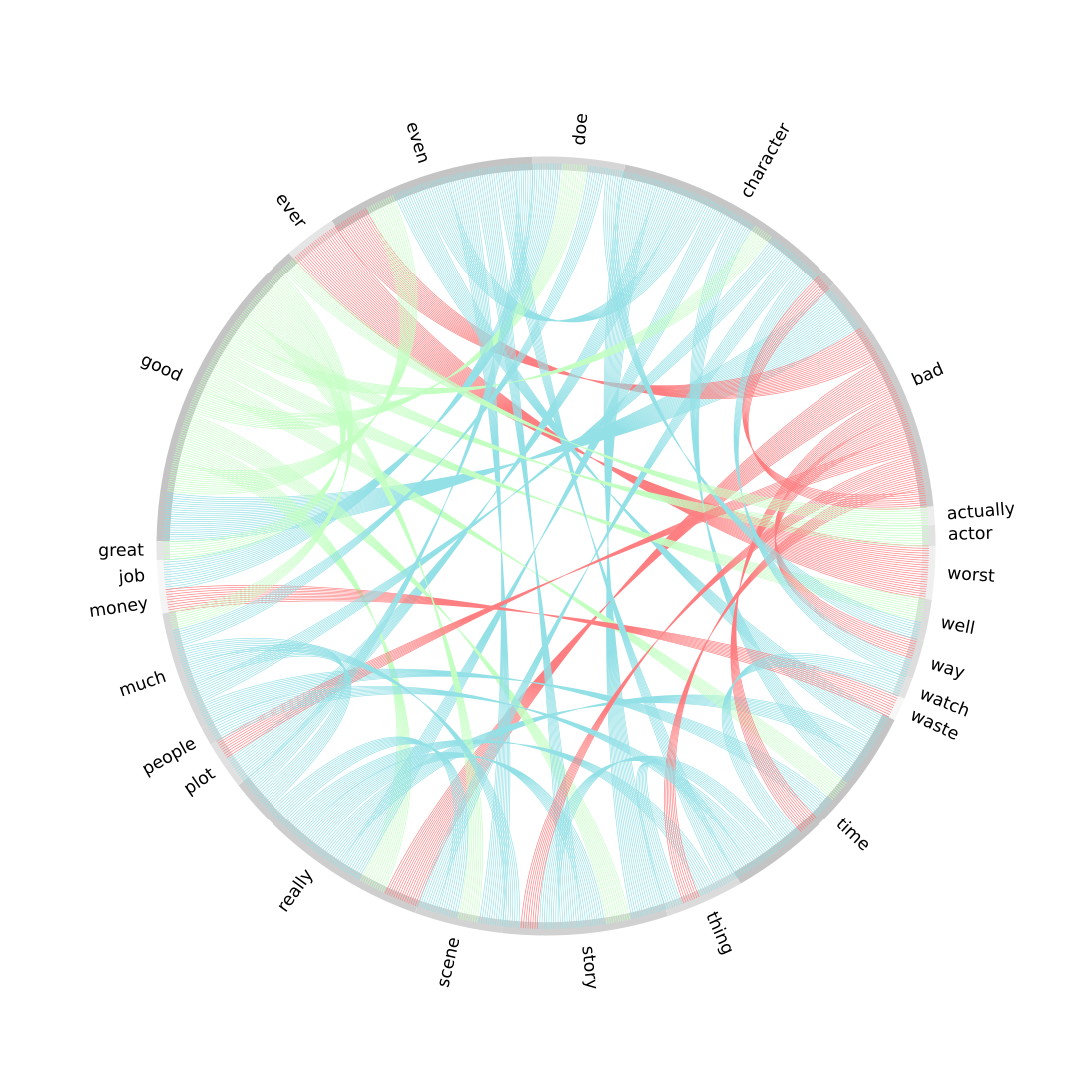
Because of the prevalence of the words "film" and "movie", they may be considered stop words. It is possible to remove them using the parameter "stopwords_to_add". For presentation purposes, the final plot and label text can be resized.
# Import necessary libraries
import pandas as pd
from ChordReviewsVis import ChordReviews

# Load dataset
df = pd.read_csv("https://github.com/felix-funes/ChordReviewsVis/raw/main/Test%20Dataset%20-%20IMDB%20Movie%20Reviews.csv")

# Generate chord plot
chord_reviews(df, 'Review', stemming=False, lemmatization=True, stopwords_to_add=["wa", "ha", "movie", "film"], label_text_font_size=13, size=400)
Dependencies
Ensure you have the following libraries installed:
- pandas
- numpy
- nltk
- BeautifulSoup
- re
- holoviews
These can be installed via pip:
pip install pandas numpy nltk beautifulsoup4 re holoviews
Contact
For any issues or inquiries, please contact the package maintainer via LinkedIn.
License
MIT License

Copyright (c) 2024 Félix Funes

Permission is hereby granted, free of charge, to any person obtaining a copy
of this software and associated documentation files (the "Software"), to deal
in the Software without restriction, including without limitation the rights
to use, copy, modify, merge, publish, distribute, sublicense, and/or sell
copies of the Software, and to permit persons to whom the Software is
furnished to do so, subject to the following conditions:

The above copyright notice and this permission notice shall be included in all
copies or substantial portions of the Software.

THE SOFTWARE IS PROVIDED "AS IS", WITHOUT WARRANTY OF ANY KIND, EXPRESS OR
IMPLIED, INCLUDING BUT NOT LIMITED TO THE WARRANTIES OF MERCHANTABILITY,
FITNESS FOR A PARTICULAR PURPOSE AND NONINFRINGEMENT. IN NO EVENT SHALL THE
AUTHORS OR COPYRIGHT HOLDERS BE LIABLE FOR ANY CLAIM, DAMAGES OR OTHER
LIABILITY, WHETHER IN AN ACTION OF CONTRACT, TORT OR OTHERWISE, ARISING FROM,
OUT OF OR IN CONNECTION WITH THE SOFTWARE OR THE USE OR OTHER DEALINGS IN THE
SOFTWARE.
Release history Release notifications | RSS feed


Download files
Download the file for your platform. If you're not sure which to choose, learn more about installing packages.
Source Distribution
Built Distribution
Filter files by name, interpreter, ABI, and platform.
If you're not sure about the file name format, learn more about wheel file names.
Copy a direct link to the current filters
File details
Details for the file chordreviewsvis-0.3.1.tar.gz.
File metadata
- Download URL: chordreviewsvis-0.3.1.tar.gz
- Upload date:
- Size: 7.7 kB
- Tags: Source
- Uploaded using Trusted Publishing? No
- Uploaded via: twine/5.0.0 CPython/3.12.4
File hashes
| Algorithm | Hash digest | |
|---|---|---|
| SHA256 |
388efc433e230b2c8839d147297d529b0518464ecd06ba0a8e9a5361487c209c
|
|
| MD5 |
a85ded0d3e408f153c56604146cd5643
|
|
| BLAKE2b-256 |
f7013d4f90c29fb02728dca5e798f3fa3b517a71433f80341d98870966ef40e5
|
File details
Details for the file ChordReviewsVis-0.3.1-py3-none-any.whl.
File metadata
- Download URL: ChordReviewsVis-0.3.1-py3-none-any.whl
- Upload date:
- Size: 8.7 kB
- Tags: Python 3
- Uploaded using Trusted Publishing? No
- Uploaded via: twine/5.0.0 CPython/3.12.4
File hashes
| Algorithm | Hash digest | |
|---|---|---|
| SHA256 |
517f5959c8e6881a64fd0f9a960a9a66dac190e2a8f27586a954c9c77a7fe92e
|
|
| MD5 |
6159bfa4426501168ca70950cb2ebb55
|
|
| BLAKE2b-256 |
70bccdf74c954cee5d2960cc2b4cb1295e189ddc09e23c83a816679b32a296f4
|






