





CoolPlot
Property diagrams and psychrometric charts for engineering thermodynamics, with CoolProp as the source of every property: log(p)-h, T-s, h-s, p-s, p-rho, T-rho and p-T diagrams for pure fluids and refrigerant blends, cycles drawn on top of them, and psychrometric charts for humid air.
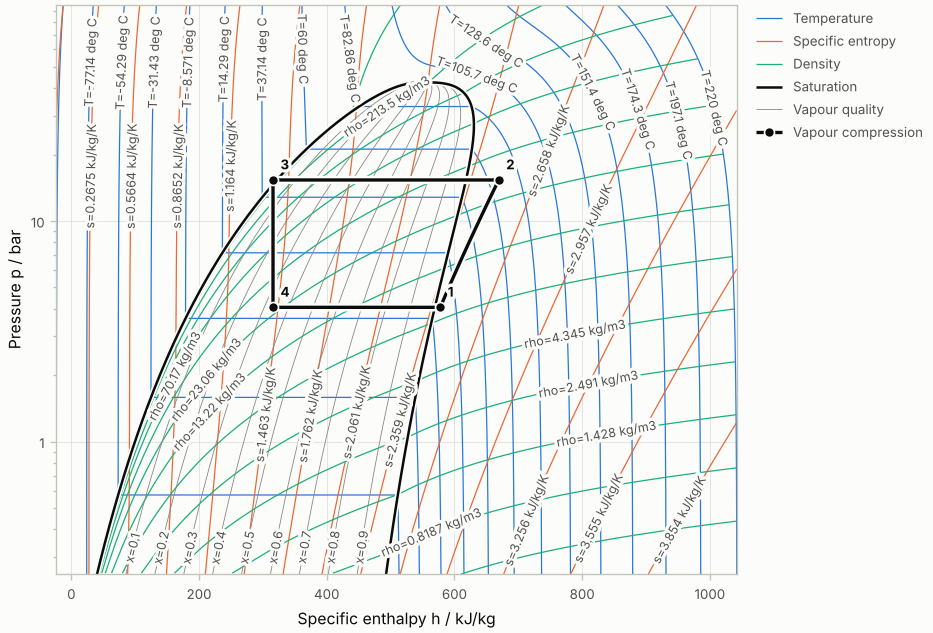
from coolplot import PropertyDiagram
from coolplot.thermo.cycles import simple_compression

diagram = PropertyDiagram("R290", "ph", units="engineering", tp_limits="ACHP")
diagram.set_default_lines(labels=True)
diagram.add_cycle(simple_compression("R290", T_evap_C=-5, T_cond_C=45, dT_sh_K=5))
diagram.save("R290_ph.png")           # or .pdf, .svg; show() opens a window
Cycles can be given state by state in the chart's units, by two properties or by the process that leads to a state:
diagram.add_cycle("Heat pump", [
    {"p": 3.0, "T": 0.0},                               # 1 compressor inlet, bar and deg C
    {"p": 15.0, "via": "compression", "eta_is": 0.7},   # 2 compressor outlet
    {"p": 15.0, "Q": 0.0},                              # 3 condenser outlet
    {"p": 3.0, "via": "isenthalpic"},                   # 4 after the valve
])
What else it does:
- Isoline labels sit at the edges of the chart, as on printed charts, and keep clear of the cycles.
- Blends: the dome from CoolProp's phase envelope, the temperature glide inside it, a chart in seconds.
- Units: SI, kPa and kJ, deg C and bar, or inch-pound; a change of units costs no new calculation.
- Output: PNG and PDF through matplotlib (fonts embedded, texts kept as text, several charts per file), SVG with no dependencies, plotly figures and HTML pages, live charts in a web page.
- Interactive: zoom, hover and dragging of cycle states in matplotlib and in a web page; only what changed is recomputed and redrawn; lines can be computed in the background.
The documentation (getting started, tutorials, how-to pages, the API
reference and a gallery of the examples) is built from docs/ and
published on Read the Docs; make docs builds it locally.
The code was forked from the main CoolProp repository at v6.3.0 with
its history preserved, hence the old commits. Version 0.2 replaced the
legacy API (from CoolPlot.Plot import PropertyPlot); the upgrade guide
in the documentation gives the equivalents, and pip install "coolplot<0.2"
keeps the last legacy release. From 1.0 to 2.0 the public API is stable.
Pull requests are encouraged!
Installation
The project gets published on PyPi as coolplot and you can install it
using pip
pip install coolplot                # core, includes the SVG backend
pip install "coolplot[matplotlib]"  # with the matplotlib backend
License
This Python package is released under the terms of the MIT license.
1 maintainer

Metadata
1 maintainer
Release files for CoolPlot 1.1.0
For a detailed explanation of source distributions (sdists) and built distributions (wheels), please see the package formats documentation.
Source distribution (sdist)
| File | Size | Uploaded | Provenance | |
|---|---|---|---|---|
| coolplot-1.1.0.tar.gz | 314.8 kB | With provenance | Details |
Built distribution (wheel)
| File | Interpreter | ABI | Platform | Reset |
|---|---|---|---|---|
| coolplot-1.1.0-py3-none-any.whl | Python 3 | none | any | Details |
Total release size: 586.9 kB
Release files / coolplot-1.1.0.tar.gz
| Download URL | coolplot-1.1.0.tar.gz |
|---|---|
| Size | 314.8 kB |
| Tags | Source |
|
SHA-256 checksum How to use checksums |
9235cd2550bcf905c4f3f7e4d4dec017b78ef47b9a51b4d7facf5632a3f30d49
|
|
BLAKE2b-256 checksum How to use checksums |
2a54dbbd061453e3c81641969828db2aadafce4830575c8828eda69a474dd4e3
|
| Upload date | |
|
Uploaded using Trusted Publishing? What is trusted publishing? |
Yes |
| Uploaded via |
twine/7.0.0 CPython/3.13.16
|
Provenance
Provenance describes where a file came from. On PyPI, provenance is shared via attestations, which provide a verifiable record of the build or publishing details. View details, limitations and caveats.


PyPI Publish Attestation
PyPI verified that this artifact, at this checksum, originated from the publisher listed below.
Signed by GitHub Actions, verified by PyPI on Oct 22, 2026.
Transparency logRelease files / coolplot-1.1.0-py3-none-any.whl
| Download URL | coolplot-1.1.0-py3-none-any.whl |
|---|---|
| Size | 272.1 kB |
| Tags | Python 3 |
|
SHA-256 checksum How to use checksums |
10a24a52bcf4dd3b1565eb5e94aa3ac921e50210460ae7947e320fecbac0cfd8
|
|
BLAKE2b-256 checksum How to use checksums |
36af4528f519fb90fab386bab277d2794122696a4afd4509541602126acf4ab9
|
| Upload date | |
|
Uploaded using Trusted Publishing? What is trusted publishing? |
Yes |
| Uploaded via |
twine/7.0.0 CPython/3.13.16
|
Provenance
Provenance describes where a file came from. On PyPI, provenance is shared via attestations, which provide a verifiable record of the build or publishing details. View details, limitations and caveats.
PyPI Publish Attestation
PyPI verified that this artifact, at this checksum, originated from the publisher listed below.
Signed by GitHub Actions, verified by PyPI on Oct 22, 2026.
Transparency logSecurity for CoolPlot 1.1.0
Provenance
Provenance describes where a file came from. On PyPI, provenance is shared via attestations, which provide a verifiable record of the build or publishing details. View details, limitations and caveats.
Full provenance
All 2 files in this release have been uploaded with provenance metadata.
Attestation for coolplot-1.1.0.tar.gz
PyPI Publish Attestation
PyPI verified that this artifact, at this checksum, originated from the publisher listed below.
Signed by GitHub Actions, verified by PyPI on Oct 22, 2026.
Transparency logA note on package security
PyPI is a repository for distributing packages, not a service for auditing them. While third-party security researchers and our staff do their best to detect and remove malicious packages, PyPI cannot guarantee the quality, security or suitability of any given package.














