
A Python based API wrapper for CraftiGames community

Project description
CraftiGames
CraftiGames Wrapper A easy to use, feature-rich, and Asynchronous warpping.
Key Features
- Wraps Pikanetwork's and JartexNetwork's API Asynchronously.
- Fast and efficient.
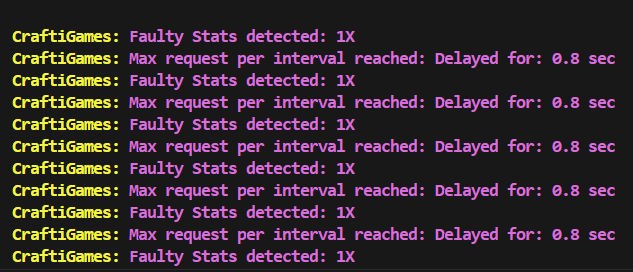
- Handles Ratelimits, ResponseErrors, faulty response.
- Covers all parts of
PikaNetwork'sandJartexNetwork's
Credits
-
Author: sti1ltyping
-
Contact: https://discord.gg/B3DQgwUgyT
-
This API wrapper is developed by the dedicated development team of
Pikachu's Stats. This same wrapper is utilized within the application.
Installing
pip install CraftiGames.py
EXAMPLES
- Profile and Stats
from  CraftiGames import Pikanetwork, PikaAnnotations
import asyncio


async def main():

    # Sending API requests with an asynchronous environment
    async with Pikanetwork() as api:

        profile = await api.Profile('Fireor')
        stats = await api.Stats('Fireor', "bedwars", "total", "all_modes")

    # Extracting items from the response
    username = profile.username
    rank = profile.highest_minigame_rank
    level = profile.level
    last_seen = profile.last_seen_text

    # Extracting guild from player's profile
    guild = profile.guild()

    # Assigning variables if player is not in a guild
    if guild is None:
        guild_name = None
        guild_tag = None
        guild_owner = None
        guild_level = None
        guild_mc = None

    guild_name = guild.name
    guild_tag = guild.tag
    guild_owner = guild.leader
    guild_level = guild.level
    guild_mc = guild.member_count

    # Extracting stats
    wins = stats.wins
    wins_lb = stats.wins_lb

    losses = stats.losses
    losses_lb = stats.losses

    wlr = stats.wlr
    win_rate = stats.win_rate

    # creating a templet to output
    description = f"""
    {username}'s Stats [{rank}]

    level: {level}
    last seen: {last_seen}

    Guild:
        Name: {guild_name}
        Tag: {guild_tag}
        Leader: {guild_owner}
        level: {guild_level}
        Members: {guild_mc}

    Stats:
        Wins: {wins} | #{wins_lb}
        Losses: {losses} | #{losses_lb}

        wlr: {wlr}
        win rate: {win_rate}%
    """
    print(description)


asyncio.run(main())
- Guilds
from CraftiGames import Pikanetwork, PikaAnnotations
import asyncio


async def main():

    # Sending API requests with an asynchronous environment
    async with Pikanetwork() as api:

        guild = await api.Guild("RIP")

    # If guild doesn't exists
    if guild is None:
        print("Guild not found!")
        return

    # Extracting items from the response
    guild_created_at = guild.created_at # UnixTimestamp usable in discord timestamp(<t:UnixTimestamp:R>)
    guild_name = guild.name
    guild_tag = guild.tag
    guild_owner = guild.leader
    guild_level = guild.level
    guild_member_count = guild.member_count

    guild_members = guild.member_list


    # creating a templet to output
    description = f"""
    Guild [<t:{guild_created_at}:R>]:

        Name: {guild_name}
        Tag: {guild_tag}
        Leader: {guild_owner}
        level: {guild_level}
        Members: {guild_member_count}

        list: {guild_members}
    """
    print(description)


asyncio.run(main())
- Recaps
from CraftiGames import Pikanetwork, PikaAnnotations
import asyncio


async def main():

    # Sending API requests with an asynchronous environment
    async with Pikanetwork() as api:

        recap = await api.Recap("c19218da-69fc-4c27-99f6-c607c1676ac2")

    # If recap doesn't exists
    if recap is None:
        print("Recap not found!")
        return

    # Extracting items from the response
    recap_id = recap.id
    winners = ', '.join(winner for winner in recap.winners)
    most_kills = recap.most_kills
    player_with_most_kills = recap.player_with_most_kills
    mapname = recap.map_name
    started = recap.game_start # UnixTimestamp
    duration = recap.game_duration
    link = recap.recap_link
    players = ", ".join(player for player in recap.players)

    # creating a templet to output
    description = f"""
    Recap: {recap_id} | Game started: <:t{started}:F> | Duration: {duration}:
    link: {link}

        winners: {winners}
        map: {mapname}
        most kills: {player_with_most_kills} | {most_kills}

        players: {players}
    """
    print(description)


asyncio.run(main())
- MultiProcessing
from CraftiGames import Pikanetwork, PikaAnnotations
import asyncio

# CraftiGames automates batch processing.
# No matter how big the lists are it will automatically break it into batches and fetch the responses.
players = ["Fireor", "fwgazes", "ignLone"]
guilds = ["RIP", "EKITTENS", "Menace"]

async def main():

    # Sending API requests with an asynchronous environment
    async with Pikanetwork() as api:

        profiles = await api.MultiProfile(players)
        stats = await api.MultiStats(players, "bedwars", "total", "all_modes")
        guilds = await api.MultiGuilds(guilds)


    for player, profile in profiles:


        if profile is None:
            print(f'Couldn\'t find any player named {player}!')

        print(player, profile.level)

    for player, stats in stats:

        if profile is None:
            print(f'Couldn\'t find any player named {player}!')

        print(player, stats.wins)

    for name, guild in guilds:

        if profile is None:
            print(f'Couldn\'t find any guild named {name}!')

        print(name, guild.totalexp)


asyncio.run(main())
How to Change Configuration
Changing the configuration is not recommended as the default settings ensure efficiency and prevent rate limits. You can still edit it for even higher efficency and logging.
from CraftiGames import config

config.update(
    Logging = True,
    Allowed_Recursion = 50,
    Batch_Size = 25,
    Batch_Delay = 0.8,
    Default_Skins = ['fwgazes', 'ignLone'],
    Interval = 1,
    Max_Requests_Per_Interval = 25,
    Delay = 0.8,
    Delay_After_Exceeding_Ratelimit = 1
)
How to reset to default configuration
from CraftiGames import config

# Reset config to default settings
config.reset()
# OR
config.update()


Download files
Download the file for your platform. If you're not sure which to choose, learn more about installing packages.
Source Distribution
Built Distribution
Filter files by name, interpreter, ABI, and platform.
If you're not sure about the file name format, learn more about wheel file names.
Copy a direct link to the current filters
File details
Details for the file CraftiGames.py-2.1.1.tar.gz.
File metadata
- Download URL: CraftiGames.py-2.1.1.tar.gz
- Upload date:
- Size: 30.5 kB
- Tags: Source
- Uploaded using Trusted Publishing? No
- Uploaded via: twine/5.1.0 CPython/3.11.3
File hashes
| Algorithm | Hash digest | |
|---|---|---|
| SHA256 |
08f7166f0551ab7798e757f1ce7f023e1f78b2a342c0ba0ce7ce989245086f40
|
|
| MD5 |
ac7772e03a4f932b6c91726ee4677266
|
|
| BLAKE2b-256 |
c1b48b3dc482b962ef94f63a2ea26515ce71a645ac467bdba2e7bf223bcde72f
|
File details
Details for the file CraftiGames.py-2.1.1-py3-none-any.whl.
File metadata
- Download URL: CraftiGames.py-2.1.1-py3-none-any.whl
- Upload date:
- Size: 51.8 kB
- Tags: Python 3
- Uploaded using Trusted Publishing? No
- Uploaded via: twine/5.1.0 CPython/3.11.3
File hashes
| Algorithm | Hash digest | |
|---|---|---|
| SHA256 |
739dc88092215cf784c334e91661c302526f17b5d641815ae451609731e1d937
|
|
| MD5 |
4706cbf1cce8c90e98b22da3206ce4b1
|
|
| BLAKE2b-256 |
674166baf4b888c6c147377053d100eaea2b460cfd356c0801538094141ff53d
|






