
Molecular sketcher for the terminally committed

Project description
CurseMol - Molecular sketcher for the terminally committed
Have you ever been working on a terminal with programs that use SMILES for input or output, and switching to your GUI sketcher is too annoying? (Not to mention reading or writing the SMILES by hand.)
Enter CurseMol, the curses-based molecular editor, with keybindings inspired by vi! The molecules are depicted using ASCII art (actually, not exactly; a few non-ASCII Unicode characters are used, as well.)
You can read in a SMILES string or start from a blank canvas, and when you exit, the final SMILES is printed to stdout, which can be useful for piping directly into other programs.
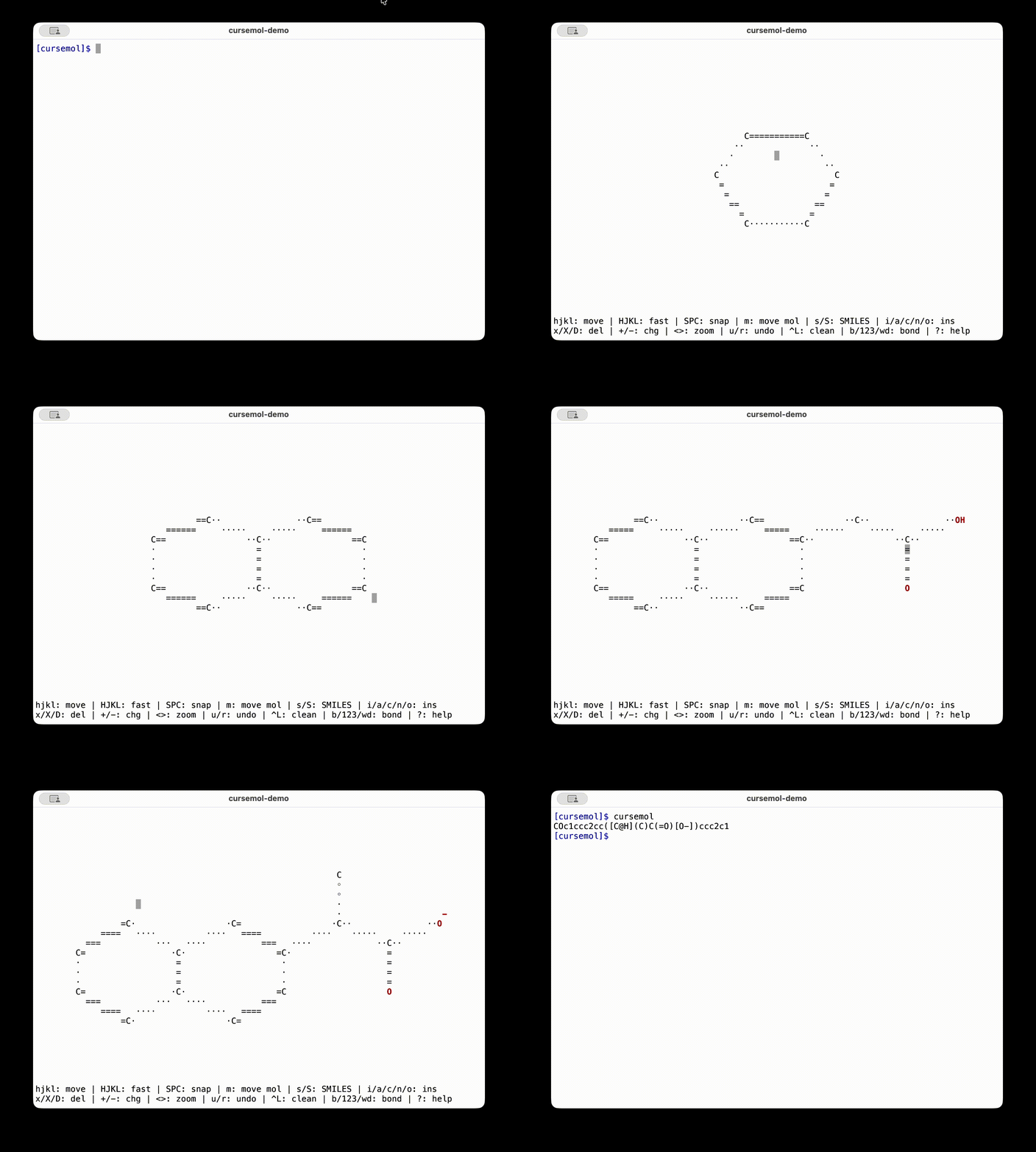
Controls:
  h, j, k, l       - Move cursor left/down/up/right (arrow keys supported too)
  H, J, K, L       - Move cursor faster (10 cells horizontal, 4 cells vertical)
  Space            - Snap cursor to nearest atom
  m                - Enter move mode (hjkl moves molecule, Esc to exit)
  s                - Enter a SMILES string to replace the current molecule
  S                - Toggle SMILES display
  i                - Insert/modify atom at cursor position
  a                - Append atoms from SMILES to atom or bond under cursor
                     (appending to a bond forms a ring by connecting the bond
                     atoms to the first and last atoms from the SMILES)
  c, n, o          - Insert/modify carbon/nitrogen/oxygen atom
  x                - Delete atom or bond
  D                - Delete fragment (all atoms connected to cursor atom)
  X                - Area delete (select rectangle)
  +, -             - Increase/decrease formal charge on atom
  <, >             - Zoom out/in
  b                - Add bond mode (add atom and move it, Enter to accept)
  1, 2, 3          - Add bond or change bond (order 1/2/3) between nearest atoms
  w, d             - Add/change to wedge or dash bond (press again to reverse)
  @                - Clear canvas (reset to blank slate)
  u, r             - Undo/redo
  Ctrl-L           - Clean up (regenerate coordinates)
  ?                - Show this help
  q                - Quit and print SMILES to stdout
Requirements
- Python (tested with 3.11)
- RDKit (tested with 2025.09.6)
Release history Release notifications | RSS feed


Download files
Download the file for your platform. If you're not sure which to choose, learn more about installing packages.
Source Distribution
Built Distribution
Filter files by name, interpreter, ABI, and platform.
If you're not sure about the file name format, learn more about wheel file names.
Copy a direct link to the current filters
File details
Details for the file cursemol-4.1.0.tar.gz.
File metadata
- Download URL: cursemol-4.1.0.tar.gz
- Upload date:
- Size: 435.6 kB
- Tags: Source
- Uploaded using Trusted Publishing? No
- Uploaded via: uv/0.6.2
File hashes
| Algorithm | Hash digest | |
|---|---|---|
| SHA256 |
0f07c334467f724892d18e7fcd346375312a28d50fdf7a71bbe003533236c9d3
|
|
| MD5 |
e3dc1b4450b047c5c5c36b7688d166ae
|
|
| BLAKE2b-256 |
3ba6afb487e8d12661bfcbfe466035b8b1ae7a73fe1bfcec1b94360cada8ab6f
|
File details
Details for the file cursemol-4.1.0-py3-none-any.whl.
File metadata
- Download URL: cursemol-4.1.0-py3-none-any.whl
- Upload date:
- Size: 41.1 kB
- Tags: Python 3
- Uploaded using Trusted Publishing? No
- Uploaded via: uv/0.6.2
File hashes
| Algorithm | Hash digest | |
|---|---|---|
| SHA256 |
9ae998930c34b3bcd0860eec52aea717696d58ee74d8249aae3cb7972d9e4351
|
|
| MD5 |
fdecd45ad68b5f9ad6aee42b3bbb099f
|
|
| BLAKE2b-256 |
55a2994862957a7348f0ce8fc7e717a9030dc4f17cd7ba5810bfe224482ad995
|






