
CursorCreate
A Multi-platform Cursor Theme Building Program.
CursorCreate allows you to build cursor themes for Windows, MacOS, and Linux. It supports reading cursors from svg, xcur, cur, ani, and all image formats supported by the Pillow imaging library. Also includes a GUI for easily modifying cursor projects.
Installing
Packaged Binaries:
If you would like to avoid going through the process of installing from source, pre-built binaries have been provided on the releases page. Just download the one for your platform, extract the zip file, and run the executable inside the extracted folder.
Releases Page: https://github.com/isaacrobinson2000/CursorCreate/releases
From PyPI:
CursorCreate is also available on PyPI. To install it, execute the command below:
pip install CursorCreate
Once it is installed, it can be executed using the CursorCreate command in the shell:
# Launch the GUI:
CursorCreate
# List all command line options:
CursorCreate --help
From Source:
To install CursorCreate from source, you will need the dependencies for CursorCreate, which can be done using the requirements.txt as shown below:
pip install -r requirements.txt
Once all the dependencies are installed in your python environment (using a virtual environment is recommended) you can pull down this repository using a git clone as below:
git clone https://github.com/isaacrobinson2000/CursorCreate.git
If you are attempting to package CursorCreate for your platform, you will need nuitka installed to the virtual environment. Use the build scripts provided with this project (build_windows.bat, build_linux.sh, or build_mac.sh), as the scripts provide flags for including all the dependencies and making the executables standalone.
Example Theme
This program also comes with a template theme, but due to separate licensing the template theme is kept in a separate repository. Follow the link below to get the template theme:
https://github.com/isaacrobinson2000/CursorCreateTemplateTheme
How to Use
To launch the GUI, simply execute the CursorCreate entry file, as below:
# If you installed via prepackaged binary (Have to be in the same directory as the executable):
./CursorCreate
# If you installed via PyPI (pip install):
CursorCreate
# If you are running it from source:
python CursorCreate/cursorcreate.py
In the GUI, images can simply be dragged and dropped onto the cursor selection widgets in order to load them in. The hotspots and delays of animation frames can be modified by simply clicking on the cursor, as shown below:
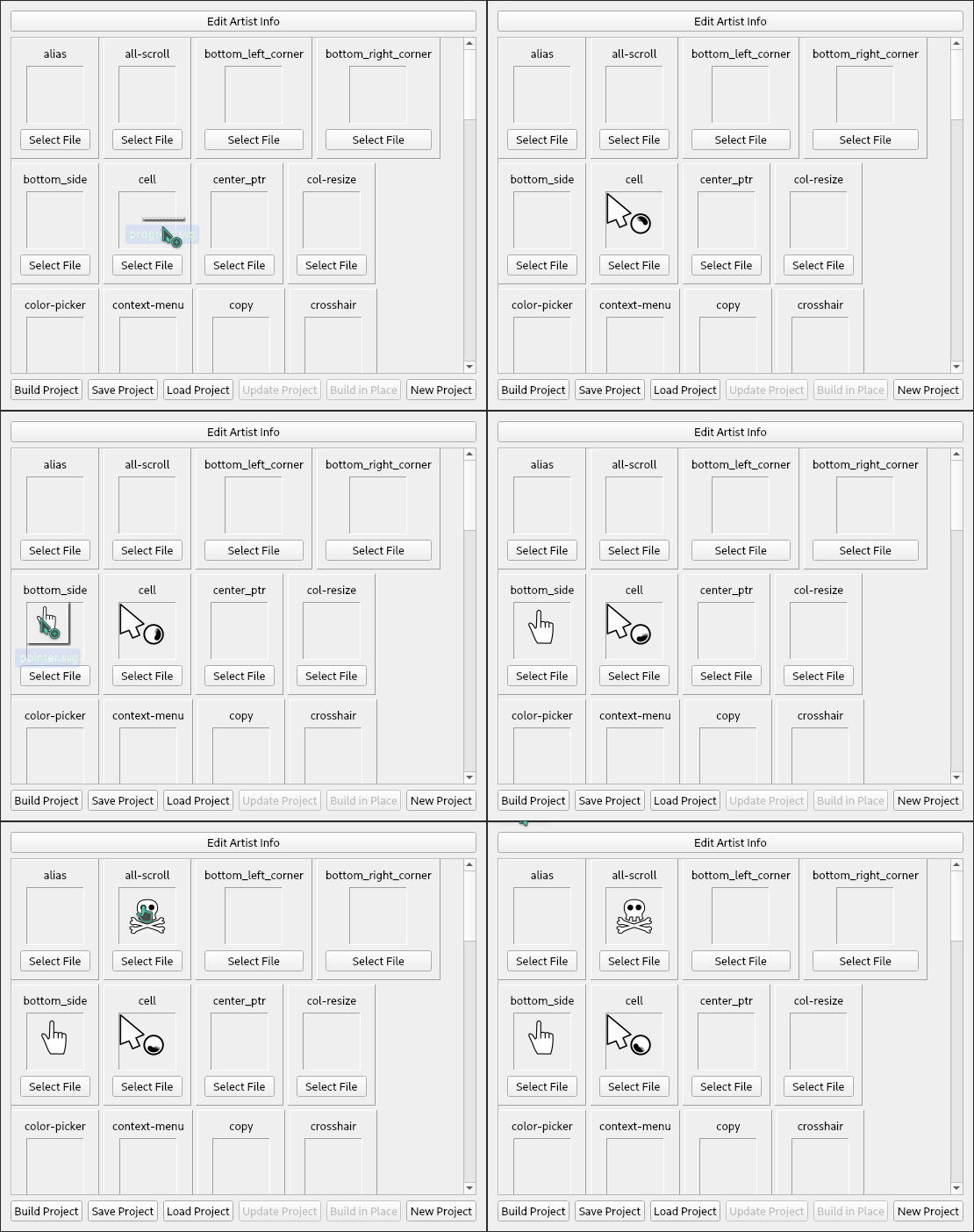
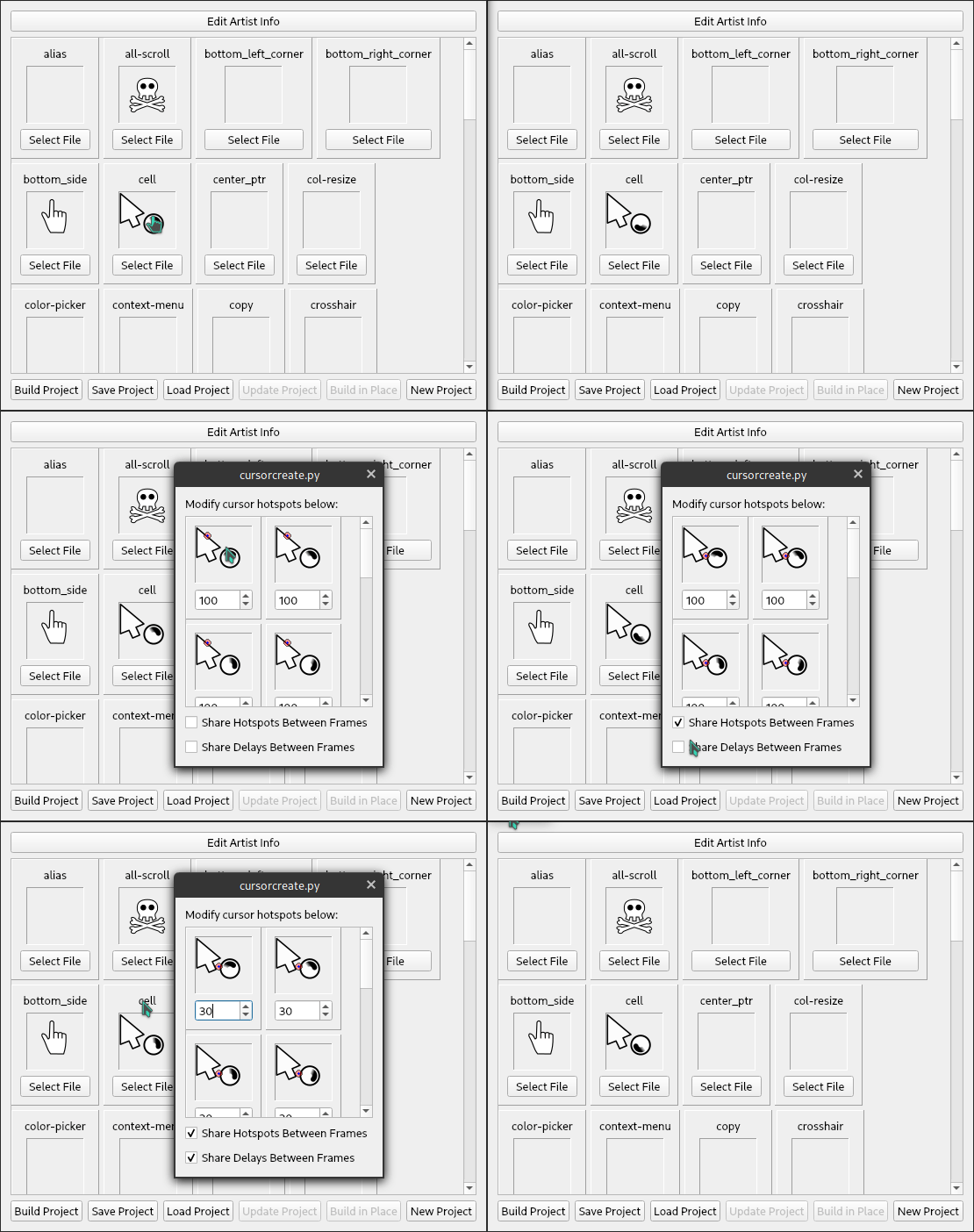
To save a project, click the "Save Project" button, which will copy the source image files over to the user selected directory and generate a 'build.json' which tells CursorCreate how to turn the image source files into cursor themes for each platform.
For static images and SVGs, the animation frames are expected to be stored horizontally as squares side by side.
Note that CursorCreate is also capable of doing several actions from the command line, including building cursor themes. To see all the supported command line operations, execute the command below:
# If you installed via prepackaged binary (Have to be in the same directory as the executable):
./CursorCreate --help
# If you installed via PyPI (pip install):
CursorCreate --help
# If you are running it from source:
python CursorCreate/cursorcreate.py --help
Bugs/Issues
This software is currently in beta, and therefore may have some bugs. If you run into any issues, feel free to open an issue on the GitHub issues page.
Future Goals
- Create a setup.py for CursorCreate
- Add progress indicators when building cursors or performing any other action.
1 maintainer

Metadata
1 maintainer
Release files for CursorCreate 1.4.0
For a detailed explanation of source distributions (sdists) and built distributions (wheels), please see the package formats documentation.
Source distribution (sdist)
| File | Size | Uploaded | Provenance | Actions |
|---|---|---|---|---|
| CursorCreate-1.4.0.tar.gz | 52.4 kB | Without provenance | Details for CursorCreate-1.4.0.tar.gz |
Built distribution (wheel)
| File | Interpreter | ABI | Platform | Actions Reset |
|---|---|---|---|---|
| CursorCreate-1.4.0-py3-none-any.whl | Python 3 | none | any | Details for CursorCreate-1.4.0-py3-none-any.whl |
Total release size: 110.8 kB
Release files / CursorCreate-1.4.0.tar.gz
| Download URL | CursorCreate-1.4.0.tar.gz |
|---|---|
| Size | 52.4 kB |
| Tags | Source |
|
SHA-256 checksum How to use checksums |
2561db42afdd073e7b4d463b486a11b98fd876123cedd1a52d165a011d9797aa
|
|
BLAKE2b-256 checksum How to use checksums |
9b2e09ad69eacb6d8c6c0c378a47abe27223346edf174b2baaa18953bfdbec3f
|
| Upload date | |
|
Uploaded using Trusted Publishing? What is trusted publishing? |
No |
| Uploaded via |
twine/3.8.0 pkginfo/1.8.2 readme-renderer/33.0 requests/2.27.1 requests-toolbelt/0.9.1 urllib3/1.26.8 tqdm/4.63.0 importlib-metadata/4.11.2 keyring/23.5.0 rfc3986/2.0.0 colorama/0.4.4 CPython/3.10.2
|
Release files / CursorCreate-1.4.0-py3-none-any.whl
| Download URL | CursorCreate-1.4.0-py3-none-any.whl |
|---|---|
| Size | 58.4 kB |
| Tags | Python 3 |
|
SHA-256 checksum How to use checksums |
b904b210a6aacd93c5bbd1a8e4ccd0acf4d5237d0c2b69b3cd1a71bff2c43d2c
|
|
BLAKE2b-256 checksum How to use checksums |
ceb2d6fbc10aafee1937316484877697857c316e23d09b073d5ffeb4a707b0a6
|
| Upload date | |
|
Uploaded using Trusted Publishing? What is trusted publishing? |
No |
| Uploaded via |
twine/3.8.0 pkginfo/1.8.2 readme-renderer/33.0 requests/2.27.1 requests-toolbelt/0.9.1 urllib3/1.26.8 tqdm/4.63.0 importlib-metadata/4.11.2 keyring/23.5.0 rfc3986/2.0.0 colorama/0.4.4 CPython/3.10.2
|
Security for CursorCreate 1.4.0
Provenance
Provenance describes where a file came from. On PyPI, provenance is shared via attestations, which provide a verifiable record of the build or publishing details. View details, limitations and caveats.
No provenance found
None of the files in this release were uploaded with provenance metadata.
A note on package security
PyPI is a repository for distributing packages, not a service for auditing them. While third-party security researchers and our staff do their best to detect and remove malicious packages, PyPI cannot guarantee the quality, security or suitability of any given package.
To learn more about protecting yourself from malicious actors, visit our package security documentation.














