
DACLhound
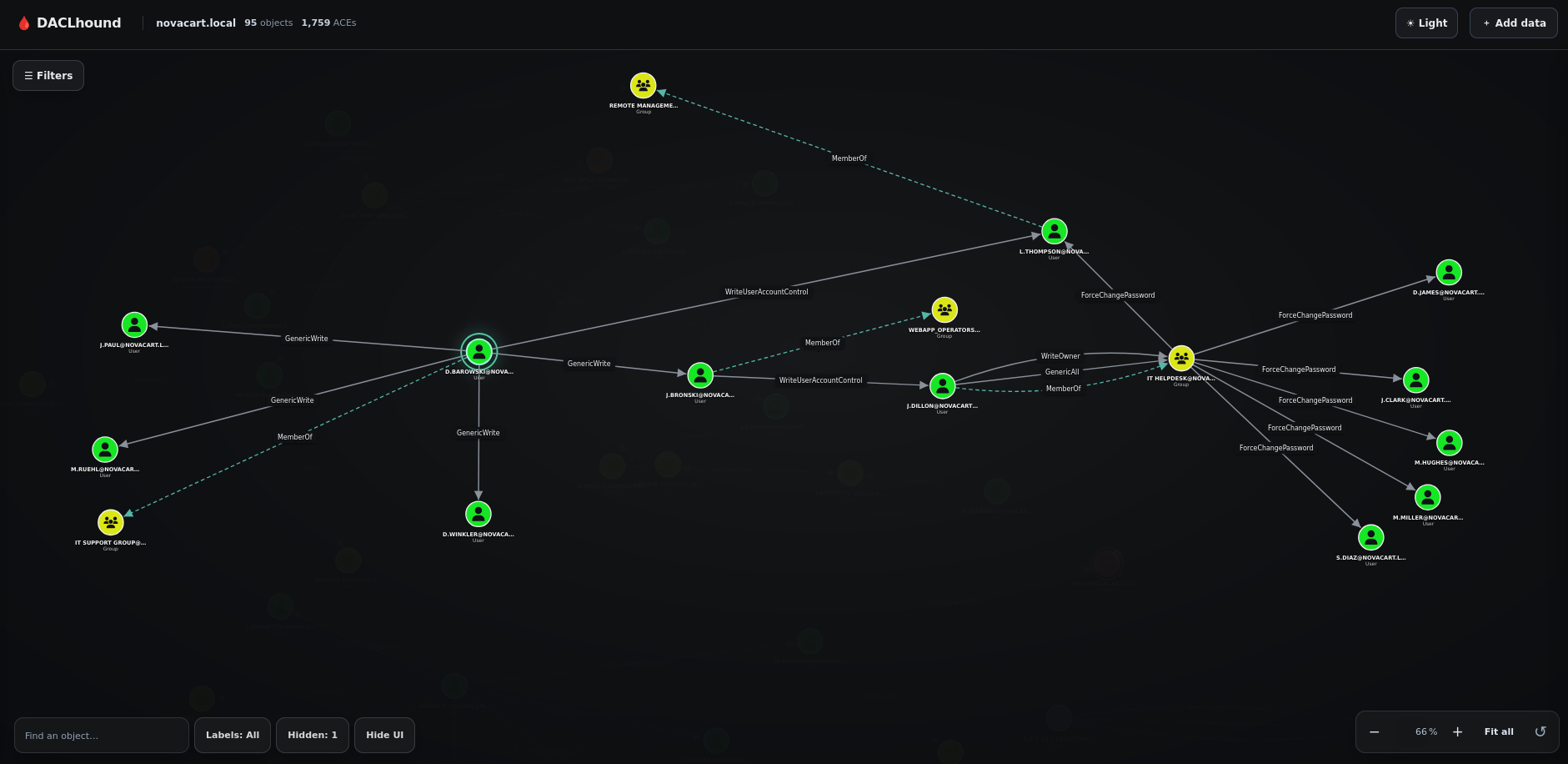
DACLhound collects Active Directory security descriptors over LDAP and turns the results into a graph you can inspect in a browser. The collector uses bloodyAD as a Python library; it does not run the bloodyAD command.
It is primarily intended for Hack The Box (HTB) and similar hands-on labs, and works best with lab-sized or otherwise moderate Active Directory environments. It is not designed or performance-tested for very large enterprise domains.
Unlike BloodHound CE's modeled graph edges, DACLhound preserves the collected DACL details and exposes individual Write-Property rights by attribute (for example, WriteLogonHours or WriteUserAccountControl, etc.). This helps inspect the specific property and ACE behind a relationship.
Install
Python 3.10 or newer is required.
pipx install DACLhound
Upgrade later with:
pipx upgrade DACLhound
Collect a graph
DACLhound.py collect --host "$FQDN" -d "$DOMAIN" -u 'user' -p 'password' --dc-ip "$IP" --output "$DOMAIN.json"
The collector is read-only. By default it collects users, groups, computers, OUs, containers, GPOs, the domain, and ADCS data. Use --types to limit directory object types:
DACLhound.py collect --host "$FQDN" -d "$DOMAIN" -u 'user' -p 'password' --types users,groups --output users-and-groups.json
Use --no-adcs to skip ADCS collection. The normalized graph is written to --output. Add --raw-output to keep the bloodyAD response as well.
Authentication
NTLM password
DACLhound.py collect --host "$FQDN" -d "$DOMAIN" -u 'user' -p 'password' --dc-ip "$IP" -o "$DOMAIN.json"
NTLM pass-the-hash
Use LMHASH:NTHASH; if you only have the NT hash, leave the LM field empty:
DACLhound.py collect --host "$FQDN" -d "$DOMAIN" -u 'user' -hashes ':<NTHASH>' --dc-ip "$IP" -o "$DOMAIN.json"
Kerberos
Kerberos supports a password, pass-the-hash, or an existing ccache. When using a
ccache, -u is optional; the identity is taken from the ticket. -no-pass is
an explicit flag for ccache authentication.
Password:
DACLhound.py collect --host "$FQDN" -d "$DOMAIN" -u 'user' -p '<password>' -k --dc-ip "$IP" -o "$DOMAIN.json"
Pass-the-hash (NT hash used as the Kerberos RC4 key):
DACLhound.py collect --host "$FQDN" -d "$DOMAIN" -u 'user' -hashes '<LMHASH>:<NTHASH>' -k --dc-ip "$IP" -o "$DOMAIN.json"
If only the NT hash is available, use -hashes '<NTHASH>'.
Existing ccache:
# Use the current KRB5CCNAME
DACLhound.py collect --host "$FQDN" -d "$DOMAIN" -k -no-pass --dc-ip "$IP" -o "$DOMAIN.json"

# Or provide a ccache file directly
DACLhound.py collect --host "$FQDN" -d "$DOMAIN" -k user.ccache -no-pass --dc-ip "$IP" -o "$DOMAIN.json"
An AES key enables Kerberos automatically: use -aesKey '<AESKEY>' (with -u). Add -s to use LDAPS.
Open the graph
Run the viewer in the foreground and stop it with Ctrl+C:
DACLhound.py graph --input "$DOMAIN.json"
Or run it in the background:
DACLhound.py graph start --input "$DOMAIN.json"
DACLhound.py graph status
DACLhound.py graph stop
The server listens on 127.0.0.1:8765 by default. Uploaded JSON files stay in memory while the server is running and are discarded when it stops. Use --bind and --port to change the listener. Run DACLhound.py collect --help or DACLhound.py graph --help for all options.
License
MIT. See LICENSE.
1 maintainer

Metadata
1 maintainer
Release files for DACLhound 0.1.3
For a detailed explanation of source distributions (sdists) and built distributions (wheels), please see the package formats documentation.
Source distribution (sdist)
| File | Size | Uploaded | Provenance | |
|---|---|---|---|---|
| daclhound-0.1.3.tar.gz | 75.8 kB | Without provenance | Details |
Built distribution (wheel)
| File | Interpreter | ABI | Platform | Reset |
|---|---|---|---|---|
| daclhound-0.1.3-py3-none-any.whl | Python 3 | none | any | Details |
Total release size: 152.4 kB
Release files / daclhound-0.1.3.tar.gz
| Download URL | daclhound-0.1.3.tar.gz |
|---|---|
| Size | 75.8 kB |
| Tags | Source |
|
SHA-256 checksum How to use checksums |
9205817d91130e9c84613cc994f4d6cde9d0d2b28692a0e03b572dea43722470
|
|
BLAKE2b-256 checksum How to use checksums |
32114136ed5e334c02d108ca6ce88b2ee6cc39bb9003ec3555aa60033bce376c
|
| Upload date | |
|
Uploaded using Trusted Publishing? What is trusted publishing? |
No |
| Uploaded via |
twine/7.0.0 CPython/3.10.18
|
Release files / daclhound-0.1.3-py3-none-any.whl
| Download URL | daclhound-0.1.3-py3-none-any.whl |
|---|---|
| Size | 76.6 kB |
| Tags | Python 3 |
|
SHA-256 checksum How to use checksums |
50662eca0e0fa57fc393ae77b6dadab94f2ea1459a6c57a9a3d4e5a871cafc55
|
|
BLAKE2b-256 checksum How to use checksums |
e0d8fc9770330bbe558d6c8269eb0a0db4d5e5e78ac5f46763ee72031c44347e
|
| Upload date | |
|
Uploaded using Trusted Publishing? What is trusted publishing? |
No |
| Uploaded via |
twine/7.0.0 CPython/3.10.18
|
Security for DACLhound 0.1.3
Provenance
Provenance describes where a file came from. On PyPI, provenance is shared via attestations, which provide a verifiable record of the build or publishing details. View details, limitations and caveats.
No provenance found
None of the files in this release were uploaded with provenance metadata.
A note on package security
PyPI is a repository for distributing packages, not a service for auditing them. While third-party security researchers and our staff do their best to detect and remove malicious packages, PyPI cannot guarantee the quality, security or suitability of any given package.














