
DAQData
Usage
Read and plot slow and fast data binary files from centrifuge experiments conducted at Center of Geotechnical Modeling at University of California Davis
Features
- Reads slow and fast data binary files.
- List downs all the sensors,channels,configuration list, sampling rate...
- Extract all data or a subset of a data within a time frame as a pandas DataFrame object
- Plot data directly from the binary file.
- supports reading and plotting large data files.
Installation
This package is availably via pypi:
pip install DAQData
Read meta data from the binary file
import DAQData as DQ;

# Centrifuge CGM (UC Davis) data file. Can be slow as well as fast data
Data_File = "./Binary_Data_Files/07122019@121326@154548@64.4rpm.bin";

# By default the, 'Extract_Data' parameter is set to be True. If the files are
# very large and only meta data needs to be checked, the data extraction can be
# stooped by setting 'Extract_Data' parameter false. This would increase the
# execution speed but will not read any data
Data_DAQ = DQ.DAQ(Data_File,Extract_Data=True);

# To print all the meta data
print(Data_DAQ)


# Extracting meta data
FileName                      = Data_DAQ.FileName; # gets the filename
Sampling_Rate                 = Data_DAQ.Sampling_Rate; # gets Sampling_Rate
Number_of_Channels            = Data_DAQ.Number_of_Channels; # gets number of channels
Number_of_Hardware_Channels   = Data_DAQ.Number_of_Hardware_Channels; # gets number of hardware channels
Number_of_Sensors             = Data_DAQ.Number_of_Sensors # gets number of Xdcr_Serial Numbers (also referred as sensors)
Channel_List                  = Data_DAQ.Channel_List; # gets the channel list
Hardware_Channel_List         = Data_DAQ.Hardware_Channel_List; # get the hardware channel list
Sensor_List                   = Data_DAQ.Sensor_List; # gets the sensor list
Number_of_Samples             = Data_DAQ.Number_of_Samples; # gets the total number of samples per sensor
Data_Length                   = Data_DAQ.Data_Length; # gets the total data length in the binary file. Number_of_Samples*Number_of_sensors
Channel_Dictionary            = Data_DAQ.Channel_Dictionary; # returns a dictionary of channel name to the column number in the Channel List
ExcelConfig                   = Data_DAQ.ExcelConfig; # return excel configuration file as a csv string
Extract data on demand
import DAQData as DQ;

Data_File = "./Binary_Data_Files/07122019@121326@154548@64.4rpm.bin";
Data_DAQ  = DQ.DAQ(Data_File,Extract_Data=True);


# If the 'Extract_Data' parameter is True, the whole data is already read and extracted and can be easily retrieved as
Sensor_Data         = Data_DAQ.Sensor_Data;	# 2-D pandas DataFrame with column names (headers) as Channel Names
print(Sensor_Data.head(2)); # shows first 2 rows of the data set
# print(Sensor_Data.shape); # gets the size of the dataset (rows,columns)
# print(Sensor_Data['ICP1-0']) # will retrieve the data for channel no  'ICP1-0'
# print(Sensor_Data.columns) # will show all the header names in the data. It is the same as the Channel List.

# The column names can be renamed to sensor names or any other meaningful names as shown below
Sensor_Data.columns = ["TIME (s)","EAST (g)","WEST (g)","P1_ACC_H2 (g)","P2_ACC_H2 (g)","P1_G1 (lbf)","P1_G2 (lbf)","P1_G3 (lbf)","P1_G4 (lbf)","P1_G5 (lbf)","P1_G6 (lbf)","P1_G7 (lbf)","P1_G8 (lbf)","P2_ACC-V1 (g)","P2_ACC_H1 (g)","4th RING (g)","SOUTH (g)","P1_ACC_H1 (g)","P1_ACC_V1 (g)","NORTH (g)","P2_G1 (lbf)","P2_G2 (lbf)","P2_G3 (lbf)","P2_G4 (lbf)","P2_G5 (lbf)","P2_G6 (lbf)","P2_G7 (lbf)","P2_G8 (lbf)","P1_G9 (lbf)","P2_G9 (lbf)","dummy3","Dummy_2","PPT_5 (kPa)","PPT_3 (kPa)","PPT_9 (kPa)","PPT_1 (kPa)","PPT_8 (kPa)","PPT_6 (kPa)","PPT_2 (kPa)","PPT_7 (kPa)","PPT_5442","PPT_4 (kPa)","PPT_10 (kPa)","PPT_10_Proxy (kPa)","Dummy-127926","ACC_6 (g)","ACC_1 (g)","ACC_3 (g)","ACC_5 (g)","ACC_2 (g)","ACC_7 (g)","ACC_4 (g)","dummy21320","dummy-108849","PT 9F008","P2_LP (mm)","P2_MEM (g)","SM2 (mm)","P1_MEM (g)","P1_LP (mm)","SM1 (mm)","PPT_22 (kPa)","PPT_14 (kPa)","PPT_16 (kPa)","PPT_15 (kPa)","PPT_21 (kPa)","MS5407_115","PPT_18 (kPa)","PPT_20 (kPa)","PPT_19 (kPa)","PPT_12 (kPa)","PPT_1 (kPa)","PPT_11 (kPa)","PPT_17 (kPa)","CPT (lbf)","EXT (lbf)","PLT (lbf)","ACT (mm)"]; # here as an example the channel names 'ICP1-0' is renamed to 'EAST (g)'
print(Sensor_Data.head(2)); # shows first 2 columns of the data with new column names
# print(Sensor_Data['EAST (g)']) # will retrieve the data corresponding to column name  'EAST (g)'. Will give the same result (print(Sensor_Data['ICP1-0'])) has the headers or column names not renames

# If the 'Extract_Data' parameter was initially set to False, the data can be extracted on demand by defining the start and end time
# ..... Time_Data, Sesnor_Data = Data_DAQ.Extract(Start_Time=0, End_Time=10)
# To extract the whole data, set the start time to be 0 and end time to be Number_of_Samples/Sampling_Rate

Data_DAQ  = DQ.DAQ(Data_File,Extract_Data=False);
Sensor_Data = Data_DAQ.Extract(Start_Time=0,End_Time=Number_of_Samples/Sampling_Rate);

# print(Sensor_Data.shape) # would return the same length of data as above
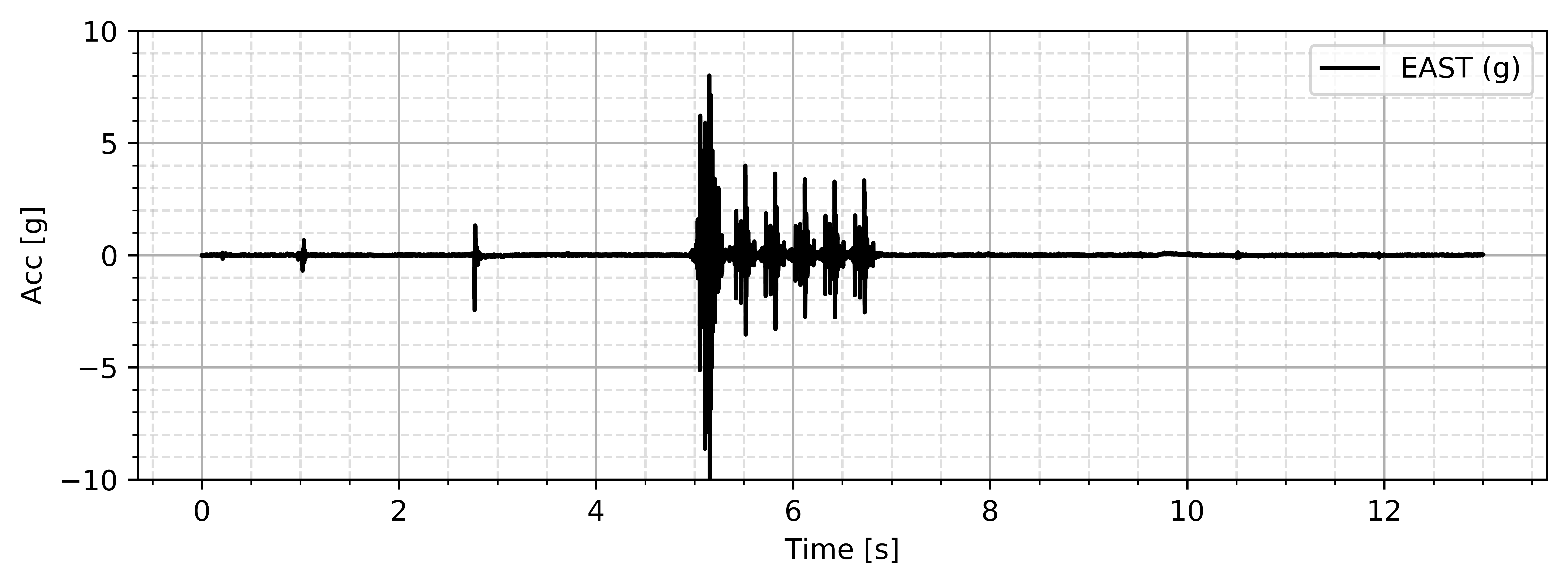
Plot data
import DAQData as DQ;

Data_File = "./Binary_Data_Files/07122019@121326@154548@64.4rpm.bin";
Data_DAQ  = DQ.DAQ(Data_File,Extract_Data=True);

Sensor_Data = Data_DAQ.Sensor_Data;

# get the time data
Time_Data   = Sensor_Data['TIME'];
# if the headers were changed as in the previous above examples
# it can be extracted as Time_Data   = Sensor_Data['TIME (s)'];

# get the sensor data of interest
# extract the data from the Sensor_Data DataFrame
Input_Acceleration    = Sensor_Data['ICP1-0'];
# if the headers were changed as in the previous above examples
# it can be extracted as Time_Data   = Sensor_Data['EAST (g)'];

# extract the sensor name
Sensor_Name   = Data_DAQ.Sensor_List[Data_DAQ.get_Channel_Index(Channel_Name='ICP1-0')];

import matplotlib.pyplot as plt;

plt.figure(figsize=(8,3));
plt.plot(Time_Data,Input_Acceleration,'k',label=Sensor_Name);
plt.legend(loc='best')
plt.grid(axis='both', which='major', ls='-')
plt.grid(axis='both', which='minor', ls='--', alpha=0.4)
plt.minorticks_on()
plt.xlabel('Time [s]')
plt.ylabel('Acc [g]')
plt.ylim([-10,10])
plt.tight_layout();
plt.show();
Send your comments, bugs, issues and features to add to Sumeet Kumar Sinha at sumeet.kumar507@gmail.com. Please feel free to create issues on https://github.com/SumeetSinha/DAQData/issues
1 maintainer

Download files
Download the file for your platform. If you're not sure which to choose, learn more about installing packages.
Source Distribution
Built Distribution
Filter files by name, interpreter, ABI, and platform.
If you're not sure about the file name format, learn more about wheel file names.
Copy a direct link to the current filters
File details
Details for the file DAQData-2.5.tar.gz.
File metadata
- Download URL: DAQData-2.5.tar.gz
- Upload date:
- Size: 9.1 kB
- Tags: Source
- Uploaded using Trusted Publishing? No
- Uploaded via:
twine/2.0.0 pkginfo/1.5.0.1 requests/2.22.0 setuptools/41.2.0 requests-toolbelt/0.9.1 tqdm/4.32.2 CPython/3.6.4
File hashes
| Algorithm | Hash digest | |
|---|---|---|
| SHA256 |
1b0a8f1df17b46ae92f6775580ae031aab61765810f83ffcb700a3ef159d49ad
|
|
| MD5 |
2c3618b99eda64c958651eaec6d0f93c
|
|
| BLAKE2b-256 |
7fead6c366c011bce1caba1db0448c99cf5b155f88d2c5c0372d0fbd94ad00e9
|
File details
Details for the file DAQData-2.5-py3-none-any.whl.
File metadata
- Download URL: DAQData-2.5-py3-none-any.whl
- Upload date:
- Size: 19.2 kB
- Tags: Python 3
- Uploaded using Trusted Publishing? No
- Uploaded via:
twine/2.0.0 pkginfo/1.5.0.1 requests/2.22.0 setuptools/41.2.0 requests-toolbelt/0.9.1 tqdm/4.32.2 CPython/3.6.4
File hashes
| Algorithm | Hash digest | |
|---|---|---|
| SHA256 |
894628397a2fc63075907fee46e9ded2ae49431fe10a610e83d36e811e42bbf3
|
|
| MD5 |
aa0fe57ffa3f6e700d3a09b42c98d9d6
|
|
| BLAKE2b-256 |
23150698b6a1925e0c91f75f0229c5d3eb05fc282fd259b7cf7e43c7a20cd546
|














