
DICaugment





DICaugment (/daɪkɔːɡˈment/) is a Python package based on the popular image augmentation library Albumentations [1], but with specific enhancements for working with 3D images, such as CT scans. This package provides a collection of powerful and efficient augmentation techniques that can be seamlessly integrated into your machine learning pipeline.
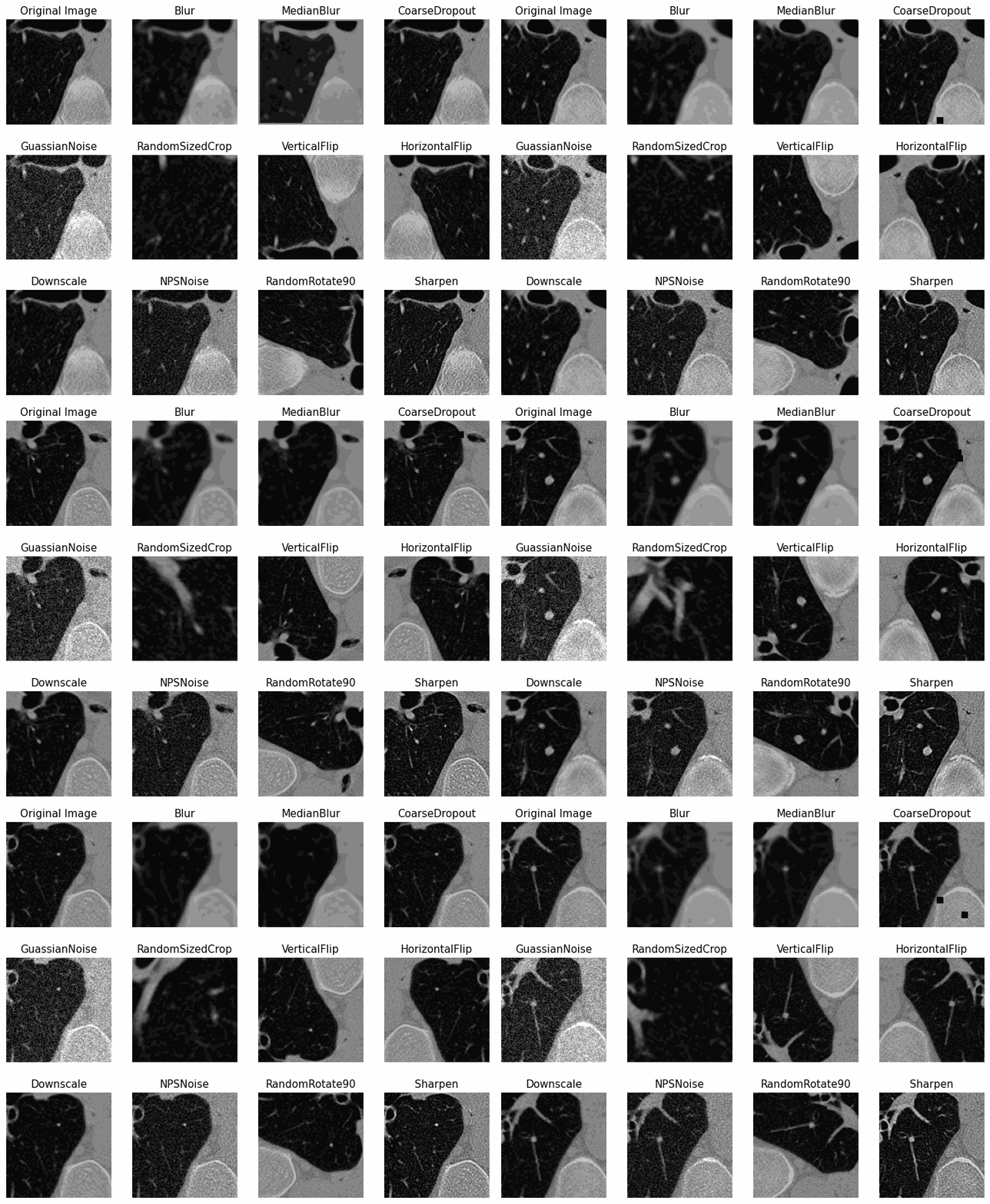
Below are some examples of some common or unique augmentations that are possible with the DICaugment library applied on an example obtained from the NLST dataset [2]:
Features
DICaugment offers the following key features:
-
3D-specific augmentation techniques: The package includes a variety of augmentation methods specifically designed for volumetric 3D images, such as CT scans. These techniques can be used to augment data and improve model generalization. The package was designed to incorporate the metadata availble in DICOM headers, allowing users to create transformations that are consistent with an image's acquisition parameters.
-
Seamless integration: The package is built as an extension of the Albumentations library, making it easy to incorporate 3D augmentation into your existing image processing pipelines. It maintains a similar API and workflow, ensuring a smooth transition for users already familiar with Albumentations.
-
Flexibility: DICaugment is designed to be flexible, allowing users to create custom augmentation pipelines tailored to their specific needs. The modular architecture of the package makes it easy create long and complex augmentation pipelines suitable for their needs.
Key Differences between DICaugment and Albumentations
-
Dimensionality is a key difference as Albumentations and most other augmentation libraries do not support volumetric images while DICaugment is specifically tailored for these types of images
-
The backbone of Albumentations mainly relies on operations in the openCV framework while DICaugment relies on SciPy. As DICaugment is specifically designed to operate on multidimensional data SciPY is used throughout the library. In the future, certain operations that are acheivable through openCV will be implemented.
Authors
Jacob McIntosh
Qian Cao
Berkman Sahiner
Nicholas Petrick
Mehdi Farhangi
Installation
DICaugment requires Python 3.8 or higher. To install the latest version using pip:
pip install dicaugment
Usage
To use DICaugment, you need to import the necessary modules and define an augmentation pipeline. Here's a simple example demonstrating how to apply a 3D augmentation pipeline to a CT scan:
import dicaugment as dca

# Define the augmentation pipeline
transform = dca.Compose([
    dca.Rotate(p=0.5, limit=20, interpolation=1),
    dca.RandomCrop(p=0.5, height=64, width=64, depth=64)
])

# Apply the augmentation pipeline to a CT scan
augmented_scan = transform(image=scan)["image"]
In the example above, we import the dicaugment module and create an instance of dca.Compose to define our augmentation pipeline. We then specify the desired augmentation techniques, such as rotation (dca.Rotate) and random cropping (dca.RandomCrop), along with their respective parameters. Finally, we apply the transformation to a CT scan using the transform function.
Please refer to the DICaugment documentation for more detailed usage instructions and a comprehensive list of available augmentation techniques.
List of augmentations
Pixel-level transforms
Pixel-level transforms will change just an input image and will leave any additional targets such as masks, bounding boxes, and keypoints unchanged. The list of pixel-level transforms:
- Blur
- Downscale
- Equalize
- FromFloat
- GaussNoise
- GaussianBlur
- InvertImg
- MedianBlur
- Normalize
- Posterize
- RandomBrightnessContrast
- RandomGamma
- Sharpen
- ToFloat
- UnsharpMask
Spatial-level transforms
Spatial-level transforms will simultaneously change both an input image as well as additional targets such as masks, bounding boxes, and keypoints. The following table shows which additional targets are supported by each transform.
| Transform | Image | Masks | BBoxes | Keypoints |
|---|---|---|---|---|
| BBoxSafeRandomCrop | ✓ | ✓ | ✓ | |
| CenterCrop | ✓ | ✓ | ✓ | ✓ |
| CoarseDropout | ✓ | ✓ | ✓ | |
| Crop | ✓ | ✓ | ✓ | ✓ |
| CropAndPad | ✓ | ✓ | ✓ | ✓ |
| Flip | ✓ | ✓ | ✓ | ✓ |
| GridDropout | ✓ | ✓ | ||
| HorizontalFlip | ✓ | ✓ | ✓ | ✓ |
| LongestMaxSize | ✓ | ✓ | ✓ | ✓ |
| NoOp | ✓ | ✓ | ✓ | ✓ |
| PadIfNeeded | ✓ | ✓ | ✓ | ✓ |
| PixelDropout | ✓ | ✓ | ✓ | ✓ |
| RandomCrop | ✓ | ✓ | ✓ | ✓ |
| RandomCropFromBorders | ✓ | ✓ | ✓ | ✓ |
| RandomCropNearBBox | ✓ | ✓ | ✓ | ✓ |
| RandomRotate90 | ✓ | ✓ | ✓ | ✓ |
| RandomScale | ✓ | ✓ | ✓ | ✓ |
| RandomSizedBBoxSafeCrop | ✓ | ✓ | ✓ | |
| RandomSizedCrop | ✓ | ✓ | ✓ | ✓ |
| Resize | ✓ | ✓ | ✓ | ✓ |
| Rotate | ✓ | ✓ | ✓ | ✓ |
| ShiftScaleRotate | ✓ | ✓ | ✓ | ✓ |
| SliceFlip | ✓ | ✓ | ✓ | ✓ |
| SmallestMaxSize | ✓ | ✓ | ✓ | ✓ |
| Transpose | ✓ | ✓ | ✓ | ✓ |
| VerticalFlip | ✓ | ✓ | ✓ | ✓ |
CT Scan Specific Transforms
These transforms utilize metadata from a DICOM header file to apply a pixel-level or spatial-level transformation
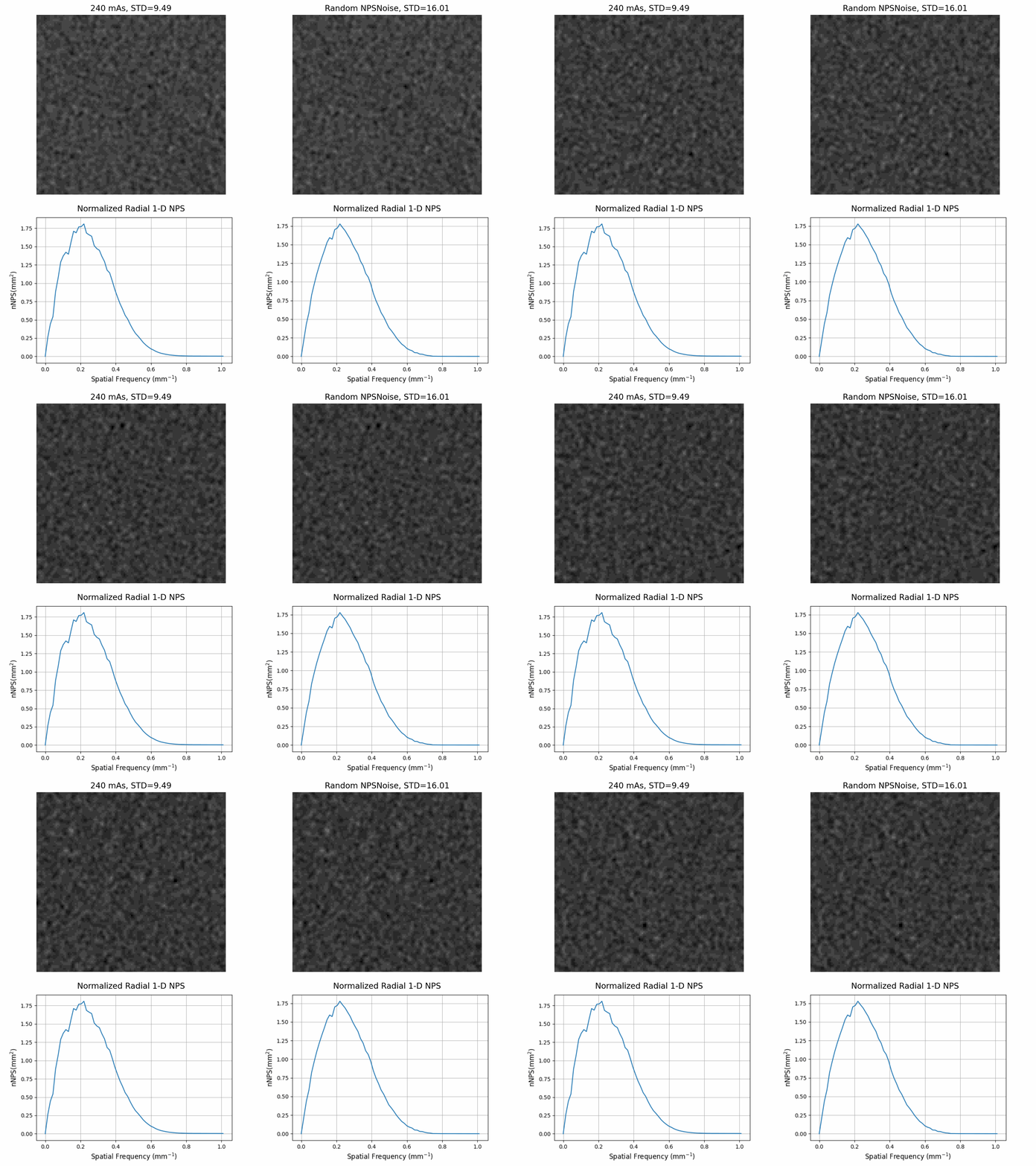
The NPSNoise transormation applies a random change in the magnitude of the noise present in the image consistent with the kernel type [3] provided in the DICOM header
import dicaugment as dca

scan = dca.read_dcm_image(
  path='path/to/dcm/folder/',
  return_header=False         # Set as True to recieve scan and dicom header
  )

dicom = {
  "PixelSpacing" : (0.48, 0.48),
  "RescaleIntercept" : -1024.0,
  "RescaleSlope" : 1.0,
  "ConvolutionKernel" : 'b30f',
  "XRayTubeCurrent" : 240
  }

aug = dca.Compose([dca.NPSNoise()])
result = aug(image=scan, dicom=dicom)
Contributing
Contributions to DICaugment are welcome! If you have any bug reports, feature requests, or would like to contribute code, please check out our CONTRIBUTING guidelines.
License
DICaugment is distributed under the MIT license. See LICENSE for more information.
Acknowledgments
We would like to express our gratitude to the developers of Albumentations [1] for their excellent work on the original library, which served as the foundation for DICaugment. We also thank the open-source community for their contributions and feedback.
Author Contributions
Jacob McIntosh authored the package, developed the pipeline and its functions, wrote the documentation, and drafted the article. Qian Cao assisted in noise insertion augmentation and contributed to the drafting of the article. Berkman Sahiner and Nicholas Petrick assisted in designing the validation study, noise simulation, and contributed to the drafting of the article. Mehdi Farhangi supervised the project, implemented the noise insertion augmentation, conducted the validation study, and contributed to the article drafting.
References
[1] Buslaev, A., Iglovikov, V. I., Khvedchenya, E., Parinov, A., Druzhinin, M., & Kalinin, A. A. (2020). Albumentations: fast and flexible image augmentations. Information, 11(2), 125.
[2] National Lung Screening Trial Research Team. (2013). Data from the National Lung Screening Trial (NLST) [Data set]. The Cancer Imaging Archive. https://doi.org/10.7937/TCIA.HMQ8-J677
[3] Solomon, Justin B., Olav Christianson, and Ehsan Samei. "Quantitative comparison of noise texture across CT scanners from different manufacturers." Medical physics 39.10 (2012): 6048-6055.


Release files for DICaugment 1.0.7
For a detailed explanation of source distributions (sdists) and built distributions (wheels), please see the package formats documentation.
Source distribution (sdist)
| File | Size | Uploaded | Provenance | Actions |
|---|---|---|---|---|
| DICaugment-1.0.7.tar.gz | 114.2 kB | Without provenance | Details for DICaugment-1.0.7.tar.gz |
Built distribution (wheel)
| File | Interpreter | ABI | Platform | Actions Reset |
|---|---|---|---|---|
| DICaugment-1.0.7-py3-none-any.whl | Python 3 | none | any | Details for DICaugment-1.0.7-py3-none-any.whl |
Total release size: 255.2 kB
Release files / DICaugment-1.0.7.tar.gz
| Download URL | DICaugment-1.0.7.tar.gz |
|---|---|
| Size | 114.2 kB |
| Tags | Source |
|
SHA-256 checksum How to use checksums |
9e6741ad42ec6728ad8bc0f4d66d7d5fe5bc2c4b5c0bde592f628efc9950e79e
|
|
BLAKE2b-256 checksum How to use checksums |
d86d7ecf3b7693dc08c431c9a38cc7ec25860316b223784ee5d2475b47f3f431
|
| Upload date | |
|
Uploaded using Trusted Publishing? What is trusted publishing? |
No |
| Uploaded via |
twine/5.0.0 CPython/3.10.13
|
Release files / DICaugment-1.0.7-py3-none-any.whl
| Download URL | DICaugment-1.0.7-py3-none-any.whl |
|---|---|
| Size | 141.0 kB |
| Tags | Python 3 |
|
SHA-256 checksum How to use checksums |
ec1870f78ceba150cb8459e30ee2d71cd647ba3ac1c1862124f4119d63db5311
|
|
BLAKE2b-256 checksum How to use checksums |
0c2482da9b1fa711176b8b6a14c36131ed56dd409bcf77a8fe4a97c297cfd12d
|
| Upload date | |
|
Uploaded using Trusted Publishing? What is trusted publishing? |
No |
| Uploaded via |
twine/5.0.0 CPython/3.10.13
|
Security for DICaugment 1.0.7
Provenance
Provenance describes where a file came from. On PyPI, provenance is shared via attestations, which provide a verifiable record of the build or publishing details. View details, limitations and caveats.
No provenance found
None of the files in this release were uploaded with provenance metadata.
A note on package security
PyPI is a repository for distributing packages, not a service for auditing them. While third-party security researchers and our staff do their best to detect and remove malicious packages, PyPI cannot guarantee the quality, security or suitability of any given package.
To learn more about protecting yourself from malicious actors, visit our package security documentation.














