DIYables MicroPython Mini Mp3 Player Library
MicroPython library for the DIYables Mini Mp3 Player module (YX5200-24SS). Easy-to-use API designed for beginners. Compatible with ESP32 and Raspberry Pi Pico.
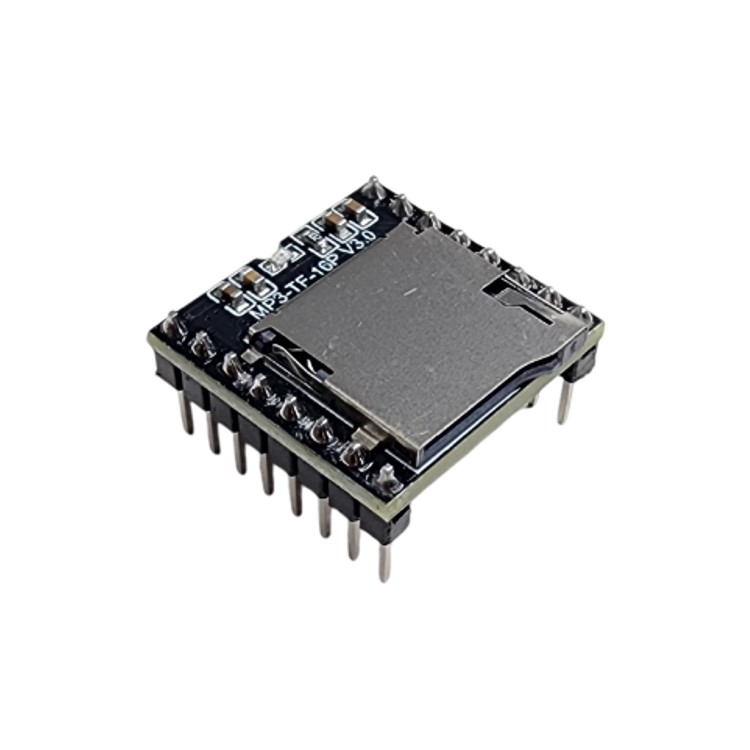
PRODUCT
DIYables Mini Mp3 Player Module
Tested Hardware
Features
- Simple, beginner-friendly API — no complex setup needed
- No external library dependencies
- Non-blocking playback commands (play, pause, stop, volume, etc.)
- Play tracks by number, from folders, or from the special
/mp3 folder
- Volume control (0-30), 6 EQ modes
- Loop track, loop folder, loop all, shuffle
- Advertisement support (interrupt and resume)
- DAC control, sleep/wake, reset
- Status queries (current track, volume, track count, etc.)
- Optional debug output via print()
- Compatible with ESP32 and Raspberry Pi Pico running MicroPython
Tutorials
Installation
You can install the library via pip from PyPI:
pip install DIYables-MicroPython-MiniMp3
Or you can install it using Thonny IDE:
- In Thonny, go to Tools > Manage Packages
- Search for DIYables-MicroPython-MiniMp3
- Click Install
Wiring
DIYables Mini Mp3 Player Pinout
| Pin |
Description |
| VCC |
Power supply (3.2V ~ 5.0V) |
| GND |
Ground |
| RX |
UART receive (connect to board's TX pin) |
| TX |
UART transmit (connect to board's RX pin) |
| SPK_1 |
Speaker+ (for direct speaker connection, max 3W) |
| SPK_2 |
Speaker- (for direct speaker connection, max 3W) |
| DAC_R |
Right audio output (for external amplifier) |
| DAC_L |
Left audio output (for external amplifier) |
| BUSY |
Low when playing, high when idle (optional) |
| IO_1 |
Short press: previous track, long press: volume down |
| IO_2 |
Short press: next track, long press: volume up |
Wiring with ESP32
| Mini Mp3 Pin |
ESP32 Pin |
Note |
| VCC |
3.3V |
|
| GND |
GND |
|
| RX |
GPIO17 (TX) |
No resistor needed (3.3V logic) |
| TX |
GPIO16 (RX) |
|
| SPK_1 |
Speaker+ |
Direct speaker connection (max 3W) |
| SPK_2 |
Speaker- |
Direct speaker connection (max 3W) |
Wiring with Raspberry Pi Pico
| Mini Mp3 Pin |
Pico Pin |
Note |
| VCC |
3.3V |
|
| GND |
GND |
|
| RX |
GPIO4 (TX) |
No resistor needed (3.3V logic) |
| TX |
GPIO5 (RX) |
|
| SPK_1 |
Speaker+ |
Direct speaker connection (max 3W) |
| SPK_2 |
Speaker- |
Direct speaker connection (max 3W) |
Note: Both ESP32 and Raspberry Pi Pico use 3.3V logic, so no resistor is needed on the RX line.
Tip: For better audio quality, connect DAC_R and DAC_L to an external amplifier instead of using the direct speaker output.
SD Card File Structure
Important: Format your SD card as FAT16 or FAT32 before use.
Track Numbering
- Track numbers start from 1 (not 0).
- The module assigns track numbers based on the order files were copied to the SD card, NOT by filename.
- To ensure correct ordering: format the SD card first, then copy files one by one in order (001.mp3 first, then 002.mp3, etc.).
- File names must start with a zero-padded number. You can add text after the number:
001-hello.mp3, 002-goodbye.mp3.
Root folder files (used by play()):
/001.mp3          <- play(1)
/002.mp3          <- play(2)
/003-mysong.mp3   <- play(3)
Folder Numbering
- Folder numbers start from 1 (not 0).
- Folder names must be 2-digit zero-padded numbers:
01, 02, ... 99.
- Track names inside folders must be 3-digit zero-padded numbers:
001, 002, ... 255.
- Maximum: 99 folders, 255 tracks per folder (using
play_folder()).
/01/001.mp3       <- play_folder(1, 1)
/01/002.mp3       <- play_folder(1, 2)
/02/001.mp3       <- play_folder(2, 1)
/02/002.mp3       <- play_folder(2, 2)
Large Folder Mode
- For more than 255 tracks per folder, use
play_large_folder().
- Folder names:
01 to 15 (max 15 folders).
- Track names must be 4-digit zero-padded numbers:
0001 to 3000.
/01/0001.mp3      <- play_large_folder(1, 1)
/01/0002.mp3      <- play_large_folder(1, 2)
/15/3000.mp3      <- play_large_folder(15, 3000)
MP3 Folder
- The folder must be named
mp3 (lowercase) in the root of the SD card.
- Track names must be 4-digit zero-padded:
0001.mp3 to 9999.mp3.
/mp3/0001.mp3     <- play_from_mp3_folder(1)
/mp3/0002.mp3     <- play_from_mp3_folder(2)
Advertisement Folder
- The folder must be named
advert (lowercase) in the root.
- Track names must be 4-digit zero-padded:
0001.mp3 to 9999.mp3.
- Used to interrupt the current track (e.g., announcements).
/advert/0001.mp3  <- play_advertisement(1)
/advert/0002.mp3  <- play_advertisement(2)
Summary Table
| Function |
Folder Name |
File Name Format |
Range |
play(n) |
Root / |
001.mp3 - 255.mp3 |
1 - 9999 |
play_folder(f, t) |
01 - 99 |
001.mp3 - 255.mp3 |
folder 1-99, track 1-255 |
play_large_folder(f, t) |
01 - 15 |
0001.mp3 - 3000.mp3 |
folder 1-15, track 1-3000 |
play_from_mp3_folder(n) |
mp3 |
0001.mp3 - 9999.mp3 |
1 - 9999 |
play_advertisement(n) |
advert |
0001.mp3 - 9999.mp3 |
1 - 9999 |
Examples
Quick Start
For ESP32
from machine import UART
import time
from DIYables_MicroPython_MiniMp3 import MiniMp3Player

uart = UART(2, baudrate=9600, tx=17, rx=16)
mp3 = MiniMp3Player(uart)
time.sleep(1)  # Wait for the module to initialize

mp3.set_volume(25)
mp3.play(1)
For Raspberry Pi Pico
from machine import UART
import time
from DIYables_MicroPython_MiniMp3 import MiniMp3Player

uart = UART(1, baudrate=9600, tx=4, rx=5)
mp3 = MiniMp3Player(uart)
time.sleep(1)  # Wait for the module to initialize

mp3.set_volume(25)
mp3.play(1)
API Reference
Constructor
mp3 = MiniMp3Player(uart, debug=False, timeout=100)
| Parameter |
Type |
Default |
Description |
uart |
machine.UART |
(required) |
UART instance, already initialized at 9600 baud |
debug |
bool |
False |
Enable debug output via print() |
timeout |
int |
100 |
Response timeout in milliseconds for status queries |
Playback Control
| Method |
Description |
play(track_num) |
Play a specific track by number (starts from 1) |
play_next() |
Play the next track |
play_previous() |
Play the previous track |
pause() |
Pause the currently playing track |
resume() |
Resume playback of a paused track |
stop() |
Stop playback completely |
Folder Playback
| Method |
Description |
play_folder(folder, track) |
Play a track from a numbered folder (1-99, 1-255) |
play_large_folder(folder, track) |
Play a track from a folder with up to 3000 tracks (1-15, 1-3000) |
play_from_mp3_folder(track_num) |
Play a track from the special /mp3 folder |
Advertisement
| Method |
Description |
play_advertisement(track_num) |
Play advertisement (interrupts current track) |
stop_advertisement() |
Stop advertisement and resume previous track |
Volume
| Method |
Description |
set_volume(vol) |
Set volume level (0-30) |
volume_up() |
Increase volume by one step |
volume_down() |
Decrease volume by one step |
Equalizer
| Method |
Description |
set_eq(eq) |
Set EQ mode: EQ_NORMAL, EQ_POP, EQ_ROCK, EQ_JAZZ, EQ_CLASSIC, EQ_BASS |
Repeat & Shuffle
| Method |
Description |
loop_track(track_num) |
Loop a specific track continuously |
loop_folder(folder) |
Loop all tracks in a folder |
loop_all() |
Loop all tracks on the SD card |
stop_loop() |
Stop looping |
shuffle() |
Play all tracks in random order |
DAC Control
| Method |
Description |
enable_dac() |
Enable the DAC output |
disable_dac() |
Disable the DAC output |
Power Management
| Method |
Description |
sleep() |
Put the module into sleep mode |
wake_up() |
Wake the module from sleep mode |
reset() |
Reset the module |
Status Queries
| Method |
Return |
Description |
is_playing() |
bool |
True if a track is currently playing |
get_volume() |
int |
Current volume (0-30), or -1 on error |
get_eq() |
int |
Current EQ setting, or -1 on error |
get_track_count() |
int |
Total tracks on the SD card, or -1 on error |
get_current_track() |
int |
Current track number, or -1 on error |
get_folder_count() |
int |
Number of folders, or -1 on error |
get_track_count_in_folder(folder) |
int |
Tracks in a folder, or -1 on error |
Configuration
| Method |
Description |
set_timeout(ms) |
Set response timeout in milliseconds |
Debug
| Method |
Description |
print_error() |
Print the last error message from the module |
EQ Constants
import DIYables_MicroPython_MiniMp3.DIYables_MicroPython_MiniMp3 as mp3_const

mp3_const.EQ_NORMAL   # 0
mp3_const.EQ_POP      # 1
mp3_const.EQ_ROCK     # 2
mp3_const.EQ_JAZZ     # 3
mp3_const.EQ_CLASSIC  # 4
mp3_const.EQ_BASS     # 5
References







