
A web framework by Dakada CN

Project description
(The original introduction was written in Chinese and translated by the author, which may seem strange to you, Original introduction is inhttps://github.com/dakadayyds/dakadaWeb)
Dakada is a web framework created by Dakada. WSGI is based on the Python internal library wsgiref, which has learned about Flask and supports basic web development, as well as database (data stored in files with the suffix '. json'), backend creation, cookies (following the '{"key": "value"}' grid), self processing of static files, blueprints (similar to Flask's Blueprint), and other functions. It has its own error correction functions, and the engine on the template is based on Jinja2, Can customize filters, and also support user registration, login, logout, and webcookie extension functions
Quick Start
Firstly, download Dakada (pip install Dakada) and use 'import Dakada' to import Dakada
Then, in the root directory of your Dakada project, run the command 'Python - m Dakada.startproject'`
You can see these files in the root directory of your project:
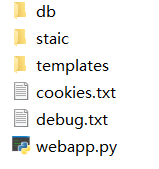
Db: Database file storage location
Static: static file storage location, which will be automatically processed by Dakada. For example, if you place a file called' 1. js' in static, and start the project, access the file link as'/1. js'
Templates: Template storage location
Cookies.txt: Stores cookies for all users, providing a certain level of security for all cookies
Debug.txt: error log
Webapp.py: Main program
#Usage of Dakada
#Basic development

#From Dakada import Dakada

Class Dakada:

     def__ Init__ (self, link=".", host='', port=8000):

        #Create a new webapp

        #[link] Project root directory, default value is the current directory

        #[host] IP address, default to local machine

        #[port] port, default to 8000

     Def addpath (self, path, URL_type="URL", method=['GET '], req_header=[('Content Type', 'text/html; charset=utf-8')], mode="static"):

#It is a decorator used to create links

#[path] Link name

#[URL_type] Link type, default to regular URL, can be set to 'RE', and the link is a regular expression

#[method] Support method, default only supports GET

#[req_header] Request header, default to Content Type with a value of text/html; Charset=utf-8

#[mode] Web page mode, default to static. If it is a websocket, it will automatically create a websocket that only the user can access

Def run (self):

#No parameters, used to start the Dakada project

Def setterr (self, Fuc):

#A decorator used to set the error handling function when the request code is 4 * * or 5 * *

#[Fuc] is not a parameter, but an error handling function

Def register_ Blueprint (self, blueprint):

#Register blueprint for app

#[blueprint] blueprint

#Database operations

#(Note: Use the first key of JSON (or dictionary) as the search criteria)

#From Dakada. Dakada import db

Class db:

Def__ Init__ (self, link=".", cookie=False):

#Create Database Request Object

#[link] Project root directory, default value is the current directory

#[cookie] System parameters, do not fill in

Def adddangerstr (self, dangerlist):

#Add dangerous characters (such as' n ')

#[dangerlist] List of dangerous characters

Def add (self, dblink, jsonordict_list):

#Add data (if there are dangerous characters in the operation data, they will not be added, and return 'Bad data!'

#Database file name under the db folder

#[jsonordict_list] json (or dictionary) list

Def load (self, dblink, key):

#Load data and return all JSON (or dictionary) values related to the key

#Database file name under the db folder

#[key] The key to search for

Def save (self, dblink, key, value):

#Change the value of all JSON (or dictionaries) with key as value

#Database file name under the db folder

#[key] key

#[value] value

Def delete (self, dblink, key):

#Delete all JSON (or dictionaries) with key

#Database file name under the db folder

#[key] key

Def clear (self, dblink):

#Clear the specified database content

#Database file name under the db folder

#Websocket

#In fact, websocket here refers to the front-end JavaScript's request for websocket link, and Python returns data after processing the request in the back-end

Def newwebsocket (self, Fuc):

#A decorator used to set the websocket processing function

#[Fuc] is not a parameter, it refers to the websocket processing function

#Template rendering

#From dakada.render import*

Def render_ HTML (link, * * kwargs):

#Rendering templates

#[link] Template link to render

#[* * kwargs] refers to * * kwargs in the render function of Jinja2

Def addfilter (name):

#A decorator for adding filters

#[name] Filter Name

#User tool

#From dakada.User import*

Def register (username, passwd, p1ink=".", * * other):

#Registered Users

#[username] username

#[password] Password

#The root directory of the project, with the default value being the current directory

#[* * other] Other information about registered users, such as user email, phone number, etc

Def login (IP, username, passwd, time, p_link=".", * * other):

#Login, successful login will create a cookie with the key 'user' and the value 'login username' for the login IP

#[ip] Login IP

#[username] username

#[password] Password

#[time] The login duration of the user, which is a datetime. timedelta object

#The root directory of the project, with the default value being the current directory

#[* * other] Other information about registered users, such as user email, phone number, etc

Def logout (ip, p.link="."):

#Log out

#[ip] Login IP

#The root directory of the project, with the default value being the current directory


#Cookies

#From Dakada import cookie

#(Expired cookies are automatically deleted by the system)

Class cookie:

Def__ Init__ (self, P_link="."):

#Create a cookie processing object

#The root directory of the project, with the default value being the current directory

Def add_ Cookies (self, ip, key, value, TTL):

#Create a new cookie for IP

#[ip] User IP

#[key] Cookie key

#The value of the cookie

Def load_ Cookies (self, ip):

#Load all cookies for the specified IP and return a list

#[ip] User IP

Def delete_ Cookies (self, ip):

#Delete cookies for the specified IP address

#[ip] User IP

#Production background

#From dakada.admin import make_ Admin

Def make_ Admin (HTML=True, link="."):

#Generate administrator backend

#[HTML] returns the format. If true, returns the HTML code, and if false, returns the database content, allowing users to customize the HTML code

#[link] Project root directory, default value is the current directory
//Javascript (HTML) API

Send (sendmsg, function (status, recvmsg){

//Your code is here

//When the web page mode is websocket, Dakada will create this function

//A backend error will return a message with the key err

//[sendmsg] Message to be sent

//[status] Status code

//Received message

})
#Practical application of the Dakada app


From Dakada import Dakada, cookie

From dakada.render import render_ HTML, addfilter

From dakada.admin import make_ Admin

From dakada.User import*

Import datetime # Required libraries

App=Dakada() # Create a Dakada app

#You can also import a file using the blueprint first: import example

#Re import blueprint: from dakada.blueprint import blueprint

#Finally, register blueprint: app. register_ Blueprint

@App. addpath ("/") # @ blueprint. addpath ("/")

Def webapp (d):

#A dictionary containing a lot of information

#Request method

#[d ["req_ip"] Request IP

#[d ["req_JSON"] Request JSON, if none, return None

#If the link entered by the user is/? 111=2, then it will be 111=2

Return "<p>hello</p>" # res


Download files
Download the file for your platform. If you're not sure which to choose, learn more about installing packages.
Source Distribution
Built Distribution
Filter files by name, interpreter, ABI, and platform.
If you're not sure about the file name format, learn more about wheel file names.
Copy a direct link to the current filters
File details
Details for the file Dakada-2.1.tar.gz.
File metadata
- Download URL: Dakada-2.1.tar.gz
- Upload date:
- Size: 9.6 kB
- Tags: Source
- Uploaded using Trusted Publishing? No
- Uploaded via: twine/4.0.2 CPython/3.7.0
File hashes
| Algorithm | Hash digest | |
|---|---|---|
| SHA256 |
e8da3da635a52236fe0e6ad49dcdb03f4d0610f0ea0353337609aafda1e9ebe5
|
|
| MD5 |
272ec6bd7fc4ee1900c032e8597147ea
|
|
| BLAKE2b-256 |
20d168bad1cb6e39469a5ef9002777f84823abe367c6c4eaa080d5e1101cf3fa
|
File details
Details for the file Dakada-2.1-py2.py3-none-any.whl.
File metadata
- Download URL: Dakada-2.1-py2.py3-none-any.whl
- Upload date:
- Size: 10.1 kB
- Tags: Python 2, Python 3
- Uploaded using Trusted Publishing? No
- Uploaded via: twine/4.0.2 CPython/3.7.0
File hashes
| Algorithm | Hash digest | |
|---|---|---|
| SHA256 |
4f08e3e61256091d3cfbf28580072e795e2baf874756b085a1a6a8ac52b545b8
|
|
| MD5 |
76e93e188da5639fe125e0b4534dc023
|
|
| BLAKE2b-256 |
4862d46c38b59a4b10dbdf481c4a82cd7d60e4bdc9b8fab676479916998dced8
|






