
+example:
response
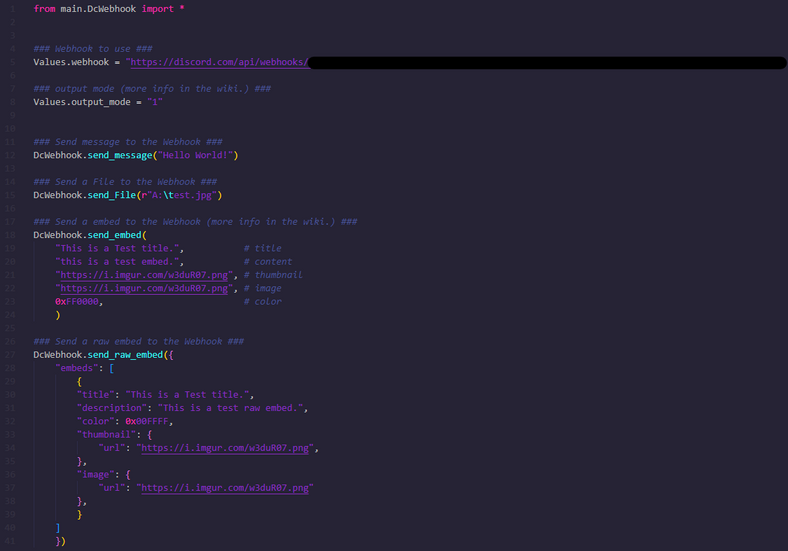
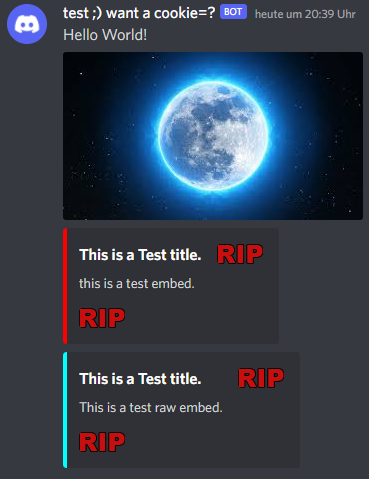
how to use
https://github.com/cookie0o/DcWebhook/wiki
+Install:
manually
- Download project
- cd in the project dir with the console
- run:
pip install . --upgrade - your done!
install with pip
- run:
pip install DcWebhook - your done!
+author(s) on github:
cookie0o
1 maintainer

Metadata
1 maintainer
Release files for DcWebhook 0.0.5
For a detailed explanation of source distributions (sdists) and built distributions (wheels), please see the package formats documentation.
Source distribution (sdist)
| File | Size | Uploaded | |
|---|---|---|---|
| DcWebhook-0.0.5.tar.gz | 15.5 kB | Details |
Built distribution (wheel)
| File | Interpreter | ABI | Platform | Reset |
|---|---|---|---|---|
| DcWebhook-0.0.5-py3-none-any.whl | Python 3 | none | any | Details |
Total release size: 29.2 kB
Release files / DcWebhook-0.0.5.tar.gz
| Download URL | DcWebhook-0.0.5.tar.gz |
|---|---|
| Size | 15.5 kB |
| Tags | Source |
|
SHA-256 checksum How to use checksums |
95e55757e145cab496a0fc40f0ecbca18243d7bb58a60d06b5abd841acfe97f7
|
|
BLAKE2b-256 checksum How to use checksums |
10b6993ad189ffab696180b42b83ba519c0d46f740f4cf6e60840ce2560a43b3
|
| Upload date | |
|
Uploaded using Trusted Publishing? What is trusted publishing? |
No |
| Uploaded via |
twine/4.0.1 CPython/3.8.0
|
Release files / DcWebhook-0.0.5-py3-none-any.whl
| Download URL | DcWebhook-0.0.5-py3-none-any.whl |
|---|---|
| Size | 13.8 kB |
| Tags | Python 3 |
|
SHA-256 checksum How to use checksums |
53b72f0b2418ff3bb505d9ec2f6fb4be259b00524a9c94689df2a893904914b3
|
|
BLAKE2b-256 checksum How to use checksums |
a02977c525ac69872e990587fe3605461ac139e59146081bf3da22df3a445832
|
| Upload date | |
|
Uploaded using Trusted Publishing? What is trusted publishing? |
No |
| Uploaded via |
twine/4.0.1 CPython/3.8.0
|














