
AI-powered image search engine with multimodal embeddings, text-to-image search, LLM captioning, and agentic RAG integration.

Project description
Deep Image Search - Search Images with Text, Images & AI Agents

DeepImageSearch is a Python library for building AI-powered image search systems. It supports text-to-image search, image-to-image search, hybrid search, and LLM-powered captioning using CLIP/SigLIP/EVA-CLIP multimodal embeddings with FAISS/ChromaDB/Qdrant vector indexing. Built for the agentic RAG era with MCP server, LangChain tool, and PostgreSQL metadata storage out of the box.







Features
- Text-to-Image Search -- find images using natural language queries like "a red car parked near a lake"
- Image-to-Image Search -- find visually similar images from a query image
- Hybrid Search -- combine text and image queries with weighted fusion
- Multimodal Embeddings -- CLIP, SigLIP, EVA-CLIP via open_clip, plus 500+ legacy timm models
- LLM Captioning -- auto-generate image captions using any OpenAI SDK-compatible provider
- Image Records -- every image tracked with ID, index, name, path, caption, timestamp (like a database)
- Multiple Vector Stores -- FAISS (default), ChromaDB, Qdrant with metadata filtering
- Metadata Storage -- local JSON (default) or PostgreSQL for production
- Agentic Integration -- MCP server for Claude, LangChain tool for agent pipelines
- GPU & CPU Support -- auto-detects CUDA, MPS (Apple Silicon), or CPU
- Modern Packaging --
uv/pipcompatible viapyproject.toml, Python 3.10+
Installation
From PyPI (stable release)
pip install DeepImageSearch --upgrade
From GitHub (latest v3)
pip install git+https://github.com/TechyNilesh/DeepImageSearch.git
Or with uv (recommended):
uv pip install git+https://github.com/TechyNilesh/DeepImageSearch.git
With optional extras from GitHub:
pip install "DeepImageSearch[all] @ git+https://github.com/TechyNilesh/DeepImageSearch.git"
Optional Extras
pip install "DeepImageSearch[llm]"          # LLM captioning (OpenAI SDK)
pip install "DeepImageSearch[chroma]"       # ChromaDB vector store
pip install "DeepImageSearch[qdrant]"       # Qdrant vector store
pip install "DeepImageSearch[postgres]"     # PostgreSQL metadata store
pip install "DeepImageSearch[mcp]"          # MCP server for Claude
pip install "DeepImageSearch[langchain]"    # LangChain agent tool
pip install "DeepImageSearch[all]"          # Everything
If using a GPU, uninstall
faiss-cpuand installfaiss-gpuinstead.
Quick Start
from DeepImageSearch import SearchEngine

engine = SearchEngine(model_name="clip-vit-b-32")

# Index from a folder or list of paths
engine.index("./photos")
engine.index(["img1.jpg", "img2.jpg", "img3.jpg"])

# Text search
results = engine.search("a sunset over mountains")

# Image search
results = engine.search("query.jpg")

# Hybrid search
results = engine.search("outdoor scene", image_query="photo.jpg", mode="hybrid")

# Filtered search
results = engine.search("red car", filters={"source": "instagram"})

# Plot results
engine.plot_similar_images("query.jpg", number_of_images=9)
Image-to-Image Search

Text-to-Image Search

Search Mode Comparison (Image vs Text vs Hybrid)

Search Results
Each result contains full image identity -- you always know which image matched:
{
    "id": "a1b2c3...",
    "score": 0.87,
    "metadata": {
        "image_id": "a1b2c3...",
        "image_index": 42,
        "image_name": "sunset_042.jpg",
        "image_path": "/data/photos/sunset_042.jpg",
        "caption": "A sunset over mountains with orange sky",
        "indexed_at": "2026-03-28T10:30:00+00:00"
    }
}
Image Records
Every indexed image is tracked as a structured record (maps directly to SQL):
records = engine.get_records()              # all records
record = engine.get_record("a1b2c3...")     # by ID
print(engine.count)                         # total indexed
print(engine.info())                        # engine summary
LLM Captioning
Auto-generate image captions using any OpenAI SDK-compatible provider. Just pass model, api_key, and base_url:
from DeepImageSearch import SearchEngine

engine = SearchEngine(
    model_name="clip-vit-l-14",
    captioner_model="your-model-name",
    captioner_api_key="your-api-key",
    captioner_base_url="https://your-provider.com/v1",
)

engine.index("./photos", generate_captions=True)
results = engine.search("person holding umbrella")
Works with OpenAI, Google Gemini, Anthropic Claude, Ollama, Together AI, Groq, vLLM, or any OpenAI SDK-compatible endpoint.
Vector Stores
# FAISS (default)
engine = SearchEngine(model_name="clip-vit-b-32")

# ChromaDB
engine = SearchEngine(model_name="clip-vit-b-32", vector_store="chroma")

# Qdrant
engine = SearchEngine(model_name="clip-vit-b-32", vector_store="qdrant")
Metadata Storage
Image records are stored locally in image_records.json by default. For production, use PostgreSQL:
from DeepImageSearch import SearchEngine
from DeepImageSearch.metadatastore.postgres_store import PostgresMetadataStore

store = PostgresMetadataStore(
    connection_string="postgresql://user:pass@localhost:5432/mydb"
)
engine = SearchEngine(model_name="clip-vit-b-32", metadata_store=store)
engine.index("./photos")   # records go to PostgreSQL, vectors go to FAISS
You can implement your own backend by subclassing BaseMetadataStore.
Embedding Presets
| Preset | Model | Text Search | Best For |
|---|---|---|---|
clip-vit-b-32 |
CLIP ViT-B/32 | Yes | Fast, general purpose |
clip-vit-b-16 |
CLIP ViT-B/16 | Yes | Better accuracy |
clip-vit-l-14 |
CLIP ViT-L/14 | Yes | High accuracy |
clip-vit-l-14-336 |
CLIP ViT-L/14@336 | Yes | Highest accuracy |
siglip-vit-b-16 |
SigLIP ViT-B/16 | Yes | Improved zero-shot |
clip-vit-bigg-14 |
CLIP ViT-bigG/14 | Yes | Maximum quality |
vgg19 |
VGG-19 (timm) | No | Legacy, image-only |
resnet50 |
ResNet-50 (timm) | No | Legacy, image-only |
Any timm model name also works for image-only search.
Agentic Integration
MCP Server
Expose your image index as a tool for Claude:
deep-image-search-mcp --index-path ./my_index --model clip-vit-l-14
Claude Desktop config:
{
  "mcpServers": {
    "image-search": {
      "command": "deep-image-search-mcp",
      "args": ["--index-path", "./my_index"]
    }
  }
}
LangChain Tool
from DeepImageSearch.agents.langchain_tool import create_langchain_tool

tool = create_langchain_tool(index_path="./my_index")
Generic Tool
from DeepImageSearch import ImageSearchTool

tool = ImageSearchTool(index_path="./my_index")
results = tool("a photo of a dog", k=5)
Advanced Usage
For full control, use core modules directly:
from DeepImageSearch.core.embeddings import EmbeddingManager
from DeepImageSearch.core.indexer import Indexer
from DeepImageSearch.core.searcher import Searcher
from DeepImageSearch.core.captioner import Captioner
from DeepImageSearch.vectorstores.faiss_store import FAISSStore
from DeepImageSearch.metadatastore.json_store import JsonMetadataStore

embedding = EmbeddingManager.create("clip-vit-l-14", device="cuda")
store = FAISSStore(dimension=embedding.dimension, index_type="hnsw")
metadata = JsonMetadataStore()

captioner = Captioner(
    model="your-model",
    api_key="your-key",
    base_url="https://your-provider.com/v1",
)

indexer = Indexer(embedding=embedding, vector_store=store, metadata_store=metadata, captioner=captioner)
searcher = Searcher(embedding=embedding, vector_store=store)

indexer.index(image_paths, generate_captions=True)
results = searcher.search_by_text("sunset photo")
Backward Compatibility (v2 API)
Existing v2 code continues to work:
from DeepImageSearch import Load_Data, Search_Setup

image_list = Load_Data().from_folder(["folder_path"])
st = Search_Setup(image_list=image_list, model_name="vgg19", pretrained=True)
st.run_index()
st.get_similar_images(image_path="query.jpg", number_of_images=10)
st.plot_similar_images(image_path="query.jpg", number_of_images=9)
Architecture
DeepImageSearch/
├── core/
│   ├── embeddings.py      # CLIP/SigLIP/EVA-CLIP + timm backends
│   ├── indexer.py          # Batch indexing pipeline
│   ├── searcher.py         # Text/image/hybrid search + plotting
│   └── captioner.py        # OpenAI SDK-compatible LLM captioning
├── vectorstores/
│   ├── base.py             # Abstract vector store interface
│   ├── faiss_store.py      # FAISS with metadata sidecar
│   ├── chroma_store.py     # ChromaDB integration
│   └── qdrant_store.py     # Qdrant integration
├── metadatastore/
│   ├── base.py             # ImageRecord dataclass + abstract interface
│   ├── json_store.py       # Local JSON file backend (default)
│   └── postgres_store.py   # PostgreSQL backend
├── agents/
│   ├── tool_interface.py   # Generic agent tool
│   ├── mcp_server.py       # MCP server for Claude
│   └── langchain_tool.py   # LangChain tool wrapper
├── data/
│   └── loader.py           # Image loading from folders/CSV/lists
├── search_engine.py        # High-level unified API
└── DeepImageSearch.py       # v2 backward-compatible shim
Examples
Ready-to-run demo scripts in the Demo/ folder:
| # | Demo | Description |
|---|---|---|
| 1 | Basic Image Search | Index a folder, find similar images, plot results |
| 2 | Text-to-Image Search | Search images with natural language queries |
| 3 | Hybrid Search | Combine text + image queries with weight tuning |
| 4 | Filtered Search | Attach metadata and filter results |
| 5 | LLM Captioning | Auto-generate captions with any vision LLM |
| 6 | Vector Stores | FAISS vs ChromaDB vs Qdrant |
| 7 | Metadata Storage | JSON records, PostgreSQL, custom stores |
| 8 | Agentic Tools | MCP server, LangChain tool, generic tool |
| 9 | Embedding Models | Compare CLIP presets and timm models |
| 10 | Incremental Indexing | Add images over time, save/reload |
Documentation
For detailed documentation: Read Full Documents
Core Contributors

Nilesh Verma
Citation
If you use DeepImageSearch in your Research/Product, please cite:
@misc{TechyNilesh/DeepImageSearch,
  author = {VERMA, NILESH},
  title = {Deep Image Search - AI-Based Image Search Engine},
  year = {2021},
  publisher = {GitHub},
  journal = {GitHub repository},
  howpublished = {\url{https://github.com/TechyNilesh/DeepImageSearch}},
}
Please do STAR the repository, if it helped you in any way.
Feel free to give suggestions, report bugs and contribute.
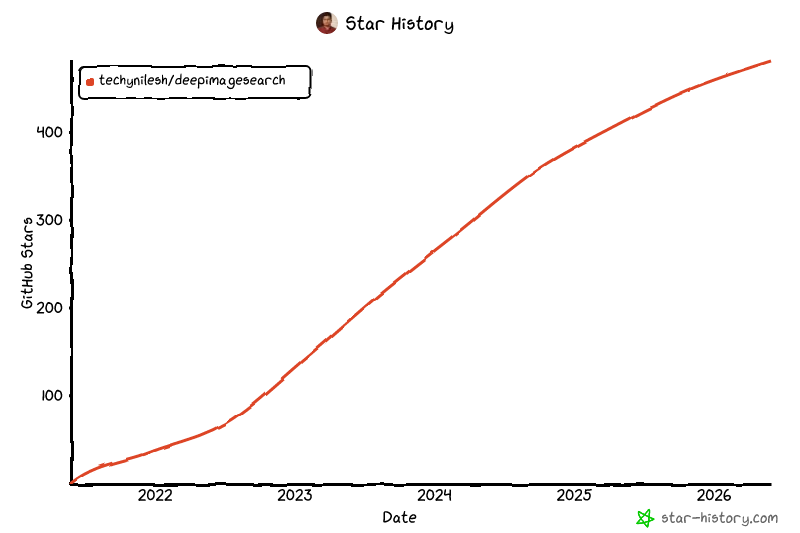
Star History


Download files
Download the file for your platform. If you're not sure which to choose, learn more about installing packages.
Source Distribution
Built Distribution
Filter files by name, interpreter, ABI, and platform.
If you're not sure about the file name format, learn more about wheel file names.
Copy a direct link to the current filters
File details
Details for the file deepimagesearch-3.0.0.tar.gz.
File metadata
- Download URL: deepimagesearch-3.0.0.tar.gz
- Upload date:
- Size: 11.2 MB
- Tags: Source
- Uploaded using Trusted Publishing? No
- Uploaded via: twine/6.2.0 CPython/3.9.6
File hashes
| Algorithm | Hash digest | |
|---|---|---|
| SHA256 |
dcaf1092a7fb99c421d28e57779d5564338447557a4b089478e0bb4d89807513
|
|
| MD5 |
6b68149ef45263deb48a6a12c3beb2dd
|
|
| BLAKE2b-256 |
07857d2df6fc5160560965393a81dc47b0bf533d6fc8d6276991bdfbc2f067c4
|
File details
Details for the file deepimagesearch-3.0.0-py3-none-any.whl.
File metadata
- Download URL: deepimagesearch-3.0.0-py3-none-any.whl
- Upload date:
- Size: 42.0 kB
- Tags: Python 3
- Uploaded using Trusted Publishing? No
- Uploaded via: twine/6.2.0 CPython/3.9.6
File hashes
| Algorithm | Hash digest | |
|---|---|---|
| SHA256 |
0291431da4d9e5d3cf841238ee4e9d244fd5bffed9487175283b4dc82d35326d
|
|
| MD5 |
011e3a191651ed5e6560fe395760c40e
|
|
| BLAKE2b-256 |
88977ae3537f17cafe180dbdba9ac4184dee67dd4e3676a5e8d2a2d5e08a05ed
|






