

A Deep Learning Framework for Multi-target Prediction





DeepMTP is a PyTorch framework for multi-target prediction (MTP). It supports multi-label classification (MLC), multivariate regression (MTR), multi-task learning (MTL), dyadic prediction (DP), and matrix completion (MC) through a common two-branch architecture.
Current capabilities
- Dense MLP, sparse, mixed tabular, token-sequence GRU, Conv1D, Transformer, molecular graph GIN/GINE, image, learned ID-embedding, and custom branch encoders.
- Dot-product, concatenation-plus-MLP, and Kronecker-product fusion.
- Validation settings A–D for known and novel instances and targets.
- Binary and multiclass classification plus regression metrics, early stopping, checkpoints, deterministic undersampling, and top-k grouped metrics where applicable.
- Random-search and Hyperband optimization, plus optional TensorBoard, Weights & Biases, and Streamlit integrations.
- Typed configuration, model-ready batches, and early validation of invalid data or model combinations.
DeepMTP 0.0.23 contains substantial changes beyond the previous 0.0.22
release. Read the changelog and
migration guide before upgrading an existing experiment. The
neural-network roadmap tracks implemented and
planned model extensions.
Installing DeepMTP
DeepMTP is tested on Python 3.10 through 3.14. CPU execution is fully supported; a CUDA-capable GPU is optional and is most useful for larger experiments.
Installing from PyPI
python -m venv .venv
source .venv/bin/activate  # On Windows: .venv\Scripts\activate
python -m pip install --upgrade pip
pip install DeepMTP
For GPU acceleration, install the appropriate PyTorch build for your platform using the official PyTorch selector before installing DeepMTP.
Optional integrations are installed explicitly:
pip install "DeepMTP[datasets]"   # downloadable benchmark datasets
pip install "DeepMTP[hpo]"        # ConfigSpace-based optimization
pip install "DeepMTP[graph]"      # PyTorch Geometric graph encoders
pip install "DeepMTP[image]"      # Torchvision image models/transforms
pip install "DeepMTP[sparse]"     # SciPy sparse matrices
pip install "DeepMTP[streamlit]"  # Streamlit progress adapters
pip install "DeepMTP[tracking]"   # TensorBoard and Weights & Biases
pip install "DeepMTP[all]"        # every runtime integration
Streamlit-specific trainers, optimizers, and progress observers live under the optional integration namespace:
from DeepMTP.integrations.streamlit import (
    DeepMTP as StreamlitDeepMTP,
    HyperBand,
    RandomSearch,
)
Installing from Source
git clone https://github.com/diliadis/DeepMTP.git
cd DeepMTP
python -m venv .venv
source .venv/bin/activate  # On Windows: .venv\Scripts\activate
python -m pip install --upgrade pip
python -m pip install -e . --group dev
python -m pytest
Conda users can instead bootstrap the environment and install the same development group:
conda env create -f environment.yml
conda activate deepmtp
python -m pip install --group dev
Development commands and contribution expectations are documented in CONTRIBUTING.md.
Upgrading an experiment from the published 0.0.22 release requires a few
behavioral checks. See the 0.0.22 to 0.0.23 migration guide for
before-and-after examples covering configuration, data preparation,
predictions, checkpoints, and optional integrations.
Project maintenance is documented in the changelog, contributor guide, security policy, and release checklist.
Background
What is MTP?
Multi-target prediction (MTP) serves as an umbrella term for machine learning tasks that concern the simultaneous prediction of multiple target variables. These include:
- Multi-label Classification
- Multivariate Regression
- Multitask Learning
- Hierarchical Multi-label Classification
- Dyadic Prediction
- Zero-shot Learning
- Matrix Completion
- (Hybrid) Matrix Completion
- Cold-start Collaborative Filtering
Despite the significant similarities, all these domains have evolved separately into distinct research areas over the last two decades. To better understand these similarities and differences it is important to get accustomed to the terminology and main concepts used in this field.
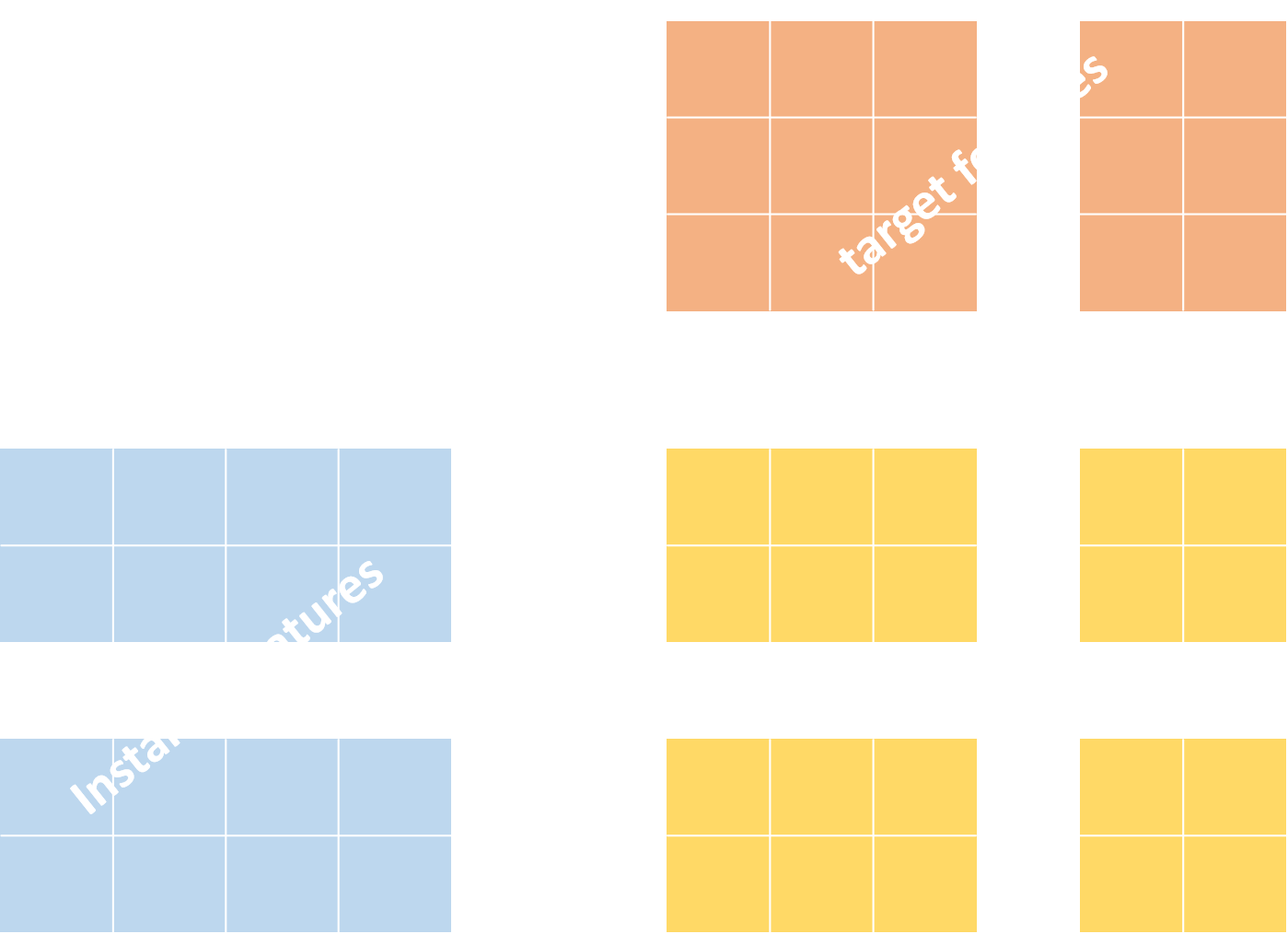
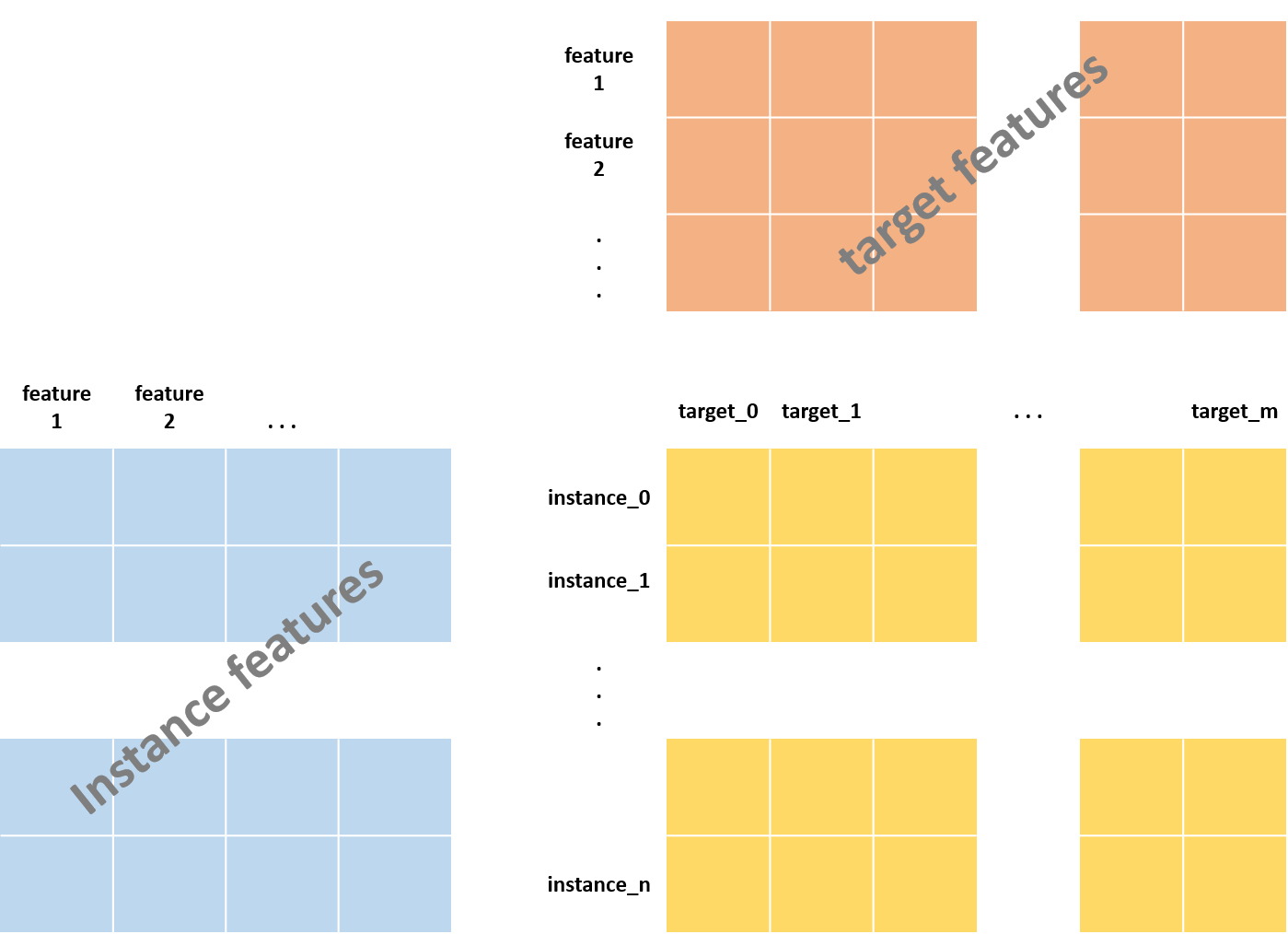
A multi-target prediction problem is characterized by instances $x \in X$ and targets $t \in T$ with the following properties:
-
A training dataset $\mathcal{D}$ contains triplets $(x_{i},t_{j},y_{ij})$, where $x_i \in \mathcal{X}$ represents an instance, $t_j \in \mathcal{T}$ represents a target, and $y_{ij} \in \mathcal{Y}$ is the score that quantifies the relationship between an instance and a target, with $i\in{1,\ldots,n}$ and $j\in{1,\ldots,m}$. The scores can be arranged in an $n \times m$ matrix $\mathbf{Y}$ that is usually incomplete.
-
The score set $\mathcal{Y}$ consists of nominal, ordinal or real values.
-
During testing, the objective is to predict the score for any unobserved instance-target couple $(\mathbf{x},\mathbf{t}) \in \mathcal{X} \times \mathcal{T}$.
The practical questions for a multi-target prediction problem are:
- What are the instances, targets, and observed interaction scores?
- Is the score categorical, ordinal, or continuous?
- Which side features are available for instances and targets?
- Does evaluation include instances or targets that were absent from training?
How does DeepMTP work?
DeepMTP maps an instance and a target through separate branch encoders, producing representation vectors $p_x$ and $q_t$. A branch can consume dense features, sparse high-dimensional vectors, explicitly declared numeric and categorical columns, token sequences, images, zero-based entity IDs, named combinations of those representations, or a custom input type. The two representations are combined with a dot product, concatenation followed by an MLP, or a Kronecker product to predict the score of the instance-target pair. Dot-product models require equal branch widths; the other fusion strategies can combine different widths.
For classification, the combined model produces logits. Binary classification
uses BCEWithLogitsLoss and sigmoid probabilities. Multiclass classification
uses CrossEntropyLoss, one logit per mutually exclusive class, and softmax
probabilities. Regression defaults to mean squared error and can instead
optimize mean absolute error or Huber loss through the validated loss
configuration field.
Reusable branch models, combined architectures, and the model factory are available from the focused model namespace:
from DeepMTP.models import (
    CompositeEncoder,
    ConvNet,
    IDEmbedding,
    MLP,
    ModelFactory,
    SparseMLP,
    TabularEncoder,
)
Model-ready dataloaders return a typed MTPBatch. It retains the historical
dictionary keys while exposing modality-specific instance_input and
target_input objects:
from DeepMTP.data import (
    CompositeBranchBatch,
    CompositeInput,
    DenseBranchBatch,
    IDBranchBatch,
    MaskedComponentInput,
    MTPBatch,
    SparseBranchBatch,
    TabularBranchBatch,
)
from DeepMTP.models import BranchEncoder
Every built-in encoder declares its input kind and output dimension. Fusion
models validate that each encoder returns a floating tensor shaped
[batch_size, output_dim], producing focused errors before an invalid
representation reaches the fusion operation.

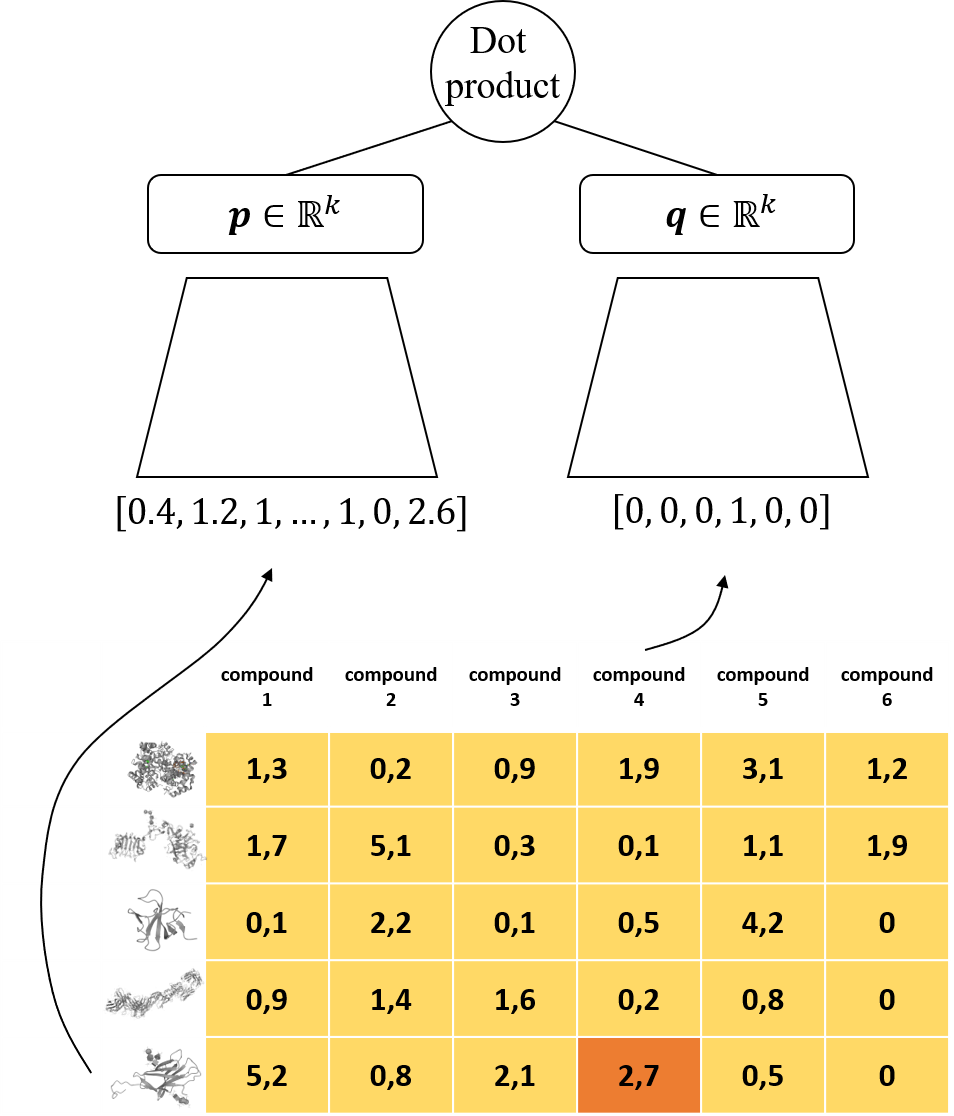
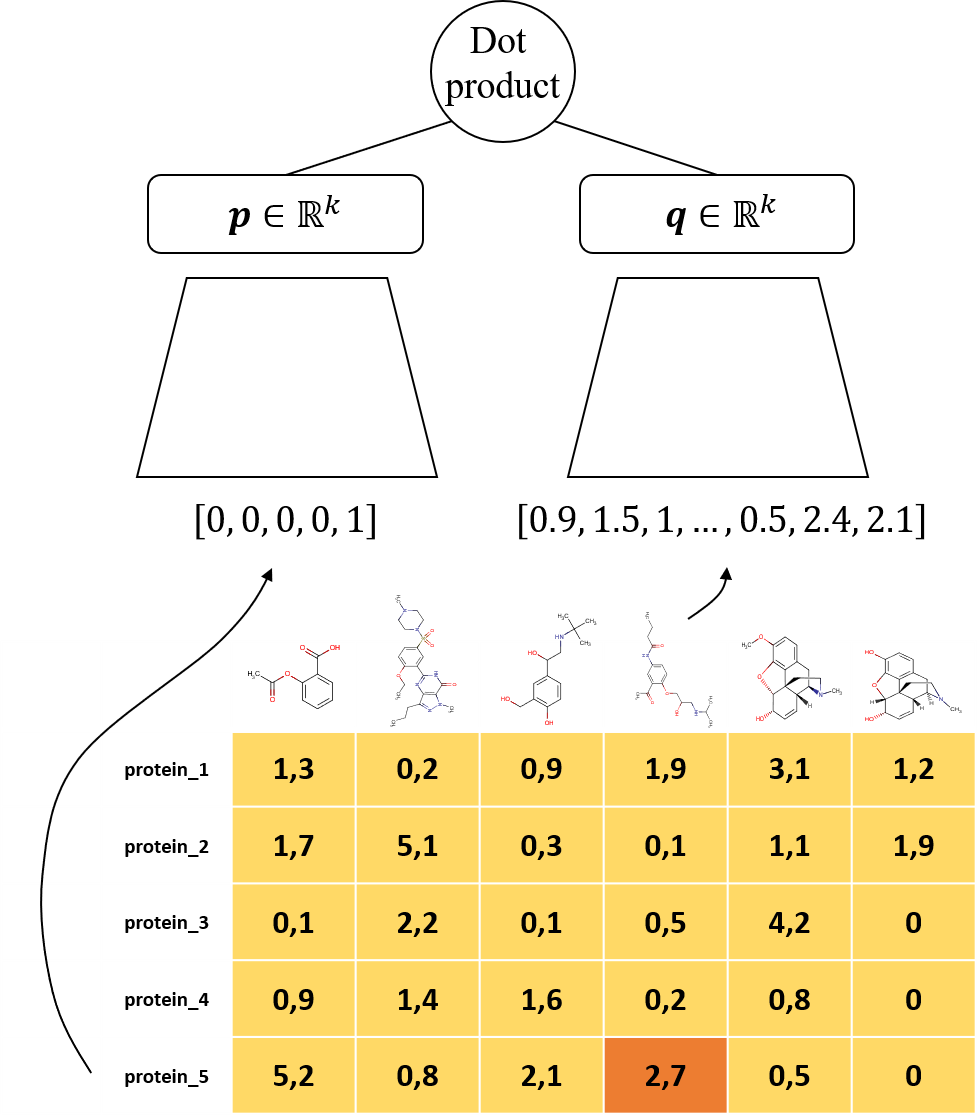
The following examples adapt the same compound-protein interaction task to different feature-availability scenarios.
Handling missing features for instances and/or targets
Click to expand!
- In the first example, compound features are available but protein features are not. The first branch uses compound side information and the second branch uses one-hot encoded protein IDs. The real-valued interaction scores make this a regression task.
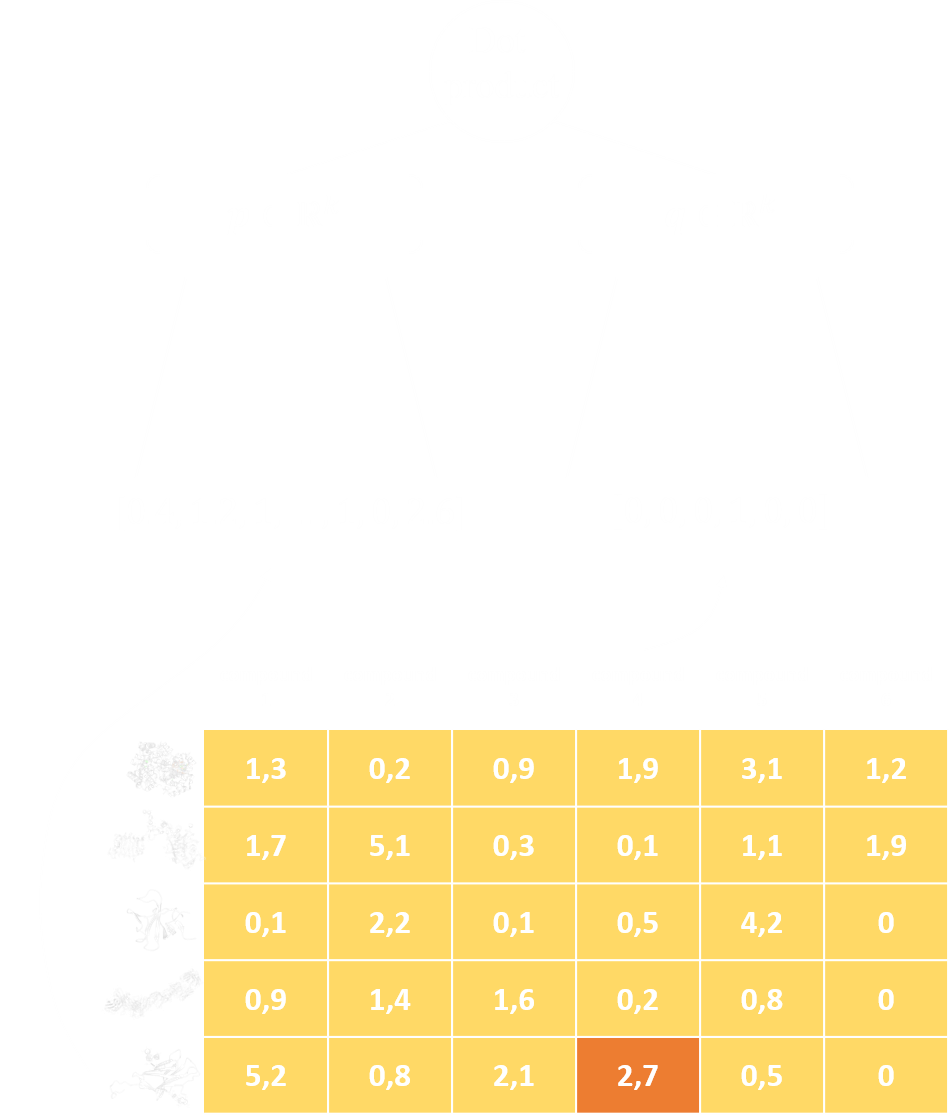
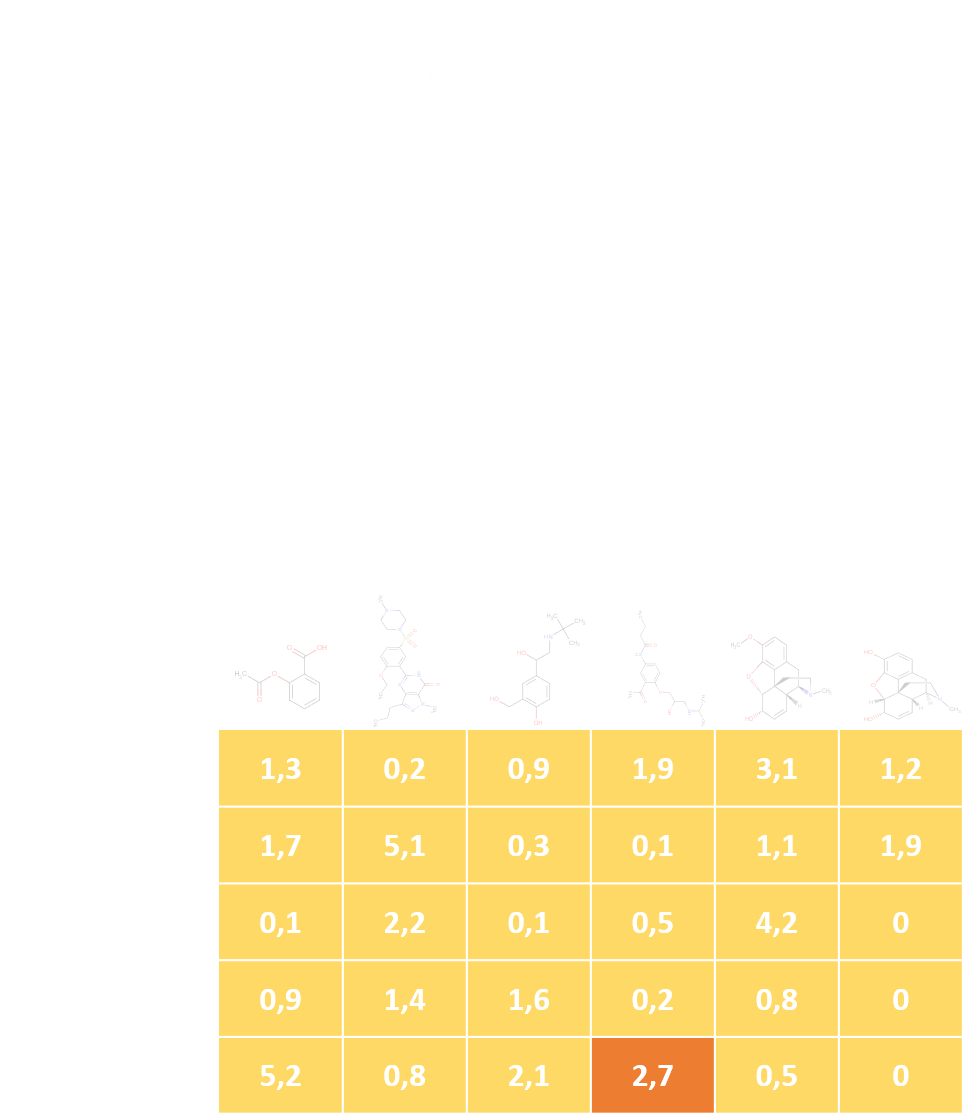
- The second example reverses the available side information: the first branch uses one-hot encoded compound IDs and the second branch uses the provided protein features.
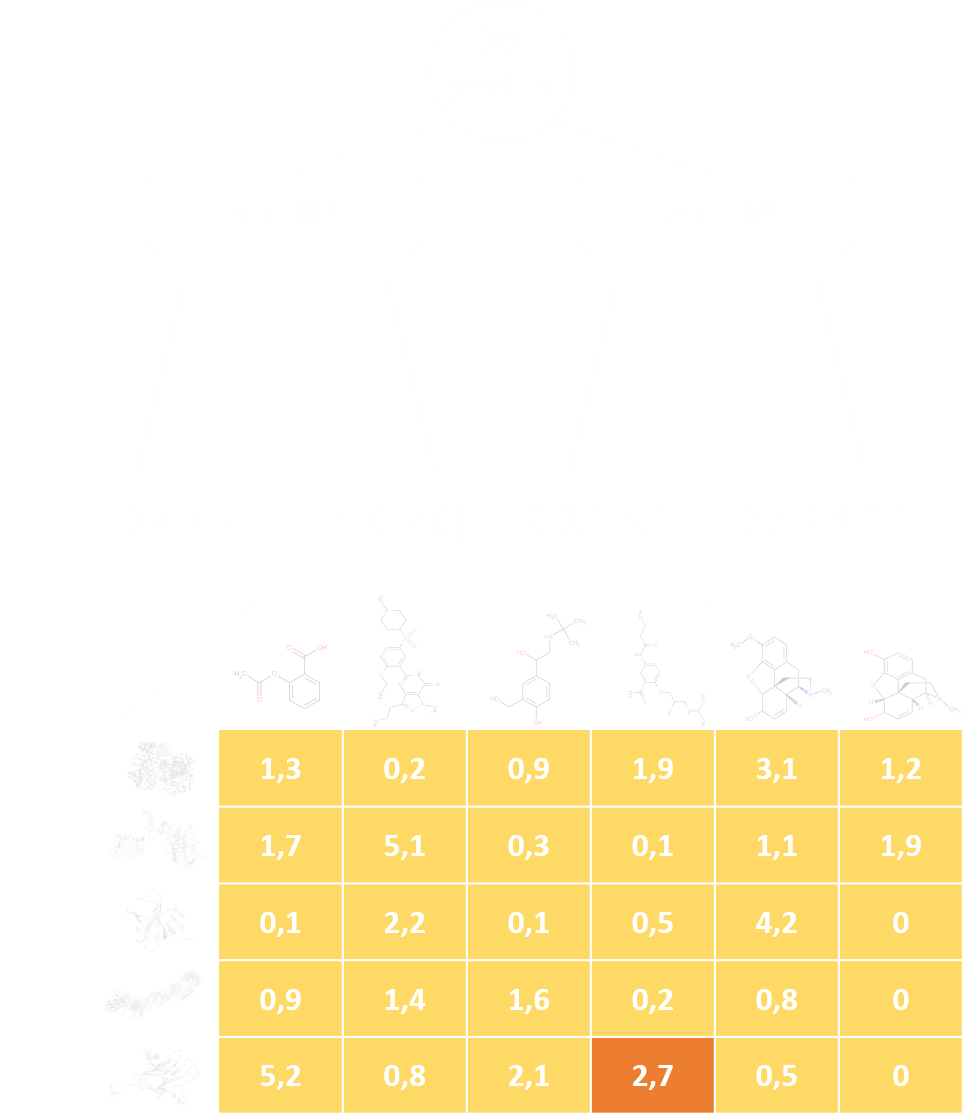
- In the third example, side information is provided for both proteins and compounds, so both branches can utilize it.
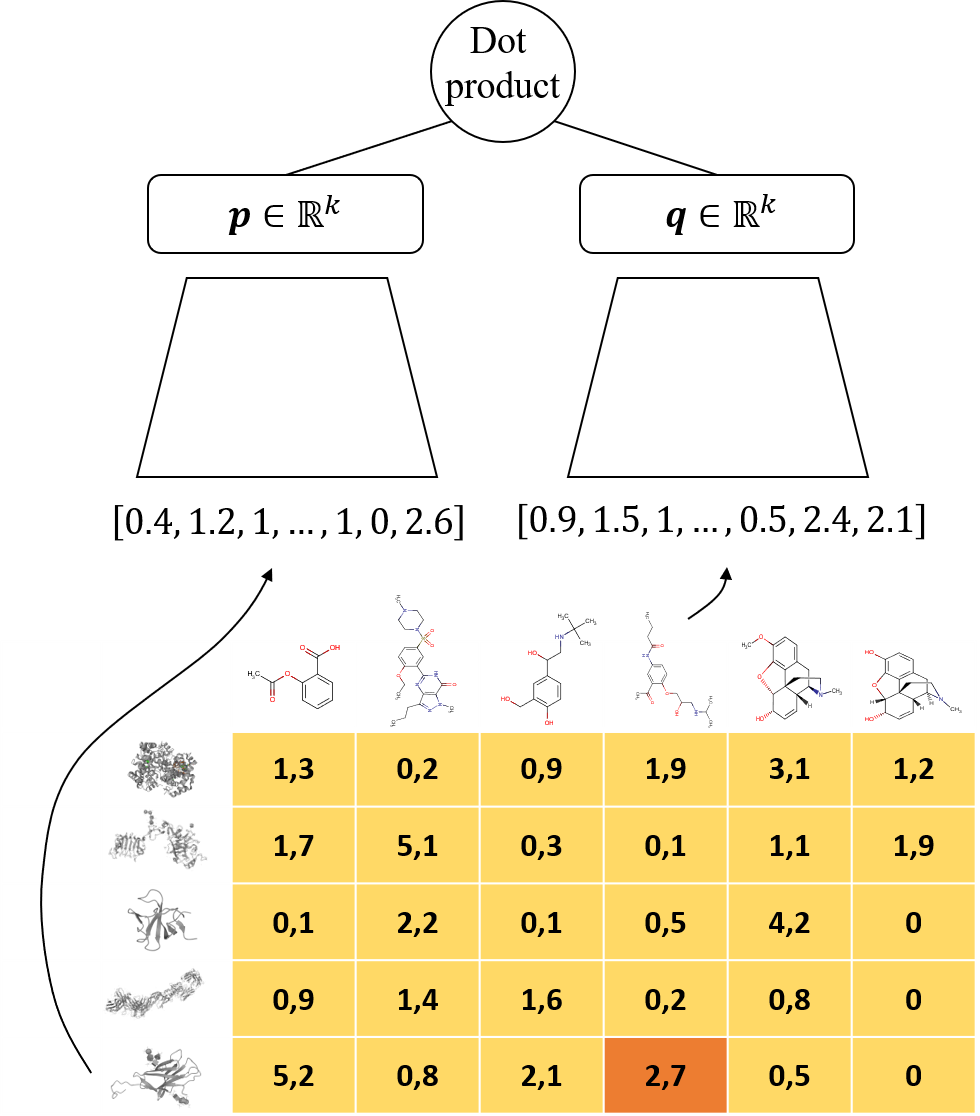
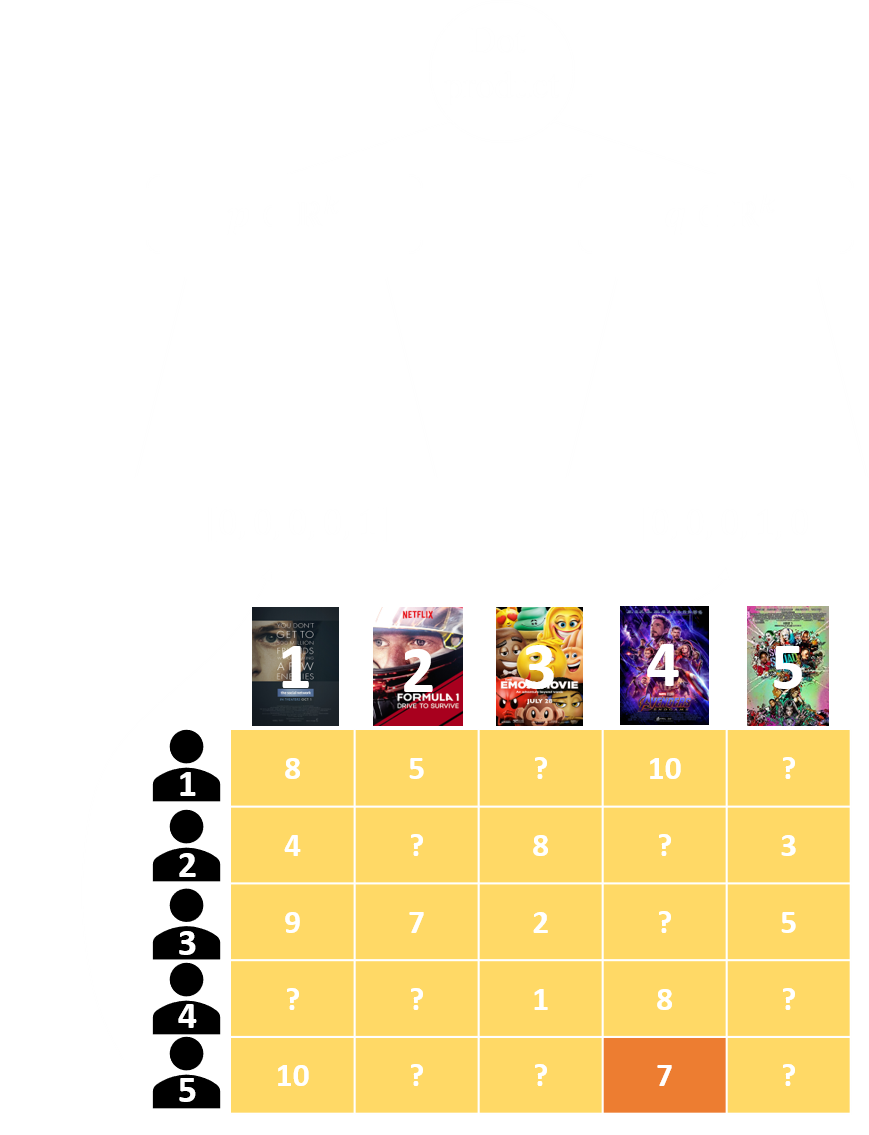
- In the fourth and final example of this subsection, we are missing features for both instances and targets. This is not a realistic setting in our compound-protein interaction prediction task but has many applications in the area of recommender systems. In terms of the neural network, one-hot encoded vectors are used for both branches.
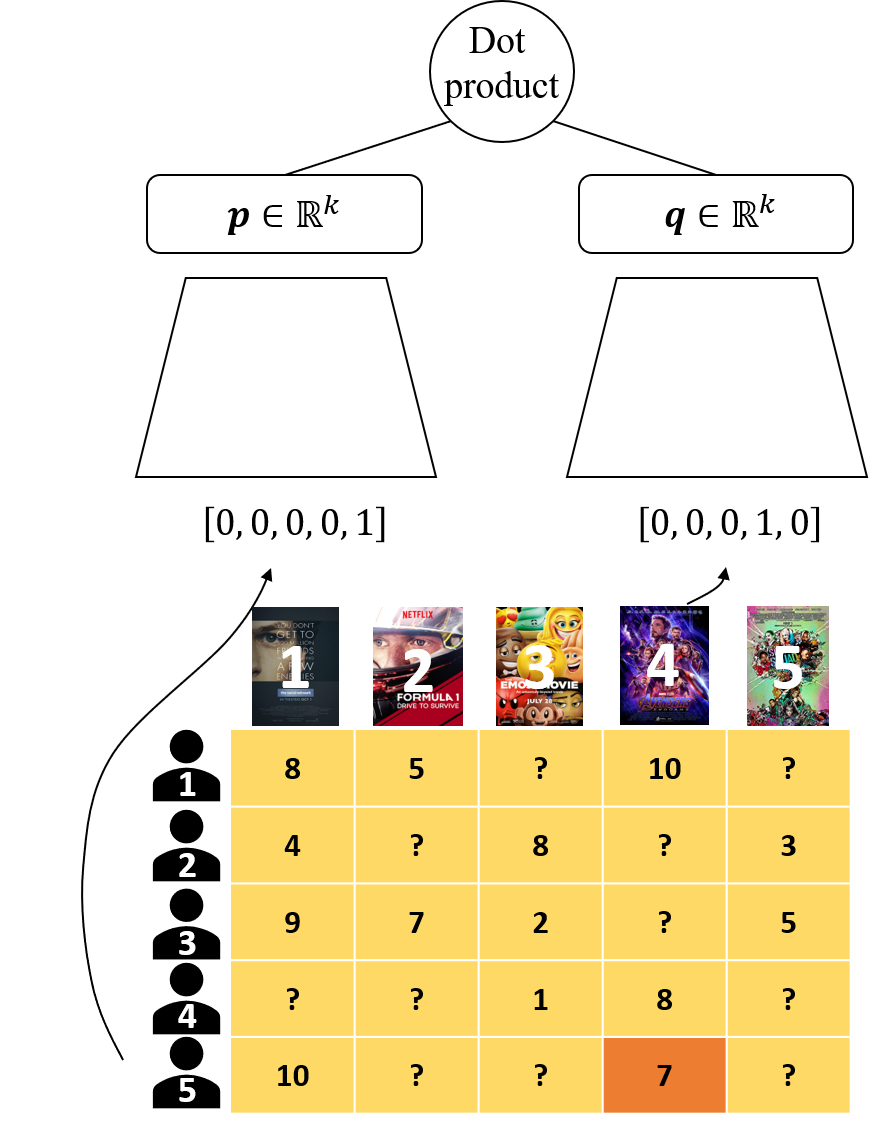
Existing MLP configurations retain this one-hot behavior. An EMBEDDING
branch provides an opt-in, memory-efficient alternative that learns a dense
vector directly from each zero-based entity ID:
from DeepMTP import DeepMTPConfig

number_of_instances = 24
number_of_targets = 4

config = DeepMTPConfig(
    validation_setting="A",
    problem_mode="classification",
    general_architecture_version="dot_product",
    metrics_average=["micro"],
    instance_branch_architecture="EMBEDDING",
    instance_branch_input_dim=number_of_instances,
    target_branch_architecture="EMBEDDING",
    target_branch_input_dim=number_of_targets,
    embedding_size=32,
)
instance_branch_input_dim and target_branch_input_dim are vocabulary sizes
for embedding branches. Interaction IDs must be integers in the range
[0, input_dim). Because a lookup table cannot represent an unseen entity,
support depends on the validation setting:
| Validation setting | Instance embedding | Target embedding |
|---|---|---|
| A: known instances and targets | Supported | Supported |
| B: novel instances | Rejected | Supported |
| C: novel targets | Supported | Rejected |
| D: novel instances and targets | Rejected | Rejected |
Handling different types of input features
Click to expand!
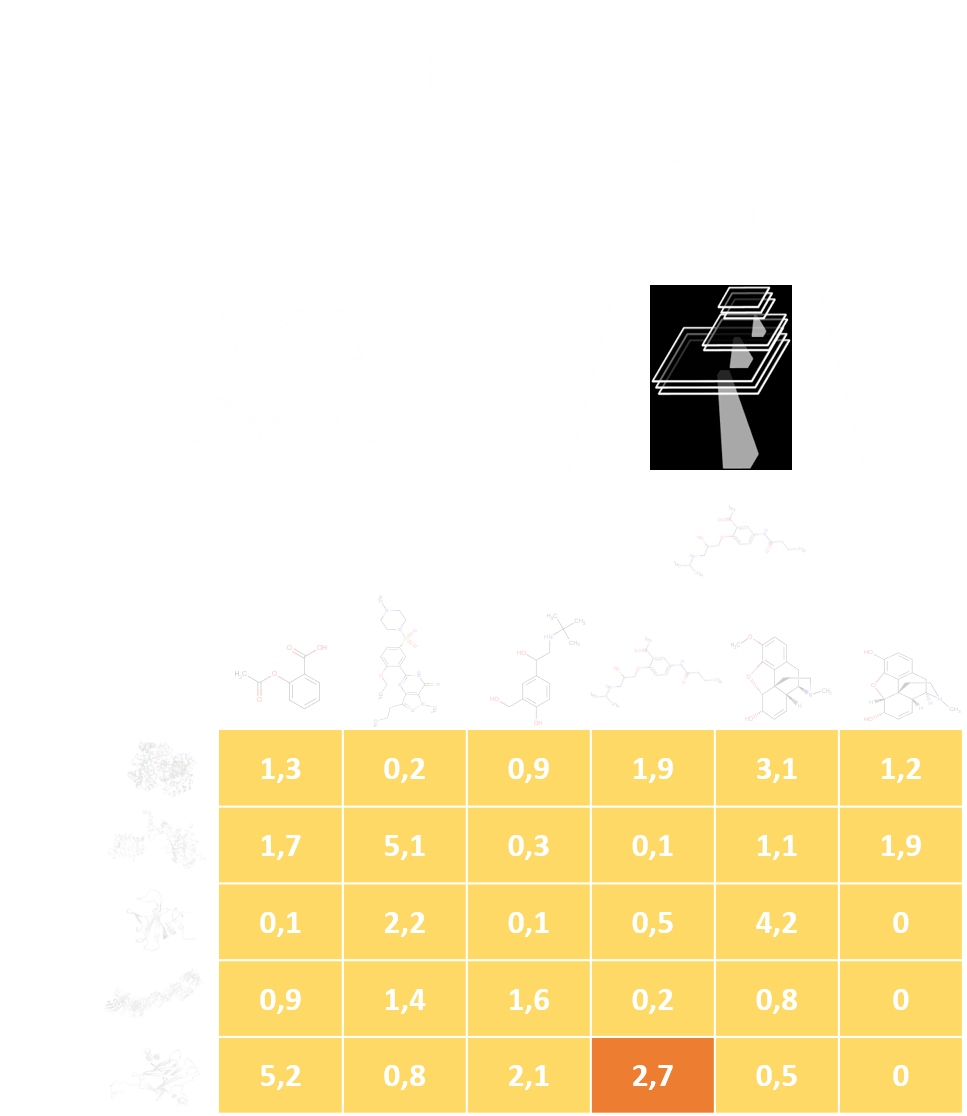
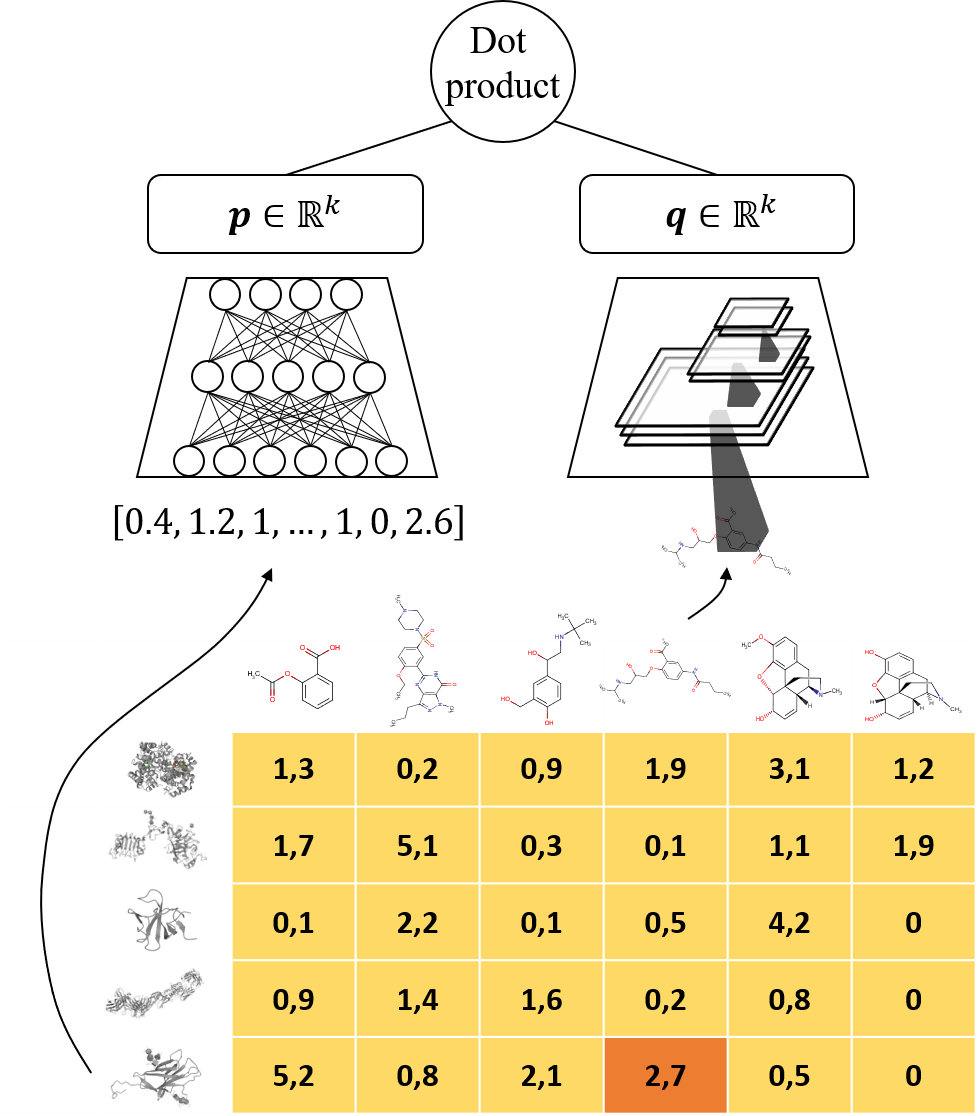
Each DeepMTP branch can use an encoder appropriate for its input modality. In the example below, protein features are dense vectors while compounds are represented by 2D images. The framework combines an MLP branch for the protein features with a convolutional branch for the compound images.
Handling different validation settings
Click to expand!
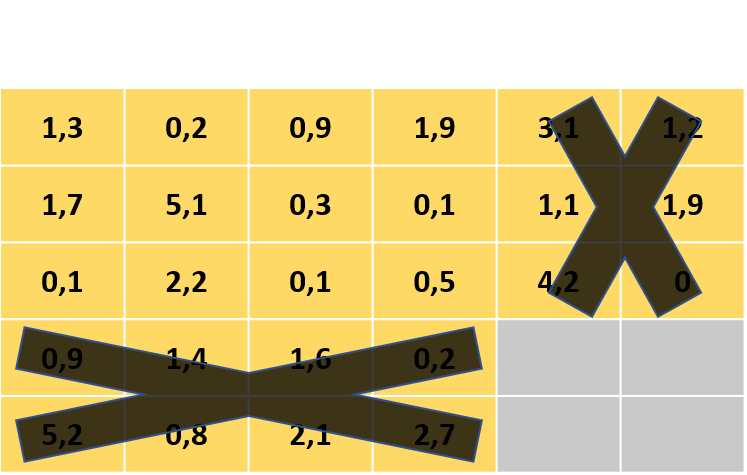
The four validation settings describe whether evaluation contains entities that were observed during training.
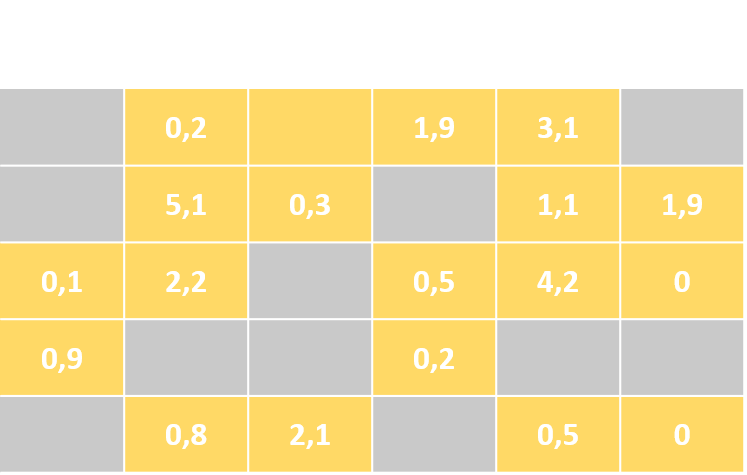
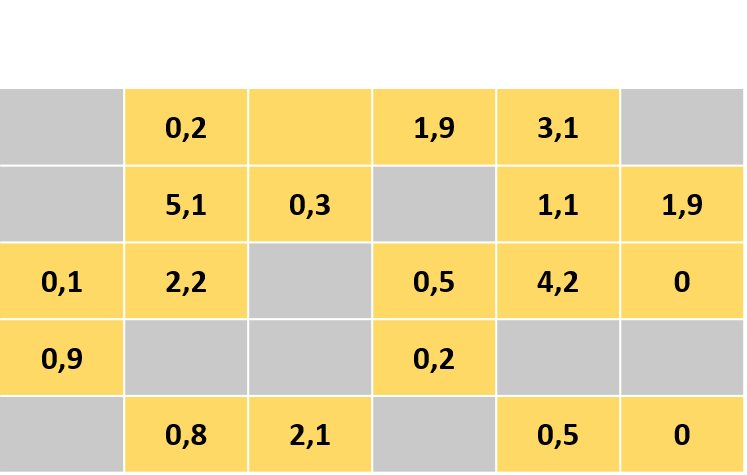
- Setting A: Completing the missing values in the interaction matrix
In setting A the test set contains a subset of the instances and targets that we observe in the training set. This setting is usually selected when the interaction matrix contains missing values and becomes the only validation choice when instance and target features are not available.
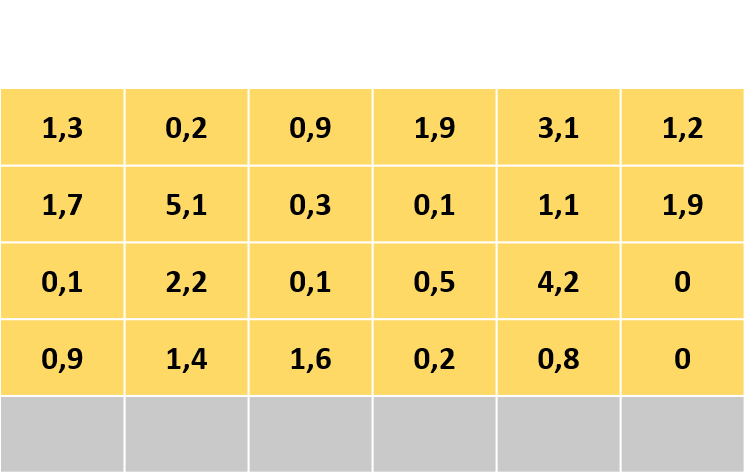
- Setting B: predict for novel instances
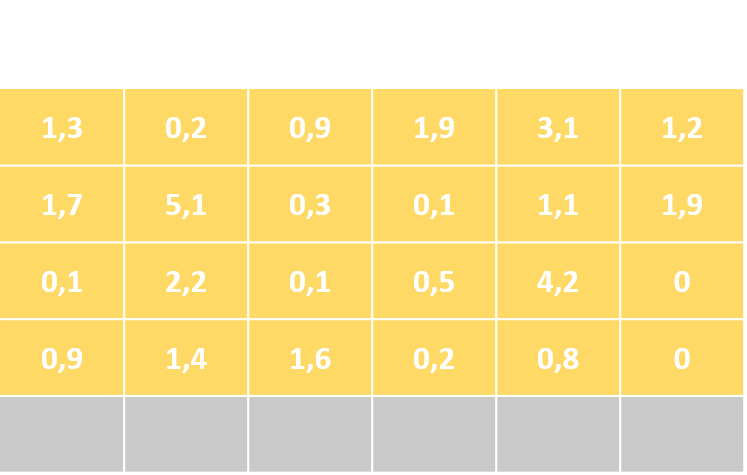
In setting B the test set contains instances never before observed in the training set. This setting is the default option for popular MTP problem settings like multi-label classification and multivariate regression. In order to generalize to new instances, their side information has to be provided!
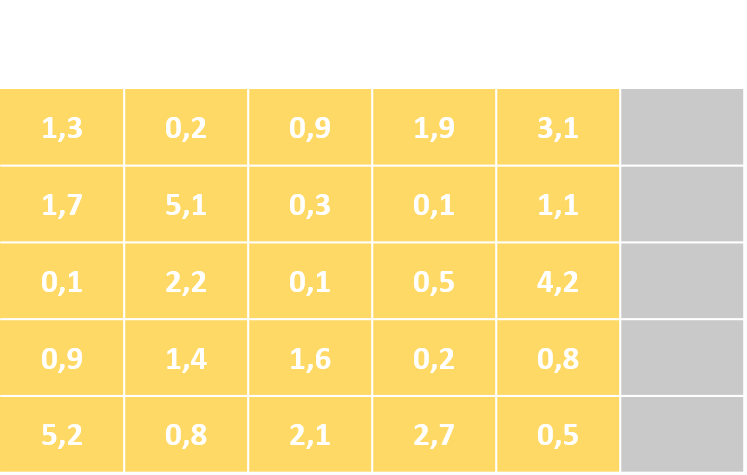
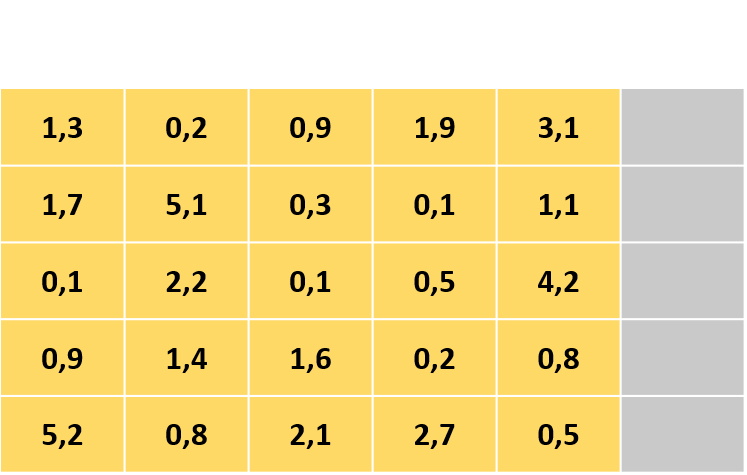
- Setting C: predict for novel targets
In setting C the test set contains targets never before observed in the training set. This setting can be seen as the reverse of Setting B, as we can easily switch the instances and targets and arrive in Setting C. In order to generalize to new targets, their side information has to be provided!
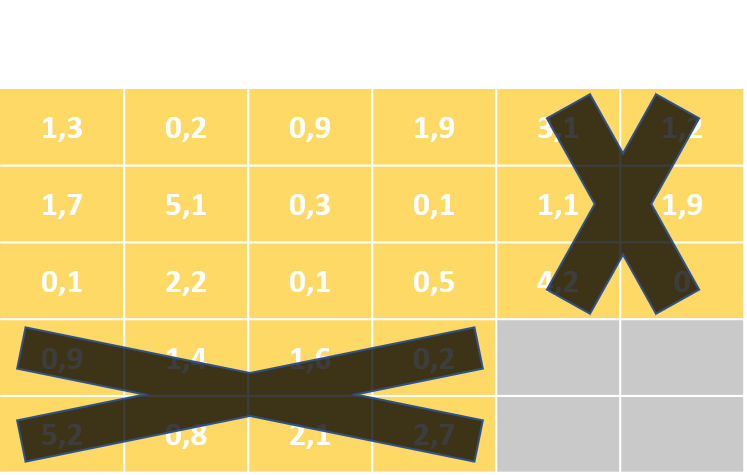
- Setting D: predict for pairs of novel instances and targets
Finally, in setting D the test set contains pairs of novel instances and targets never before observed in the training set. This is usually considered the most difficult generalization task compared to the others. In order to generalize to pairs of new instances and targets, the side information for both has to be provided!
Quick start
This complete example trains on a small synthetic multi-label dataset, runs on
the CPU, and requires no downloads or optional dependencies. DeepMTP writes the
experiment summary and configuration below results/quickstart.
import numpy as np

from DeepMTP import DeepMTP, DeepMTPConfig, data_process

rng = np.random.default_rng(42)
scores = (
    np.arange(24)[:, np.newaxis] + np.arange(4)[np.newaxis, :]
) % 2
data = {
    "train": {
        "y": scores,
        "X_instance": rng.normal(size=(24, 3)),
        "X_target": None,
    }
}
train, validation, test, data_info = data_process(
    data,
    validation_setting="B",
)

config = DeepMTPConfig(
    validation_setting=data_info["detected_validation_setting"],
    problem_mode=data_info["detected_problem_mode"],
    general_architecture_version="dot_product",
    compute_mode="cpu",
    num_workers=0,
    train_batchsize=16,
    val_batchsize=16,
    num_epochs=1,
    metrics=["accuracy"],
    metrics_average=["macro"],
    evaluate_val=True,
    use_early_stopping=False,
    save_model=False,
    results_path="results",
    experiment_name="quickstart",
    instance_branch_architecture="MLP",
    instance_branch_input_dim=data_info["instance_branch_input_dim"],
    instance_branch_nodes_per_layer=[8],
    target_branch_architecture="MLP",
    target_branch_input_dim=data_info["target_branch_input_dim"],
    target_branch_nodes_per_layer=[8],
    embedding_size=4,
)

model = DeepMTP(config)
validation_results = model.train(train, validation, test)
test_results, predictions = model.predict(test, return_predictions=True)
Multiclass classification
Multiclass mode predicts exactly one of three or more classes for each
instance-target pair. Labels must be zero-based integer IDs in [0, C).
Declare the interpretation during data preparation because integer-valued
regression scores cannot be distinguished safely from class IDs:
import numpy as np

from DeepMTP import DeepMTPConfig, data_process

scores = (
    np.arange(18)[:, np.newaxis] + np.arange(3)[np.newaxis, :]
) % 3
train, validation, test, data_info = data_process(
    {"train": {"y": scores}},
    validation_setting="A",
    classification_mode="multiclass",
)

config = DeepMTPConfig(
    validation_setting=data_info["detected_validation_setting"],
    problem_mode="classification",
    classification_mode=data_info["detected_classification_mode"],
    num_classes=data_info["detected_num_classes"],
    metrics=["accuracy", "f1_score", "auroc"],
    metrics_average=["micro"],
    multiclass_average="macro",
    compute_mode="cpu",
    instance_branch_architecture="EMBEDDING",
    instance_branch_input_dim=data_info["instance_branch_input_dim"],
    target_branch_architecture="EMBEDDING",
    target_branch_input_dim=data_info["target_branch_input_dim"],
    embedding_size=8,
)
CrossEntropyLoss and macro class averaging are selected automatically.
metrics_average still controls whether observations are grouped globally,
per target, or per instance; multiclass_average controls how classes are
combined inside precision, recall, F1, AUROC, and AUPR. Set it to micro,
macro, or weighted.
All declared classes must occur in the training interactions. Prediction
frames contain predicted_values as class IDs, predicted_probability for
the winning class, and one probability_class_<id> column per class.
Interaction-ranking top_k metrics are not available in multiclass mode.
See the
multiclass guide
for the complete contract.
Mixed tabular inputs
Use a TABULAR branch when entity side information contains both continuous
measurements and categories. Pass a pandas DataFrame with a unique id column
and declare the remaining columns explicitly:
import pandas as pd

from DeepMTP import DeepMTPConfig

instance_features = pd.DataFrame(
    {
        "id": [0, 1, 2],
        "age": [22.0, None, 41.0],
        "site": ["Ghent", "Paris", "Ghent"],
    }
)

tabular_schema = {
    "numeric_columns": ["age"],
    "categorical_columns": {
        "site": {
            "categories": ["Ghent", "Paris"],
            "embedding_dim": 2,
        }
    },
    "numeric_normalization": "standard",
    "numeric_missing": "mean",
    "categorical_unknown": "unknown",
    "feature_gating": True,
}

number_of_targets = 4

config = DeepMTPConfig(
    validation_setting="B",
    problem_mode="classification",
    general_architecture_version="dot_product",
    instance_branch_architecture="TABULAR",
    instance_branch_tabular_schema=tabular_schema,
    instance_branch_nodes_per_layer=[16],
    target_branch_architecture="EMBEDDING",
    target_branch_input_dim=number_of_targets,
    embedding_size=8,
)
Numeric preprocessing is fitted only on the training entities. Its imputation and normalization statistics are stored in the experiment configuration and checkpoint, then reused for validation, testing, and restored-model prediction. Category index zero represents missing or unknown values by default. See the mixed tabular input guide for policies and a complete configuration.
Sparse high-dimensional inputs
Use a SPARSE branch for fingerprints, bag-of-words features, and large
indicator matrices whose stored values are mostly zero. PyTorch COO/CSR
tensors work with the core installation. SciPy matrices require
pip install "DeepMTP[sparse]".
from scipy import sparse

from DeepMTP import DeepMTPConfig

instance_features = sparse.csr_matrix(dense_or_generated_features)

config = DeepMTPConfig(
    validation_setting="B",
    problem_mode="classification",
    general_architecture_version="dot_product",
    instance_branch_architecture="SPARSE",
    instance_branch_input_dim=instance_features.shape[1],
    instance_branch_nodes_per_layer=[128, 32],
    target_branch_architecture="MLP",
    target_branch_input_dim=number_of_targets,
    target_branch_nodes_per_layer=[32],
    embedding_size=32,
)
Sparse rows remain sparse through data preparation, splitting, collation, and the first linear projection. Later layers operate on the projected dense representation. Legacy feature scaling rejects sparse inputs rather than silently densifying them; apply sparse-safe preprocessing upstream. See the sparse input guide for explicit-ID DataFrames, compatibility details, and the included memory and throughput benchmark.
Token-sequence inputs
Use a SEQUENCE branch for already-tokenized proteins, chemical strings, or
text. Declare the representation during data preparation so variable-length
integer rows are preserved:
instance_sequences = [[5, 12, 8], [7], [3, 14, 9, 6]]

train, validation, test, data_info = data_process(
    {
        "train": {
            "y": interaction_scores,
            "X_instance": instance_sequences,
            "X_target": None,
        }
    },
    validation_setting="B",
    instance_feature_kind="sequence",
)
The configured input dimension is the complete vocabulary size, not the maximum sequence length:
from DeepMTP import DeepMTPConfig

vocabulary_size = 32
number_of_targets = 4

config = DeepMTPConfig(
    validation_setting="B",
    problem_mode="classification",
    general_architecture_version="dot_product",
    instance_branch_architecture="SEQUENCE",
    instance_branch_input_dim=vocabulary_size,
    instance_branch_sequence_encoder="transformer",
    instance_branch_sequence_embedding_dim=16,
    instance_branch_sequence_transformer_num_heads=4,
    instance_branch_sequence_transformer_feedforward_dim=64,
    instance_branch_sequence_num_layers=1,
    instance_branch_sequence_padding_idx=0,
    target_branch_architecture="MLP",
    target_branch_input_dim=number_of_targets,
    target_branch_nodes_per_layer=[8],
    embedding_size=8,
)
The dataloader dynamically creates padded token IDs, attention masks, and
original lengths. Choose gru for recurrence, conv1d for masked temporal
convolutions, or transformer for position-aware self-attention with masked
mean pooling. All three ignore padded positions and emit the same fixed-width
branch representation expected by every existing fusion model. Raw sequences
must be unpadded and cannot contain the configured padding ID. See the
token-sequence input guide
for the structured batch contract, configuration options, and compatibility
details.
Molecular graph inputs
Install pip install "DeepMTP[graph]" and pass precomputed homogeneous
torch_geometric.data.Data objects. Each object needs floating node features
x, COO edge_index, and optionally floating edge_attr. Declare the graph
representation during preparation:
train, validation, test, data_info = data_process(
    {
        "train": {
            "y": interaction_scores,
            "X_instance": molecular_graphs,
            "X_target": None,
        }
    },
    validation_setting="B",
    instance_feature_kind="graph",
)
Configure GRAPH with the inferred node and edge widths:
config = DeepMTPConfig(
    validation_setting="B",
    problem_mode="classification",
    instance_branch_architecture="GRAPH",
    instance_branch_input_dim=data_info["instance_branch_input_dim"],
    instance_branch_graph_edge_dim=data_info["instance_branch_graph_edge_dim"],
    instance_branch_graph_hidden_dim=64,
    instance_branch_graph_output_dim=32,
    instance_branch_graph_num_layers=3,
    instance_branch_graph_pooling="mean",
    instance_branch_graph_use_edge_features=True,
    target_branch_architecture="MLP",
    target_branch_input_dim=number_of_targets,
    target_branch_nodes_per_layer=[32],
    embedding_size=32,
)
DeepMTP uses GINE when edge features are enabled and GIN when
graph_use_edge_features=False. PyG performs batching; the rest of DeepMTP
sees a typed GraphInput containing node features, offset edge indices,
optional edge features, graph membership, and the graph count. GRAPH is also
available as a required or optional COMPOSITE component. See the
graph input guide.
Composite inputs
Use a COMPOSITE branch when one entity has multiple representations, such as
dense descriptors plus a token sequence:
train, validation, test, data_info = data_process(
    {
        "train": {
            "y": interaction_scores,
            "X_instance": {
                "descriptors": descriptor_matrix,
                "tokens": token_sequences,
            },
            "X_target": None,
        }
    },
    validation_setting="B",
    instance_feature_kind={
        "descriptors": None,
        "tokens": "sequence",
    },
)

component_dims = data_info["instance_branch_component_input_dims"]
config = DeepMTPConfig(
    validation_setting="B",
    problem_mode="classification",
    metrics=["accuracy"],
    metrics_average=["macro"],
    instance_branch_architecture="COMPOSITE",
    instance_branch_composite_fusion="attention",
    instance_branch_composite_attention_dim=32,
    instance_branch_composite_attention_num_heads=4,
    instance_branch_composite_components={
        "descriptors": {
            "architecture": "MLP",
            "input_dim": component_dims["descriptors"],
            "output_dim": 16,
        },
        "tokens": {
            "architecture": "SEQUENCE",
            "input_dim": component_dims["tokens"],
            "output_dim": 16,
            "embedding_dim": 16,
        },
    },
    target_branch_architecture="MLP",
    target_branch_input_dim=number_of_targets,
    target_branch_nodes_per_layer=[32],
    embedding_size=32,
)
Composite branches combine named dense, graph, sparse, sequence, and known-ID
encoder outputs. The default concat fusion preserves the historical behavior.
Opt-in gated fusion learns one sample-specific sigmoid gate per component,
scales each component output, and then concatenates the gated representations.
Opt-in attention fusion projects differently sized components to a shared
width, applies multi-head self-attention across modalities, and projects
contextualized components back to their original widths. The composite output
width is unchanged for all three strategies.
A component can be missing for selected entities by marking it optional in both data preparation and model configuration:
instance_feature_kind={
    "descriptors": None,
    "tokens": {"kind": "sequence", "optional": True},
}

instance_branch_composite_components={
    "descriptors": descriptor_component,
    "tokens": {**token_component, "optional": True},
}

instance_branch_composite_modality_dropout=0.2
Optional components carry explicit presence masks and use a checkpointed learned representation for missing rows. Existing components remain required by default. Gated fusion includes the component-presence indicators in its gate input. Attention fusion masks missing components as keys and values while allowing their learned representations to query available modalities. An always-present fusion token keeps fully missing rows finite.
The branch-level modality-dropout probability defaults to 0.0. During
training, it randomly replaces genuinely present optional components with
their learned missing representations and updates the presence indicators used
by gated or attention fusion. Required components are never dropped, and at
least one genuinely available component is retained per sample. Evaluation and
prediction use only the actual presence masks. See the
composite input guide
for the complete component, fusion, validation-setting, batching, and
checkpoint contract.
Input data
Loading a built-in benchmark dataset
The quick start above uses synthetic data and requires no download. DeepMTP
also provides optional benchmark loaders. Install the datasets extra and
import them from DeepMTP.data.datasets:
pip install "DeepMTP[datasets]"
| Function | Description |
|---|---|
load_process_MLC() |
Multi-label classification datasets such as emotions, scene, and yeast |
load_process_MTR() |
Multivariate regression datasets such as atp1d, oes10, and rf1 |
load_process_MTL() |
The bird and dog crowdsourcing multi-task datasets |
load_process_MC() |
The MovieLens 100K matrix-completion dataset |
load_process_DP() |
The ern, srn, dpie, and dpii biological-network datasets |
The historical DeepMTP.dataset import path remains available as a
compatibility facade. See the
dataset-loading guide
for supported names and examples.
Creating a custom MTP dataset
data_process accepts a mapping with train, val, and test splits. Each
split contains interactions under y and optional instance and target side
information:
data = {
    "train": {
        "y": train_interactions,
        "X_instance": train_instance_features,
        "X_target": train_target_features,
    },
    "val": {
        "y": validation_interactions,
        "X_instance": validation_instance_features,
        "X_target": validation_target_features,
    },
    "test": {
        "y": test_interactions,
        "X_instance": test_instance_features,
        "X_target": test_target_features,
    },
}
When validation or test data is omitted, data_process can construct the
requested validation setting from the training data. Feature requirements
depend on whether the split contains novel instances, novel targets, or both.
Dense features use arrays or DataFrames; sparse features use SciPy matrices,
PyTorch COO/CSR tensors, or explicit-ID DataFrames of sparse rows; mixed
numeric/categorical features use the explicit TABULAR schema described
above.
Configuration options
New code should construct DeepMTPConfig directly. It normalizes architecture
names, validates incompatible combinations before training, and can also
validate an existing dictionary with DeepMTPConfig.from_mapping(...).
generate_config remains available for compatibility and returns a dictionary.
The table below summarizes the commonly configured public options.
| Parameter name | Description |
|---|---|
| Training | |
validation_setting |
Generalization setting A, B, C, or D |
problem_mode |
classification or regression |
classification_mode |
binary (the backward-compatible classification default) or multiclass |
num_classes |
Number of mutually exclusive classes; required and at least 3 for multiclass classification |
loss |
Training objective. Binary classification defaults to binary_cross_entropy_with_logits, multiclass classification uses cross_entropy, and regression defaults to mean_squared_error with optional mean_absolute_error or huber |
num_epochs |
The max number of epochs allowed for training |
learning_rate |
The learning rate used to determine the step size at each iteration of the optimization process |
decay |
The weight decay (L2 penalty) used by the Adam optimizer |
compute_mode |
cpu, cuda, or cuda:<index>; unavailable CUDA devices fall back to CPU |
num_workers |
The number of sub-processes to use for data loading. Larger values usually improve performance but after a point training speed will become worse |
train_batchsize |
The number of samples that comprise a batch from the training set |
val_batchsize |
The number of samples that comprise a batch from the validation and test sets |
random_seed |
Non-negative seed for isolated model initialization and data-loader shuffling, or None for nondeterministic behavior |
patience |
The number of epochs that the network is allowed to continue training for while observing worse overall performance |
delta |
Minimum change in the monitored quantity to qualify as an improvement |
return_results_per_target |
Whether to include per-target metric values in the results; requires macro averaging |
evaluate_train |
Whether or not to calculate performance metrics over the training set |
evaluate_val |
Whether or not to calculate performance metrics over the validation set |
eval_every_n_epochs |
The interval that indicates when the performance metrics are computed |
use_early_stopping |
Whether or not to use early stopping while training |
| Metrics | |
metrics |
The performance metrics that will be calculated. For classification tasks the available metrics are ['hamming_loss', 'auroc', 'f1_score', 'aupr', 'accuracy', 'recall', 'precision'] while for regression tasks the available metrics are ['RMSE', 'MSE', 'MAE', 'R2'] |
metrics_average |
The averaging strategy used to calculate metrics. Available options are ['macro', 'micro', 'instance']; validation setting A supports only ['micro']. |
multiclass_average |
Class averaging for multiclass precision, recall, F1, AUROC, and AUPR: micro, macro (default), or weighted |
top_k |
Number of top predictions used to calculate grouped metric variants; requires macro or instance averaging and is unavailable for multiclass classification |
metric_to_optimize_early_stopping |
The metric that will be used for tracking by the early stopping routine. The value can be the loss or one of the available performance metrics. |
metric_to_optimize_best_epoch_selection |
The validation metric that will be used to determine the best configuration. The value can be the loss or one of the available performance metrics. |
| Printing - Saving - Logging | |
verbose |
Whether to print training progress in the terminal |
use_tensorboard_logger |
Whether to write TensorBoard event files |
wandb_project_name |
W&B project name; set together with wandb_project_entity to enable W&B |
wandb_project_entity |
W&B team or account entity |
wandb_mode |
online, offline, disabled, or None to use the SDK/environment default |
wandb_run_name |
Optional W&B display name |
wandb_group |
Optional group for related runs |
wandb_job_type |
W&B job type; defaults to train |
wandb_tags |
Searchable W&B run tags |
wandb_notes |
Free-form W&B run notes |
wandb_watch |
Model monitoring: gradients (default), parameters, all, or None |
wandb_watch_log_freq |
Positive model-monitoring interval |
wandb_log_graph |
Include the model graph in W&B monitoring; opt-in |
wandb_log_code |
Upload project source with Run.log_code; opt-in |
wandb_log_model_artifact |
Publish saved checkpoint, config, and summary files as a versioned W&B model Artifact |
wandb_model_artifact_name |
Optional explicit model Artifact name |
wandb_model_artifact_aliases |
Model Artifact aliases; defaults to ["latest", "best"] |
wandb_input_artifacts |
Online Artifact references to mark as run inputs for lineage |
wandb_registry_name |
Existing online W&B Registry to link the model version into |
wandb_registry_collection |
Registry collection paired with wandb_registry_name |
wandb_log_predictions |
Log a bounded test-prediction Table and classification charts; opt-in |
wandb_prediction_table_max_rows |
Maximum sampled rows in the prediction Table; defaults to 1000 |
results_path |
Parent directory for experiment artifacts |
experiment_name |
Experiment subdirectory and reporting name |
save_model |
Whether or not to save the model of the epoch with the best validation performance |
data_preparation_state |
Split provenance and fitted dense-scaler state; normally captured automatically from data_process outputs |
| General architecture | |
general_architecture_version |
Fusion strategy: mlp, dot_product, or kronecker; defaults to dot_product |
batch_norm |
Whether to use batch normalization between fully connected layers |
dropout_rate |
Default dropout rate for both branches |
dropout_rate_instance_branch |
The amount of dropout used in the layers of the instance branch |
dropout_rate_target_branch |
The amount of dropout used in the layers of the target branch |
| Instance branch architecture | |
instance_branch_architecture |
The instance encoder: MLP for dense vectors, SPARSE for SciPy/PyTorch sparse vectors, GRAPH for PyG graphs, SEQUENCE for token IDs, TABULAR for explicit numeric/categorical columns, COMPOSITE for named component encoders, CONV for images, EMBEDDING for zero-based IDs, or CUSTOM for a user-supplied branch |
instance_branch_input_dim |
The dense/sparse width, graph node-feature width, sequence vocabulary size, or number of instance IDs for an EMBEDDING branch |
instance_branch_graph_edge_dim |
Graph edge-feature width, or None when edge features are disabled |
instance_branch_graph_hidden_dim |
Hidden message-passing width for an instance GRAPH branch |
instance_branch_graph_output_dim |
Instance graph output width for MLP and Kronecker fusion; dot-product fusion uses embedding_size |
instance_branch_graph_num_layers |
Number of GIN/GINE message-passing layers |
instance_branch_graph_pooling |
Graph-level pooling: mean, sum, or max |
instance_branch_graph_use_edge_features |
Use GINE with edge_attr; set False to use GIN without edge features |
instance_branch_composite_components |
Ordered component mappings with per-component architecture, input dimension, output dimension, encoder options, and optional missing-modality handling |
instance_branch_composite_fusion |
Composite component fusion: concat (default), sample-specific gated concatenation, or modality self-attention |
instance_branch_composite_attention_dim |
Shared positive projection width for composite attention fusion |
instance_branch_composite_attention_num_heads |
Positive attention-head count; instance_branch_composite_attention_dim must be divisible by this value |
instance_branch_composite_modality_dropout |
Training-only probability of replacing a present optional component with its learned missing representation; defaults to 0.0 |
instance_branch_sequence_encoder |
Sequence encoder name: gru, conv1d, or transformer |
instance_branch_sequence_embedding_dim |
Trainable token embedding width for an instance SEQUENCE branch |
instance_branch_sequence_output_dim |
Instance sequence output width for MLP and Kronecker fusion; dot-product fusion uses embedding_size |
instance_branch_sequence_conv_kernel_size |
Positive odd Conv1D kernel width; used only when the sequence encoder is conv1d |
instance_branch_sequence_transformer_num_heads |
Transformer attention-head count; the sequence embedding width must be divisible by this value |
instance_branch_sequence_transformer_feedforward_dim |
Transformer feed-forward sublayer width |
instance_branch_sequence_num_layers |
Number of stacked GRU, Conv1D, or Transformer layers |
instance_branch_sequence_padding_idx |
Reserved non-negative padding token ID |
instance_branch_tabular_schema |
Column names, category vocabularies, normalization, missing-value policies, and optional feature gating for an instance TABULAR branch |
instance_train_transforms |
PyTorch-compatible transforms for instance training samples, typically images |
instance_inference_transforms |
PyTorch-compatible transforms for instance validation and test samples |
| Target branch architecture | |
target_branch_architecture |
The target encoder: MLP for dense vectors, SPARSE for SciPy/PyTorch sparse vectors, GRAPH for PyG graphs, SEQUENCE for token IDs, TABULAR for explicit numeric/categorical columns, COMPOSITE for named component encoders, CONV for images, EMBEDDING for zero-based IDs, or CUSTOM for a user-supplied branch |
target_branch_input_dim |
The dense/sparse width, graph node-feature width, sequence vocabulary size, or number of target IDs for an EMBEDDING branch |
target_branch_graph_edge_dim |
Graph edge-feature width, or None when edge features are disabled |
target_branch_graph_hidden_dim |
Hidden message-passing width for a target GRAPH branch |
target_branch_graph_output_dim |
Target graph output width for MLP and Kronecker fusion; dot-product fusion uses embedding_size |
target_branch_graph_num_layers |
Number of GIN/GINE message-passing layers |
target_branch_graph_pooling |
Graph-level pooling: mean, sum, or max |
target_branch_graph_use_edge_features |
Use GINE with edge_attr; set False to use GIN without edge features |
target_branch_composite_components |
Ordered component mappings with per-component architecture, input dimension, output dimension, encoder options, and optional missing-modality handling |
target_branch_composite_fusion |
Composite component fusion: concat (default), sample-specific gated concatenation, or modality self-attention |
target_branch_composite_attention_dim |
Shared positive projection width for composite attention fusion |
target_branch_composite_attention_num_heads |
Positive attention-head count; target_branch_composite_attention_dim must be divisible by this value |
target_branch_composite_modality_dropout |
Training-only probability of replacing a present optional component with its learned missing representation; defaults to 0.0 |
target_branch_sequence_encoder |
Sequence encoder name: gru, conv1d, or transformer |
target_branch_sequence_embedding_dim |
Trainable token embedding width for a target SEQUENCE branch |
target_branch_sequence_output_dim |
Target sequence output width for MLP and Kronecker fusion; dot-product fusion uses embedding_size |
target_branch_sequence_conv_kernel_size |
Positive odd Conv1D kernel width; used only when the sequence encoder is conv1d |
target_branch_sequence_transformer_num_heads |
Transformer attention-head count; the sequence embedding width must be divisible by this value |
target_branch_sequence_transformer_feedforward_dim |
Transformer feed-forward sublayer width |
target_branch_sequence_num_layers |
Number of stacked GRU, Conv1D, or Transformer layers |
target_branch_sequence_padding_idx |
Reserved non-negative padding token ID |
target_branch_tabular_schema |
Column names, category vocabularies, normalization, missing-value policies, and optional feature gating for a target TABULAR branch |
target_train_transforms |
PyTorch-compatible transforms for target training samples, typically images |
target_inference_transforms |
PyTorch-compatible transforms for target validation and test samples |
| Combination branch architecture | |
comb_mlp_nodes_per_layer |
Positive layer widths for the combination branch. A list defines each layer; an integer repeats that width comb_mlp_layers times. Only used if general_architecture_version == mlp |
comb_mlp_layers |
Positive number of repeated combination layers, required when comb_mlp_nodes_per_layer is an integer. Only used if general_architecture_version == mlp |
embedding_size |
The output width of both branches for a dot-product model; for a COMPOSITE branch it must equal the sum of component output widths |
| Other | |
additional_info |
Extra experiment metadata included in reporting |
For example, Huber loss is less sensitive to large regression errors than mean squared error:
config = DeepMTPConfig(
    validation_setting="B",
    problem_mode="regression",
    loss="huber",
    # branch configuration...
)
The low-level loss registry also retains binary_cross_entropy for deliberate
reproduction of the historical sigmoid-plus-BCELoss training path. New
classification experiments should keep the stable
binary_cross_entropy_with_logits default. Incompatible task/loss
combinations are rejected during configuration validation.
RRMSE remains available through the low-level
get_performance_results utility for macro evaluation when a training mean is
provided for every target. The trainer does not yet retain those baselines, so
RRMSE is rejected in trainer configurations instead of returning silent NaN
results.
The legacy momentum, weighted_loss, use_instance_features,
use_target_features, load_pretrained_model, pretrained_model_path, and
non-default comb_mlp_nodes_reducing_factor options have no runtime effect.
Setting them to non-default values emits ConfigDeprecationWarning.
generate_config applies documented branch defaults silently. If it changes
metrics_average to satisfy or recommend a validation-setting policy, it emits
ConfigNormalizationWarning so applications can display, filter, or escalate
that adjustment using Python's standard warnings controls.
Instance and target branch hyperparameters
With DeepMTPConfig, branch hyperparameters are ordinary flattened fields.
The legacy generate_config helper also accepts instance_branch_params and
target_branch_params dictionaries and expands them to these fields.
| Key | Description |
|---|---|
| Instance branch | |
instance_branch_nodes_per_layer |
Instance MLP widths. A list defines each layer; an integer repeats that width instance_branch_layers times |
instance_branch_layers |
The number of layers in the MLP version of the instance branch. (Only used if instance_branch_nodes_per_layer is int) |
instance_branch_conv_architecture |
Instance convolutional architecture: resnet or VGG |
instance_branch_conv_architecture_version |
Instance ResNet version: resnet18 or resnet101 |
instance_branch_conv_architecture_dense_layers |
Number of replacement instance ResNet dense layers: 1 or 2 |
instance_branch_conv_architecture_last_layer_trained |
Earliest trainable instance ResNet block: last or layer4 through layer1 |
instance_branch_conv_pretrained |
Use torchvision's default pretrained weights. Defaults to True; set to False to construct the model without downloading weights |
| Target branch | |
target_branch_nodes_per_layer |
Target MLP widths. A list defines each layer; an integer repeats that width target_branch_layers times |
target_branch_layers |
The number of layers in the MLP version of the target branch. (Only used if target_branch_nodes_per_layer is int) |
target_branch_conv_architecture |
Target convolutional architecture: resnet or VGG |
target_branch_conv_architecture_version |
Target ResNet version: resnet18 or resnet101 |
target_branch_conv_architecture_dense_layers |
Number of replacement target ResNet dense layers: 1 or 2 |
target_branch_conv_architecture_last_layer_trained |
Earliest trainable target ResNet block: last or layer4 through layer1 |
target_branch_conv_pretrained |
Use torchvision's default pretrained weights. Defaults to True; set to False to construct the model without downloading weights |
Pretrained convolutional branches use torchvision's current DEFAULT weight
enum. Torchvision may download those weights into its local cache the first
time a model is created. Set the corresponding *_branch_conv_pretrained
option to False for offline construction; this passes weights=None.
Logging results
DeepMTP always writes experiment configuration and summary artifacts below
results_path/experiment_name. TensorBoard and Weights & Biases are optional;
install both integrations with:
pip install "DeepMTP[tracking]"
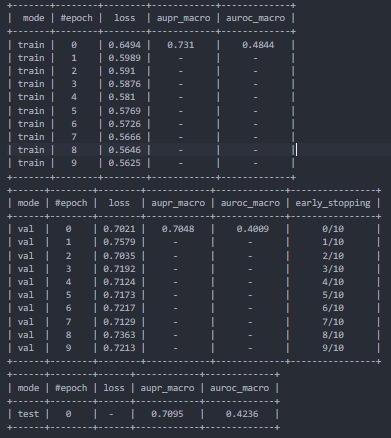
Text summary
The default reporter writes three semi-structured tables to summary.txt in
the experiment directory.
TensorBoard
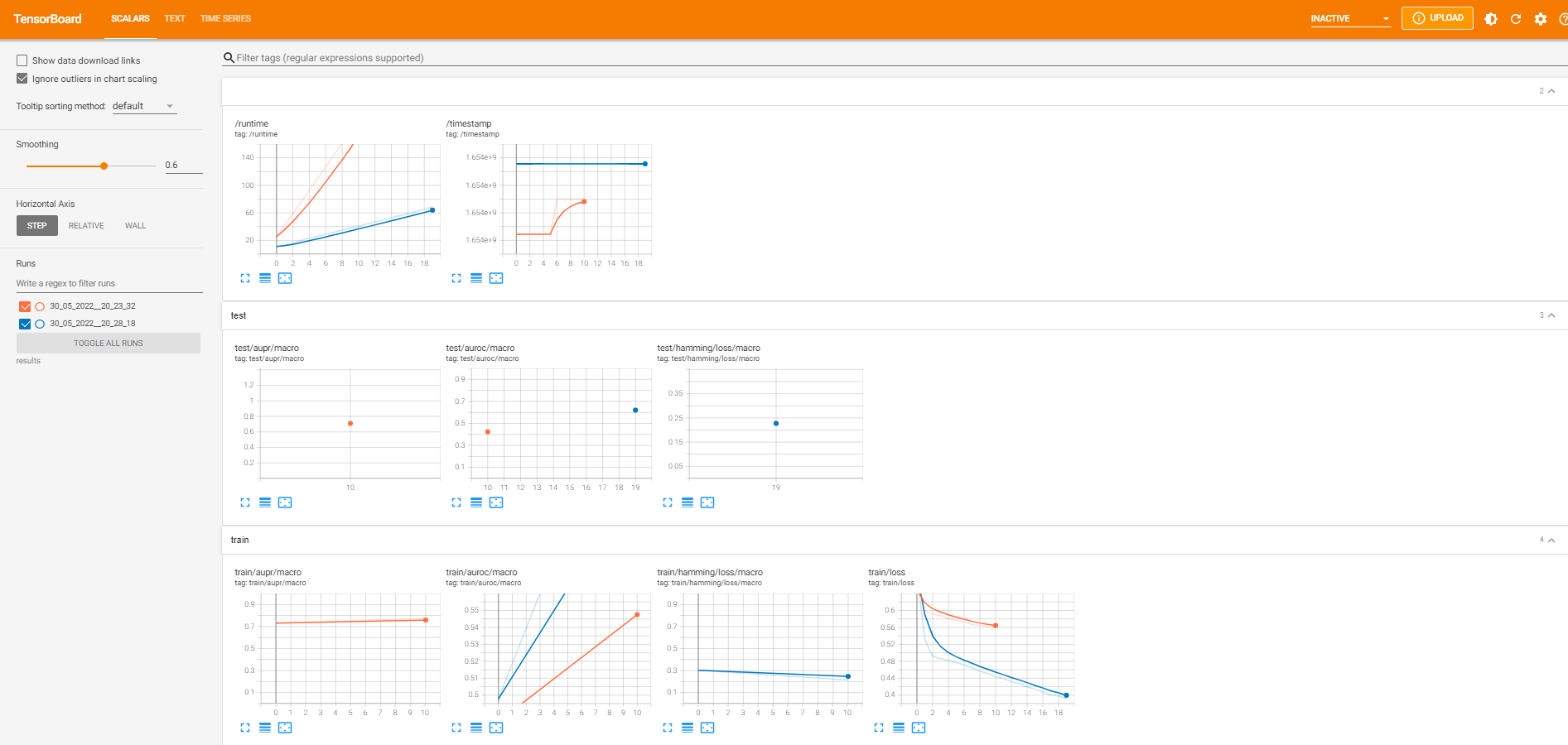
Set use_tensorboard_logger=True to write TensorBoard events alongside the
other experiment artifacts. Start TensorBoard with the configured results
directory:
tensorboard --logdir results
Weights & Biases
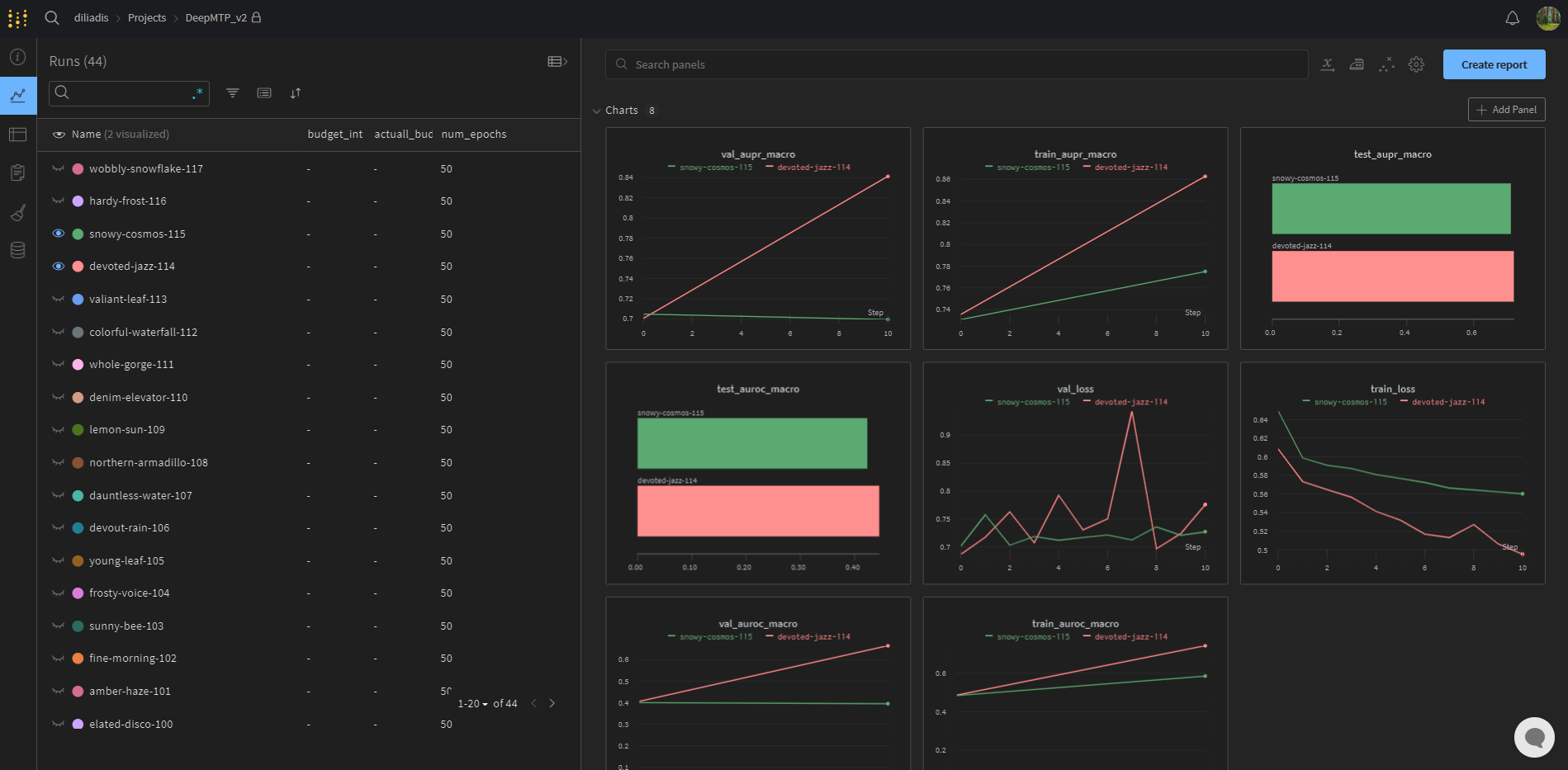
Set both wandb_project_entity and wandb_project_name to send configuration
and metrics to a Weights & Biases project. Leaving both values as None
disables the integration. DeepMTP defines epoch as the metric step, records
best/test values in the run summary, reports parameter counts and failure
status, and supports W&B's online, offline, and disabled modes.
config = generate_config(
    # model and training options...
    wandb_project_entity="my-team",
    wandb_project_name="deepmtp",
    wandb_run_name="fingerprint-baseline",
    wandb_group="ablations",
    wandb_job_type="train",
    wandb_tags=["sparse", "baseline"],
    wandb_mode="online",
    wandb_watch="gradients",
    wandb_log_model_artifact=True,
    wandb_model_artifact_aliases=["latest", "best"],
    wandb_log_predictions=True,
    wandb_prediction_table_max_rows=1000,
)
Remote uploads with larger privacy or storage implications are opt-in:
wandb_log_code, wandb_log_model_artifact, and
wandb_log_predictions all default to False. Model Artifacts contain
model.pt plus the saved configuration and summary. Input Artifact references
can be declared through wandb_input_artifacts to capture lineage. In online
mode, a model version can also be linked to an existing Registry collection:
config["wandb_registry_name"] = "Models"
config["wandb_registry_collection"] = "DeepMTP"
Restore a model from a W&B Artifact without manually downloading its files:
model = DeepMTP.from_wandb_artifact(
    "my-team/deepmtp/deepmtp-model:best",
    {
        "results_path": "./results",
        "experiment_name": "restored",
    },
)
See the W&B integration guide and reproducible checkpoint guide for lineage, Registry, offline-mode, preprocessing-replay, and compatibility details.
Hyperparameter Optimization
DeepMTP includes random-search and Hyperband optimizers for automating model selection. Hyperband is a practical option for many of the MTP problem settings supported by the project.
Hyperband
One of the core steps in any standard HPO method is the performance evaluation of a given configuration. This can be manageable for simple models that are relatively cheap to train and test, but can be a significant bottleneck for more complex models that need hours or even days to train. This is particularly evident in deep learning, as big neural networks with millions of parameters trained on increasingly larger datasets can deem traditional black-box HPO methods impractical.
Addressing this issue, multi-fidelity HPO methods have been devised to discard unpromising hyperparameter configurations already at an early stage. To this end, the evaluation procedure is adapted to support cheaper evaluations of hyperparameter configurations, such as evaluating on sub-samples (feature-wise or instance-wise) of the provided data set or executing the training procedure only for a certain number of epochs in the case of iterative learners. The more promising candidates are subsequently evaluated on increasing budgets until a maximum assignable budget is reached.
A popular representative of such methods is Hyperband. Hyperband builds upon Successive Halving (SH), where a set of n candidates is first evaluated on a small budget. Based on these low-fidelity performance estimates, the $\frac{n}{\eta}$ ($\eta \geq 2)$ best candidates are preserved, while the remaining configurations are already discarded. Iteratively increasing the evaluation budget and reevaluating the remaining candidates with the increased budget while discarding the inferior candidates results in fewer resources wasted on inferior candidates. In return, one focuses more on the promising candidates.
Despite the efficiency of the successive halving strategy, it is well known that it suffers from the exploration-exploitation trade-off. In simple terms, a static budget $\mathcal{B}$ means that the user has to manually decide whether to explore a number of configurations $n$ or give each configuration a sufficient budget to develop. An incorrect decision can lead to an inadequate exploration of the search space (small $n$) or the early rejection of promising configurations (large $n$). Hyperband overcomes the exploration-exploitation trade-off by repeating the successive halving strategy with different initializations of SH, varying the budget and the number of initial candidate configurations.
Combining Hyperband with DeepMTP
Install the HPO dependency with pip install "DeepMTP[hpo]". The example below
uses synthetic data and one epoch so it can also serve as a quick API check;
increase max_budget and expand the configuration space for real experiments.
Sampled branch-specific parameters must retain their instance_ or target_
prefixes so BaseWorker can route them to the correct branch.
import ConfigSpace as CS
import numpy as np

from DeepMTP import DeepMTP, data_process
from DeepMTP.hpo import BaseWorker, HyperBand

rng = np.random.default_rng(42)
scores = (
    np.arange(16)[:, np.newaxis] + np.arange(3)[np.newaxis, :]
) % 2
data = {
    "train": {
        "y": scores,
        "X_instance": rng.normal(size=(16, 3)),
        "X_target": None,
    }
}
train, validation, test, data_info = data_process(
    data,
    validation_setting="B",
)

config_space = CS.ConfigurationSpace(seed=42)
config_space.add(
    [
        CS.Float(
            "learning_rate",
            (1e-4, 1e-2),
            default=1e-3,
            log=True,
        ),
        CS.Integer("embedding_size", (2, 4), default=3),
    ]
)

base_config = {
    "hpo_results_path": "hpo_results",
    "validation_setting": data_info["detected_validation_setting"],
    "problem_mode": data_info["detected_problem_mode"],
    "general_architecture_version": "dot_product",
    "compute_mode": "cpu",
    "num_workers": 0,
    "train_batchsize": 16,
    "val_batchsize": 16,
    "metrics": [],
    "metrics_average": ["macro"],
    "evaluate_train": False,
    "evaluate_val": False,
    "use_early_stopping": False,
    "save_model": True,
    "verbose": False,
    "instance_branch_architecture": "MLP",
    "instance_branch_input_dim": data_info["instance_branch_input_dim"],
    "target_branch_architecture": "MLP",
    "target_branch_input_dim": data_info["target_branch_input_dim"],
}

worker = BaseWorker(
    train,
    validation,
    test,
    data_info,
    base_config,
    metric_to_optimize="loss",
)
optimizer = HyperBand(
    base_worker=worker,
    configspace=config_space,
    eta=2,
    max_budget=1,
    direction="min",
)
best_experiment = optimizer.run_optimizer()

best_model = DeepMTP(
    best_experiment.info["config"],
    checkpoint_dir=best_experiment.info["model_dir"],
)
best_model_results = best_model.predict(test, verbose=True)
DEMOS
These notebooks use small local datasets and are executed by the test suite.
Each Colab link opens the version-controlled notebook rather than a separate
copy. In a fresh Colab runtime, the first code cell installs the matching
DeepMTP source and its datasets extra from the repository's main branch;
the HPO notebooks also install the hpo extra. Outside Colab, that bootstrap
is skipped so the same notebooks continue to run against the active local
environment.
The links are checked weekly and can be verified manually with:
python scripts/check_colab_links.py
| Example | Notebook |
|---|---|
| Local dataset preparation |  |
| Multi-label classification (MLC) | |
| Multivariate regression (MTR) | |
| Multi-task learning (MTL) | |
| Matrix completion (MC) | |
| Dyadic prediction (DP) | |
| Hyperband | |
| Random search | |
Cite Us
If you use this package, please cite our paper:
@article{iliadis2023deepmtp,
  title={DeepMTP: A Python-based deep learning framework for multi-target prediction},
  author={Iliadis, Dimitrios and De Baets, Bernard and Waegeman, Willem},
  journal={SoftwareX},
  volume={23},
  pages={101516},
  year={2023},
  publisher={Elsevier}
}
Related publications to this work:
- Paper that showed the feasibility of using the two-branch architecture for different multi-target prediction settings: link
- Paper that benchmarks different hyperparameter optimization methods using the two-branch neural network as the base model: link
- Paper that compares different embedding aggregation strategies specifically in the area of drug-target interaction prediction: link
1 maintainer

Download files
Download the file for your platform. If you're not sure which to choose, learn more about installing packages.
Source Distribution
Built Distribution
Filter files by name, interpreter, ABI, and platform.
If you're not sure about the file name format, learn more about wheel file names.
Copy a direct link to the current filters
File details
Details for the file deepmtp-0.0.23.tar.gz.
File metadata
- Download URL: deepmtp-0.0.23.tar.gz
- Upload date:
- Size: 3.0 MB
- Tags: Source
- Uploaded using Trusted Publishing? Yes
- Uploaded via:
twine/6.1.0 CPython/3.13.14
File hashes
| Algorithm | Hash digest | |
|---|---|---|
| SHA256 |
4d805d5df916a27f956e98ed06578ffd0a5676d62817df3f666613d505fad455
|
|
| MD5 |
12f9faf3dcd697f4e4071433dd7e6bf5
|
|
| BLAKE2b-256 |
717a34688935a8507e8bb1a9eb892fd0f33795f2db34bc947163bf3ed7d09a2b
|
Provenance
The following attestation bundles were made for deepmtp-0.0.23.tar.gz:
Publisher:
publish.yml on diliadis/DeepMTP
-
Statement:
-
Statement type:
https://in-toto.io/Statement/v1 -
Predicate type:
https://docs.pypi.org/attestations/publish/v1 -
Subject name:
deepmtp-0.0.23.tar.gz -
Subject digest:
4d805d5df916a27f956e98ed06578ffd0a5676d62817df3f666613d505fad455 - Sigstore transparency entry: 2294521842
- Sigstore integration time:
-
Permalink:
diliadis/DeepMTP@7d6d2e59eaba6b3f4e1093ae1ead41bd1dee6e80 -
Branch / Tag:
refs/tags/v0.0.23 - Owner: https://github.com/diliadis
-
Access:
public
-
Token Issuer:
https://token.actions.githubusercontent.com -
Runner Environment:
github-hosted -
Publication workflow:
publish.yml@7d6d2e59eaba6b3f4e1093ae1ead41bd1dee6e80 -
Trigger Event:
release
-
Statement type:
File details
Details for the file deepmtp-0.0.23-py3-none-any.whl.
File metadata
- Download URL: deepmtp-0.0.23-py3-none-any.whl
- Upload date:
- Size: 197.2 kB
- Tags: Python 3
- Uploaded using Trusted Publishing? Yes
- Uploaded via:
twine/6.1.0 CPython/3.13.14
File hashes
| Algorithm | Hash digest | |
|---|---|---|
| SHA256 |
854c6eb930b049b6244b826ffd816572f071be799eaf8848c7e32d7919b945f8
|
|
| MD5 |
a3ccb6590243b791648556cafe186d89
|
|
| BLAKE2b-256 |
8a698d6813b29d875b9d906ba73040f4b29c883044118bf56203e78e5b2b8436
|
Provenance
The following attestation bundles were made for deepmtp-0.0.23-py3-none-any.whl:
Publisher:
publish.yml on diliadis/DeepMTP
-
Statement:
-
Statement type:
https://in-toto.io/Statement/v1 -
Predicate type:
https://docs.pypi.org/attestations/publish/v1 -
Subject name:
deepmtp-0.0.23-py3-none-any.whl -
Subject digest:
854c6eb930b049b6244b826ffd816572f071be799eaf8848c7e32d7919b945f8 - Sigstore transparency entry: 2294521847
- Sigstore integration time:
-
Permalink:
diliadis/DeepMTP@7d6d2e59eaba6b3f4e1093ae1ead41bd1dee6e80 -
Branch / Tag:
refs/tags/v0.0.23 - Owner: https://github.com/diliadis
-
Access:
public
-
Token Issuer:
https://token.actions.githubusercontent.com -
Runner Environment:
github-hosted -
Publication workflow:
publish.yml@7d6d2e59eaba6b3f4e1093ae1ead41bd1dee6e80 -
Trigger Event:
release
-
Statement type:














