
This repository contains a docker-compose file that can be used to run a Ray cluster on a single machine

Project description
DiLLeMa
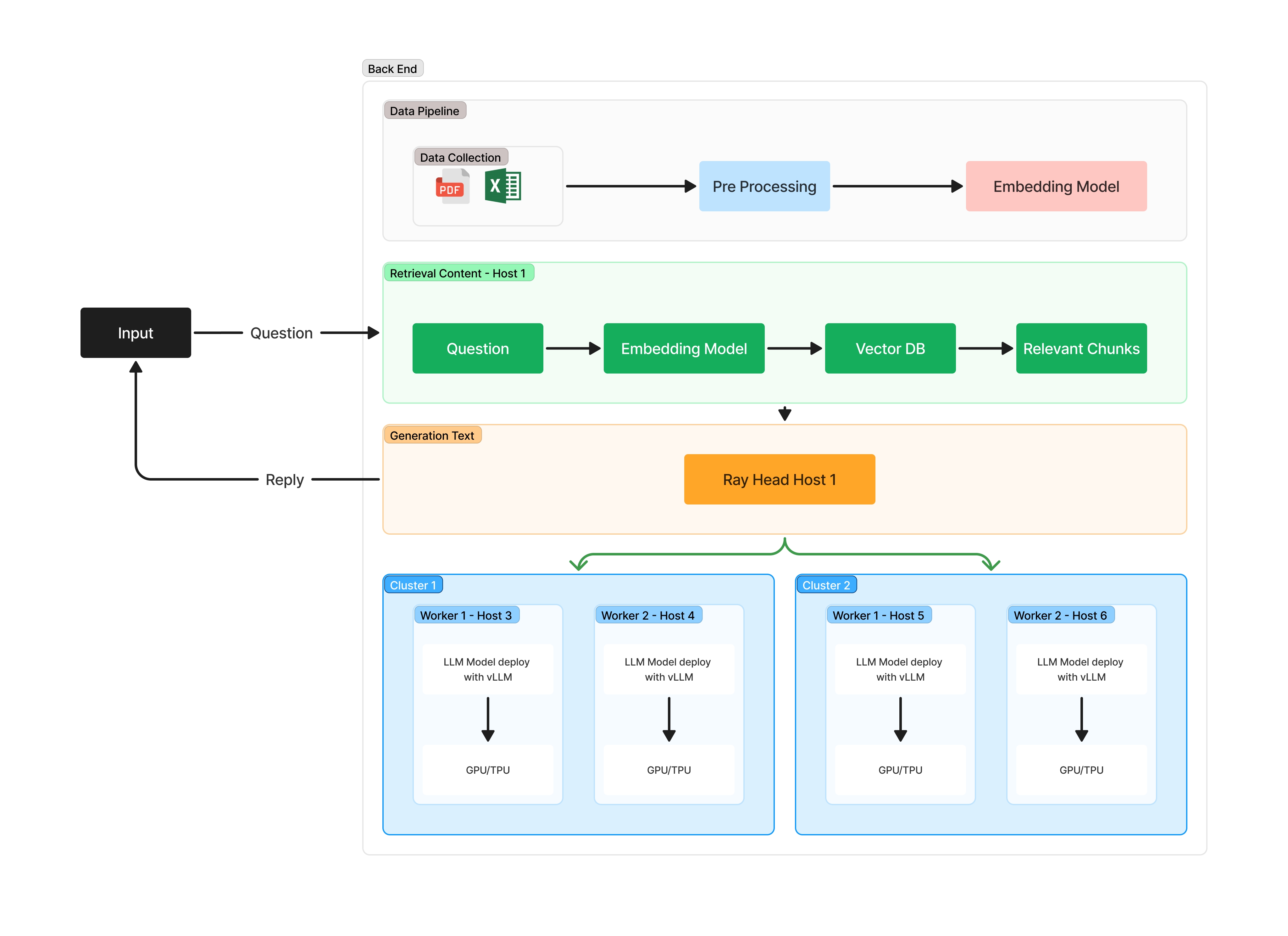
DiLLeMa is a distributed Large Language Model (LLM) that can be used to generate text. It is built on top of Ray Framework and VLLM. The purpose of this project is to provide a easy-to-use interface for users to deploy and use LLMs in a distributed setting.
Installation
pip install dillema
Project Structure
/dillema
│
├── api_gateway/                # API Layer (FastAPI)
│   ├── __init__.py
│   ├── main.py                 # Entry point untuk API
│   ├── endpoints.py            # Definisi endpoint API
│   └── utils.py                # Utility functions (e.g., request validation)
│
├── ray_cluster/                # Ray cluster manager & task scheduler
│   ├── __init__.py
│   ├── ray_manager.py          # Manajer cluster Ray
│   ├── task_scheduler.py       # Pembagian tugas ke worker
│   └── worker_manager.py       # Menangani pengelolaan worker Ray
│
├── workers/                    # Worker nodes yang menjalankan LLM inferensi
│   ├── __init__.py
│   ├── worker.py               # Kode untuk setiap worker (Actor Ray)
│   ├── preprocessing.py        # Preprocessing data sebelum inferensi
│   ├── llm_inference.py        # Kode untuk melakukan inferensi LLM
│   └── postprocessing.py       # Postprocessing hasil inferensi
│
├── models/                     # Model LLM dan penyimpanan
│   ├── __init__.py
│   ├── model_loader.py         # Mengelola pemuatan model
│   ├── model_storage.py        # Mengatur akses ke penyimpanan model (misal S3)
│   └── model_config.py         # Konfigurasi model yang digunakan
│
├── vllm/                       # Implementasi VLLM untuk optimisasi
│   ├── __init__.py
│   ├── vllm_batching.py        # Optimasi batching menggunakan VLLM
│   └── vllm_inference.py       # Integrasi VLLM untuk inference
│
├── tests/                      # Unit test dan integration test
│   ├── __init__.py
│   ├── test_api.py             # Test API Gateway
│   ├── test_ray.py             # Test distribusi task ke worker
│   └── test_inference.py       # Test inferensi LLM dan optimisasi VLLM
│
├── requirements.txt            # Dependensi library (Ray, VLLM, FastAPI, dll)
├── Dockerfile                  # Dockerfile untuk deployment
└── README.md                   # Dokumentasi proyek
Flow Diagram
  +------------------------+
  |    Pengguna (User)     |
  +------------------------+
            |
            v
  +------------------------+     +------------------------+
  |    API Server (FastAPI) |<--->|   Ray Worker (Client)  |
  +------------------------+     +------------------------+
            |                         ^
            v                         |
    +--------------------+    +--------------------+
    |  Head Node Ray     |----|  Ray Cluster      |
    |  (Ray Management)  |    | (Worker Nodes)    |
    +--------------------+    +--------------------+
            |
            v
  +------------------------+
  |  Model Loading         |
  |  (LLM Model)           |
  +------------------------+
Usage
PRE-REQUISITES
- For your safety you must to install anaconda and run the following script.
conda create -n dillema
conda activate dillema

conda install python=3.12.9
- Run the Head Node: The user first runs the head node to start the Ray cluster.
python -m dillema.ray_cluster.head_node --port 6379
- Run the Client Node: After that, the user runs the client node to connect the worker to the head node.
python -m dillema.ray_cluster.client_node --head-node-ip <head-node-ip> --port 6379
SERVE YOUR OWN LLM MODEL
- Run the API Server: Finally, the user runs the API server to start model serving and receive inference requests.
python -m dillema.cli serve --model "meta/llma-" --port 8000 --head-node-ip <head-node-ip>


Download files
Download the file for your platform. If you're not sure which to choose, learn more about installing packages.
Source Distribution
Built Distribution
Filter files by name, interpreter, ABI, and platform.
If you're not sure about the file name format, learn more about wheel file names.
Copy a direct link to the current filters
File details
Details for the file dillema-0.1.1.tar.gz.
File metadata
- Download URL: dillema-0.1.1.tar.gz
- Upload date:
- Size: 5.1 kB
- Tags: Source
- Uploaded using Trusted Publishing? No
- Uploaded via: twine/6.1.0 CPython/3.12.9
File hashes
| Algorithm | Hash digest | |
|---|---|---|
| SHA256 |
ed10e157636b7f31fea9d6ef55802f8235f906fd840436b971cf443f95e20916
|
|
| MD5 |
c9b881e4a40a2c4d7f4b5ea1b3aecec2
|
|
| BLAKE2b-256 |
f81f7b3d74e98f10420a59d207d9aa8fb8cd1e5cab65ddf0a2694cf456b533d6
|
File details
Details for the file dillema-0.1.1-py3-none-any.whl.
File metadata
- Download URL: dillema-0.1.1-py3-none-any.whl
- Upload date:
- Size: 6.0 kB
- Tags: Python 3
- Uploaded using Trusted Publishing? No
- Uploaded via: twine/6.1.0 CPython/3.12.9
File hashes
| Algorithm | Hash digest | |
|---|---|---|
| SHA256 |
d1590b033cd030078126aabd1bf5bbcc3aeb89a58f9317c3299cd2054c2d7c42
|
|
| MD5 |
aae9d580f589909a69292ae8956be62d
|
|
| BLAKE2b-256 |
e10034b2f3f5ad8efaa4018324c3519caeb8e3fe6e00115958dc4cde7c9bbe5a
|






