
DisPass is a password manager for GNU/Linux, *BSD, MacOS X and Windows. It can be used as any traditional password manager, but has one key difference. DisPass does not store your passwords anywhere, so you can never lose them. It creates strong and unique passphrases formed from a master password and a label (and some optional parameters), helping you get rid of the bad habit of using a single password for multiple websites. Dispass is a console application, but also has a simple graphical interface.
Resources
Main website: https://dispass.org
Python Package Index: http://pypi.python.org/pypi/DisPass
Github: https://github.com/babab/dispass
Gitter.im: https://gitter.im/babab/DisPass
Quick start
These are quick instructions for the impatient, just wanting to check out DisPass. For full documentation on using DisPass, visit http://dispass.org
Download
Download and install DisPass from the Python Package Index with pip:
pip install --user dispassUsing DisPass for the first time
For this example we will create a passphrase to use for a google account.
Create and save a label google to the labelfile:
dispass add googleGenerate the passphrase for the first time. Since you will need to register the passphrase with google we pass the --verify flag or simply -v so DisPass asks us to verify the password and we can avoid typing errors in the input password while creating the resulting passphrase for the first time:
dispass generate --verify google
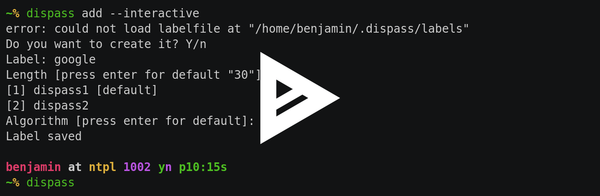
Mini screencast
Checkout the following mini screencast. In this demo the label is added interactively.
Software license
DisPass is released under an ISC license, which is functionally equivalent to the simplified BSD and MIT/Expat licenses, with language that was deemed unnecessary by the Berne convention removed.
Copyright (c) 2012-2016  Tom Willemse <tom@ryuslash.org>
Copyright (c) 2011-2018  Benjamin Althues <benjamin@babab.nl>

Permission to use, copy, modify, and distribute this software for any
purpose with or without fee is hereby granted, provided that the above
copyright notice and this permission notice appear in all copies.

THE SOFTWARE IS PROVIDED "AS IS" AND THE AUTHOR DISCLAIMS ALL WARRANTIES
WITH REGARD TO THIS SOFTWARE INCLUDING ALL IMPLIED WARRANTIES OF
MERCHANTABILITY AND FITNESS. IN NO EVENT SHALL THE AUTHOR BE LIABLE FOR
ANY SPECIAL, DIRECT, INDIRECT, OR CONSEQUENTIAL DAMAGES OR ANY DAMAGES
WHATSOEVER RESULTING FROM LOSS OF USE, DATA OR PROFITS, WHETHER IN AN
ACTION OF CONTRACT, NEGLIGENCE OR OTHER TORTIOUS ACTION, ARISING OUT OF
OR IN CONNECTION WITH THE USE OR PERFORMANCE OF THIS SOFTWARE.
1 maintainer

Release files for DisPass 0.4.0
For a detailed explanation of source distributions (sdists) and built distributions (wheels), please see the package formats documentation.
Source distribution (sdist)
| File | Size | Uploaded | |
|---|---|---|---|
| DisPass-0.4.0.tar.gz | 261.8 kB | Details |
Built distribution (wheel)
| File | Interpreter | ABI | Platform | Reset |
|---|---|---|---|---|
| DisPass-0.4.0-py2.py3-none-any.whl | Python 3, Python 2 | none | any | Details |
Total release size: 299.3 kB
Release files / DisPass-0.4.0.tar.gz
| Download URL | DisPass-0.4.0.tar.gz |
|---|---|
| Size | 261.8 kB |
| Tags | Source |
|
SHA-256 checksum How to use checksums |
aee85f4d8aaa26e54bcb21bca958488f4c90cee650b5a74571fbacd4751c7b0f
|
|
BLAKE2b-256 checksum How to use checksums |
eb4d6e7be044e0d59cd1664bd647a300913bb05047f42dac02692aecffce2f17
|
| Upload date | |
|
Uploaded using Trusted Publishing? What is trusted publishing? |
No |
Release files / DisPass-0.4.0-py2.py3-none-any.whl
| Download URL | DisPass-0.4.0-py2.py3-none-any.whl |
|---|---|
| Size | 37.5 kB |
| Tags | Python 2 Python 3 |
|
SHA-256 checksum How to use checksums |
1a60950afbb4ec4877dc77029995d989945549712bd7b71a0c7ee60740d7dae9
|
|
BLAKE2b-256 checksum How to use checksums |
bae6175746590ab216917590edaee8caafeb248c4a7f7cea2de3ecd291b5d829
|
| Upload date | |
|
Uploaded using Trusted Publishing? What is trusted publishing? |
No |














