
A Discord chat exporter that is easy to use and customizable. // Un exporteur de chat Discord facile à utiliser et personnalisable.

Project description
Discord Channel To HTML Transcripts






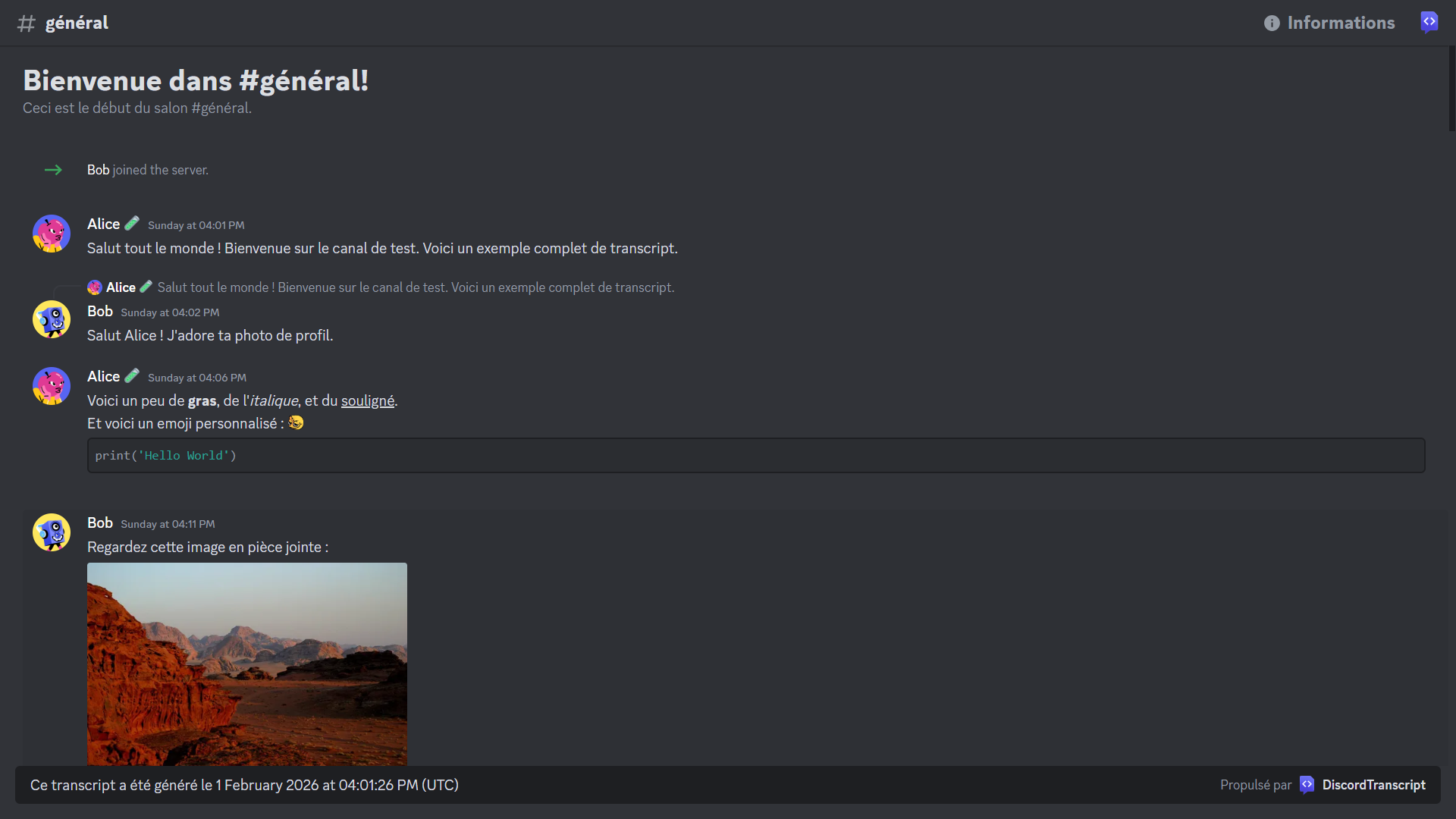
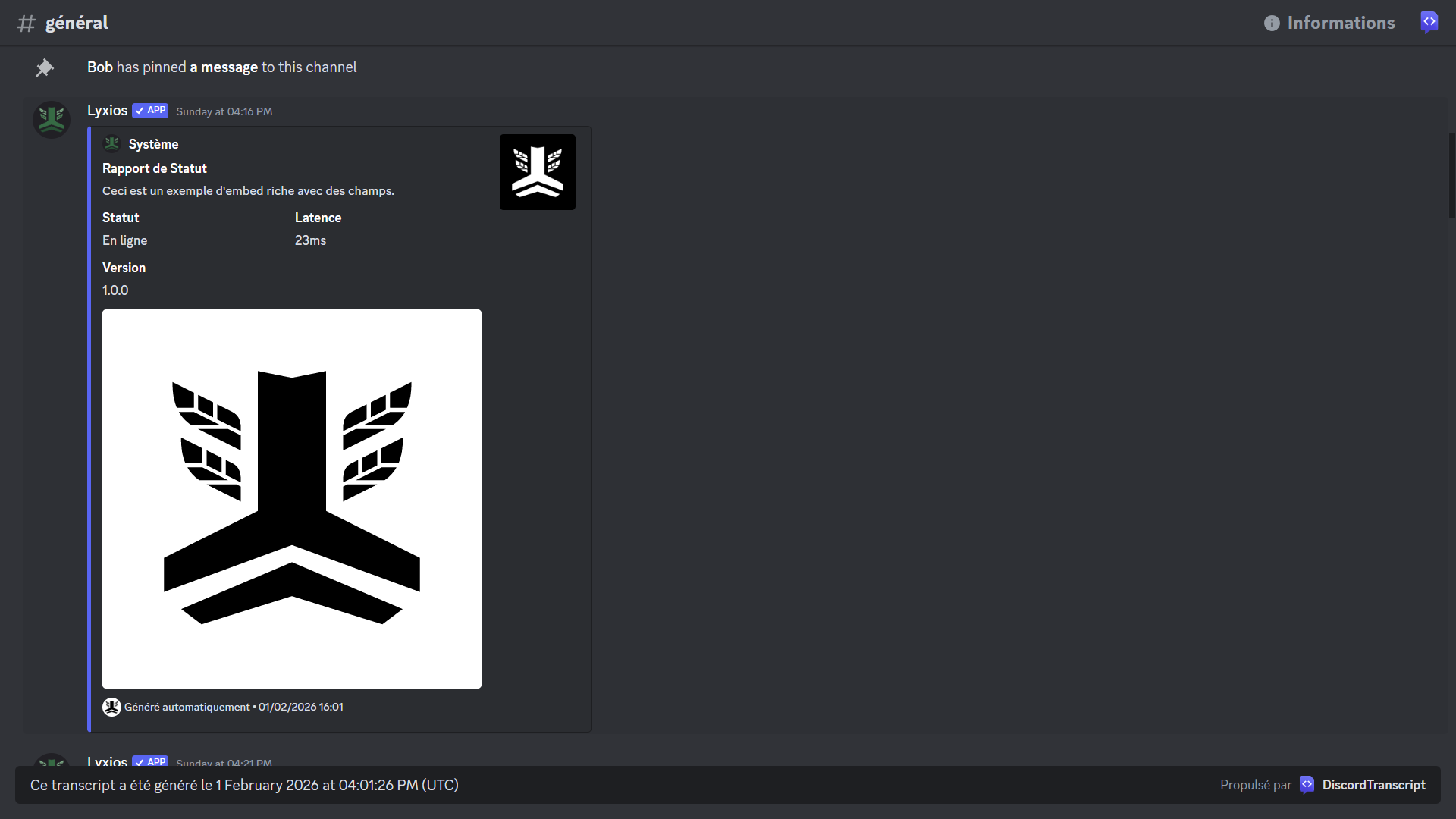
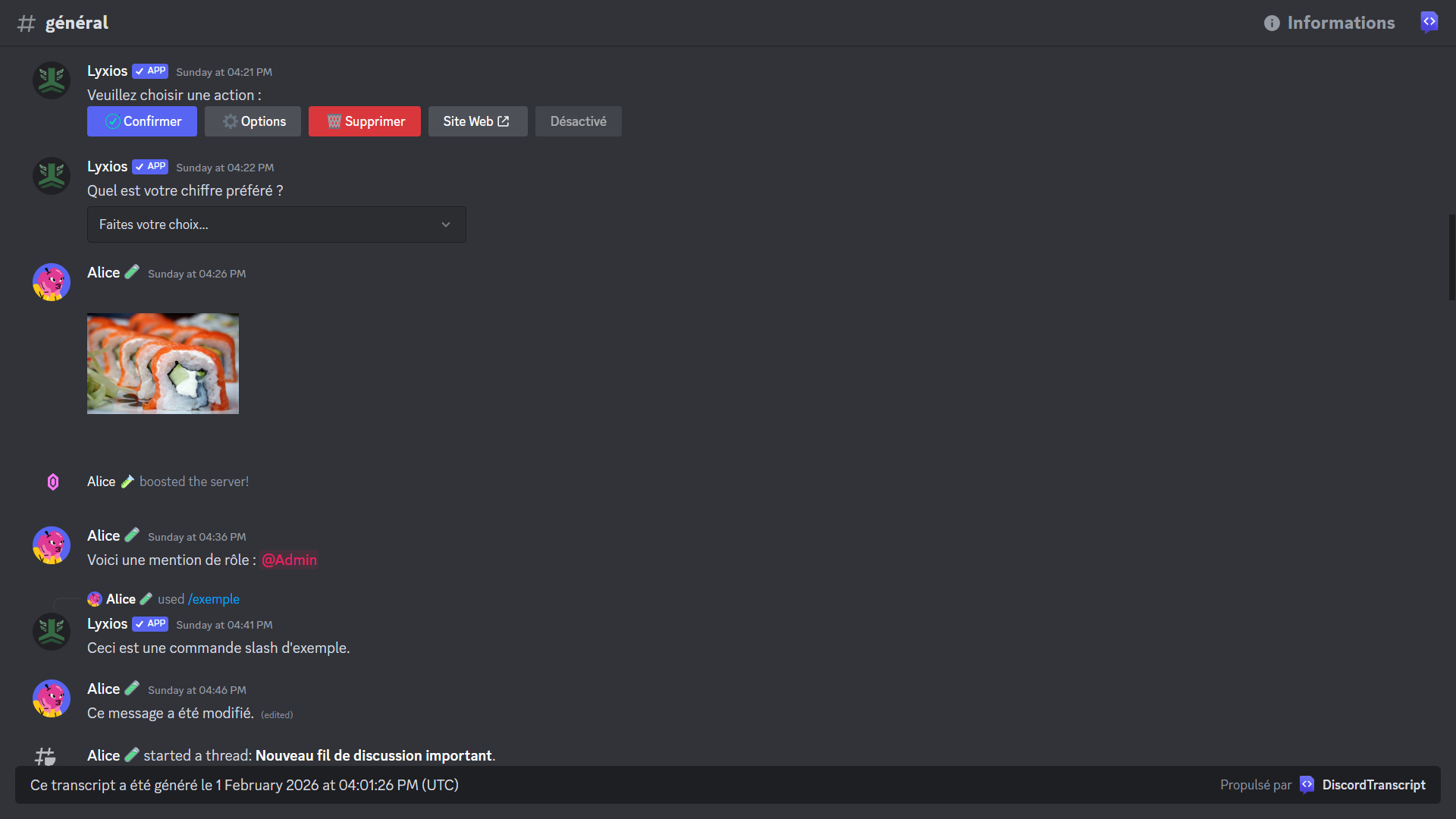
A Python library for creating HTML transcripts of Discord channels.
The base code comes from py-discord-html-transcripts and has been adapted and improved.
Preview
🇫🇷 Documentation en Français
🇫🇷 Documentation en Français
Table des matières
- Prérequis
- Installation
- Utilisation
- Paramètres
- Exemples avancés
- Sauvegarder les pièces jointes localement
- Utilisation dans un Cog
- Utilisation avec les commandes d'application
- Gestion des erreurs
- Envoyer la transcription dans un autre salon
- Envoyer la transcription en message privé
- Sauvegarde quotidienne automatisée
- Utilisation avec des boutons d'interface utilisateur
Prérequis
discord.pyv2.4.0 ou plus récent
Installation
Pour installer la librairie, exécutez la commande suivante :
pip install DiscordTranscript
NOTE : Cette librairie est une extension pour discord.py et ne fonctionne pas de manière autonome. Vous devez avoir un bot discord.py fonctionnel pour l'utiliser.
Utilisation
Il existe trois méthodes principales pour exporter une conversation : quick_export, export, et raw_export.
Utilisation de base
La fonction .quick_export() est la manière la plus simple d'utiliser la librairie. Elle récupère l'historique du salon, génère la transcription, puis la publie directement dans le même salon.
Arguments requis :
channel: L'objetdiscord.TextChannelà exporter.
Arguments optionnels :
bot: (Optionnel) L'objetdiscord.Clientoucommands.Bot. Voir la section Paramètres pour plus de détails.
Retourne :
discord.Message: Le message contenant la transcription.
Exemple
import discord
import DiscordTranscript
from discord.ext import commands

intents = discord.Intents.default()
intents.members = True
intents.message_content = True

bot = commands.Bot(command_prefix="!", intents=intents)

@bot.command()
async def save(ctx: commands.Context):
    await DiscordTranscript.quick_export(ctx.channel, bot=bot)

bot.run("VOTRE_TOKEN")
Utilisation personnalisable
La fonction .export() est la méthode la plus flexible. Elle permet de personnaliser la transcription avec plusieurs options.
Arguments requis :
channel: L'objetdiscord.TextChannelà exporter.
Arguments optionnels :
- Voir la section Paramètres pour une liste complète des options disponibles.
Retourne :
str: Le contenu HTML de la transcription.
Exemple
import io
import discord
import DiscordTranscript
from discord.ext import commands

# ... (initialisation du bot)

@bot.command()
async def save_custom(ctx: commands.Context):
    transcript = await DiscordTranscript.export(
        ctx.channel,
        limit=100,
        tz_info="Europe/Paris",
        military_time=True,
        bot=bot,
    )

    if transcript is None:
        return

    transcript_file = discord.File(
        io.BytesIO(transcript.encode()),
        filename=f"transcript-{ctx.channel.name}.html",
    )

    await ctx.send(file=transcript_file)
Utilisation brute (raw)
La fonction .raw_export() permet de créer une transcription à partir d'une liste de messages que vous fournissez.
Arguments requis :
channel: L'objetdiscord.TextChannel(utilisé pour les en-têtes).messages: Une liste d'objetsdiscord.Message.
Arguments optionnels :
- Voir la section Paramètres pour une liste complète des options disponibles.
Retourne :
str: Le contenu HTML de la transcription.
Exemple
import io
import discord
import DiscordTranscript
from discord.ext import commands

# ... (initialisation du bot)

@bot.command()
async def save_purged(ctx: commands.Context):
    deleted_messages = await ctx.channel.purge(limit=50)

    transcript = await DiscordTranscript.raw_export(
        ctx.channel,
        messages=deleted_messages,
        bot=bot,
    )

    if transcript is None:
        return

    transcript_file = discord.File(
        io.BytesIO(transcript.encode()),
        filename=f"purged-transcript-{ctx.channel.name}.html",
    )

    await ctx.send("Voici la transcription des messages supprimés :", file=transcript_file)
Paramètres
Voici une liste des paramètres que vous pouvez utiliser dans les fonctions export() et raw_export() pour personnaliser vos transcriptions.
| Paramètre | Type | Description | Défaut |
|---|---|---|---|
limit |
int |
Le nombre maximum de messages à récupérer. | None (illimité) |
before |
datetime.datetime |
Récupère les messages avant cette date. | None |
after |
datetime.datetime |
Récupère les messages après cette date. | None |
tz_info |
str |
Le fuseau horaire à utiliser pour les horodatages. Doit être un nom de la base de données TZ (ex: "Europe/Paris"). | "UTC" |
military_time |
bool |
Si True, utilise le format 24h. Si False, utilise le format 12h (AM/PM). |
True |
fancy_times |
bool |
Si True, utilise des horodatages relatifs (ex: "Aujourd'hui à..."). Si False, affiche la date complète. |
True |
bot |
discord.Client |
L'instance de votre bot. Nécessaire pour résoudre correctement les informations des utilisateurs (noms, rôles, etc.), en particulier pour les membres qui ne sont plus sur le serveur. | None |
attachment_handler |
AttachmentHandler |
Un gestionnaire pour contrôler la façon dont les pièces jointes sont sauvegardées. Voir l'exemple Sauvegarder les pièces jointes localement. | None (les liens des pièces jointes pointent vers le CDN de Discord) |
Exemples avancés
Sauvegarder les pièces jointes localement
Par défaut, les pièces jointes sont liées via leur URL Discord. Pour les sauvegarder localement, utilisez AttachmentToLocalFileHostHandler.
Exemple
import io
import os
import discord
import DiscordTranscript
from DiscordTranscript.construct.attachment_handler import AttachmentToLocalFileHostHandler
from discord.ext import commands

# ... (initialisation du bot)

@bot.command()
async def save_local_attachments(ctx: commands.Context):
    if not os.path.exists(f"attachments/{ctx.channel.id}"):
        os.makedirs(f"attachments/{ctx.channel.id}")

    transcript = await DiscordTranscript.export(
        ctx.channel,
        attachment_handler=AttachmentToLocalFileHostHandler(
            path=f"attachments/{ctx.channel.id}"
        ),
        bot=bot,
    )

    if transcript is None:
        return

    transcript_file = discord.File(
        io.BytesIO(transcript.encode()),
        filename=f"transcript-{ctx.channel.name}.html",
    )

    await ctx.send(file=transcript_file)
Envoyer la transcription dans un autre salon
Vous pouvez envoyer la transcription dans un salon différent de celui où la commande a été exécutée.
Exemple
import io
import discord
import DiscordTranscript
from discord.ext import commands

# ... (initialisation du bot)

LOG_CHANNEL_ID = 123456789012345678 # Remplacez par l'ID de votre salon de logs

@bot.command()
async def save_to_log(ctx: commands.Context):
    log_channel = bot.get_channel(LOG_CHANNEL_ID)
    if not log_channel:
        await ctx.send("Le salon de logs n'a pas été trouvé.")
        return

    transcript = await DiscordTranscript.export(
        ctx.channel,
        bot=bot,
    )

    if transcript is None:
        return

    transcript_file = discord.File(
        io.BytesIO(transcript.encode()),
        filename=f"transcript-{ctx.channel.name}.html",
    )

    await log_channel.send(f"Transcription du salon {ctx.channel.mention}", file=transcript_file)
    await ctx.send("Transcription envoyée dans le salon de logs.")
Envoyer la transcription en message privé
Vous pouvez également envoyer la transcription directement à l'utilisateur en message privé.
Exemple
import io
import discord
import DiscordTranscript
from discord.ext import commands

# ... (initialisation du bot)

@bot.command()
async def save_dm(ctx: commands.Context):
    transcript = await DiscordTranscript.export(
        ctx.channel,
        bot=bot,
    )

    if transcript is None:
        return

    transcript_file = discord.File(
        io.BytesIO(transcript.encode()),
        filename=f"transcript-{ctx.channel.name}.html",
    )

    try:
        await ctx.author.send(f"Voici la transcription du salon {ctx.channel.mention}", file=transcript_file)
        await ctx.send("Je vous ai envoyé la transcription en message privé.")
    except discord.Forbidden:
        await ctx.send("Je ne peux pas vous envoyer de message privé. Veuillez activer vos MPs.")
Sauvegarde quotidienne automatisée
Utilisez discord.ext.tasks pour créer automatiquement une sauvegarde d'un salon chaque jour.
Exemple
import io
import discord
import datetime
import DiscordTranscript
from discord.ext import commands, tasks

# ... (initialisation du bot)

BACKUP_CHANNEL_ID = 123456789012345678 # Le salon à sauvegarder
LOG_CHANNEL_ID = 123456789012345679 # Le salon où envoyer la sauvegarde

@tasks.loop(time=datetime.time(hour=0, minute=0)) # S'exécute tous les jours à minuit
async def daily_backup():
    backup_channel = bot.get_channel(BACKUP_CHANNEL_ID)
    log_channel = bot.get_channel(LOG_CHANNEL_ID)

    if not backup_channel or not log_channel:
        print("Les salons de sauvegarde ou de logs n'ont pas été trouvés.")
        return

    transcript = await DiscordTranscript.export(
        backup_channel,
        bot=bot,
    )

    if transcript is None:
        return

    transcript_file = discord.File(
        io.BytesIO(transcript.encode()),
        filename=f"backup-{datetime.date.today()}.html",
    )

    await log_channel.send(f"Sauvegarde du {datetime.date.today()}", file=transcript_file)

@bot.event
async def on_ready():
    print(f"{bot.user} est en ligne !")
    daily_backup.start()
Utilisation avec des boutons d'interface utilisateur
Utilisez les vues (discord.ui.View) pour créer des interfaces interactives, comme un bouton pour demander une transcription.
Exemple
import io
import discord
import DiscordTranscript
from discord.ext import commands
from discord import ui

# ... (initialisation du bot)

class TranscriptView(ui.View):
    def __init__(self, channel: discord.TextChannel, bot: commands.Bot):
        super().__init__(timeout=None)
        self.channel = channel
        self.bot = bot

    @ui.button(label="Créer une transcription", style=discord.ButtonStyle.primary, emoji="📄")
    async def create_transcript(self, interaction: discord.Interaction, button: ui.Button):
        await interaction.response.defer(thinking=True, ephemeral=True)

        transcript = await DiscordTranscript.export(
            self.channel,
            bot=self.bot,
        )

        if transcript is None:
            await interaction.followup.send("Impossible de créer la transcription.", ephemeral=True)
            return

        transcript_file = discord.File(
            io.BytesIO(transcript.encode()),
            filename=f"transcript-{self.channel.name}.html",
        )

        await interaction.followup.send(file=transcript_file, ephemeral=True)

@bot.command()
async def ticket(ctx: commands.Context):
    view = TranscriptView(ctx.channel, bot)
    await ctx.send("Cliquez sur le bouton ci-dessous pour créer une transcription de ce salon.", view=view)
Utilisation dans un Cog
Organisez votre code en utilisant des Cogs.
Exemple
# cogs/transcript_cog.py
import io
import discord
import DiscordTranscript
from discord.ext import commands

class TranscriptCog(commands.Cog):
    def __init__(self, bot: commands.Bot):
        self.bot = bot

    @commands.command()
    async def save_in_cog(self, ctx: commands.Context):
        transcript = await DiscordTranscript.export(
            ctx.channel,
            bot=self.bot,
        )

        if transcript is None:
            return

        transcript_file = discord.File(
            io.BytesIO(transcript.encode()),
            filename=f"transcript-{ctx.channel.name}.html",
        )

        await ctx.send(file=transcript_file)

async def setup(bot: commands.Bot):
    await bot.add_cog(TranscriptCog(bot))
Utilisation avec les commandes d'application
Utilisez DiscordTranscript avec les commandes slash.
Exemple
import io
import discord
import DiscordTranscript
from discord import app_commands

# ... (initialisation du bot)

@bot.tree.command(name="save", description="Sauvegarde la conversation actuelle.")
@app_commands.describe(channel="Le salon à sauvegarder (optionnel, défaut: salon actuel)")
async def save_slash(interaction: discord.Interaction, channel: discord.TextChannel = None):
    await interaction.response.defer()

    if channel is None:
        channel = interaction.channel

    transcript = await DiscordTranscript.export(
        channel,
        bot=bot,
    )

    if transcript is None:
        await interaction.followup.send("Impossible de sauvegarder la conversation.", ephemeral=True)
        return

    transcript_file = discord.File(
        io.BytesIO(transcript.encode()),
        filename=f"transcript-{channel.name}.html",
    )

    await interaction.followup.send(file=transcript_file)

# N'oubliez pas de synchroniser l'arbre de commandes
# @bot.event
# async def on_ready():
#     await bot.tree.sync()
Gestion des erreurs
Il est important de gérer les erreurs potentielles, comme les permissions manquantes.
Exemple
import io
import discord
import DiscordTranscript
from discord.ext import commands

# ... (initialisation du bot)

@bot.command()
async def save_safe(ctx: commands.Context):
    try:
        transcript = await DiscordTranscript.export(
            ctx.channel,
            bot=bot,
        )
    except discord.Forbidden:
        await ctx.send("Je n'ai pas la permission de lire l'historique de ce salon.")
        return
    except Exception as e:
        await ctx.send(f"Une erreur est survenue : {e}")
        return

    if transcript is None:
        return

    transcript_file = discord.File(
        io.BytesIO(transcript.encode()),
        filename=f"transcript-{ctx.channel.name}.html",
    )

    await ctx.send(file=transcript_file)
🇬🇧 English Documentation
🇬🇧 English Documentation
Table of Contents
Prerequisites
discord.pyv2.4.0 or newer
Installation
To install the library, run the following command:
pip install DiscordTranscript
NOTE: This library is an extension for discord.py and does not work standalone. You must have a functional discord.py bot to use it.
Usage
There are three main methods for exporting a conversation: quick_export, export, and raw_export.
Basic Usage
The .quick_export() function is the simplest way to use the library. It retrieves the channel's history, generates the transcript, and then publishes it directly in the same channel.
Required Arguments:
channel: Thediscord.TextChannelobject to export.
Optional Arguments:
bot: (Optional) Thediscord.Clientorcommands.Botobject. See the Parameters section for more details.
Returns:
discord.Message: The message containing the transcript.
Example
import discord
import DiscordTranscript
from discord.ext import commands

intents = discord.Intents.default()
intents.members = True
intents.message_content = True

bot = commands.Bot(command_prefix="!", intents=intents)

@bot.command()
async def save(ctx: commands.Context):
    await DiscordTranscript.quick_export(ctx.channel, bot=bot)

bot.run("YOUR_TOKEN")
Customizable Usage
The .export() function is the most flexible method. It allows you to customize the transcript with several options.
Required Arguments:
channel: Thediscord.TextChannelobject to export.
Optional Arguments:
- See the Parameters section for a full list of available options.
Returns:
str: The HTML content of the transcript.
Example
import io
import discord
import DiscordTranscript
from discord.ext import commands

# ... (bot initialization)

@bot.command()
async def save_custom(ctx: commands.Context):
    transcript = await DiscordTranscript.export(
        ctx.channel,
        limit=100,
        tz_info="America/New_York",
        military_time=True,
        bot=bot,
    )

    if transcript is None:
        return

    transcript_file = discord.File(
        io.BytesIO(transcript.encode()),
        filename=f"transcript-{ctx.channel.name}.html",
    )

    await ctx.send(file=transcript_file)
Raw Usage
The .raw_export() function allows you to create a transcript from a list of messages you provide.
Required Arguments:
channel: Thediscord.TextChannelobject (used for headers).messages: A list ofdiscord.Messageobjects.
Optional Arguments:
- See the Parameters section for a full list of available options.
Returns:
str: The HTML content of the transcript.
Example
import io
import discord
import DiscordTranscript
from discord.ext import commands

# ... (bot initialization)

@bot.command()
async def save_purged(ctx: commands.Context):
    deleted_messages = await ctx.channel.purge(limit=50)

    transcript = await DiscordTranscript.raw_export(
        ctx.channel,
        messages=deleted_messages,
        bot=bot,
    )

    if transcript is None:
        return

    transcript_file = discord.File(
        io.BytesIO(transcript.encode()),
        filename=f"purged-transcript-{ctx.channel.name}.html",
    )

    await ctx.send("Here is the transcript of the deleted messages:", file=transcript_file)
Parameters
Here is a list of parameters you can use in the export() and raw_export() functions to customize your transcripts.
| Parameter | Type | Description | Default |
|---|---|---|---|
limit |
int |
The maximum number of messages to retrieve. | None (unlimited) |
before |
datetime.datetime |
Retrieves messages before this date. | None |
after |
datetime.datetime |
Retrieves messages after this date. | None |
tz_info |
str |
The timezone to use for timestamps. Must be a TZ database name (e.g., "America/New_York"). | "UTC" |
military_time |
bool |
If True, uses 24h format. If False, uses 12h format (AM/PM). |
True |
fancy_times |
bool |
If True, uses relative timestamps (e.g., "Today at..."). If False, displays the full date. |
True |
bot |
discord.Client |
Your bot's instance. Necessary to correctly resolve user information (names, roles, etc.), especially for members who are no longer in the server. | None |
attachment_handler |
AttachmentHandler |
A handler to control how attachments are saved. See the Saving Attachments Locally example. | None (attachment links point to Discord's CDN) |
Advanced Examples
Saving Attachments Locally
By default, attachments are linked via their Discord URL. To save them locally, use AttachmentToLocalFileHostHandler.
Example
import io
import os
import discord
import DiscordTranscript
from DiscordTranscript.construct.attachment_handler import AttachmentToLocalFileHostHandler
from discord.ext import commands

# ... (bot initialization)

@bot.command()
async def save_local_attachments(ctx: commands.Context):
    if not os.path.exists(f"attachments/{ctx.channel.id}"):
        os.makedirs(f"attachments/{ctx.channel.id}")

    transcript = await DiscordTranscript.export(
        ctx.channel,
        attachment_handler=AttachmentToLocalFileHostHandler(
            path=f"attachments/{ctx.channel.id}"
        ),
        bot=bot,
    )

    if transcript is None:
        return

    transcript_file = discord.File(
        io.BytesIO(transcript.encode()),
        filename=f"transcript-{ctx.channel.name}.html",
    )

    await ctx.send(file=transcript_file)
Sending the transcript to another channel
You can send the transcript to a different channel from where the command was executed.
Example
import io
import discord
import DiscordTranscript
from discord.ext import commands

# ... (bot initialization)

LOG_CHANNEL_ID = 123456789012345678 # Replace with your log channel ID

@bot.command()
async def save_to_log(ctx: commands.Context):
    log_channel = bot.get_channel(LOG_CHANNEL_ID)
    if not log_channel:
        await ctx.send("The log channel was not found.")
        return

    transcript = await DiscordTranscript.export(
        ctx.channel,
        bot=bot,
    )

    if transcript is None:
        return

    transcript_file = discord.File(
        io.BytesIO(transcript.encode()),
        filename=f"transcript-{ctx.channel.name}.html",
    )

    await log_channel.send(f"Transcript from {ctx.channel.mention}", file=transcript_file)
    await ctx.send("Transcript sent to the log channel.")
DMing the transcript to the user
You can also send the transcript directly to the user in a DM.
Example
import io
import discord
import DiscordTranscript
from discord.ext import commands

# ... (bot initialization)

@bot.command()
async def save_dm(ctx: commands.Context):
    transcript = await DiscordTranscript.export(
        ctx.channel,
        bot=bot,
    )

    if transcript is None:
        return

    transcript_file = discord.File(
        io.BytesIO(transcript.encode()),
        filename=f"transcript-{ctx.channel.name}.html",
    )

    try:
        await ctx.author.send(f"Here is the transcript from {ctx.channel.mention}", file=transcript_file)
        await ctx.send("I have sent you the transcript in a DM.")
    except discord.Forbidden:
        await ctx.send("I could not send you a DM. Please enable your DMs.")
Automated daily backup
Use discord.ext.tasks to automatically create a backup of a channel every day.
Example
import io
import discord
import datetime
import DiscordTranscript
from discord.ext import commands, tasks

# ... (bot initialization)

BACKUP_CHANNEL_ID = 123456789012345678 # The channel to backup
LOG_CHANNEL_ID = 123456789012345679 # The channel to send the backup to

@tasks.loop(time=datetime.time(hour=0, minute=0)) # Runs every day at midnight
async def daily_backup():
    backup_channel = bot.get_channel(BACKUP_CHANNEL_ID)
    log_channel = bot.get_channel(LOG_CHANNEL_ID)

    if not backup_channel or not log_channel:
        print("Backup or log channels not found.")
        return

    transcript = await DiscordTranscript.export(
        backup_channel,
        bot=bot,
    )

    if transcript is None:
        return

    transcript_file = discord.File(
        io.BytesIO(transcript.encode()),
        filename=f"backup-{datetime.date.today()}.html",
    )

    await log_channel.send(f"Backup for {datetime.date.today()}", file=transcript_file)

@bot.event
async def on_ready():
    print(f"{bot.user} is online!")
    daily_backup.start()
Usage with UI Buttons
Use views (discord.ui.View) to create interactive interfaces, such as a button to request a transcript.
Example
import io
import discord
import DiscordTranscript
from discord.ext import commands
from discord import ui

# ... (bot initialization)

class TranscriptView(ui.View):
    def __init__(self, channel: discord.TextChannel, bot: commands.Bot):
        super().__init__(timeout=None)
        self.channel = channel
        self.bot = bot

    @ui.button(label="Create Transcript", style=discord.ButtonStyle.primary, emoji="📄")
    async def create_transcript(self, interaction: discord.Interaction, button: ui.Button):
        await interaction.response.defer(thinking=True, ephemeral=True)

        transcript = await DiscordTranscript.export(
            self.channel,
            bot=self.bot,
        )

        if transcript is None:
            await interaction.followup.send("Could not create the transcript.", ephemeral=True)
            return

        transcript_file = discord.File(
            io.BytesIO(transcript.encode()),
            filename=f"transcript-{self.channel.name}.html",
        )

        await interaction.followup.send(file=transcript_file, ephemeral=True)

@bot.command()
async def ticket(ctx: commands.Context):
    view = TranscriptView(ctx.channel, bot)
    await ctx.send("Click the button below to create a transcript of this channel.", view=view)
Usage in a Cog
Organize your code using Cogs.
Example
# cogs/transcript_cog.py
import io
import discord
import DiscordTranscript
from discord.ext import commands

class TranscriptCog(commands.Cog):
    def __init__(self, bot: commands.Bot):
        self.bot = bot

    @commands.command()
    async def save_in_cog(self, ctx: commands.Context):
        transcript = await DiscordTranscript.export(
            ctx.channel,
            bot=self.bot,
        )

        if transcript is None:
            return

        transcript_file = discord.File(
            io.BytesIO(transcript.encode()),
            filename=f"transcript-{ctx.channel.name}.html",
        )

        await ctx.send(file=transcript_file)

async def setup(bot: commands.Bot):
    await bot.add_cog(TranscriptCog(bot))
Usage with Application Commands
Use DiscordTranscript with slash commands.
Example
import io
import discord
import DiscordTranscript
from discord import app_commands

# ... (bot initialization)

@bot.tree.command(name="save", description="Saves the current conversation.")
@app_commands.describe(channel="The channel to save (optional, defaults to current channel)")
async def save_slash(interaction: discord.Interaction, channel: discord.TextChannel = None):
    await interaction.response.defer()

    if channel is None:
        channel = interaction.channel

    transcript = await DiscordTranscript.export(
        channel,
        bot=bot,
    )

    if transcript is None:
        await interaction.followup.send("Could not save the conversation.", ephemeral=True)
        return

    transcript_file = discord.File(
        io.BytesIO(transcript.encode()),
        filename=f"transcript-{channel.name}.html",
    )

    await interaction.followup.send(file=transcript_file)

# Don't forget to sync the command tree
# @bot.event
# async def on_ready():
#     await bot.tree.sync()
Error Handling
It is important to handle potential errors, such as missing permissions.
Example
import io
import discord
import DiscordTranscript
from discord.ext import commands

# ... (bot initialization)

@bot.command()
async def save_safe(ctx: commands.Context):
    try:
        transcript = await DiscordTranscript.export(
            ctx.channel,
            bot=bot,
        )
    except discord.Forbidden:
        await ctx.send("I don't have permission to read the history of this channel.")
        return
    except Exception as e:
        await ctx.send(f"An error occurred: {e}")
        return

    if transcript is None:
        return

    transcript_file = discord.File(
        io.BytesIO(transcript.encode()),
        filename=f"transcript-{ctx.channel.name}.html",
    )

    await ctx.send(file=transcript_file)
Release history Release notifications | RSS feed


Download files
Download the file for your platform. If you're not sure which to choose, learn more about installing packages.
Source Distribution
Built Distribution
Filter files by name, interpreter, ABI, and platform.
If you're not sure about the file name format, learn more about wheel file names.
Copy a direct link to the current filters
File details
Details for the file discordtranscript-0.1.1.tar.gz.
File metadata
- Download URL: discordtranscript-0.1.1.tar.gz
- Upload date:
- Size: 52.0 kB
- Tags: Source
- Uploaded using Trusted Publishing? No
- Uploaded via: twine/6.2.0 CPython/3.13.3
File hashes
| Algorithm | Hash digest | |
|---|---|---|
| SHA256 |
ce3e67d5a8dee541e2811230016c6a000ef4528d4a1eb0b17b148ba161b1fc41
|
|
| MD5 |
366e37b12efde107b31ef1c72c4525dd
|
|
| BLAKE2b-256 |
7a227fe47724b5e157a25189cf0e76c7b1e05c0f71013c8cd661ba0786693d79
|
File details
Details for the file discordtranscript-0.1.1-py3-none-any.whl.
File metadata
- Download URL: discordtranscript-0.1.1-py3-none-any.whl
- Upload date:
- Size: 56.0 kB
- Tags: Python 3
- Uploaded using Trusted Publishing? No
- Uploaded via: twine/6.2.0 CPython/3.13.3
File hashes
| Algorithm | Hash digest | |
|---|---|---|
| SHA256 |
1af755d768f34dc3d2ffde41d88c6bf667004fb603b9bd5553129e27a3176227
|
|
| MD5 |
4477a08a032412eda92cf4338c20ea99
|
|
| BLAKE2b-256 |
435eec2d10a5259a673d9bd31f630e309281a588e31f07bf6dbc4ab52d3d8e3a
|






