
Log QSO for Ham radio

Project description
DragonLog


Author: Andreas Schawo, DF1ASC (HamQTH, eQSL)
DragonLog is a logging program to log hamradio QSOs. Beside logging for ham radio you can also log CB radio QSOs.
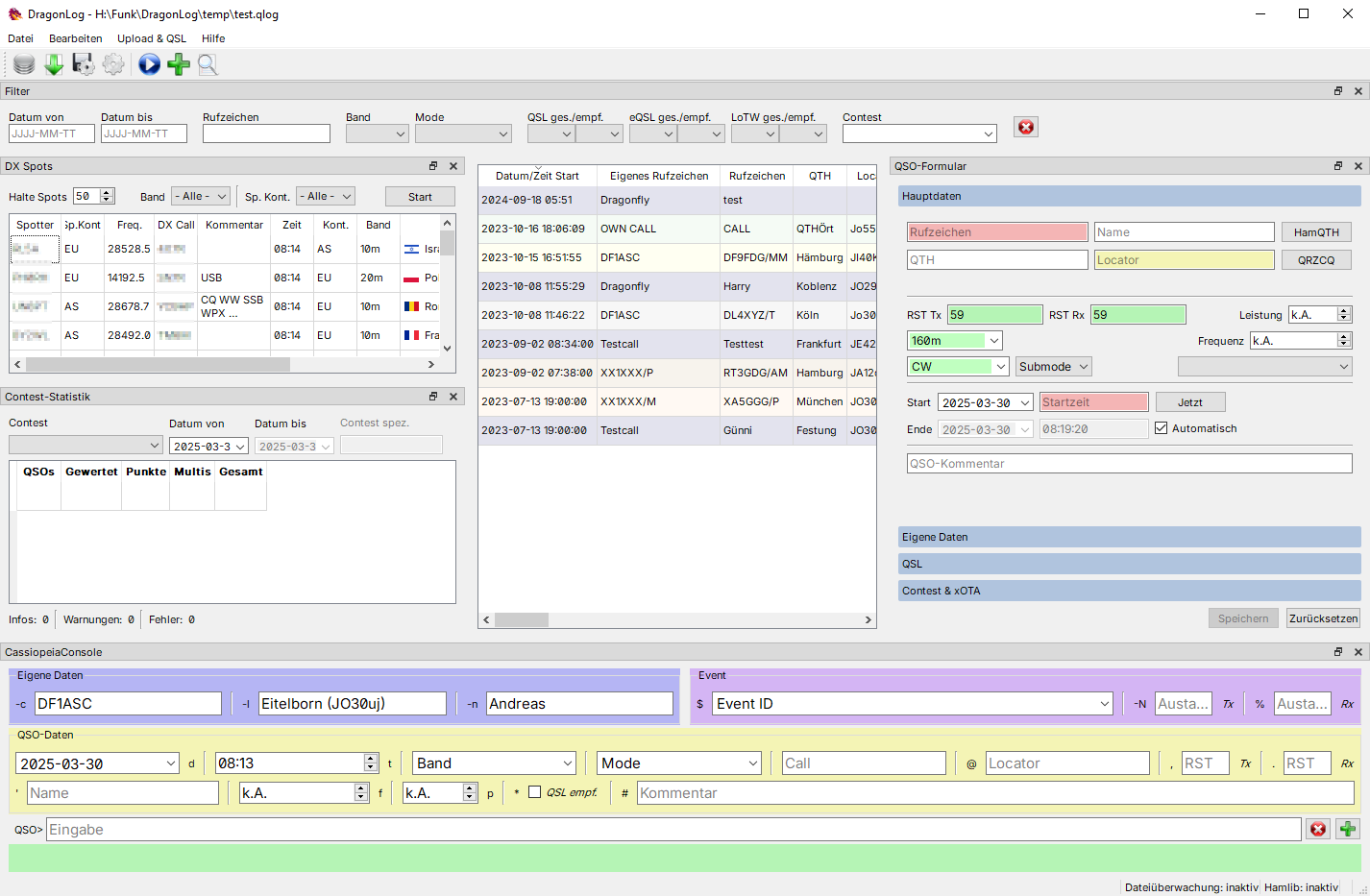
Screenshot in german translation
This README will provide only brief introduction.
For detailed instructions see
Features
- Runs on Windows, Linux and macOS
- predefined fields for logging
- input validation for callsign, RST, locator
- show worked before if a callsign is already logged
- distance calculation
- automatic time
- local callbook with immediate lookup
- OM data build of your contacts (per callsign)
- contest call history with received exchanges (per contest and callsign)
- incorporating prefixes/suffixes
- user triggered callbook search (HamQTH.com, QRZ.com and QRZCQ.com)
- single and multiple QSO log upload
- HamQTH.com
- eQSL upload, check and download
- LoTW signing, upload and check status
- QSO and QSL statistics
- log Contest and xOTA QSOs data (supported Contests see
Help - Available Contests)- follow Contest statistics
- export Contest log as Cabrillo, EDI or special file formats
- CAT (band, frequency, mode/submode, power via hamlib integration)
- watch log files for automatic log import of WSJT-X, JS8Call, fldigi and others
- QSO log import/export
- ADIF adi/adx/adi zipped
- Excel/CSV
- log 11m band QSOs
- filter preset for recent QSOs (last week, month, half year, year)
- UTF-8 support (e.g. use german umlauts)
- convert non ASCII characters for ADIF export (for supported languages)
- integrates CassiopeiaConsole
- display DX spots from DX cluster via telnet
- selectable font and font size
- default proportional font with slashed zero (modified Inter font)
- 3 independent font sizes for application, QSO form and CassiopeiaConsole
- Read QSL-QR-Codes to QSL or import QSOs (based on work of TobbY, DG1ATN)
Security Notes
The passwords for callbook lookup and QSO upload are securely stored in your systems key vault (e.g. Credential Manager on Windows, KWallet on KDE/Linux, Keychain on macOS).
At startup, DragonLog will inform about which service is actually in use.
DragonLog relies on the keyring module.
Copyright
DragonLog © 2023 by Andreas Schawo is licensed under CC BY-SA 4.0
Release history Release notifications | RSS feed


Download files
Download the file for your platform. If you're not sure which to choose, learn more about installing packages.
Source Distribution
Built Distribution
Filter files by name, interpreter, ABI, and platform.
If you're not sure about the file name format, learn more about wheel file names.
Copy a direct link to the current filters
File details
Details for the file dragonlog-26.5.tar.gz.
File metadata
- Download URL: dragonlog-26.5.tar.gz
- Upload date:
- Size: 1.4 MB
- Tags: Source
- Uploaded using Trusted Publishing? No
- Uploaded via: twine/6.2.0 CPython/3.12.3
File hashes
| Algorithm | Hash digest | |
|---|---|---|
| SHA256 |
ca439512c0f1e49e4a56bffdd4775b0f845042f2d880e2491f39f53b341b5188
|
|
| MD5 |
c57cf02d09b7529314d8d3258b91ce65
|
|
| BLAKE2b-256 |
130f330787266c6f408ba639722ffe1a566171638e0dabf74ca4cda692899c48
|
File details
Details for the file dragonlog-26.5-py3-none-any.whl.
File metadata
- Download URL: dragonlog-26.5-py3-none-any.whl
- Upload date:
- Size: 1.4 MB
- Tags: Python 3
- Uploaded using Trusted Publishing? No
- Uploaded via: twine/6.2.0 CPython/3.12.3
File hashes
| Algorithm | Hash digest | |
|---|---|---|
| SHA256 |
38c8f10032c9518d10bbb991456d6bdfb819214d81b7de266270e1f3ab4ed65d
|
|
| MD5 |
a7c51fbd723a43414cb7a438579afadb
|
|
| BLAKE2b-256 |
18ec969daad0105700e97f92ff9bcb02fa8e8d9f3402e005a4adf74bd51dd277
|






