
This package allows users to perform exploratory data analysis tasks and techniques such as creating an EDA PDF report from any dataset

Project description
EDA-assistant
Background
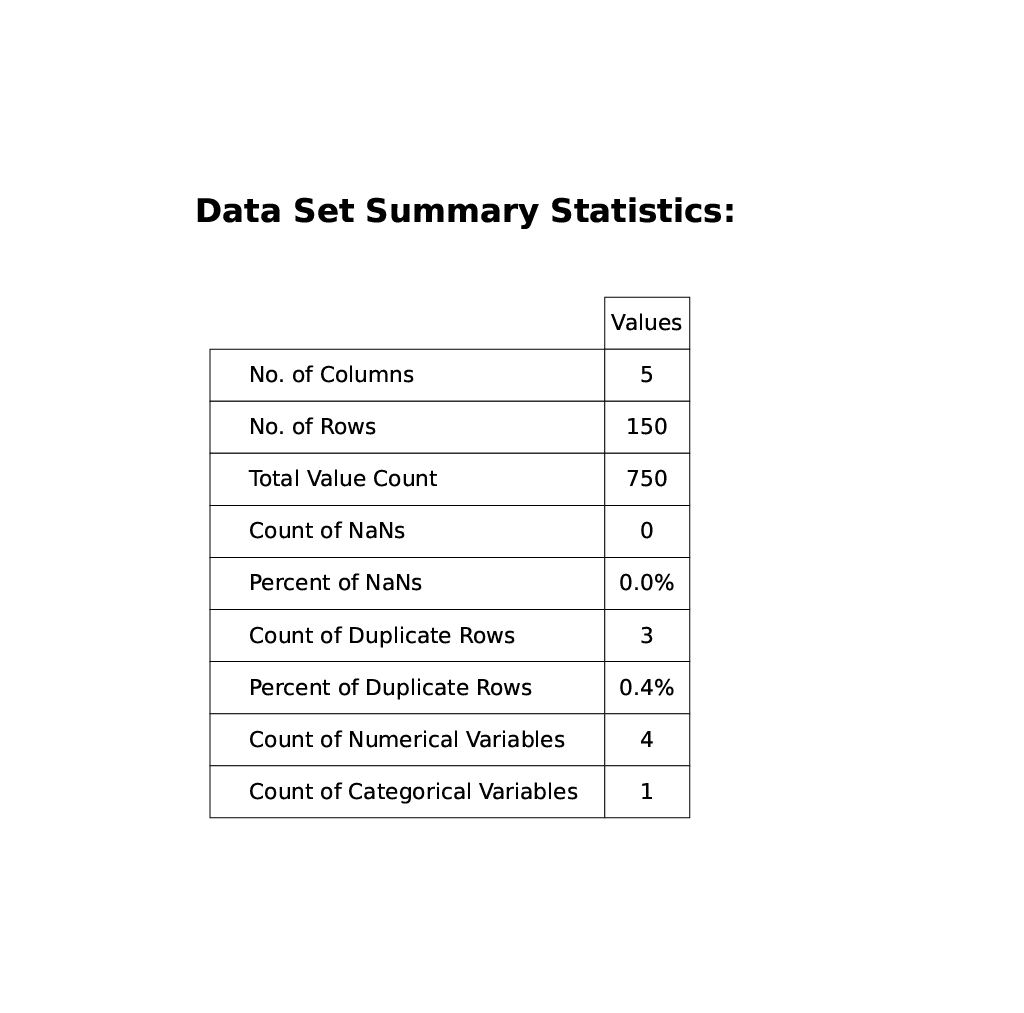
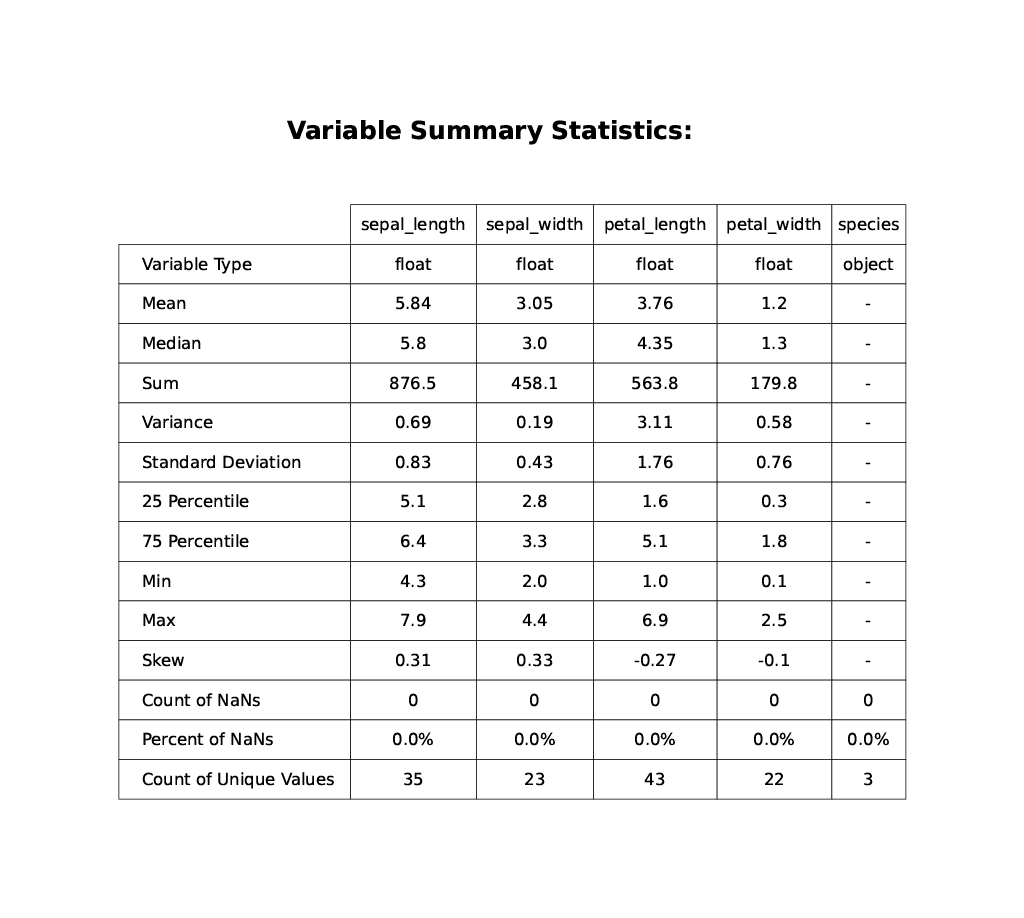
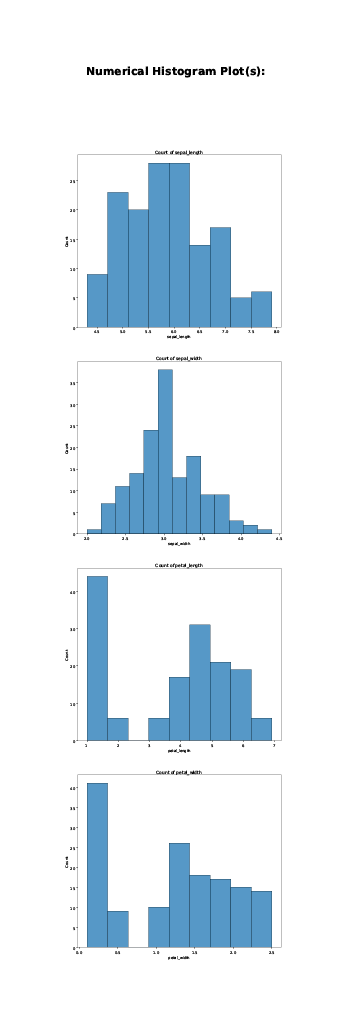
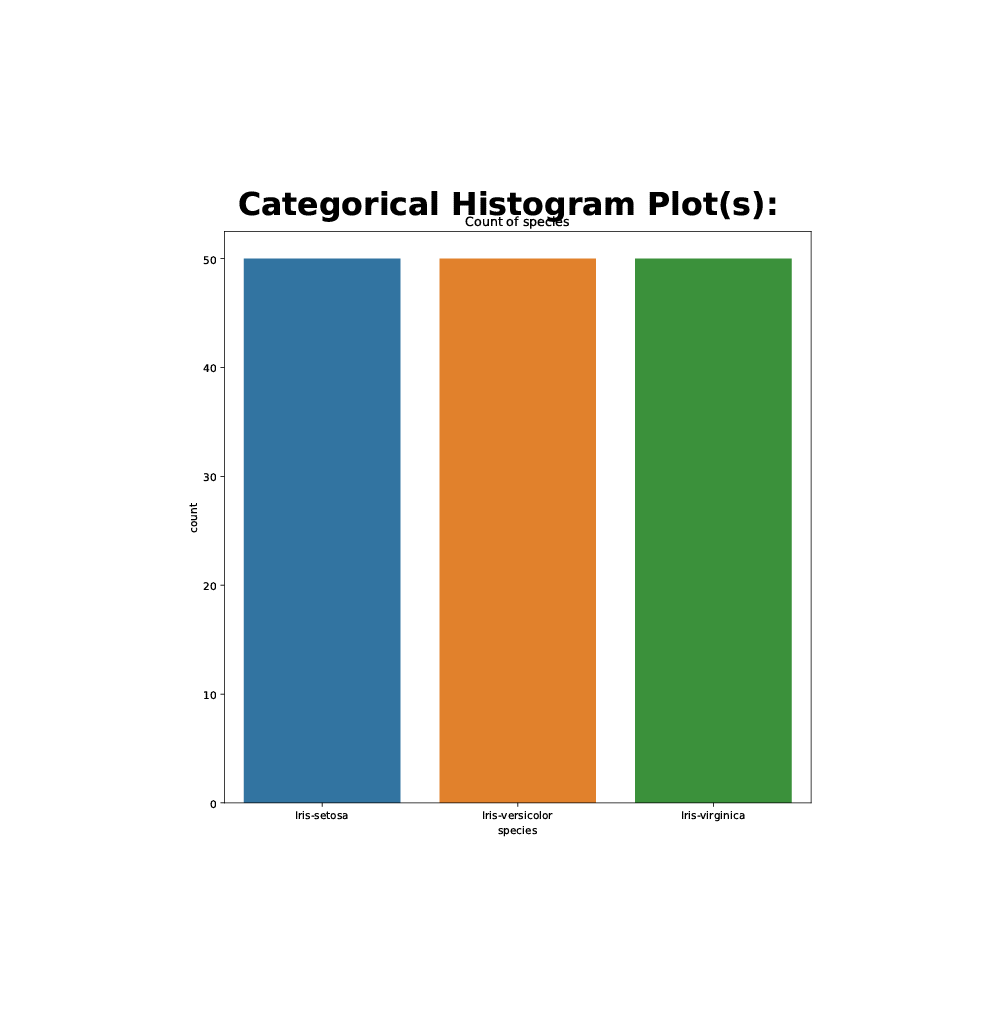
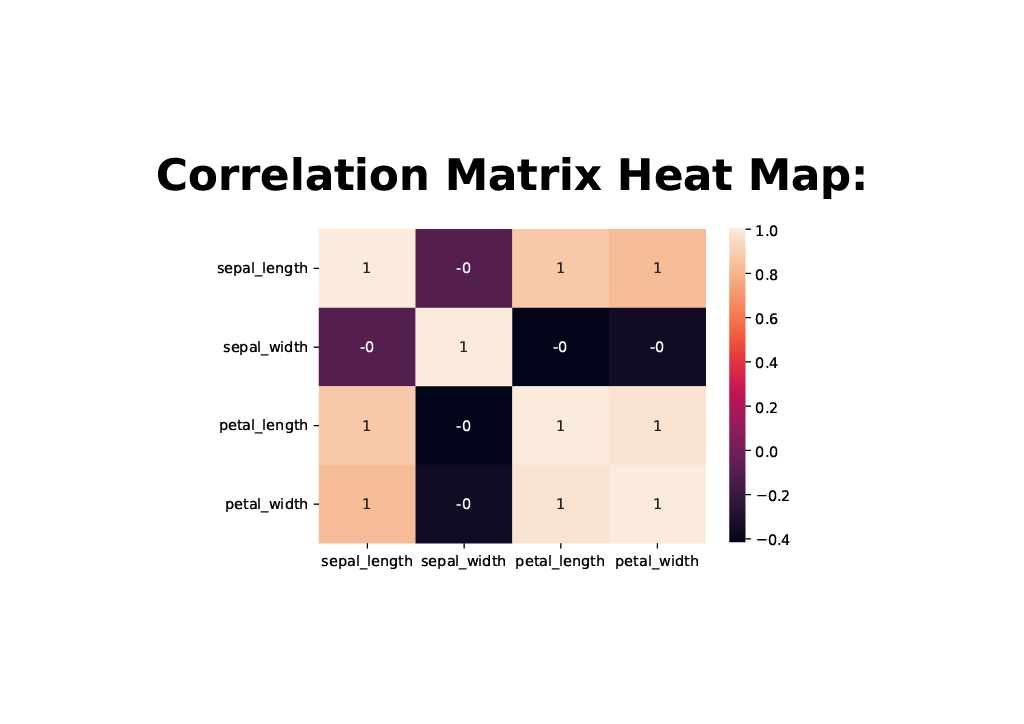
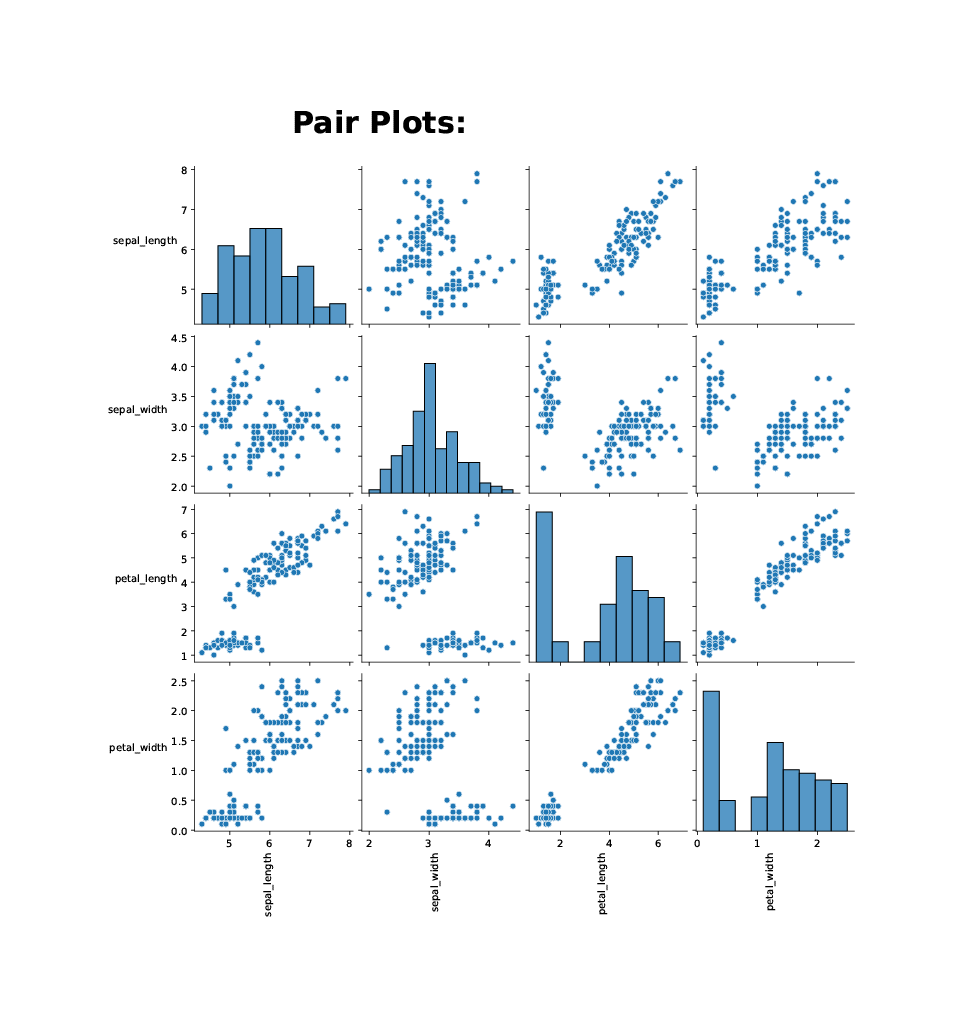
The goal of this project is to help data scientists or data analysts perform easy and quick exploratory data analysis in Python. With the current process for EDA in Python involving importing many packages and writing multiple lines of code, the EDA-assistant package makes this process more simple for the end user with just a single import and two lines of code to produce a PDF report containing all standard EDA summary statistics and graphs. Specifically, the EDA PDF report produced currently contains tables for data set and variable summary statistics calculations, bar graphs for visualizing data distribution, a correlation matrix heat map plot, and a scatter pair plot.
Data
The datasets used in this repository for testing and demonstration are listed along with their sources below:
- Iris Flower Dataset
- File Name: IRIS.csv
- Source: Kaggle Iris Flower Dataset
- Purpose: This file is used for the demonstration of the package
- File Name: IRIS.csv
- Wine Quality Dataset
- File Name: WineQT.csv
- Source: Kaggle Wine Quality Dataset
- Purpose: This file is used for the demonstration of the package
- File Name: WineQT.csv
- Cereal Dataset
- File Name: cereal.csv
- Source: Kaggle 80 Cereals Dataset
- Purpose: This file is used for the test code in the package
- File Name: cereal.csv
Software
Programming Language(s):
Python
Python Packages:
cycler==0.11.0
fonttools==4.29.1
kiwisolver==1.3.2
matplotlib==3.5.1
numpy==1.22.2
packaging==21.3
pandas==1.4.1
Pillow==9.0.1
pyparsing==3.0.7
python-dateutil==2.8.2
pytz==2021.3
scipy==1.8.0
seaborn==0.11.2
six==1.16.0
Package Structure
EDA-assistant/
  |- eda_assistant/
    |- __init__.py
    |- _calc_dataframe_statistics.py
    |- _calc_variable_statistics.py
    |- _create_graphs.py
    |- _create_tables.py
    |- _format_eda_report.py
    |- _format_graphs.py
    |- _format_tables.py
    |- eda_eassistant.py
    |- tests/
      |- __init__.py
      |- test_calc_dataframe_statistics.py
      |- test_calc_variable_statistics.py
      |- test_create_tables.py
      |- test_eda_assistant.py
      |- test_format_graphs.py
      |- test_format_tables.py
      |- test_create_tables_results/
        |- test_create_df_summary_cereal_results.csv
        |- test_create_var_summary_cereal_results.csv
  |- data/
    |- IRIS.csv
    |- WineQT.csv
    |- cereal.csv
  |- docs/
    |- EDA_assistant_final_presentation.pdf
    |- EDA_assistant_written_report.pdf
  |- examples/
    |- demo_EDA_assistant.ipynb
    |- demo_iris_eda_report.pdf
    |- demo_iris_eda_report_cat_hist.png
    |- demo_iris_eda_report_corr.png
    |- demo_iris_eda_report_df_table.png
    |- demo_iris_eda_report_num_hist.png
    |- demo_iris_eda_report_pair.png
    |- demo_iris_eda_report_var_table.png
    |- demo_wine_eda_report.pdf
  |- LICENSE
  |- README.md
  |- requirements.txt
  |- setup.py
Installation
To install this package, simply enter the following command:
pip install EDA-assistant
Assumptions and Dependencies
- Dataset file to create an EDA class must be in a .csv file format
- Dataset file to create an EDA class must be in the current working directory for the user
- The variable types in the dataset are determined with Panda’s dtype function, which may not always identify the correct variable type 100% of the time
- The categorical bar plots in the EDA report will not be plotted unless the number of unique variables in the categorical column is less than or equal to 10. This is because as the number of bars surpass 10, the bar plot becomes more compressed and thus harder to read
- The scatter pair plot in the EDA report will not be plotted unless the number of numeric variables in the dataset is less than or equal to 10. This is because as the number of variables surpass 10, the processing time for the plot takes much longer to produce
- The PDF format of the EDA report may vary widely; the title of the pages may sometimes overlap the title of the graphs or have a large white-space gap between them
Usage
To see how to use the package to create the EDA report, refer to the example notebook
Output Preview
Below contains some screenshots for the sample output of the EDA report created with this package.
These tables and graphs seen below are associated with the data set IRIS.csv (source listed above):
License


Download files
Download the file for your platform. If you're not sure which to choose, learn more about installing packages.
Source Distribution
Built Distribution
Filter files by name, interpreter, ABI, and platform.
If you're not sure about the file name format, learn more about wheel file names.
Copy a direct link to the current filters
File details
Details for the file EDA-assistant-0.0.4.tar.gz.
File metadata
- Download URL: EDA-assistant-0.0.4.tar.gz
- Upload date:
- Size: 12.2 kB
- Tags: Source
- Uploaded using Trusted Publishing? No
- Uploaded via: twine/3.8.0 pkginfo/1.8.2 readme-renderer/32.0 requests/2.26.0 requests-toolbelt/0.9.1 urllib3/1.26.7 tqdm/4.62.3 importlib-metadata/4.8.1 keyring/23.1.0 rfc3986/2.0.0 colorama/0.4.4 CPython/3.9.7
File hashes
| Algorithm | Hash digest | |
|---|---|---|
| SHA256 |
5b7bad4d317330538a68d5e59d42e505d9179f344bc62cdd2ec2cc7335ac1606
|
|
| MD5 |
d13948b545e157236dcf9a1f2a1532d9
|
|
| BLAKE2b-256 |
19dff679c605dcf53208bf71ca6331c92ca7201f155dd97db537faaa77540983
|
File details
Details for the file EDA_assistant-0.0.4-py3-none-any.whl.
File metadata
- Download URL: EDA_assistant-0.0.4-py3-none-any.whl
- Upload date:
- Size: 17.7 kB
- Tags: Python 3
- Uploaded using Trusted Publishing? No
- Uploaded via: twine/3.8.0 pkginfo/1.8.2 readme-renderer/32.0 requests/2.26.0 requests-toolbelt/0.9.1 urllib3/1.26.7 tqdm/4.62.3 importlib-metadata/4.8.1 keyring/23.1.0 rfc3986/2.0.0 colorama/0.4.4 CPython/3.9.7
File hashes
| Algorithm | Hash digest | |
|---|---|---|
| SHA256 |
c177ebc48f5b9379941e7438be693664a1d72c642239b8066296dc0c9d51a095
|
|
| MD5 |
e22fe7f941f4616fd7903bf8b5092d73
|
|
| BLAKE2b-256 |
7a383a0f6395a944101bffc491a22dc5c4d0d0691fbc2fb6ed17a34d84e60d12
|






