
ESPNN - Electronic Stopping Power Neural Network




The ESPNN is a Python-based deep neural network that enables users to predict the electronic stopping power cross-section for any ion and target1 combinations for a wide range of incident energies. The deep neural network was trained on tens of thousands of curated data points from the IAEA database. See more details of the ESPNN in this publication.
You can use the ESPNN package remotely or locally. Find below all the usage options available.
If you encounter problems installing the package or notice troubling features in the stopping power model, make sure to post an issue or send us an email2.
Run ESPNN online
The ESPNN package can be used remotely in the Binder platform. There, you'll find a Jupyter notebook with a quick tutorial on how to use the ESPNN. You can compute the stopping power of any projectile-target combination in that Jupyter notebook. The stopping power results are saved in plain text files and can be downloaded by clicking on the folder icon in the vertical left menu. Make sure to download them as they will be lost once the tab is closed.
Install ESPNN
To use the ESPNN on your computer, first, you'll need to install it. ESPNN is currently restricted to Python 3.7 and 3.8. We recommend using a Python virtual environment to this end (for example, see anaconda or virtualenv). If you are not familiar with virtual environments and would like to rapidly start using Python, follow the Anaconda instructions according to your operating system:
Using pip
The simplest way to install the ESPNN is via pip. Indistinctly, Ubuntu, Windows, and macOS users can install the package by typing in the terminal or the Anaconda bash terminal:
pip install ESPNN
Using this repository
You can also install the ESPNN package by cloning or downloading this repository. To clone (make sure you have git installed) this repo, use the following commands in your terminal/anaconda bash terminal:
git clone https://github.com/ale-mendez/ESPNN.git
cd ESPNN
pip install ESPNN/
If you downloaded the zip, change your directory to your download folder and, in your terminal/anaconda bash terminal, type
pip install ESPNN-master.zip
Run ESPNN locally
Once you've installed the ESPNN package in your preferred environment, you can run it by using a jupyter notebook or directly from terminal.
Using a notebook
A basic tutorial of the ESPNN package usage is given in prediction.ipynb. The package requires the following parameters:
projectile: Chemical formula for the projectiletarget: Chemical formula for the target
import ESPNN
ESPNN.run_NN(projectile='He', target='Au')
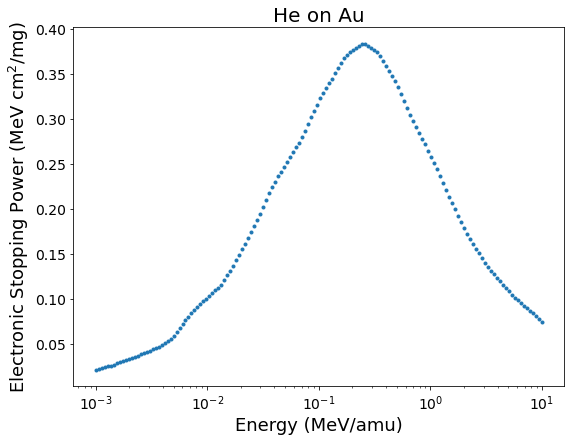
The package automatically produces a matplotlib figure and a sample file named XY_prediction.dat, where X is the name of the projectile and Y is the name of the target system.
ls -a
.  ..  HHe_prediction.dat  prediction.ipynb
Optional arguments
The energy grid used for the ESPNN calculation can be customized with arguments
emin: Minimum energy value in MeV/amu units (default:0.001)emax: Maximum energy value in MeV/amu units (default:10)npoints: Number of grid points (default:150)
Furthermore, the figure plotting and output-file directory path can be modified via
plot: Prediction plot (default:True)outdir: Path to output folder (default:"./")
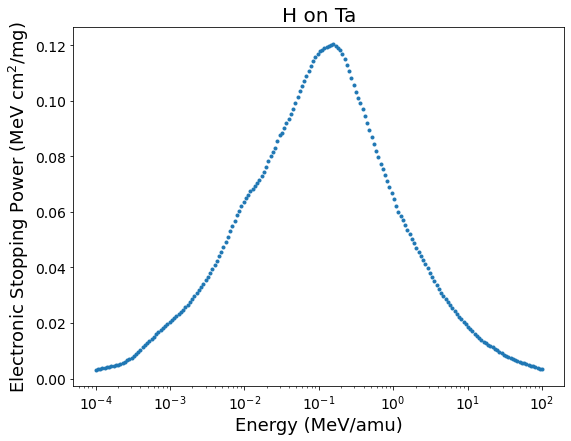
ESPNN.run_NN(projectile='H', target='Ta', emin=0.0001, emax=100, npoints=200)
From terminal
The ESPNN package can also be used from the terminal with a syntax analogous to the above given:
python -m ESPNN H Au
Additional information about the optional arguments input can be obtained with the -h, --help flag:
python -m ESPNN -h
Funding Acknowledgements
The following institutions financially support this work: the Consejo Nacional de Investigaciones Científicas y Técnicas (CONICET) by the PIP-11220200102421CO and the Agencia Nacional de Promoción Científica y Tecnológica (ANPCyT) of Argentina PICT-2020-SERIEA-01931. CCM also acknowledges the financial support of the IAEA.
-
ESPNN first release considers only mono-atomic targets. ↩
1 maintainer

Metadata
1 maintainer
Release files for ESPNN 1.0.1
For a detailed explanation of source distributions (sdists) and built distributions (wheels), please see the package formats documentation.
Source distribution (sdist)
| File | Size | Uploaded | |
|---|---|---|---|
| espnn-1.0.1.tar.gz | 70.6 kB | Details |
Release files / espnn-1.0.1.tar.gz
| Download URL | espnn-1.0.1.tar.gz |
|---|---|
| Size | 70.6 kB |
| Tags | Source |
|
SHA-256 checksum How to use checksums |
6775cb7fbe95a45fe822b4bdd470027f31e6e1ecde155ce0cc7fee82e1522881
|
|
BLAKE2b-256 checksum How to use checksums |
c5b4c538154a01bb4d1124fa97c8c3cd7c57e8c8a124b5c5a7d28b6ab09e2ffb
|
| Upload date | |
|
Uploaded using Trusted Publishing? What is trusted publishing? |
No |
| Uploaded via |
twine/4.0.1 CPython/3.8.17
|














