
Colored messages in the palm of your hand

Project description
Easy Output
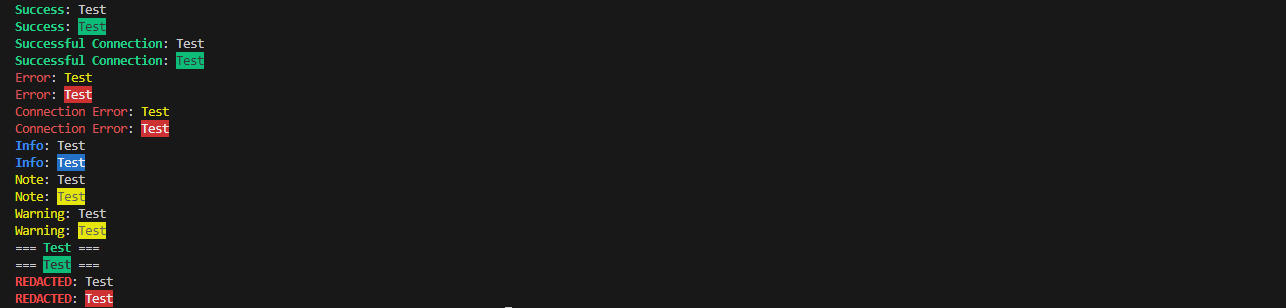
# How to use 👽
from EasyOutput.EasyOutput import *



ChangeLog 📝
Alpha
v0.0.1
ADDED
- Success Message
- Error Message
- Wait Message
v0.0.2
ADDED
- Connection Success Message
- Connection Error Message
v0.0.3
ADDED
- Function Notes

FIXED
- Small Success Message Bugs
v0.0.4
ADDED
- Info Mesage
- Note Message
v0.0.5
ADDED
- Title Print

FIXED
- Calling issues
v0.0.6
ADDED
- REDACTED Message

REMOVED
- Usless Classes
v0.0.7
REMOVED
- Wait Message

ADDED
- Warning Message

FIXED
- imports
v0.0.7.1
FIXED
-
v0.0.8
ADDED
- Highlight Message Option!
v0.0.8.1
FIXED
- Leaving all functions at the bottom of the file... IM SORRY
Information
EasyOutput consists of easy colored print options without the hassle of doing
# You can now highlight your message aswell!
Success_Message("New Highlight!", highlight=True)

# Or keep it og 😄
Success_Message("No Highlight!")
# Same as
Success_Message("No Highlight!", highlight=False)
In reality this is nothing special and just simply for my lazy use. You could easily make these yourself by doing
from colorama import Fore, Style

def Success(message):
    print(f"{Fore.GREEN + Style.BRIGHT}Success{Style.RESET_ALL}: {message}")

# and calling it like so

Success("Your Success Message")
If you would rather save time instead, you can always download it by entering pip install EasyOutput into your terminal!
Feel free to use this in any way you like, all I ask is that you show me your project when finished! 😄
Request a feature
Report an issue
Updating as much as I can!
Functions
Success
Use:
Success_Message("EasyOutput")
Shows:
Success: EasyOutput
Error
Use:
Error_Message("EasyOutput")
Shows:
Error: EasyOutput
PYPI
Badges from: Shields.io
Release history Release notifications | RSS feed


Download files
Download the file for your platform. If you're not sure which to choose, learn more about installing packages.
Source Distribution
Built Distribution
Filter files by name, interpreter, ABI, and platform.
If you're not sure about the file name format, learn more about wheel file names.
Copy a direct link to the current filters
File details
Details for the file easyoutput-0.0.8.1.tar.gz.
File metadata
- Download URL: easyoutput-0.0.8.1.tar.gz
- Upload date:
- Size: 4.5 kB
- Tags: Source
- Uploaded using Trusted Publishing? No
- Uploaded via: twine/5.0.0 CPython/3.12.1
File hashes
| Algorithm | Hash digest | |
|---|---|---|
| SHA256 |
6bda63ea173a1914c272d01cdfe31fe59442873f2576feb3c4cb6f50c22e0291
|
|
| MD5 |
176e9666f6d98dd1de169e191e22ac12
|
|
| BLAKE2b-256 |
e562323a96a5ce1539dd91ad6f347b2ee81c1c8c492bc71a6f951a627dbcd7a8
|
File details
Details for the file easyoutput-0.0.8.1-py3-none-any.whl.
File metadata
- Download URL: easyoutput-0.0.8.1-py3-none-any.whl
- Upload date:
- Size: 4.2 kB
- Tags: Python 3
- Uploaded using Trusted Publishing? No
- Uploaded via: twine/5.0.0 CPython/3.12.1
File hashes
| Algorithm | Hash digest | |
|---|---|---|
| SHA256 |
b1519c9594a506e5686bdc5bb245cd98351c91f01df65e532aac18165ba44a0d
|
|
| MD5 |
d15cef0d2b97159d4f15348e4ad7fa89
|
|
| BLAKE2b-256 |
e7a88945162e78a183c362c7c1054c878185dce311d904e312341e0dc347a893
|






