
ErisPulse-CYOA
CYOA(Choose Your Own Adventure,选择你自己的旅途)— 基于 inkpython 的多平台 Ink 互动小说播放器。
特性
- Ink 原生格式 — 用 Ink 编写,Inky/inklecate 编译
- 跨平台按钮 — Telegram / 云湖 / QQBot 按钮 +
event.choose()回退 - 仓库分发 — 添加 Git 仓库自动获取故事
- 独立存档 — 每用户每故事多槽位
安装
epsdk install CYOA
Docker 部署
docker compose(推荐)
# 复制配置模板
cp -r config/ ./docker-config/

# 编辑配置(填写适配器 token 等)
# vim docker-config/config.toml

# 设置 Dashboard Token(可选)
export ERISPULSE_DASHBOARD_TOKEN=your-token

# 启动
docker compose up -d
docker run
docker run -d \
  --name cyoa-bot \
  -p 8000:8000 \
  -v $(pwd)/config:/app/config \
  -e TZ=Asia/Shanghai \
  -e ERISPULSE_DASHBOARD_TOKEN=your-token \
  --restart unless-stopped \
  ghcr.io/wsu2059q/erispulse-cyoa:latest
命令
/cyoa                        帮助
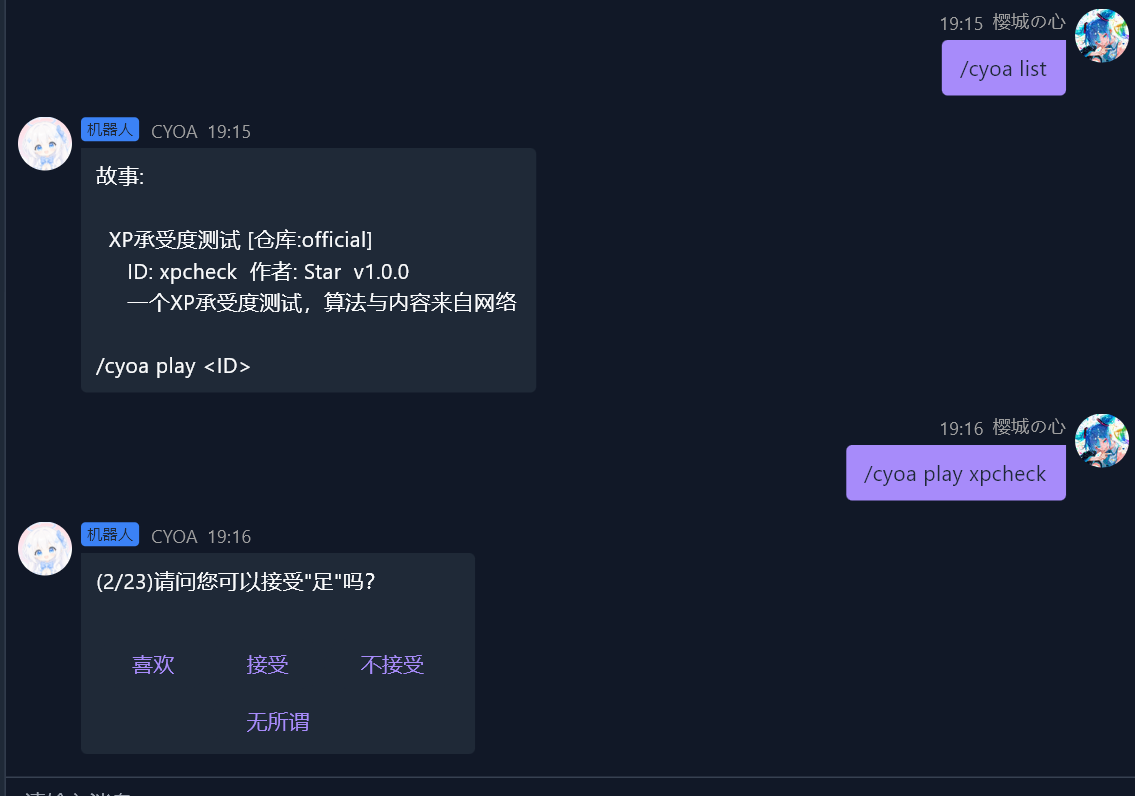
/cyoa list                   故事列表
/cyoa play <ID>              开始
/cyoa import <URL>           导入 .ink.json
/cyoa save|load|restart|quit 游戏管理
/cyoa repo list|add|remove|update  仓库管理
快速开始
导入编译好的 .ink.json 直接玩:
/cyoa import https://example.com/my_story.ink.json
/cyoa play my_story
或添加小说仓库,一次更新就能获取全部故事:
/cyoa repo add <名称> https://raw.githubusercontent.com/<用户>/<仓库>/main
/cyoa repo update
/cyoa list
/cyoa play <故事ID>
推荐仓库
我们维护的官方故事合集:
/cyoa repo add official https://raw.githubusercontent.com/wsu2059q/cyoa-stories/main
贡献请 Fork cyoa-stories。
编写故事
用 Inky 编写 .ink 文件,导出为 .ink.json 后导入。
详见 FORMAT.md。
平台兼容
| 平台 | 交互 |
|---|---|
| Telegram | Inline Keyboard |
| 云湖 | Buttons (actionType=3) |
| QQBot | Keyboard |
| 其他 | event.choose() |
License
MIT
1 maintainer

Release files for ErisPulse-CYOA 1.1.3
For a detailed explanation of source distributions (sdists) and built distributions (wheels), please see the package formats documentation.
Source distribution (sdist)
| File | Size | Uploaded | |
|---|---|---|---|
| erispulse_cyoa-1.1.3.tar.gz | 22.3 kB | Details |
Built distribution (wheel)
| File | Interpreter | ABI | Platform | Reset |
|---|---|---|---|---|
| erispulse_cyoa-1.1.3-py3-none-any.whl | Python 3 | none | any | Details |
Total release size:46.9 kB
Release files / erispulse_cyoa-1.1.3.tar.gz
| Download URL | erispulse_cyoa-1.1.3.tar.gz |
|---|---|
| Size | 22.3 kB |
| Tags | Source |
|
SHA-256 checksum How to use checksums |
483d0553b3c0f5d285e905761593ce46af4b2c37e1e4b85895e8f769ed13c324
|
|
BLAKE2b-256 checksum How to use checksums |
d59c6f95c6fdabdb5e954054e7a9db6d7c252f19fcd32b2ed6a5e33eeaec001a
|
| Upload date | |
|
Uploaded using Trusted Publishing? What is trusted publishing? |
Yes |
| Uploaded via |
twine/6.1.0 CPython/3.13.12
|
Provenance
Provenance describes where a file came from. On PyPI, provenance is shared via attestations, which provide a verifiable record of the build or publishing details. View details, limitations and caveats.


PyPI Publish Attestation
PyPI verified that this artifact, at this checksum, originated from the publisher listed below.
Signed by GitHub Actions, verified by PyPI on May 31, 2026.
Transparency logRelease files / erispulse_cyoa-1.1.3-py3-none-any.whl
| Download URL | erispulse_cyoa-1.1.3-py3-none-any.whl |
|---|---|
| Size | 24.5 kB |
| Tags | Python 3 |
|
SHA-256 checksum How to use checksums |
781b6d614b39f30f41565be5bc98966f3480a97cbb6c7fb543d54c1ea19fa729
|
|
BLAKE2b-256 checksum How to use checksums |
6bd7229edc9cd5cc7136ca7951a819482be67ca7a3ed20111fc247555891c272
|
| Upload date | |
|
Uploaded using Trusted Publishing? What is trusted publishing? |
Yes |
| Uploaded via |
twine/6.1.0 CPython/3.13.12
|
Provenance
Provenance describes where a file came from. On PyPI, provenance is shared via attestations, which provide a verifiable record of the build or publishing details. View details, limitations and caveats.
PyPI Publish Attestation
PyPI verified that this artifact, at this checksum, originated from the publisher listed below.
Signed by GitHub Actions, verified by PyPI on May 31, 2026.
Transparency log













