
FORD (FORtran Documenter) is an automatic documentation generator for modern Fortran programs.


Project description
FORD





This is an automatic documentation generator for modern Fortran programs. FORD stands for FORtran Documenter. As you may know, "to ford" refers to crossing a river (or other body of water). It does not, in this context, refer to any company or individual associated with cars.
Ford was written due to Doxygen's poor handling of Fortran and the lack of comparable alternatives. ROBODoc can't actually extract any information from the source code and just about any other automatic documentation software I found was either proprietary, didn't work very well for Fortran, or was limited in terms of how it produced its output. f90doc is quite good and I managed to modify it so that it could handle most of Fortran 2003, but it produces rather ugly documentation, can't provide as many links between different parts of the documentation as I'd like, and is written in Perl (which I'm not that familiar with and which lacks the sort of libraries found in Python for producing HTML content).
The goal of FORD is to be able to reliably produce documentation for modern Fortran software which is informative and nice to look at. The documentation should be easy to write and non-obtrusive within the code. While it will never be as feature-rich as Doxygen, hopefully FORD will be able to provide a good alternative for documenting Fortran projects.
Capabilities
Current features include:
- the ability to extract information about variables, procedures, procedure arguments, derived types, programs, and modules from the source code.
- the ability to extract documentation from comments in the source code.
- LaTeX support in documentation using MathJax.
- searchable documentation, using Lunr Search.
- author description and social media (including Github!) links.
- links to download the source code.
- links to individual files, both in their raw form or in HTML with syntax highlighting.
- use of Markdown to type-set documentation.
- links between related parts of the software.
- Bootstrap CSS for the documentation, making it both functional and pretty.
- configurable settings.
- ability to create a hierarchical set of pages containing general information, not associated with any particular part of the source code.
- display an entry for non-Fortran source files with file-level documentation and syntax highlighted code.
Installation
The simplest way to install FORD is using pip:
pip install ford
Pip will automatically handle all dependencies for you. By default this will
place ford in ~/.local/bin -- you might need to add this to your PATH.
Alternatively, FORD is available through the Homebrew package manager for Mac OS X. To update Homebrew and install FORD, run these commands in a terminal:
brew update
brew install FORD
If you would like to install the latest development (master) branch from github,
simply add the --HEAD flag: brew install --HEAD FORD
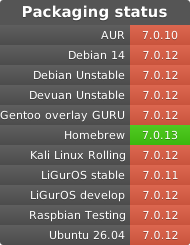
FORD is also available through several system package managers:
Documentation
More complete documentation can be found in the docs.
License
This program is free software: you can redistribute it and/or modify it under the terms of the GNU General Public License as published by the Free Software Foundation, either version 3 of the License, or (at your option) any later version.
This program is distributed in the hope that it will be useful, but without any warrenty; without even the implied warranty of merchantability or fitness for a particular purpose. See the GNU General Public License for more details.
You should have received a copy of the GNU General Public License along with this program. If not, see the GNU website.
Documents produced by FORD are derivative works derived from the input used in their production; they are not affected by this license.
Release history Release notifications | RSS feed


Download files
Download the file for your platform. If you're not sure which to choose, learn more about installing packages.
Source Distribution
Built Distribution
Filter files by name, interpreter, ABI, and platform.
If you're not sure about the file name format, learn more about wheel file names.
Copy a direct link to the current filters
File details
Details for the file ford-7.0.13.tar.gz.
File metadata
- Download URL: ford-7.0.13.tar.gz
- Upload date:
- Size: 6.3 MB
- Tags: Source
- Uploaded using Trusted Publishing? No
- Uploaded via: twine/6.1.0 CPython/3.13.7
File hashes
| Algorithm | Hash digest | |
|---|---|---|
| SHA256 |
482a75b34b9f2b1975cbae9aa1c533a62d63e0c1861b5b772d25aa52fb1ce809
|
|
| MD5 |
1728054f50cd8ad0a8e3f509b70beca4
|
|
| BLAKE2b-256 |
7e22c9688672022dc47456a0dd0a51e0f4310e5c69ef4cd8243c141420421dc9
|
File details
Details for the file ford-7.0.13-py3-none-any.whl.
File metadata
- Download URL: ford-7.0.13-py3-none-any.whl
- Upload date:
- Size: 837.4 kB
- Tags: Python 3
- Uploaded using Trusted Publishing? No
- Uploaded via: twine/6.1.0 CPython/3.13.7
File hashes
| Algorithm | Hash digest | |
|---|---|---|
| SHA256 |
0f6a73fc85db45fea51254165dd13b699dd27f059387aa98d494bbc92e7c8752
|
|
| MD5 |
d9f526d66812a986e181ee9e5dd85d9a
|
|
| BLAKE2b-256 |
f8f6fe778029784e2849ac84a828247ba60a358d91fa8dbe67dfc988aa60c56c
|






