
FastSQLA
Async SQLAlchemy 2.0+ for FastAPI — boilerplate, pagination, and seamless session management.






Documentation: https://hadrien.github.io/FastSQLA/
Github Repo: https://github.com/hadrien/fastsqla
FastSQLA is an async SQLAlchemy 2.0+
extension for FastAPI with built-in pagination,
SQLModel support and more.
It streamlines the configuration and asynchronous connection to relational databases by
providing boilerplate and intuitive helpers. Additionally, it offers built-in
customizable pagination and automatically manages the SQLAlchemy session lifecycle
following SQLAlchemy's best practices.
Features
-
Easy setup at app startup using
FastAPILifespan:from fastapi import FastAPI from fastsqla import lifespan app = FastAPI(lifespan=lifespan)
-
SQLAlchemyasync session dependency:... from fastsqla import Session from sqlalchemy import select ... @app.get("/heros") async def get_heros(session:Session): stmt = select(...) result = await session.execute(stmt) ...
-
SQLAlchemyasync session with an async context manager:from fastsqla import open_session async def background_job(): async with open_session() as session: stmt = select(...) result = await session.execute(stmt) ...
-
Built-in pagination:
...
from fastsqla import Page, Paginate
from sqlalchemy import select
...

@app.get("/heros", response_model=Page[HeroModel])
async def get_heros(paginate:Paginate):
    return await paginate(select(Hero))
👇
/heros?offset=10&limit=10👇{ "data": [ { "name": "The Flash", "secret_identity": "Barry Allen", "id": 11 }, { "name": "Green Lantern", "secret_identity": "Hal Jordan", "id": 12 } ], "meta": { "offset": 10, "total_items": 12, "total_pages": 2, "page_number": 2 } }
-
Pagination customization:
from typing import Annotated from fastapi import Depends from fastsqla import Page, PaginateType, new_pagination CustomPaginate = Annotated[ PaginateType[HeroModel], Depends(new_pagination(default_page_size=5, max_page_size=500)), ] @app.get("/heroes", response_model=Page[HeroModel]) async def get_heroes(paginate: CustomPaginate): return await paginate(select(Hero))
-
Session lifecycle management: session is commited on request success or rollback on failure.
-
SQLModelsupport:... from fastsqla import Item, Page, Paginate, Session from sqlmodel import Field, SQLModel ... class Hero(SQLModel, table=True): id: int | None = Field(default=None, primary_key=True) name: str secret_identity: str age: int @app.get("/heroes", response_model=Page[Hero]) async def get_heroes(paginate: Paginate): return await paginate(select(Hero)) @app.get("/heroes/{hero_id}", response_model=Item[Hero]) async def get_hero(session: Session, hero_id: int): hero = await session.get(Hero, hero_id) if hero is None: raise HTTPException(status_code=HTTPStatus.NOT_FOUND) return {"data": hero}
Installing
Using uv:
uv add fastsqla
Using pip:
pip install fastsqla
Quick Example
example.py
Let's write some tiny app in example.py:
# example.py
from http import HTTPStatus
from fastapi import FastAPI, HTTPException
from fastsqla import Base, Item, Page, Paginate, Session, lifespan
from pydantic import BaseModel, ConfigDict
from sqlalchemy import select
from sqlalchemy.exc import IntegrityError
from sqlalchemy.orm import Mapped, mapped_column
app = FastAPI(lifespan=lifespan)
class Hero(Base):
__tablename__ = "hero"
id: Mapped[int] = mapped_column(primary_key=True)
name: Mapped[str] = mapped_column(unique=True)
secret_identity: Mapped[str]
age: Mapped[int]
class HeroBase(BaseModel):
name: str
secret_identity: str
age: int
class HeroModel(HeroBase):
model_config = ConfigDict(from_attributes=True)
id: int
@app.get("/heros", response_model=Page[HeroModel])
async def list_heros(paginate: Paginate):
stmt = select(Hero)
return await paginate(stmt)
@app.get("/heros/{hero_id}", response_model=Item[HeroModel])
async def get_hero(hero_id: int, session: Session):
hero = await session.get(Hero, hero_id)
if hero is None:
raise HTTPException(HTTPStatus.NOT_FOUND, "Hero not found")
return {"data": hero}
@app.post("/heros", response_model=Item[HeroModel])
async def create_hero(new_hero: HeroBase, session: Session):
hero = Hero(**new_hero.model_dump())
session.add(hero)
try:
await session.flush()
except IntegrityError:
raise HTTPException(HTTPStatus.CONFLICT, "Duplicate hero name")
return {"data": hero}
Database
💡 This example uses an SQLite database for simplicity: FastSQLA is compatible with
all asynchronous db drivers that SQLAlchemy is compatible with.
Let's create an SQLite database using sqlite3 and insert 12 rows in the hero table:
sqlite3 db.sqlite <<EOF
-- Create Table hero
CREATE TABLE hero (
id INTEGER PRIMARY KEY AUTOINCREMENT,
name TEXT NOT NULL UNIQUE, -- Unique hero name (e.g., Superman)
secret_identity TEXT NOT NULL, -- Secret identity (e.g., Clark Kent)
age INTEGER NOT NULL -- Age of the hero (e.g., 30)
);
-- Insert heroes with their name, secret identity, and age
INSERT INTO hero (name, secret_identity, age) VALUES ('Superman', 'Clark Kent', 30);
INSERT INTO hero (name, secret_identity, age) VALUES ('Batman', 'Bruce Wayne', 35);
INSERT INTO hero (name, secret_identity, age) VALUES ('Wonder Woman', 'Diana Prince', 30);
INSERT INTO hero (name, secret_identity, age) VALUES ('Iron Man', 'Tony Stark', 45);
INSERT INTO hero (name, secret_identity, age) VALUES ('Spider-Man', 'Peter Parker', 25);
INSERT INTO hero (name, secret_identity, age) VALUES ('Captain America', 'Steve Rogers', 100);
INSERT INTO hero (name, secret_identity, age) VALUES ('Black Widow', 'Natasha Romanoff', 35);
INSERT INTO hero (name, secret_identity, age) VALUES ('Thor', 'Thor Odinson', 1500);
INSERT INTO hero (name, secret_identity, age) VALUES ('Scarlet Witch', 'Wanda Maximoff', 30);
INSERT INTO hero (name, secret_identity, age) VALUES ('Doctor Strange', 'Stephen Strange', 40);
INSERT INTO hero (name, secret_identity, age) VALUES ('The Flash', 'Barry Allen', 28);
INSERT INTO hero (name, secret_identity, age) VALUES ('Green Lantern', 'Hal Jordan', 35);
EOF
Run the app
Let's install required dependencies:
pip install uvicorn aiosqlite fastsqla
Let's run the app:
sqlalchemy_url=sqlite+aiosqlite:///db.sqlite?check_same_thread=false \
uvicorn example:app
Check the result
Execute GET /heros?offset=10&limit=10 using curl:
curl -X 'GET' -H 'accept: application/json' 'http://127.0.0.1:8000/heros?offset=10&limit=10'
Returns:
{
  "data": [
    {
      "name": "The Flash",
      "secret_identity": "Barry Allen",
      "id": 11
    },
    {
      "name": "Green Lantern",
      "secret_identity": "Hal Jordan",
      "id": 12
    }
  ],
  "meta": {
    "offset": 10,
    "total_items": 12,
    "total_pages": 2,
    "page_number": 2
  }
}
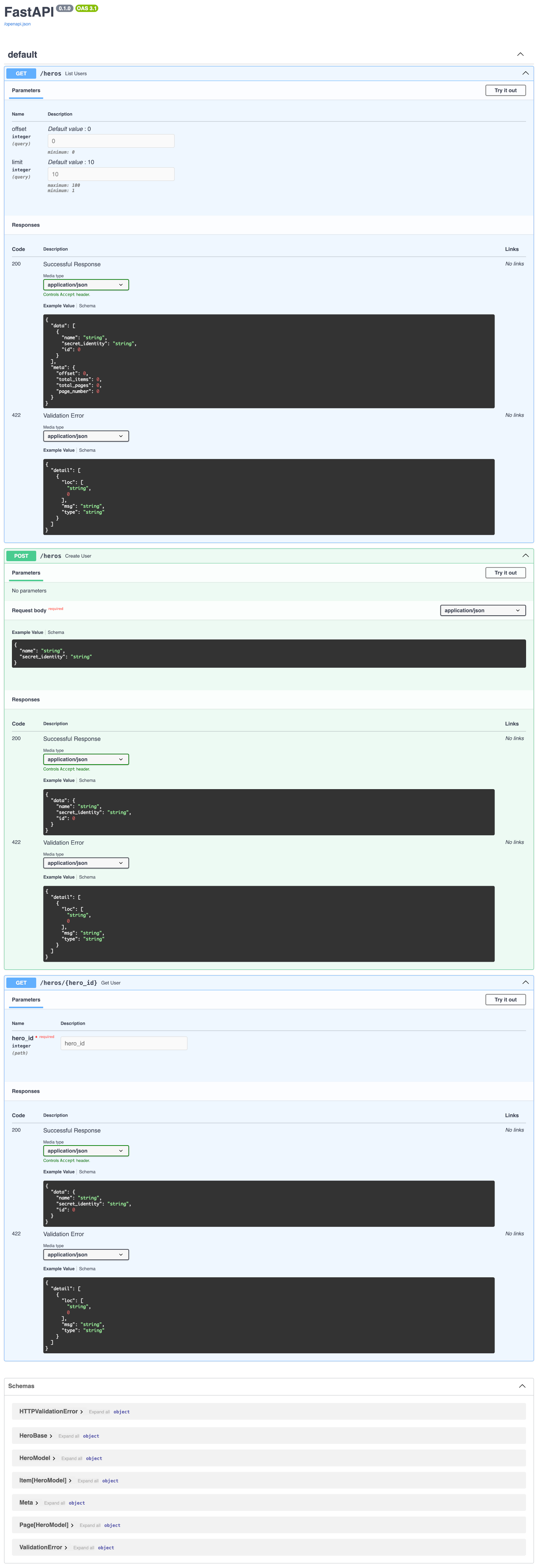
You can also check the generated openapi doc by opening your browser to http://127.0.0.1:8000/docs.
License
This project is licensed under the terms of the MIT license.
For coding agents and LLMs
FastSQLA publishes agent-readable documentation alongside the website:
llms.txtis the concise documentation index.llms-full.txtcontains the complete documentation in one file.- Every indexed page has a Markdown twin, such as
setup/index.md. - Context7 serves the current documentation and FastSQLA-specific usage rules.
The repository also bundles Agent Skills for setup, session management, and pagination. Install all three as one plugin:
Claude Code
claude plugin marketplace add hadrien/FastSQLA
claude plugin install fastsqla@fastsqla
Codex
codex plugin marketplace add hadrien/FastSQLA
codex plugin add fastsqla@fastsqla
1 maintainer

Download files
Download the file for your platform. If you're not sure which to choose, learn more about installing packages.
Source Distribution
Built Distribution
Filter files by name, interpreter, ABI, and platform.
If you're not sure about the file name format, learn more about wheel file names.
Copy a direct link to the current filters
File details
Details for the file fastsqla-0.8.1.tar.gz.
File metadata
- Download URL: fastsqla-0.8.1.tar.gz
- Upload date:
- Size: 11.4 kB
- Tags: Source
- Uploaded using Trusted Publishing? No
- Uploaded via: twine/6.2.0 CPython/3.12.3
File hashes
| Algorithm | Hash digest | |
|---|---|---|
| SHA256 |
bb3a8c932251122eead27e887a909dd350aa10fca089226f20436b9b0279d388
|
|
| MD5 |
0d1348c86e1ac3a711ae72e49e85ec04
|
|
| BLAKE2b-256 |
1ae92ff6ac37119707128b420ed4e48a3fd4af7f0df5c8e501439e261fd8ceff
|
File details
Details for the file fastsqla-0.8.1-py3-none-any.whl.
File metadata
- Download URL: fastsqla-0.8.1-py3-none-any.whl
- Upload date:
- Size: 10.3 kB
- Tags: Python 3
- Uploaded using Trusted Publishing? No
- Uploaded via: twine/6.2.0 CPython/3.12.3
File hashes
| Algorithm | Hash digest | |
|---|---|---|
| SHA256 |
936205b080da2684799b6bf497118abd2fe233a260683ff5c2b1e0f9ec59f56e
|
|
| MD5 |
ada2e2f040ebf56889dc0bcbd2c30e1a
|
|
| BLAKE2b-256 |
3948e756a6c9907619fa594d53700f207f553f2a12e7313d11f3a9221c528d3b
|







