

FireEye
AWS Monitoring Toolkit



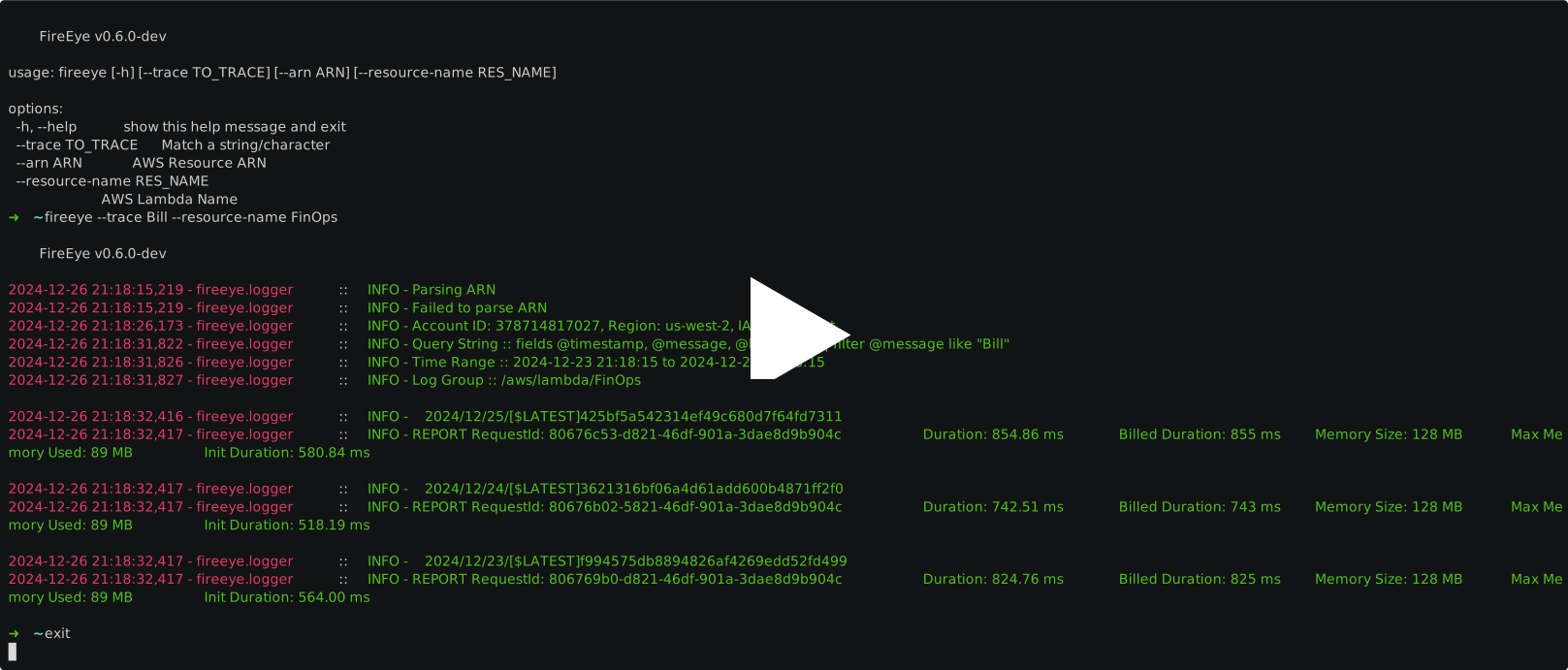
FireEye is an AWS monitoring toolkit for DevOps, Security, and IT teams. It can currently trace strings in AWS Lambda function(s) output logs via CloudWatch using simple commands.
Installation
git clone https://github.com/r0075h3ll/FireEye && cd FireEye
pip install .

# or

pip install FireEye-AWS
Credentials
FireEye uses your existing AWS configuration. It reads AWS_ACCESS_KEY_ID, AWS_SECRET_ACCESS_KEY and
AWS_DEFAULT_REGION if they are set, and otherwise falls back to whatever boto3 finds: ~/.aws/credentials,
a profile, or an instance role.
A region is required. Without one you get You must specify a region. and exit status 1.
The IAM permissions needed are logs:StartQuery, logs:GetQueryResults, logs:StopQuery and
sts:GetCallerIdentity.
Features
Monitor Lambda functions w/ CloudWatch Logs Insights
fireeye --trace Bill --resource-name lambda_name
--resource-name also accepts a log group directly, and --arn accepts a Lambda or EC2 ARN,
qualified ones included:
fireeye --trace Bill --resource-name /aws/lambda/lambda_name
fireeye --trace Bill --arn arn:aws:lambda:us-east-1:123456789012:function:lambda_name:PROD
Monitor EC2 instances
EC2 log groups are named by whoever set up the CloudWatch agent, so pass the group explicitly. Logs are scoped to the streams belonging to the instance.
fireeye --trace "Out of memory" --resource-name i-0abc1234 --log-group /var/log/syslog
Instance scoping assumes the CloudWatch agent writes one stream per instance named after the
instance ID, which is what "log_stream_name": "{instance_id}" produces. Verified against agent
1.300069.1 on Amazon Linux 2023.
If your agent uses something else, {hostname} or a fixed string, then --resource-name i-0abc1234
matches no streams and returns nothing. FireEye cannot tell that apart from a search that genuinely
found no lines. Search the group directly instead, which reads every stream in it:
fireeye --trace "Out of memory" --resource-name /var/log/syslog
Check what your agent is doing with aws logs describe-log-streams --log-group-name <group>.
Search
--trace is a plain substring match by default. Pass --regex to use a CloudWatch regex
instead, which also gets you case-insensitive and multi-term searches:
fireeye --trace '(?i)error|timeout' --resource-name lambda_name --regex --days 7 --limit 200
--days sets how far back to look (default 3) and --limit caps the number of lines
returned (default 100). Both must be 1 or greater.
Without --trace the search term defaults to duration.
Get alerts on a Slack channel
export SLACK_URL=https://slack-webhook-url
fireeye --trace Bill --resource-name lambda_name --slack-url

# or pass it inline
fireeye --trace Bill --resource-name lambda_name --slack-url https://slack-webhook-url
An alert that cannot be delivered is an error, not a warning: if the webhook is unreachable, returns a non-200, or is not set at all, FireEye exits 1. Long results are trimmed to fit Slack's message limit and the remainder is counted in a trailing line.
Output and exit status
Matched log lines go to stdout. Everything else, banner and progress and errors, goes to stderr, so results can be piped or redirected on their own:
fireeye --trace ERROR --resource-name lambda_name > matches.txt
| Status | Meaning |
|---|---|
| 0 | Ran successfully, whether or not anything matched |
| 1 | Failed: no credentials, no region, missing log group, access denied, bad query, Slack alert not delivered |
| 2 | Bad arguments |
Errors print as a single line. Add --debug for the full traceback.
This makes it usable from cron:
0 * * * * fireeye --trace ERROR --resource-name lambda_name --slack-url || logger fireeye failed
Development
python3 test_fireeye.py
No test framework needed. The checks cover ARN parsing, query building and escaping, result handling, and the Slack payload, and they make no AWS calls.
Testing against a local AWS
MiniStack emulates CloudWatch Logs locally, so the AWS paths can be exercised without touching a real account or paying for Logs Insights scans. It is pure Python and needs no Docker.
pip install ministack
ministack -d          # starts on port 4566, `ministack --stop` to stop
Seed a log group with a Lambda stream and an EC2 style stream:
import time, boto3

logs = boto3.client(
    "logs", region_name="us-east-1", endpoint_url="http://127.0.0.1:4566",
    aws_access_key_id="test", aws_secret_access_key="test",
)
group = "/aws/lambda/example-fn"
logs.create_log_group(logGroupName=group)

now = int(time.time() * 1000)
for stream, events in {
    "2026/01/01/[$LATEST]aaaa": ["REPORT RequestId: 1111\tDuration: 514.37 ms", "ERROR exploded"],
    "i-0abc1234": ["kernel: Out of memory: Killed process 999"],
}.items():
    logs.create_log_stream(logGroupName=group, logStreamName=stream)
    logs.put_log_events(
        logGroupName=group, logStreamName=stream,
        logEvents=[{"timestamp": now - 1000 * i, "message": m} for i, m in enumerate(events)],
    )
Point FireEye at it with AWS_ENDPOINT_URL and any non-empty credentials:
export AWS_ENDPOINT_URL=http://127.0.0.1:4566
export AWS_ACCESS_KEY_ID=test AWS_SECRET_ACCESS_KEY=test AWS_DEFAULT_REGION=us-east-1

fireeye --resource-name example-fn --trace ERROR --regex
fireeye --resource-name i-0abc1234 --log-group /aws/lambda/example-fn --trace '(?i)out of memory' --regex
Two differences from real CloudWatch are worth knowing before you trust a result:
- MiniStack does not apply
filter @message like "text", the quoted form, and returns every event instead. The regex form,like /text/, filters correctly. So use--regexlocally. Real CloudWatch filters both, verified against a live account. - A query run immediately after seeding can come back empty. Retry before believing it.
MiniStack cannot tell you whether a CloudWatch agent on a real instance names its streams after the instance ID. That is a matter of how the agent is configured, not something the code decides.
To Do
- EC2 Log Monitoring
- Send alerts on slack channel
- Improved search capabilities
Contributions
You're welcome to open PR for making direct contributions to the project. Additionally, "Issues" section will be considered for
- bug reports
- feature requests
1 maintainer

Release files for FireEye-AWS 0.7.0
For a detailed explanation of source distributions (sdists) and built distributions (wheels), please see the package formats documentation.
Source distribution (sdist)
| File | Size | Uploaded | |
|---|---|---|---|
| fireeye_aws-0.7.0.tar.gz | 18.3 kB | Details |
Built distribution (wheel)
| File | Interpreter | ABI | Platform | Reset |
|---|---|---|---|---|
| fireeye_aws-0.7.0-py3-none-any.whl | Python 3 | none | any | Details |
Total release size: 35.3 kB
Release files / fireeye_aws-0.7.0.tar.gz
| Download URL | fireeye_aws-0.7.0.tar.gz |
|---|---|
| Size | 18.3 kB |
| Tags | Source |
|
SHA-256 checksum How to use checksums |
fb2ec8ede9d74fcd23e33355bca86a4fbec58aadf00475b5af8afdc9c36b915e
|
|
BLAKE2b-256 checksum How to use checksums |
56b137525ce04d8e4a860c84fd7a4ca176a8d43f36b5dd3d6479fddb20a9d8a3
|
| Upload date | |
|
Uploaded using Trusted Publishing? What is trusted publishing? |
Yes |
| Uploaded via |
twine/7.0.0 CPython/3.13.14
|
Provenance
Provenance describes where a file came from. On PyPI, provenance is shared via attestations, which provide a verifiable record of the build or publishing details. View details, limitations and caveats.


PyPI Publish Attestation
PyPI verified that this artifact, at this checksum, originated from the publisher listed below.
Signed by GitHub Actions, verified by PyPI on Aug 29, 2026.
Transparency logRelease files / fireeye_aws-0.7.0-py3-none-any.whl
| Download URL | fireeye_aws-0.7.0-py3-none-any.whl |
|---|---|
| Size | 17.0 kB |
| Tags | Python 3 |
|
SHA-256 checksum How to use checksums |
d638d5d958da144d277a3491722ddb99737d43bd3894f4c8e332b040a558ddcf
|
|
BLAKE2b-256 checksum How to use checksums |
0571f538d8fecbb9975064498e29237ea312b02993853e7ea847d1a0fdcd4648
|
| Upload date | |
|
Uploaded using Trusted Publishing? What is trusted publishing? |
Yes |
| Uploaded via |
twine/7.0.0 CPython/3.13.14
|
Provenance
Provenance describes where a file came from. On PyPI, provenance is shared via attestations, which provide a verifiable record of the build or publishing details. View details, limitations and caveats.
PyPI Publish Attestation
PyPI verified that this artifact, at this checksum, originated from the publisher listed below.
Signed by GitHub Actions, verified by PyPI on Aug 29, 2026.
Transparency log













