
Flask-RestGlue(ALPHA)
Integrates Flask + MongoDB + OpenAPI in a simple and elegant way!
Explore the docs »
View Demo
·
Report Bug
·
Request Feature









Contents
Table of Contents
Example
For a fullstack boilerplate, visit https://github.com/abassel/Flask_RestGlue_Svelte_Docker
import mongoengine as mongo
from flask_rest_glue import FlaskRestGlue

mongo.connect("pyglue", host='localhost:27017')

api = FlaskRestGlue()


@api.rest_model()
class User(mongo.Document):
  # id = mongo.StringField(primary_key=True)
  email = mongo.StringField(primary_key=True)
  password = mongo.StringField()


api.run()
Go to http://127.0.0.1:5000/spec_doc or http://127.0.0.1:5000/spec_rdoc to see the documentation bellow:
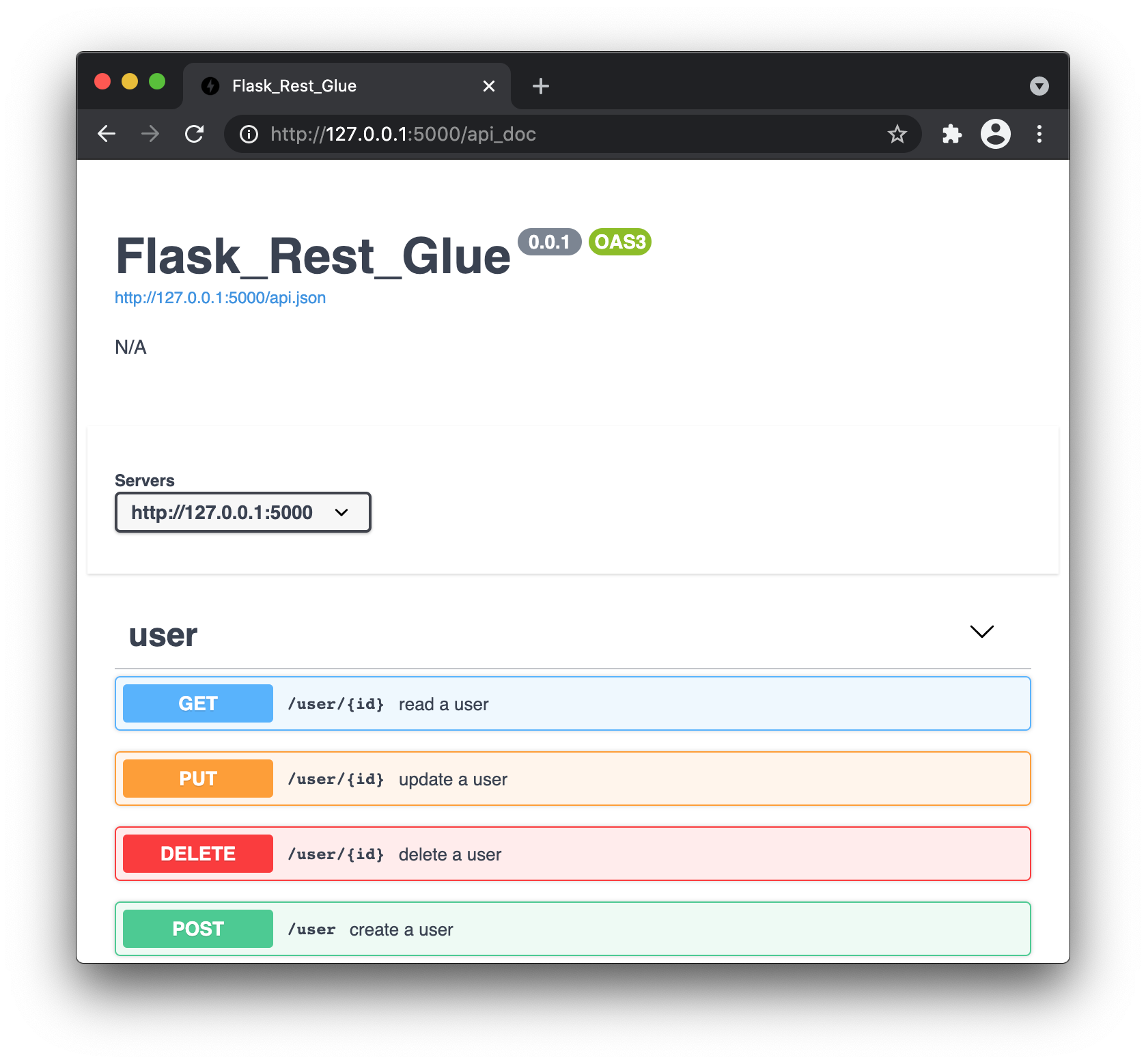
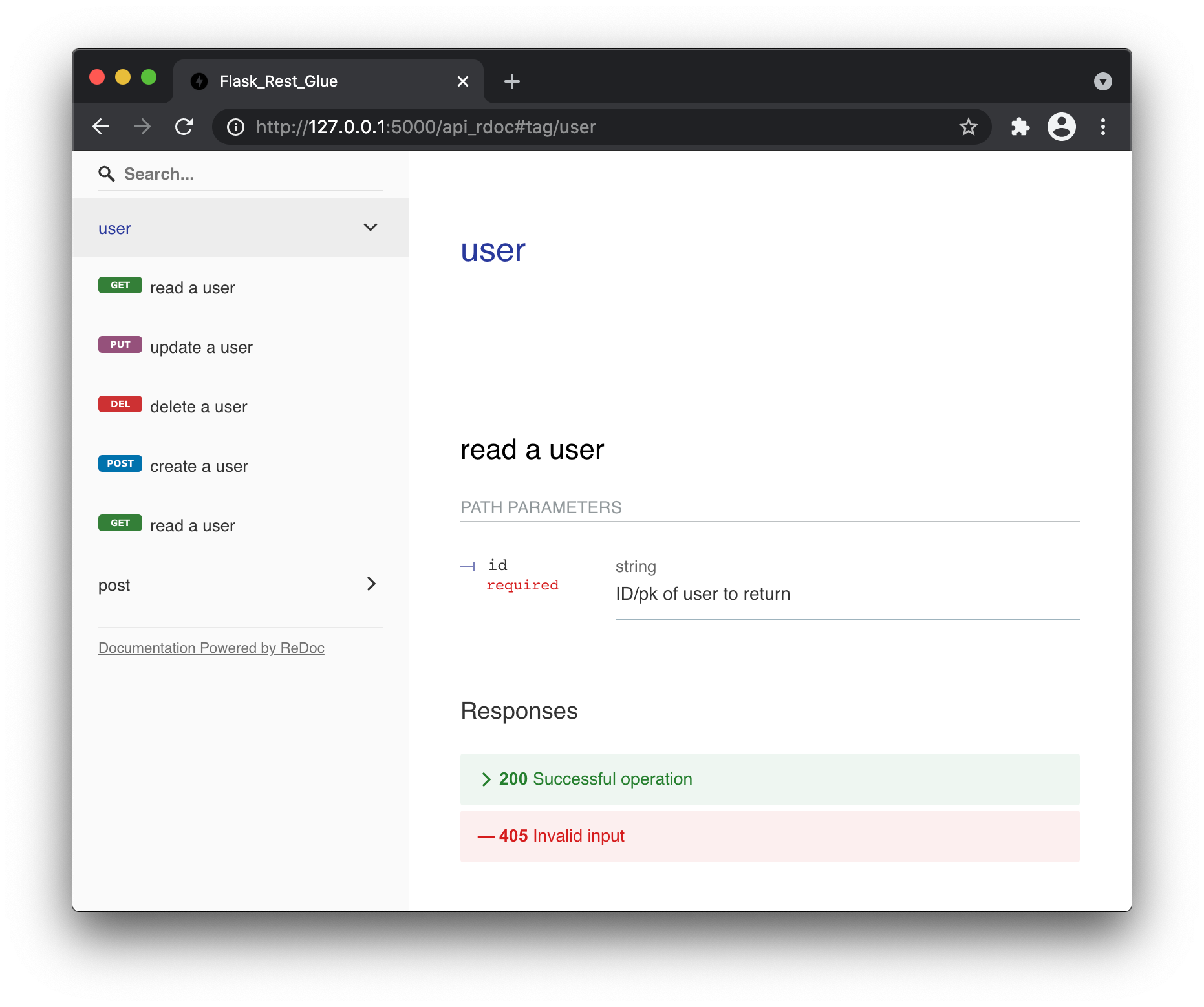
Expected output:
curl -v -d '{"email":"a@b.com","password":"xyz"}' \
     -H "Content-Type: application/json" http://localhost:5000/user

#< HTTP/1.0 200 OK
#< Content-Type: application/json
#< Content-Length: 45
#<
#{
#  "_id": "a@b.com",
#  "password": "xyz"
#}


curl -v http://localhost:5000/users
#< HTTP/1.0 200 OK
#< Content-Type: application/json
#< Content-Length: 57
#<
#[
#  {
#    "_id": "a@b.com",
#    "password": "xyz"
#  }
#]


curl -v http://localhost:5000/user/a@b.com
#< HTTP/1.0 200 OK
#< Content-Type: application/json
#< Content-Length: 45
#<
#{
#  "_id": "a@b.com",
#  "password": "xyz"
#}


curl -v -X PUT -d '{"password":"new_pass"}' \
     -H "Content-Type: application/json" http://localhost:5000/user/a@b.com
#< HTTP/1.0 200 OK
#< Content-Type: application/json
#< Content-Length: 50
#<
#{
#  "_id": "a@b.com",
#  "password": "new_pass"
#}


curl -v -X DELETE http://localhost:5000/user/a@b.com
#< HTTP/1.0 200 OK
#< Content-Type: application/json
#< Content-Length: 45
#<
#{
#  "_id": "a@b.com",
#  "password": "xyz"
#}
Quick Start
Requires docker and python 3.9
1 - install local MongoDB
mkdir -p ~/mongodata

docker run -d --rm -p 27017:27017 -v ~/mongodata:/data/db --name mongodb mongo
2 - Install this library
pip install Flask-RestGlue
3 - Pull the code
curl -s -O -L  https://github.com/abassel/Flask-RestGlue/blob/master/example/tut01_hello_world.py
curl -s -O -L  https://github.com/abassel/Flask-RestGlue/blob/master/example/tut01_hello_world.sh
4 - Run the code
python tut01_hello_world.py
In another terminal window
bash tut01_hello_world.sh
References 📓
1 maintainer

Metadata
1 maintainer
Release files for flask-restglue 0.0.4
For a detailed explanation of source distributions (sdists) and built distributions (wheels), please see the package formats documentation.
Source distribution (sdist)
| File | Size | Uploaded | |
|---|---|---|---|
| Flask-RestGlue-0.0.4.tar.gz | 12.0 kB | Details |
Built distribution (wheel)
| File | Interpreter | ABI | Platform | Reset |
|---|---|---|---|---|
| Flask_RestGlue-0.0.4-py3-none-any.whl | Python 3 | none | any | Details |
Total release size: 22.3 kB
Release files / Flask-RestGlue-0.0.4.tar.gz
| Download URL | Flask-RestGlue-0.0.4.tar.gz |
|---|---|
| Size | 12.0 kB |
| Tags | Source |
|
SHA-256 checksum How to use checksums |
e98819fc2dc00d71b56c1005ba784b864d98619123ae96385469f050974a2a00
|
|
BLAKE2b-256 checksum How to use checksums |
400813f516d46a8c6f1fc94e2ddb7ec13e089330e11144b194408c58e7a3621a
|
| Upload date | |
|
Uploaded using Trusted Publishing? What is trusted publishing? |
No |
| Uploaded via |
poetry/1.1.4 CPython/3.8.6 Linux/5.4.0-1032-azure
|
Release files / Flask_RestGlue-0.0.4-py3-none-any.whl
| Download URL | Flask_RestGlue-0.0.4-py3-none-any.whl |
|---|---|
| Size | 10.3 kB |
| Tags | Python 3 |
|
SHA-256 checksum How to use checksums |
7f68cc607b22eec318e27fdcd0520da8e0343ae9f7cc866499404fc56afb5a3a
|
|
BLAKE2b-256 checksum How to use checksums |
d8cb4f4f3cf7f8f180fabd4eb72fee2f29519c6ede95101e75b2f98e98975941
|
| Upload date | |
|
Uploaded using Trusted Publishing? What is trusted publishing? |
No |
| Uploaded via |
poetry/1.1.4 CPython/3.8.6 Linux/5.4.0-1032-azure
|














