

FlowCyPy: Flow Cytometer Simulation Tool
Meta |
|||
Testing |
|||
PyPi |
|||
Anaconda |











Overview
FlowCyPy is a cutting-edge Python library designed to simulate flow cytometer experiments. By generating realistic Forward Scatter (FSC) and Side Scatter (SSC) signals, FlowCyPy enables detailed modeling of flow cytometry setups, making it ideal for researchers and engineers working with extracellular vesicles (EVs) or other scatterers.
Key Features
Particle Event Simulation: Create detailed FSC/SSC signals with customizable particle size and refractive index distributions.
Noise and Signal Modeling: Incorporate realistic noise sources (thermal, shot, dark current) and baseline shifts.
Detector Configurations: Simulate real-world detector behaviors, including saturation and responsivity.
Fluorescence Modeling: Simulate fluorescence signals for labeled particles (e.g., EV surface markers).
Visualization Tools: Generate advanced plots, including density maps and signal traces.
For full documentation and examples, visit the FlowCyPy Documentation.
Installation
Install FlowCyPy via pip or conda`:
pip install FlowCyPy
conda install FlowCyPy --channels MartinPdeSRequirements: Python 3.11 or higher with dependencies: numpy, pint, tabulate, seaborn, MPSPlots, PyMieSim, pydantic>=2.6.3
Prebuilt wheels are published for Linux x86_64 and macOS ARM64. Other platforms require building from source with FFTW and OpenMP available.
Quick Start
Simulate a simple flow cytometer experiment:
from FlowCyPy.units import ureg
from FlowCyPy.fluidics import (
    Fluidics,
    FlowCell,
    ScattererCollection,
    populations,
    SampleFlowRate,
    SheathFlowRate,
)

# from FlowCyPy.sampling_method import GammaModel, ExplicitModel
from FlowCyPy.fluidics import distributions

flow_cell = FlowCell(
    sample_volume_flow=SampleFlowRate.MEDIUM.value,
    sheath_volume_flow=SheathFlowRate.MEDIUM.value,
    width=400 * ureg.micrometer,
    height=150 * ureg.micrometer,
)

scatterer_collection = ScattererCollection()

medium_refractive_index = distributions.Delta(1.33)

diameter_dist = distributions.RosinRammler(
    scale=200 * ureg.nanometer,
    shape=10,
)

ri_dist = distributions.Normal(
    mean=1.44,
    standard_deviation=0.002,
    low_cutoff=1.33,
)

sampling_method = populations.ExplicitModel()

population_0 = populations.SpherePopulation(
    name="Pop 0",
    medium_refractive_index=medium_refractive_index,
    concentration=1e10 * ureg.particle / ureg.milliliter,
    diameter=diameter_dist,
    refractive_index=ri_dist,
    sampling_method=sampling_method,
)


diameter_dist = distributions.RosinRammler(
    scale=30 * ureg.nanometer,
    shape=50,
)

ri_dist = distributions.Normal(
    mean=1.44,
    standard_deviation=0.002,
    low_cutoff=1.33,
)

population_1 = populations.SpherePopulation(
    name="Pop 1",
    medium_refractive_index=medium_refractive_index,
    concentration=5e11 * ureg.particle / ureg.milliliter,
    diameter=diameter_dist,
    refractive_index=ri_dist,
    sampling_method=populations.GammaModel(number_of_samples=5_000),
)

scatterer_collection.add_population(population_0, population_1)

scatterer_collection.dilute(factor=80)

fluidics = Fluidics(scatterer_collection=scatterer_collection, flow_cell=flow_cell)

# %%
# Step 2: Define Optical Subsystem
# --------------------------------
from FlowCyPy.opto_electronics import (
    Detector,
    Digitizer,
    OptoElectronics,
    Amplifier,
    source,
    circuits,
)

analog_processing = [
    circuits.BaselineRestorationServo(time_constant=100 * ureg.microsecond),
    circuits.BesselLowPass(cutoff_frequency=2 * ureg.megahertz, order=4, gain=2),
]

source = source.Gaussian(
    waist_z=10e-6 * ureg.meter,  # Beam waist along flow direction (z-axis)
    waist_y=60e-6 * ureg.meter,
    wavelength=405 * ureg.nanometer,
    optical_power=200 * ureg.milliwatt,
    rin=-140 * ureg.dB_per_Hz,
    bandwidth=10 * ureg.megahertz,
)

detectors = [
    Detector(
        name="side",
        phi_angle=90 * ureg.degree,
        numerical_aperture=1.1,
        responsivity=1 * ureg.ampere / ureg.watt,
    ),
    Detector(
        name="forward",
        phi_angle=0 * ureg.degree,
        numerical_aperture=0.3,
        cache_numerical_aperture=0.1,
        responsivity=1 * ureg.ampere / ureg.watt,
    ),
]

digitizer = Digitizer(
    sampling_rate=60 * ureg.megahertz,
    bit_depth=14,
    use_auto_range=True,
    channel_range_mode="shared",
)

amplifier = Amplifier(
    gain=10 * ureg.volt / ureg.ampere,
    bandwidth=10 * ureg.megahertz,
    voltage_noise_density=0.0 * ureg.nanovolt / ureg.sqrt_hertz,
    current_noise_density=0.0 * ureg.femtoampere / ureg.sqrt_hertz,
)

opto_electronics = OptoElectronics(
    digitizer=digitizer,
    detectors=detectors,
    source=source,
    amplifier=amplifier,
    analog_processing=analog_processing,
)


# %%
# Step 3: Signal Processing Configuration
# ---------------------------------------
from FlowCyPy.digital_processing import (
    DigitalProcessing,
    peak_locator,
    discriminator,
)

triggering = discriminator.FixedWindow(
    trigger_channel="side",
    threshold="4sigma",
    pre_buffer=40,
    post_buffer=40,
    max_triggers=-1,
)

peak_algo = peak_locator.GlobalPeakLocator()

digital_processing = DigitalProcessing(
    discriminator=triggering,
    peak_algorithm=peak_algo,
)

# %%
# Step 4: Run Simulation
# ----------------------
from FlowCyPy import FlowCytometer

cytometer = FlowCytometer(
    fluidics=fluidics,
    background_power=0.001 * ureg.milliwatt,
)

run_record = cytometer.run(
    opto_electronics=opto_electronics,
    digital_processing=digital_processing,
    run_time=1 * ureg.millisecond,
)

run_record.event_collection.plot(x="Diameter")

run_record.event_collection.plot(x="forward")

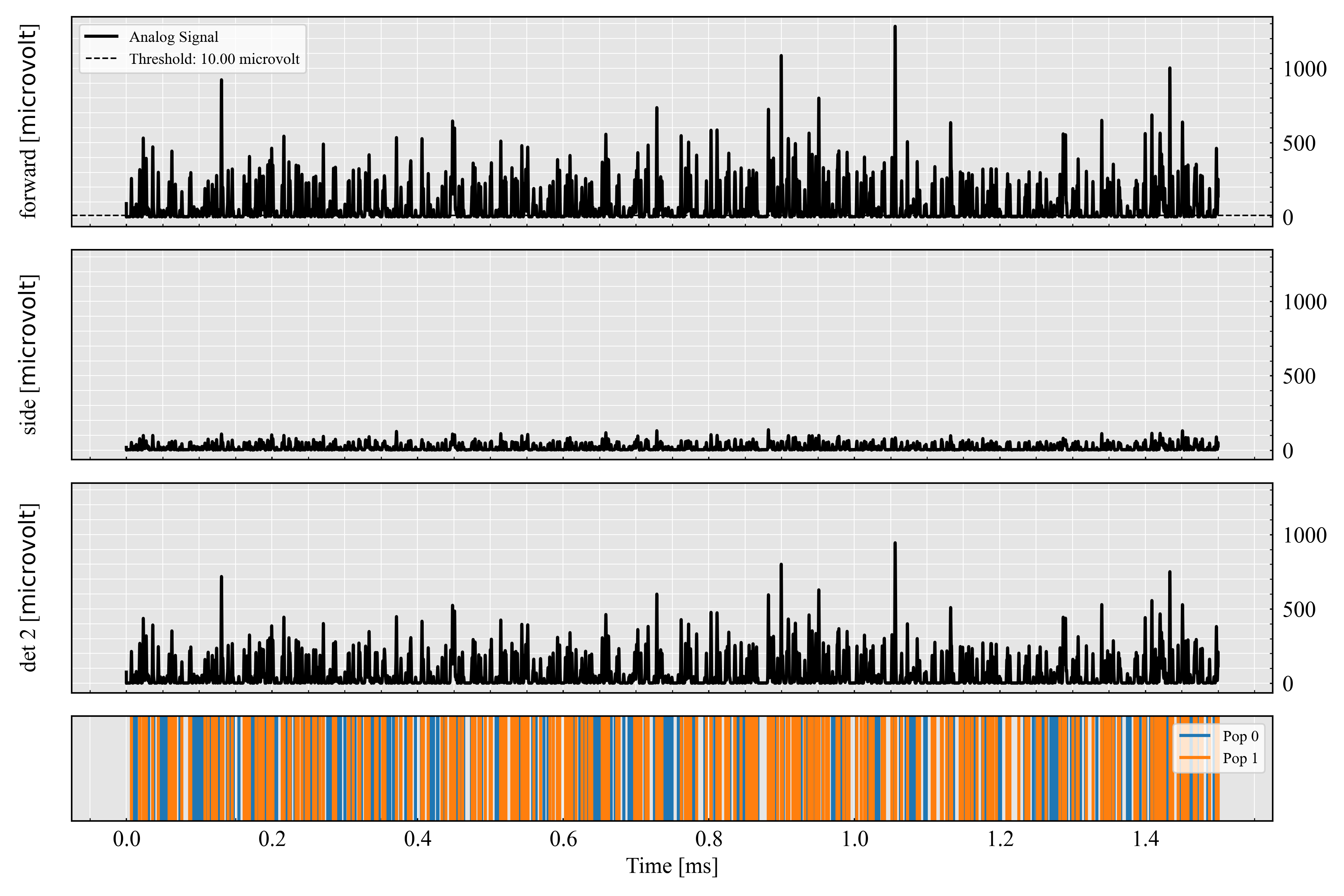
run_record.plot_analog()

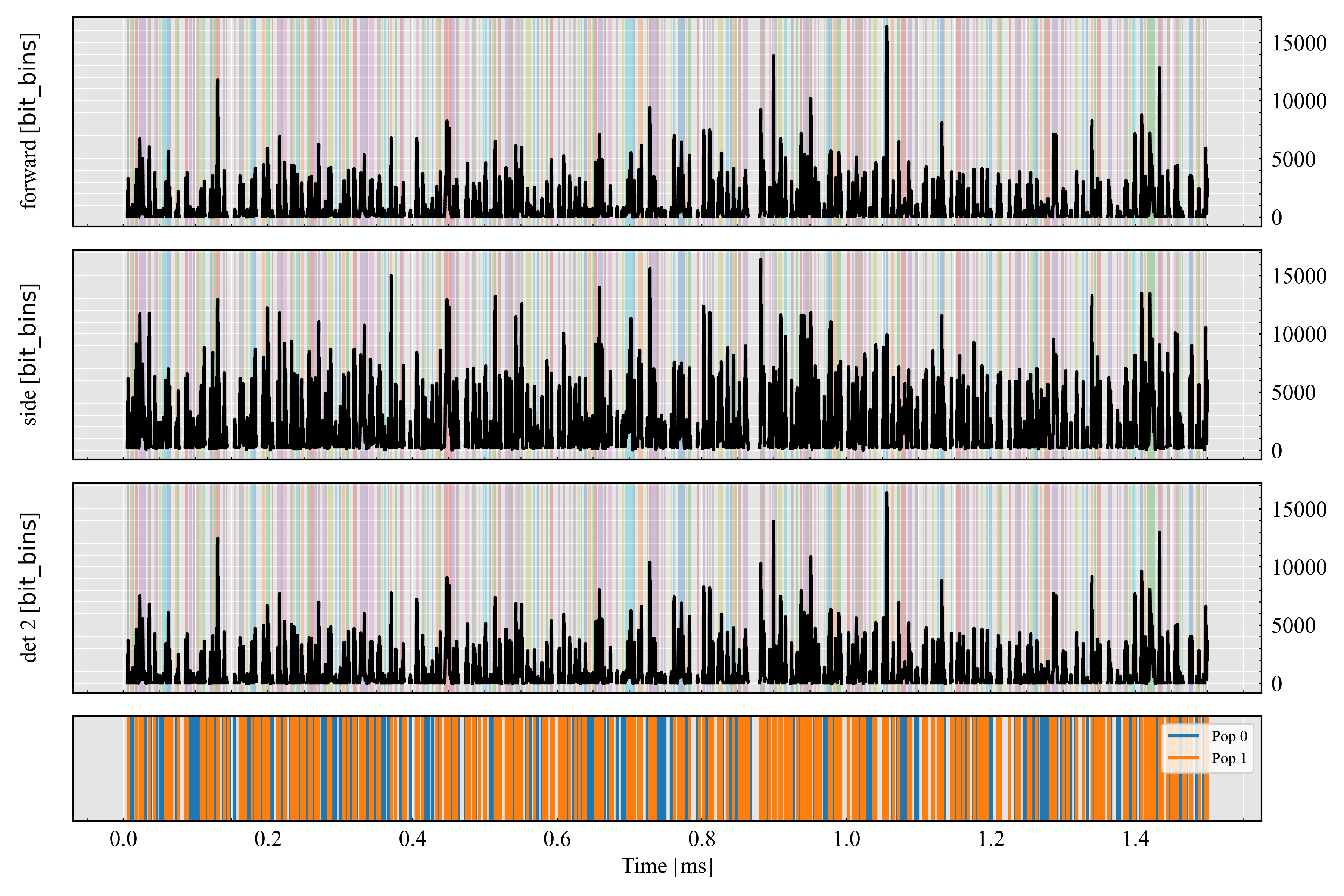
run_record.plot_digital()


run_record.peaks.plot(x=("forward", "Height"))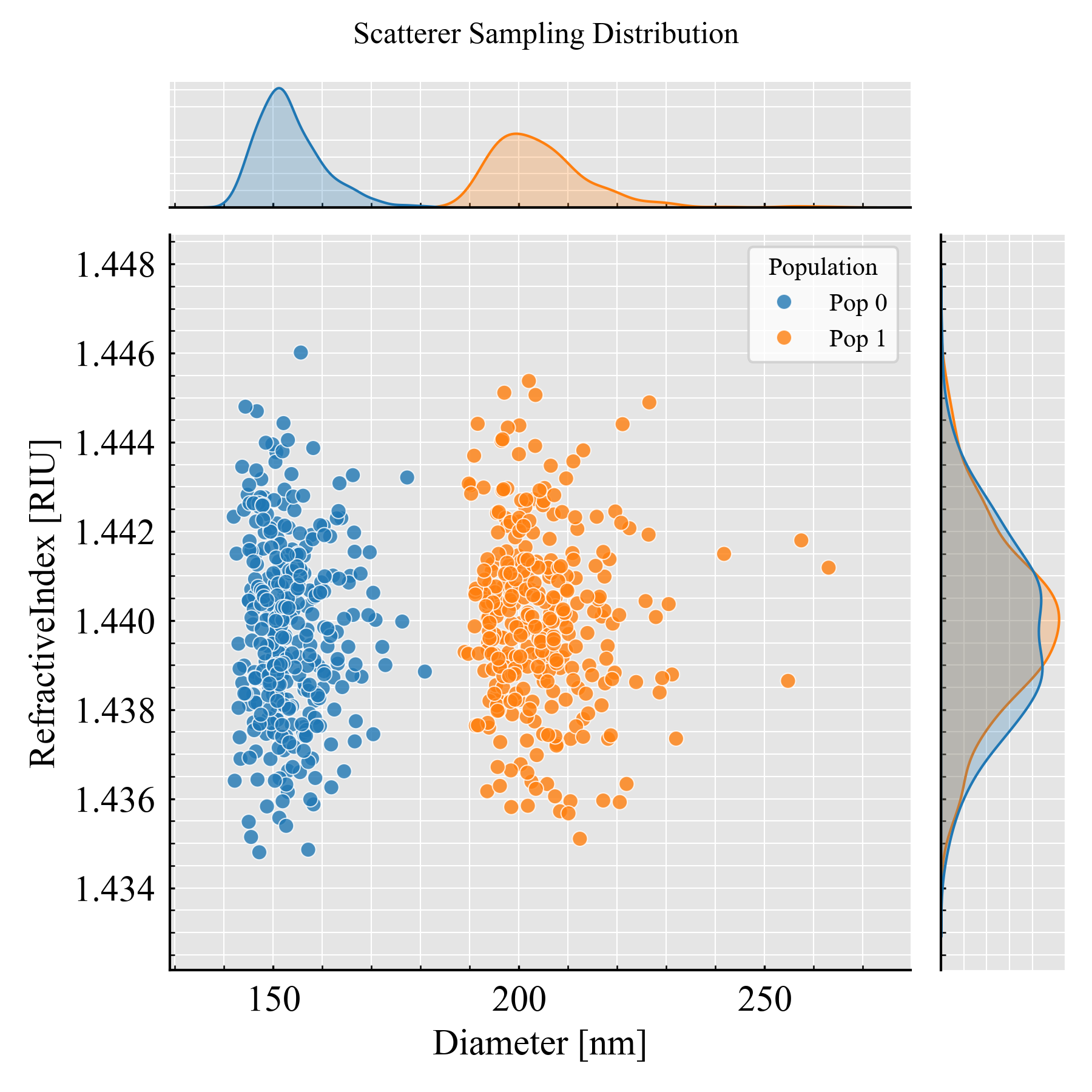
_ = run_record.plot_analog(
    figure_size=(12, 8),
    show=False,
    save_as=f"{dir_path}/../images/readme_analog.png",
)
_ = run_record.plot_digital(
    figure_size=(12, 8),
    show=False,
    save_as=f"{dir_path}/../images/readme_digital.png",
)
Explore more examples in the FlowCyPy Examples.
Code structure
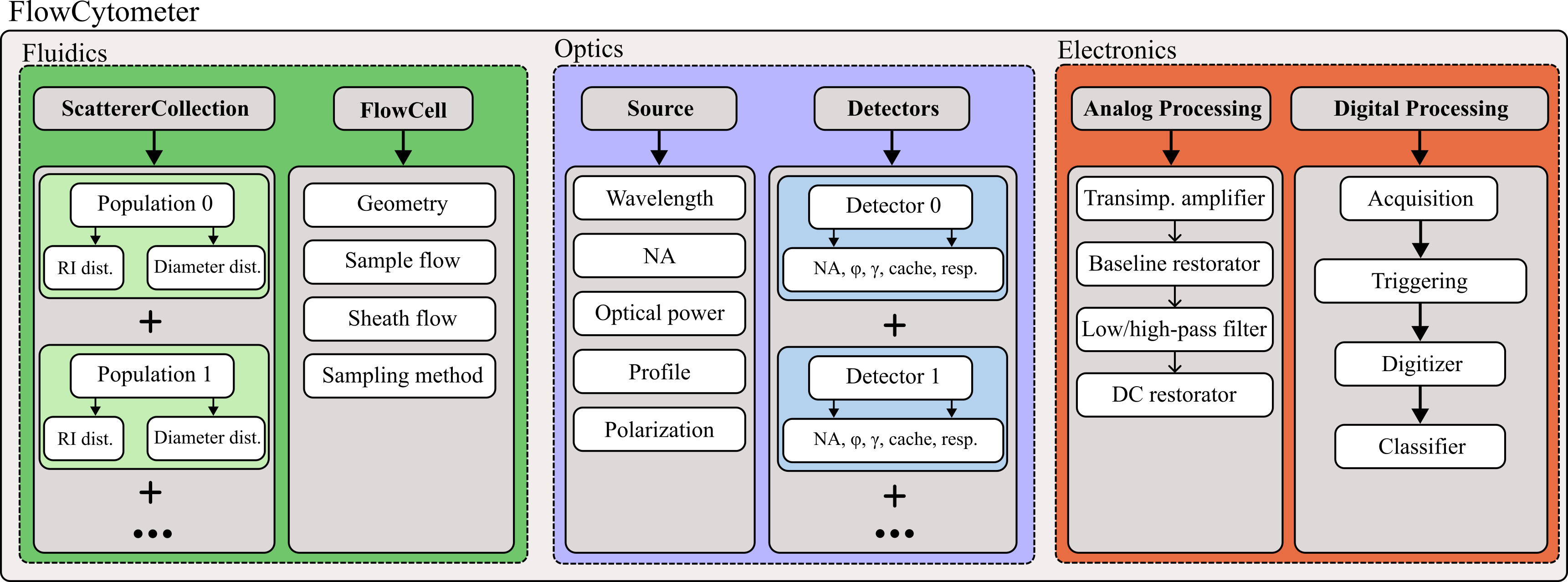
Here is the architecture for a standard workflow using FlowCyPy:
Development and Contribution
Clone the Repository
git clone https://github.com/MartinPdeS/FlowCyPy.git
cd FlowCyPy
Install Locally
Install in editable mode with testing and documentation dependencies:
pip install -e .[testing,documentation] (on linux system)
pip install -e ".[testing,documentation]" (on macOS system)
Run Tests
Use pytest to validate functionality:
pytestBuild Documentation
Build the documentation locally:
cd docs
make html
Find the documentation in docs/_build/html.
Additional Resources
Documentation: Full guide and API reference at FlowCyPy Documentation
Examples: Explore use cases in the Examples Section
GitHub Repository: Access the source code and contribute at FlowCyPy GitHub
Contributions
Contributions are welcome! If you have suggestions, issues, or would like to collaborate, visit the GitHub repository.
Contact
For inquiries or collaboration, contact Martin Poinsinet de Sivry-Houle.
1 maintainer

Metadata
1 maintainer
Release files for FlowCyPy 1.2.3
For a detailed explanation of source distributions (sdists) and built distributions (wheels), please see the package formats documentation.
Built distributions (wheels)
| File | Reset | |||
|---|---|---|---|---|
| flowcypy-1.2.3-cp314-cp314-manylinux_2_27_x86_64.manylinux_2_28_x86_64.whl | CPython 3.14 | CPython 3.14 | Linux glibc 2.27+ x86-64, Linux glibc 2.28+ x86-64 | Details |
| flowcypy-1.2.3-cp314-cp314-macosx_26_0_arm64.whl | CPython 3.14 | CPython 3.14 | macOS 26.0+ ARM64 | Details |
| flowcypy-1.2.3-cp313-cp313-manylinux_2_27_x86_64.manylinux_2_28_x86_64.whl | CPython 3.13 | CPython 3.13 | Linux glibc 2.27+ x86-64, Linux glibc 2.28+ x86-64 | Details |
| flowcypy-1.2.3-cp313-cp313-macosx_26_0_arm64.whl | CPython 3.13 | CPython 3.13 | macOS 26.0+ ARM64 | Details |
| flowcypy-1.2.3-cp312-cp312-manylinux_2_27_x86_64.manylinux_2_28_x86_64.whl | CPython 3.12 | CPython 3.12 | Linux glibc 2.27+ x86-64, Linux glibc 2.28+ x86-64 | Details |
| flowcypy-1.2.3-cp312-cp312-macosx_26_0_arm64.whl | CPython 3.12 | CPython 3.12 | macOS 26.0+ ARM64 | Details |
| flowcypy-1.2.3-cp311-cp311-manylinux_2_27_x86_64.manylinux_2_28_x86_64.whl | CPython 3.11 | CPython 3.11 | Linux glibc 2.27+ x86-64, Linux glibc 2.28+ x86-64 | Details |
| flowcypy-1.2.3-cp311-cp311-macosx_26_0_arm64.whl | CPython 3.11 | CPython 3.11 | macOS 26.0+ ARM64 | Details |
Total release size: 34.1 MB
Release files / flowcypy-1.2.3-cp314-cp314-manylinux_2_27_x86_64.manylinux_2_28_x86_64.whl
| Download URL | flowcypy-1.2.3-cp314-cp314-manylinux_2_27_x86_64.manylinux_2_28_x86_64.whl |
|---|---|
| Size | 3.9 MB |
| Tags | CPython 3.14 Linux glibc 2.27+ x86-64 Linux glibc 2.28+ x86-64 |
|
SHA-256 checksum How to use checksums |
7eb9dcd02595c78857393eeca3be0d8df00c4c3b39e08393c883dd46e43e4f31
|
|
BLAKE2b-256 checksum How to use checksums |
3c00c2a4f0bcbbeb4db9091439279b023a8e89068e97096c10c61b563eefcfc4
|
| Upload date | |
|
Uploaded using Trusted Publishing? What is trusted publishing? |
No |
| Uploaded via |
twine/7.0.0 CPython/3.13.14
|
Release files / flowcypy-1.2.3-cp314-cp314-macosx_26_0_arm64.whl
| Download URL | flowcypy-1.2.3-cp314-cp314-macosx_26_0_arm64.whl |
|---|---|
| Size | 4.6 MB |
| Tags | CPython 3.14 macOS 26.0+ ARM64 |
|
SHA-256 checksum How to use checksums |
24080f8e987874ebd5ae7fe6180e69d1987f81c07818d615701b57fbb68cee1f
|
|
BLAKE2b-256 checksum How to use checksums |
ca827938946d94b2491cc001b12719004be5c57d960a2536cbc3dfd0a9ecf560
|
| Upload date | |
|
Uploaded using Trusted Publishing? What is trusted publishing? |
No |
| Uploaded via |
twine/7.0.0 CPython/3.13.14
|
Release files / flowcypy-1.2.3-cp313-cp313-manylinux_2_27_x86_64.manylinux_2_28_x86_64.whl
| Download URL | flowcypy-1.2.3-cp313-cp313-manylinux_2_27_x86_64.manylinux_2_28_x86_64.whl |
|---|---|
| Size | 3.9 MB |
| Tags | CPython 3.13 Linux glibc 2.27+ x86-64 Linux glibc 2.28+ x86-64 |
|
SHA-256 checksum How to use checksums |
93be4378b0e02f4e5d471a773939a6883c30f21ff5237557aac0b63e589f8c86
|
|
BLAKE2b-256 checksum How to use checksums |
ff2559f509bd2b0811e1427cd28985e39ee83789461f975e08590554c5200d4e
|
| Upload date | |
|
Uploaded using Trusted Publishing? What is trusted publishing? |
No |
| Uploaded via |
twine/7.0.0 CPython/3.13.14
|
Release files / flowcypy-1.2.3-cp313-cp313-macosx_26_0_arm64.whl
| Download URL | flowcypy-1.2.3-cp313-cp313-macosx_26_0_arm64.whl |
|---|---|
| Size | 4.6 MB |
| Tags | CPython 3.13 macOS 26.0+ ARM64 |
|
SHA-256 checksum How to use checksums |
15876c0bc49a2af50bacf4802e13383a380d25750050739d8d0888786b4510fd
|
|
BLAKE2b-256 checksum How to use checksums |
d18c7280e755d931c3cf8af0e30ef383d3f112e68851aa1a2e676bb58d1ae25c
|
| Upload date | |
|
Uploaded using Trusted Publishing? What is trusted publishing? |
No |
| Uploaded via |
twine/7.0.0 CPython/3.13.14
|
Release files / flowcypy-1.2.3-cp312-cp312-manylinux_2_27_x86_64.manylinux_2_28_x86_64.whl
| Download URL | flowcypy-1.2.3-cp312-cp312-manylinux_2_27_x86_64.manylinux_2_28_x86_64.whl |
|---|---|
| Size | 3.9 MB |
| Tags | CPython 3.12 Linux glibc 2.27+ x86-64 Linux glibc 2.28+ x86-64 |
|
SHA-256 checksum How to use checksums |
9d793e49a05da7bda044930da5220c618749f84cebe58eaa6d7517c77391edc9
|
|
BLAKE2b-256 checksum How to use checksums |
5b9df85a5954891affa6412d5294cd6926ed2c101e0d87dd4a34855ccd8224fe
|
| Upload date | |
|
Uploaded using Trusted Publishing? What is trusted publishing? |
No |
| Uploaded via |
twine/7.0.0 CPython/3.13.14
|
Release files / flowcypy-1.2.3-cp312-cp312-macosx_26_0_arm64.whl
| Download URL | flowcypy-1.2.3-cp312-cp312-macosx_26_0_arm64.whl |
|---|---|
| Size | 4.6 MB |
| Tags | CPython 3.12 macOS 26.0+ ARM64 |
|
SHA-256 checksum How to use checksums |
b2493dc0ac6f48d24ab4db955e758fc62875cd3956363a0d98feaed6dfe636f8
|
|
BLAKE2b-256 checksum How to use checksums |
d22fa3f2a1f3d851a7734d4d0f26b555aabce41beb5b81a684e7c1759de8a93c
|
| Upload date | |
|
Uploaded using Trusted Publishing? What is trusted publishing? |
No |
| Uploaded via |
twine/7.0.0 CPython/3.13.14
|
Release files / flowcypy-1.2.3-cp311-cp311-manylinux_2_27_x86_64.manylinux_2_28_x86_64.whl
| Download URL | flowcypy-1.2.3-cp311-cp311-manylinux_2_27_x86_64.manylinux_2_28_x86_64.whl |
|---|---|
| Size | 3.9 MB |
| Tags | CPython 3.11 Linux glibc 2.27+ x86-64 Linux glibc 2.28+ x86-64 |
|
SHA-256 checksum How to use checksums |
735b42390a52284703acdfafb95306a181af1dc05567e7a2daa95e0e66f946ef
|
|
BLAKE2b-256 checksum How to use checksums |
20c6bb4135446f6e6a1ee30aa97ff8c84b0eabdf29f9215ad2d8ed0c699e25b6
|
| Upload date | |
|
Uploaded using Trusted Publishing? What is trusted publishing? |
No |
| Uploaded via |
twine/7.0.0 CPython/3.13.14
|
Release files / flowcypy-1.2.3-cp311-cp311-macosx_26_0_arm64.whl
| Download URL | flowcypy-1.2.3-cp311-cp311-macosx_26_0_arm64.whl |
|---|---|
| Size | 4.6 MB |
| Tags | CPython 3.11 macOS 26.0+ ARM64 |
|
SHA-256 checksum How to use checksums |
5adef0273177678932a37191c342b7bc2f13a4fd728a360d548ebbb87b479213
|
|
BLAKE2b-256 checksum How to use checksums |
0c8e6f4e00b32d32e4e9f986a18ac5965411afbd095fd2b0e84d8cc7d3d0f45c
|
| Upload date | |
|
Uploaded using Trusted Publishing? What is trusted publishing? |
No |
| Uploaded via |
twine/7.0.0 CPython/3.13.14
|














