

Visualize the flow of your python code.



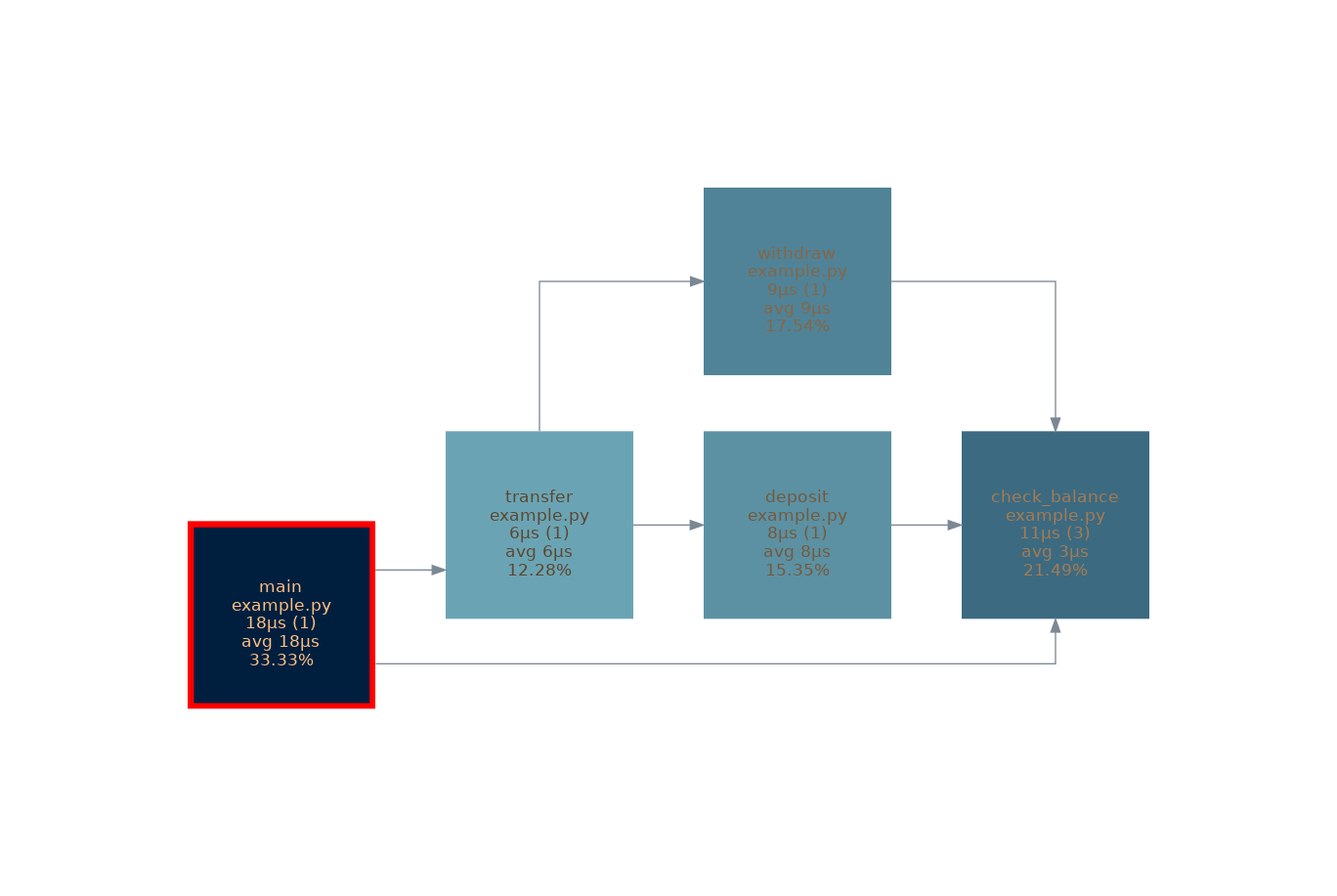
Installation
pip install FlowVisor
Usage
from FlowVisor import FlowVisor, vis

@vis # This will visualize the function in the flow
def my_function():
    print("Hello World")

@vis
def my_other_function():
    my_function()

my_other_function()
FlowVisor.CONFIG.output_file = "example_graph" # You can add some configureation with the CONFIG object
FlowVisor.graph() # Generate the graph
FlowVisor.export("example_flow", "json") # Save the flow as json
CLI
add-vis
Adds the vis decorator to all functions in all python files in a directory.
add-vis -p <path-to-dir>
remove-vis
Removes the vis decorator from all functions in all python files in a directory.
remove-vis -p <path-to-dir>
vis-file
Generate a graph from a exported flow file.
vis-file -f <path-to-flow-file>
Overhead
The overhead of the FlowVisor is tried to be kept as low as possible. The overhead is mainly caused by the decorator. Therefore the time for running the logic of the Flowvisor is excluded from the profiling.
You can even descrease the overhead by the advanced_ovhead_reduction:
FlowVisor.enable_advanced_overhead_reduction()
Development
git clone https://github.com/cophilot/FlowVisor
cd FlowVisor
pip install -r requirements.txt
Example
Run the example:
pip install -r requirements.txt
python example.py
by Philipp B.
1 maintainer

Metadata
1 maintainer
Release files for FlowVisor 0.3.2
For a detailed explanation of source distributions (sdists) and built distributions (wheels), please see the package formats documentation.
Source distribution (sdist)
| File | Size | Uploaded | |
|---|---|---|---|
| FlowVisor-0.3.2.tar.gz | 18.8 kB | Details |
Built distribution (wheel)
| File | Interpreter | ABI | Platform | Reset |
|---|---|---|---|---|
| FlowVisor-0.3.2-py3-none-any.whl | Python 3 | none | any | Details |
Total release size: 43.3 kB
Release files / FlowVisor-0.3.2.tar.gz
| Download URL | FlowVisor-0.3.2.tar.gz |
|---|---|
| Size | 18.8 kB |
| Tags | Source |
|
SHA-256 checksum How to use checksums |
710675cfb8b09683e3e64dc94fd9b17125f4b2b0cea9ee17f8c2025f3969cb2c
|
|
BLAKE2b-256 checksum How to use checksums |
72a75ca6ccff31af0b12a1d538b55211ad8a2fc49acc1155a047209075a25126
|
| Upload date | |
|
Uploaded using Trusted Publishing? What is trusted publishing? |
No |
| Uploaded via |
twine/5.0.0 CPython/3.10.12
|
Release files / FlowVisor-0.3.2-py3-none-any.whl
| Download URL | FlowVisor-0.3.2-py3-none-any.whl |
|---|---|
| Size | 24.6 kB |
| Tags | Python 3 |
|
SHA-256 checksum How to use checksums |
43969b0382e1f831ef79e8c05c7c6233bdaa7e18716b45d9bd2995e679269478
|
|
BLAKE2b-256 checksum How to use checksums |
0411d14d97109e0f60f8dbc3289ddbf362f52e482b30f26aeb194fc8af207396
|
| Upload date | |
|
Uploaded using Trusted Publishing? What is trusted publishing? |
No |
| Uploaded via |
twine/5.0.0 CPython/3.10.12
|














