
Project combining flowfile core (backend) and flowfile_worker (compute offloader) and flowfile_frame (api)

Project description

Flowfile
Main Repository: Edwardvaneechoud/Flowfile
Documentation:
Website -
Core -
Worker -
Frontend -
Technical Architecture
Flowfile is a visual ETL tool and Python library suite that combines drag-and-drop workflow building with the speed of Polars dataframes. Build data pipelines visually, transform data using powerful nodes, or define data flows programmatically with Python and analyze results - all with high-performance data processing. Export your visual flows as standalone Python/Polars code for production deployment.
🚀 Getting Started
Installation
Install Flowfile directly from PyPI:
pip install Flowfile
Quick Start: Web UI
The easiest way to get started is by launching the web-based UI:
# Start the Flowfile web UI with integrated services
flowfile run ui
This will:
- Start the combined core and worker services
- Launch a web interface in your browser
- Provide access to the full visual ETL capabilities
Options:
# Customize host
flowfile run ui --host 0.0.0.0

# Start without opening a browser
flowfile run ui --no-browser
You can also start the web UI programmatically:
import flowfile

# Start with default settings
flowfile.start_web_ui()

# Or customize
flowfile.start_web_ui(open_browser=False)
Using the FlowFrame API
Flowfile provides a Polars-like API for defining data pipelines programmatically:
import flowfile as ff
from flowfile import col, open_graph_in_editor

# Create a data pipeline
df = ff.from_dict({
    "id": [1, 2, 3, 4, 5],
    "category": ["A", "B", "A", "C", "B"],
    "value": [100, 200, 150, 300, 250]
})

# Process the data
result = df.filter(col("value") > 150).with_columns([
    (col("value") * 2).alias("double_value")
])

# Open the graph in the web UI (starts the server if needed)
open_graph_in_editor(result.flow_graph)
📦 Package Components
The Flowfile PyPI package includes:
- Core Service (
flowfile_core): The main ETL engine using Polars - Worker Service (
flowfile_worker): Handles computation-intensive tasks - Web UI: Browser-based visual ETL interface
- FlowFrame API (
flowfile_frame): Polars-like API for Python coding
✨ Key Features
Visual ETL with Web UI
- No Installation Required: Launch directly from the pip package
- Drag-and-Drop Interface: Build data pipelines visually
- Integrated Services: Combined core and worker services
- Browser-Based: Access from any device on your network
- Code Generation: Export visual flows as Python/Polars scripts
FlowFrame API
- Familiar Syntax: Polars-like API makes it easy to learn
- ETL Graph Generation: Automatically builds visual workflows
- Lazy Evaluation: Operations are not executed until needed
- Interoperability: Move between code and visual interfaces
Data Operations
- Data Cleaning & Transformation: Complex joins, filtering, etc.
- High Performance: Built on Polars for efficient processing
- Data Integration: Handle various file formats
- ETL Pipeline Building: Create reusable workflows
🔄 Common FlowFrame Operations
import flowfile as ff
from flowfile import col, when, lit

# Read data
df = ff.from_dict({
    "id": [1, 2, 3, 4, 5],
    "category": ["A", "B", "A", "C", "B"],
    "value": [100, 200, 150, 300, 250]
})
# df_parquet = ff.read_parquet("data.parquet")
# df_csv = ff.read_csv("data.csv")

other_df = ff.from_dict({
    "product_id": [1, 2, 3, 4, 6],
    "product_name": ["WidgetA", "WidgetB", "WidgetC", "WidgetD", "WidgetE"],
    "supplier": ["SupplierX", "SupplierY", "SupplierX", "SupplierZ", "SupplierY"]
}, flow_graph=df.flow_graph  # Assign the data to the same graph
)

# Filter
filtered = df.filter(col("value") > 150)

# Transform
result = df.select(
    col("id"),
    (col("value") * 2).alias("double_value")
)

# Conditional logic
with_status = df.with_columns([
    when(col("value") > 200).then(lit("High")).otherwise(lit("Low")).alias("status")
])

# Group and aggregate
by_category = df.group_by("category").agg([
    col("value").sum().alias("total"),
    col("value").mean().alias("average")
])

# Join data
joined = df.join(other_df, left_on="id", right_on="product_id")

joined.flow_graph.flow_settings.execution_location = "auto"
joined.flow_graph.flow_settings.execution_mode = "Development"
ff.open_graph_in_editor(joined.flow_graph)  # opens the graph in the UI!
📝 Code Generation
Export your visual flows as standalone Python/Polars code for production use:
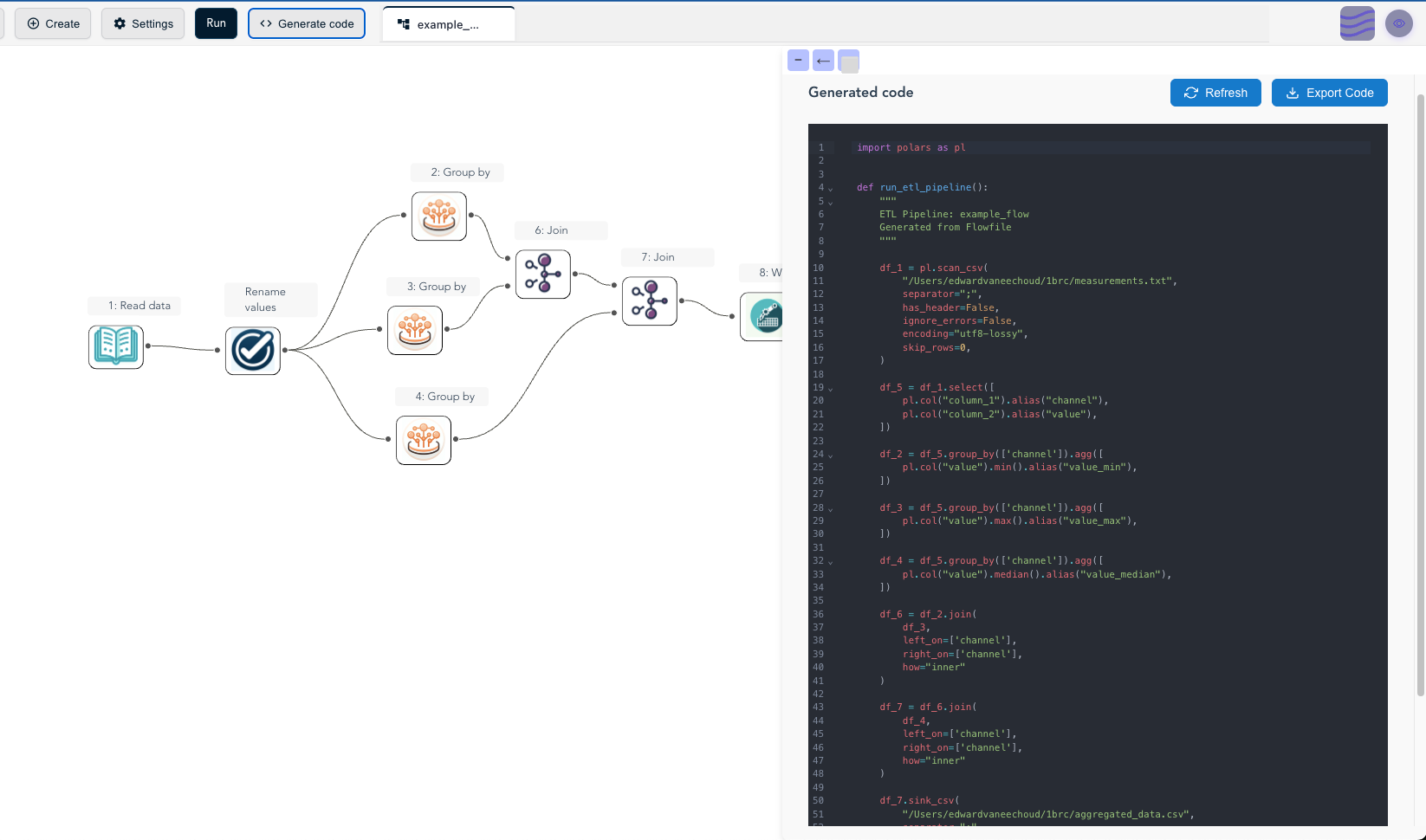
Simply click the "Generate code" button in the visual editor to:
- Generate clean, readable Python/Polars code
- Export flows without Flowfile dependencies
- Deploy workflows in any Python environment
- Share ETL logic with team members
🧰 Command-Line Interface
# Show help and version info
flowfile

# Start the web UI
flowfile run ui [options]

# Run individual services
flowfile run core --host 0.0.0.0 --port 63578
flowfile run worker --host 0.0.0.0 --port 63579
📚 Resources
- Main Repository: Latest code and examples
- Documentation: Comprehensive guides
- Technical Architecture: Design overview
🖥️ Full Application Options
For the complete visual ETL experience, you have additional options:
- Desktop Application: Download from the main repository
- Docker Setup: Run with Docker Compose
- Manual Setup: For development environments
📋 Development Roadmap
See the main repository for the latest development roadmap and TODO list.
Release history Release notifications | RSS feed


Download files
Download the file for your platform. If you're not sure which to choose, learn more about installing packages.
Source Distribution
Built Distribution
Filter files by name, interpreter, ABI, and platform.
If you're not sure about the file name format, learn more about wheel file names.
Copy a direct link to the current filters
File details
Details for the file flowfile-0.6.1.tar.gz.
File metadata
- Download URL: flowfile-0.6.1.tar.gz
- Upload date:
- Size: 5.2 MB
- Tags: Source
- Uploaded using Trusted Publishing? Yes
- Uploaded via: twine/6.1.0 CPython/3.13.7
File hashes
| Algorithm | Hash digest | |
|---|---|---|
| SHA256 |
bfb9c6683b1d106829f4c9458ae4f614c4c585e01b38ec893024aa2eed39cb7c
|
|
| MD5 |
2e0a8b7399a56607f43cb734698ca8c5
|
|
| BLAKE2b-256 |
22dac803be7c28ae06d55790bfa92203876ce094965626ad30c772eca3288aac
|
Provenance
The following attestation bundles were made for flowfile-0.6.1.tar.gz:
Publisher:
pypi-release.yml on Edwardvaneechoud/Flowfile
-
Statement:
-
Statement type:
https://in-toto.io/Statement/v1 -
Predicate type:
https://docs.pypi.org/attestations/publish/v1 -
Subject name:
flowfile-0.6.1.tar.gz -
Subject digest:
bfb9c6683b1d106829f4c9458ae4f614c4c585e01b38ec893024aa2eed39cb7c - Sigstore transparency entry: 870848048
- Sigstore integration time:
-
Permalink:
Edwardvaneechoud/Flowfile@17c700c1ec73e9180c2987f26d04afe617876cbe -
Branch / Tag:
refs/tags/v0.6.1 - Owner: https://github.com/Edwardvaneechoud
-
Access:
public
-
Token Issuer:
https://token.actions.githubusercontent.com -
Runner Environment:
github-hosted -
Publication workflow:
pypi-release.yml@17c700c1ec73e9180c2987f26d04afe617876cbe -
Trigger Event:
push
-
Statement type:
File details
Details for the file flowfile-0.6.1-py3-none-any.whl.
File metadata
- Download URL: flowfile-0.6.1-py3-none-any.whl
- Upload date:
- Size: 5.4 MB
- Tags: Python 3
- Uploaded using Trusted Publishing? Yes
- Uploaded via: twine/6.1.0 CPython/3.13.7
File hashes
| Algorithm | Hash digest | |
|---|---|---|
| SHA256 |
21fbd2745ea80013b35e35e2764146cc148d896a220ddf230d6a0c43bd651e44
|
|
| MD5 |
01e61459894daaace14844feb8dc17b7
|
|
| BLAKE2b-256 |
7a282eb80b7a4714b138ed3515f0f118d398b8f7d41b53695803463ffe8d9a00
|
Provenance
The following attestation bundles were made for flowfile-0.6.1-py3-none-any.whl:
Publisher:
pypi-release.yml on Edwardvaneechoud/Flowfile
-
Statement:
-
Statement type:
https://in-toto.io/Statement/v1 -
Predicate type:
https://docs.pypi.org/attestations/publish/v1 -
Subject name:
flowfile-0.6.1-py3-none-any.whl -
Subject digest:
21fbd2745ea80013b35e35e2764146cc148d896a220ddf230d6a0c43bd651e44 - Sigstore transparency entry: 870848050
- Sigstore integration time:
-
Permalink:
Edwardvaneechoud/Flowfile@17c700c1ec73e9180c2987f26d04afe617876cbe -
Branch / Tag:
refs/tags/v0.6.1 - Owner: https://github.com/Edwardvaneechoud
-
Access:
public
-
Token Issuer:
https://token.actions.githubusercontent.com -
Runner Environment:
github-hosted -
Publication workflow:
pypi-release.yml@17c700c1ec73e9180c2987f26d04afe617876cbe -
Trigger Event:
push
-
Statement type:






