
Font Rendering Library for OpenCV
Introduction
The Font library is designed to solve the problem of rendering text with custom TrueType fonts in OpenCV applications. OpenCV, a popular computer vision library, does not natively support the use of TrueType fonts, which can be a limitation for many projects that require advanced text rendering capabilities.
This library provides a simple and efficient solution to this problem by allowing developers to use custom fonts in their OpenCV projects. It abstracts away the low-level details of font rendering, providing a clean and intuitive API for text rendering.
Features
- Support for custom TrueType fonts
- Configurable font settings (size, color, spacing, alignment, background)
- Rendering of single-line and multi-line text
- Efficient rendering using a custom
Characterclass andRendererclass - Compatibility with OpenCV (tested with OpenCV 4.x)
Installation
To use the Font library in your project, follow these steps:
$ pip install Font
or
- Clone the repository:
git clone https://github.com/ivanrj7j/Font.git - Add the
character.py,config.py, andrender.pyfiles to your project's directory.
Usage
For detailed usage instructions and examples, please refer to the Usage Guide.
Example

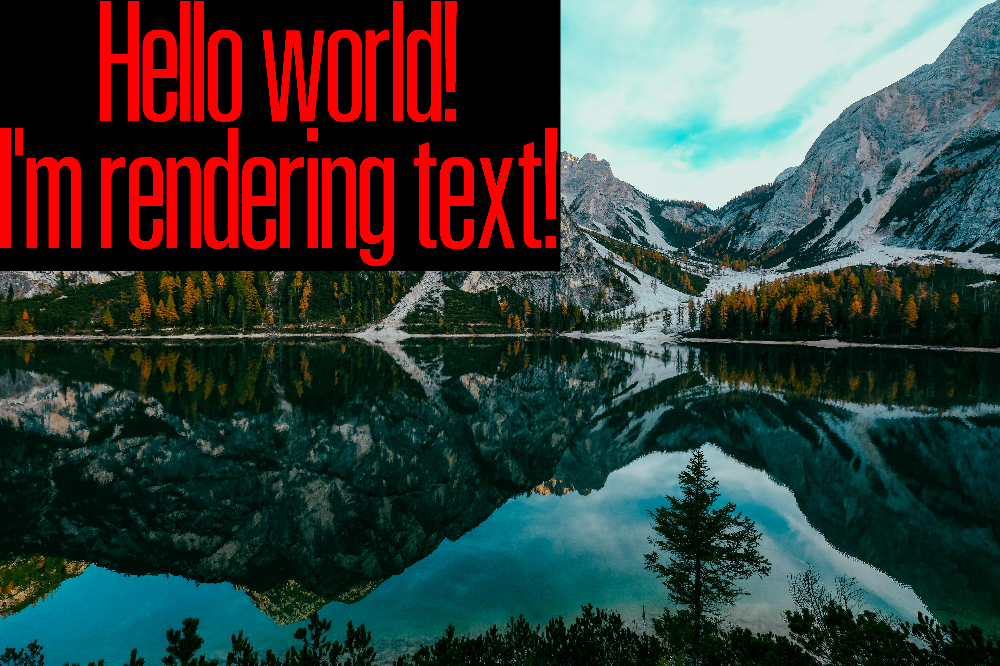
renderedImage = putTTFText(image, "Hello world!\nI'm rendering text!", (0, 0), "alktall.ttf", 1000, color=(255, 0, 0), spacing=20, wordSpacing=100, lineSpacing=30, backBox=(0, 0, 0), align="center")
API Reference
For detailed information about the available classes and methods, please refer to the API Reference.
Contributing
Contributions to the Font library are welcome! If you find any issues or have suggestions for improvements, please feel free to submit a pull request or open an issue on the GitHub repository.
License
Click here to see the license
1 maintainer

Release files for Font 1.1.1
For a detailed explanation of source distributions (sdists) and built distributions (wheels), please see the package formats documentation.
Source distribution (sdist)
| File | Size | Uploaded | |
|---|---|---|---|
| Font-1.1.1.tar.gz | 10.7 kB | Details |
Built distribution (wheel)
| File | Interpreter | ABI | Platform | Reset |
|---|---|---|---|---|
| Font-1.1.1-py3-none-any.whl | Python 3 | none | any | Details |
Total release size: 22.8 kB
Release files / Font-1.1.1.tar.gz
| Download URL | Font-1.1.1.tar.gz |
|---|---|
| Size | 10.7 kB |
| Tags | Source |
|
SHA-256 checksum How to use checksums |
923afe6cb69ee7069bd4e4da4085eef62118c19594c18ba1c006cb3ef1bb3280
|
|
BLAKE2b-256 checksum How to use checksums |
1068f78b4d341dd33dceb31e7199584986f4abf2eae4ad1cbbc01f557732b7b6
|
| Upload date | |
|
Uploaded using Trusted Publishing? What is trusted publishing? |
No |
| Uploaded via |
twine/5.1.1 CPython/3.11.7
|
Release files / Font-1.1.1-py3-none-any.whl
| Download URL | Font-1.1.1-py3-none-any.whl |
|---|---|
| Size | 12.1 kB |
| Tags | Python 3 |
|
SHA-256 checksum How to use checksums |
e4426e10e589a965710d6e7b2d4c8289817287e31512675942e1b7c99419fe0e
|
|
BLAKE2b-256 checksum How to use checksums |
f3f20cbc1a2645e17cf2165a859bb0fe3f8467e2563f4cc45e11c77f86c20d96
|
| Upload date | |
|
Uploaded using Trusted Publishing? What is trusted publishing? |
No |
| Uploaded via |
twine/5.1.1 CPython/3.11.7
|














