
ForexPy: A currency conversion tool that also scraps the web and gives the Forex Exchange rates from major services.

Project description
ForexPy
A command-line tool for currency conversion that fetches live Forex exchange rates from popular exchange services using web scraping.
Motivation
When sending money to another country, how to choose which service to use?
- You could google the conversion ,visit every site and compare the rates to find the best exchange rate
OR
- Use
ForexPyand get rates from major services with a single command!
Personally, I was frustated whenever I needed to do a foreign transaction. If I choose one service due to its better rate next time the same service might be offering the worst rate. Therefore, I created ForexPy to save myself time, hassle and money.
Quick Start
For Linux & Windows:
Install using:
- Pypi
Using a virtual envrionment is recommended with pip
pip install fxpy
- Git
pip install git+https://github.com/navrajkalsi/forexpy.git
- Clone the Repo
git clone https://github.com/navrajkalsi/forexpy
cd forexpy
pip install .
Usage
In Windows, use the new Windows Terminal, preferably in Administrator mode.
DO NOT USE STRAIGHT COMMAND PROMPT or POWERSHELL! Click for more details.
In Linux this tool requires root access (because of usage of keyboard library). Therefore, run the terminal as root OR run the command as sudo.
USE 'sudo -E' TO PRESERVE ENVIRONMENT VARIABLES. Not doing so may lead to 'Module Not Found' Error.
After Installation is complete, ForexPy can be used in the following ways:
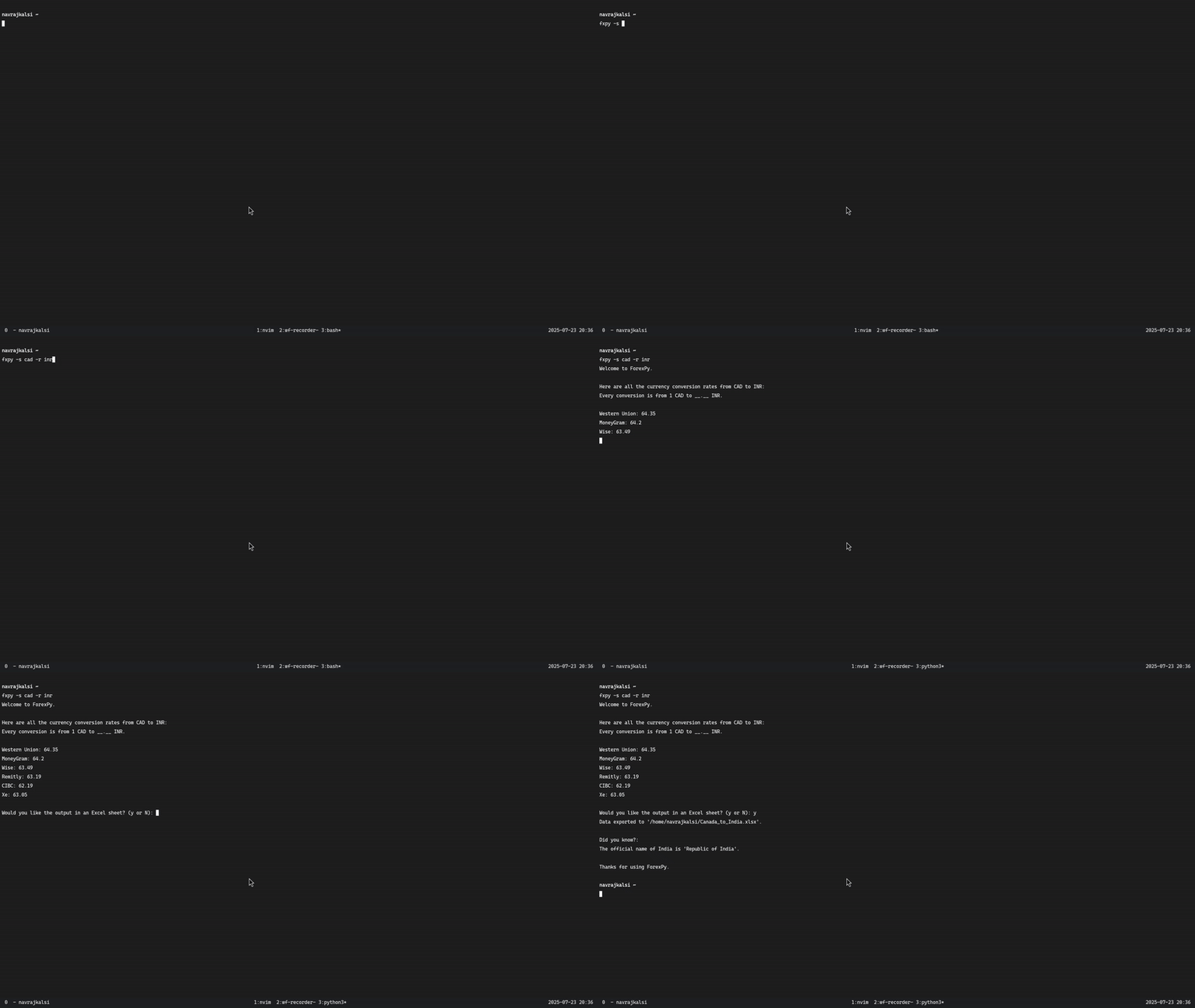
- With Arguments (No root privileges required): If you know the ISO Alpha 3 Codes of the currencies you want to convert, simply use the following command and pass the currency codes as arguments. The below example uses 'CAD' and 'INR'.
| Flag | Flag Description |
|---|---|
| -s | Sender Currency Code |
| -r | Receiver Currency Code |
| -v | Current Version of Tool |
# codes are case insensitive
fxpy --sender CAD --receiver INR
# or
fxpy -s cad -r inr
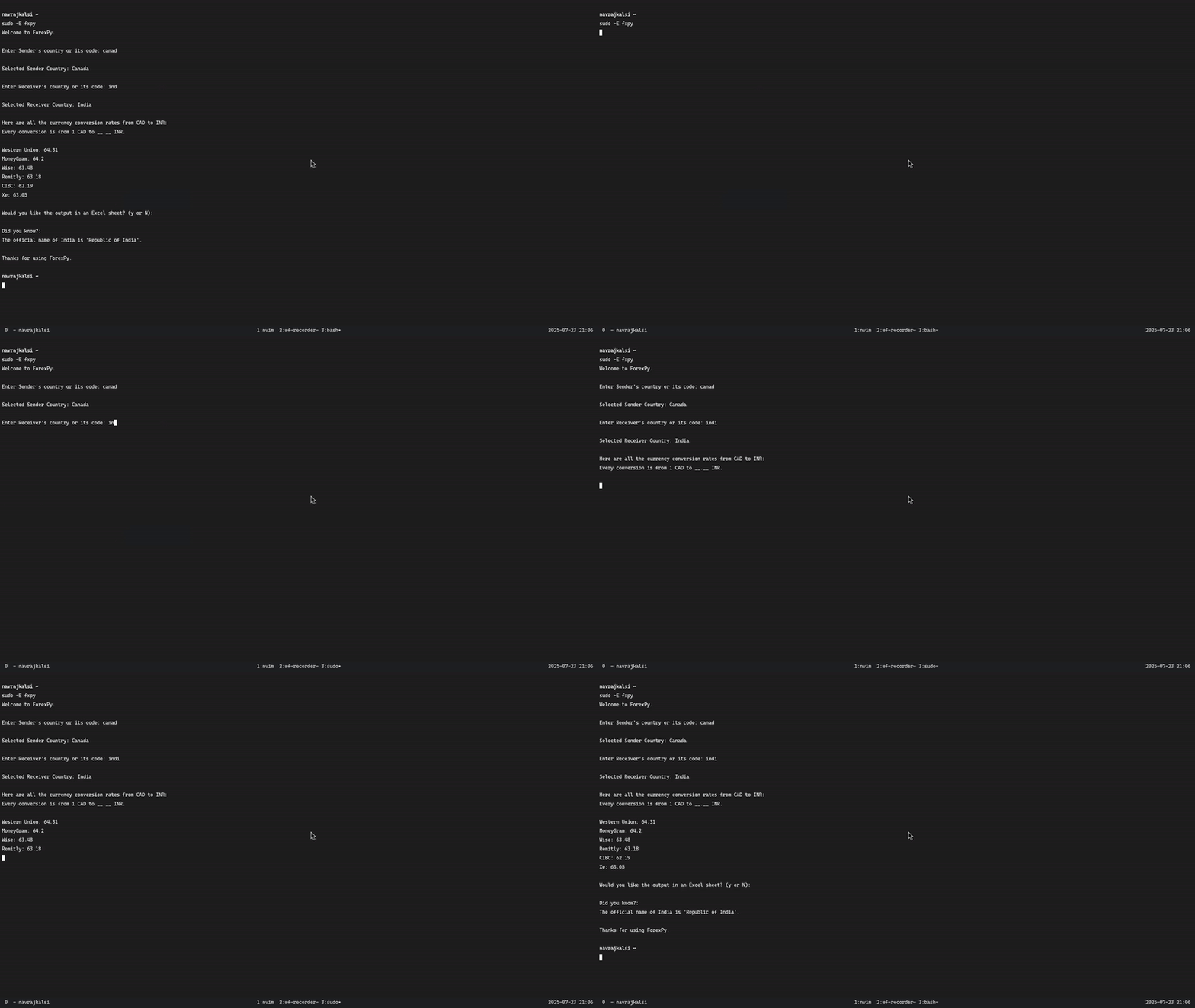
- Without Arguments (Root privileges may be required): If you do not know the exact currency codes, then you could just enter the following command and follow the instructions by entering in the respective country names (these names do not need to be perfect, the program will help in choosing the correct names).
fxpy
Windows Issue
While testing this tool on different computers, I found myself as a part of the 'works on my machine' meme:)
Context: Windows Command Prompt and Powershell do not natively support ANSI escape codes.
This program does make use of these codes when using the tool without arguments and selecting a country.
In such case, if the shell does not support ANSI codes you will see something similar:

To resolve this use Windows Terminal and use Command Prompt in this terminal. Side Note: If you haven't already, you SHOULD try this terminal. It houses all the shells and even WSL! It looks incredible too.
Release history Release notifications | RSS feed


Download files
Download the file for your platform. If you're not sure which to choose, learn more about installing packages.
Source Distribution
Built Distribution
Filter files by name, interpreter, ABI, and platform.
If you're not sure about the file name format, learn more about wheel file names.
Copy a direct link to the current filters
File details
Details for the file fxpy-1.2.3.tar.gz.
File metadata
- Download URL: fxpy-1.2.3.tar.gz
- Upload date:
- Size: 14.4 kB
- Tags: Source
- Uploaded using Trusted Publishing? No
- Uploaded via: twine/6.0.1 CPython/3.12.7
File hashes
| Algorithm | Hash digest | |
|---|---|---|
| SHA256 |
04b141c5d479138b9ef3d0e2237789b552142512abcaef85ee68dee4e69b3312
|
|
| MD5 |
1e5a33c0fbf375868d397228cdd3897e
|
|
| BLAKE2b-256 |
f1d8710026f4bbd8ddc6fd4f55f856ffc84fc0455204b2ed486c2624273844aa
|
File details
Details for the file fxpy-1.2.3-py3-none-any.whl.
File metadata
- Download URL: fxpy-1.2.3-py3-none-any.whl
- Upload date:
- Size: 14.9 kB
- Tags: Python 3
- Uploaded using Trusted Publishing? No
- Uploaded via: twine/6.0.1 CPython/3.12.7
File hashes
| Algorithm | Hash digest | |
|---|---|---|
| SHA256 |
9db6d29b02217465977c9884a336fe24c5b3c065e031f3a4f876f5adb7657c29
|
|
| MD5 |
6a932c499891be2b8be30dbdaa83b30f
|
|
| BLAKE2b-256 |
5c08be5d94d04d5faa292ec80179590bf71038266d3a9d332f82b6b871938bcc
|






