
General Relativistic Emitter-Observer problem Python algorithm (GREOPy)






What GREOPy does
GREOPy is a Python library for calculating light rays sent by an emitter to a receiver in the presence of a gravitational field modelled by the theory of General Relativity (GR). The emitter and receiver can move along arbitrary curves and the gravitational field can be described by a rotating, non-accelerating central mass. Finding a light signal and corresponding reception event to a given emission event is also sometimes called the Emitter-Observer problem (EOP).
This package is specifically dedicated for work in (relativistic) geodesy. In classical geodesy, either a light signal's travel time or its bending angle (deviation from a straight line) is usually neglected because of the Earth's weak gravitational field and short light travel distance. While these deviations and resulting observable uncertainties might be overshadowed by other effects with state-of-the-art measurement accuracies, they might become relevant in the future where these accuracies increase. GREOPy builds a basis for quantifying what impact these deviations have on the subsequent observable error. Please visit the documentation for general information about the package.
How GREOPy fits into the scientific ecosystem
The behaviour of test particle worldlines has been treated numerically in a wide range of applications in GR and gravitational physics; e.g. calculate light- and timelike geodesics in Schwarzschild or Kerr(-Newman) spacetimes with EinsteinPy (part of the Python ecosystem), or in Kerr spacetimes with Kerr-Geodesics-in-Terms-of-Weierstrass-Elliptic-Functions (written in Wolfram Mathematica). The Black Hole Perturbation Toolkit offers a wide variety of software specialised for black hole perturbation theory. Localisation of events in curved spacetime with the help of at least four different satellite trajectories can be done with squirrel.jl (written in Julia).
To extend the scientific ecosystem, GREOPy aims to provide a numerical treatment for the EOP via direct pairwise satellite communication.
How to install GREOPy
Note: It is recommended to install GREOPy inside of a virtual environment.
You can use pip to install this package in two ways:
-
GREOPy is published on pypi.org, so simply run
python -m pip install GREOPy -
or directly install the package from its repository by running
python -m pip install git+https://codeberg.org/JPHackstein/GREOPy
Optional dependencies e.g. for documentation and development tools can be specified during the installation by running e.g.
python -m pip install GREOPy[docs,dev]
All optional dependencies are listed in the pyproject.toml file.
Get started using GREOPy
Note: The documentation contains a more detailed quickstart guide that can be downloaded and run immediately or changed to suit your needs.
Quick overview over the minimal workflow for the user:
Two curves and the underlying spacetime structure are needed to calculate light signals between the curves.
Assume emission_curve and reception_curve contain the coordinates and four-velocity tangent vector of each point along the respective curve in spacetime.
Also assume that config contains information on the spacetime structure.
Then calling the eop_solver function calculates for each point along the emission curve the corresponding unique light signal propagating to the reception curve:
from greopy.emitter_observer_problem import eop_solver

light_rays = eop_solver(config, emission_curve, reception_curve)
The resulting light_rays contains the coordinates and four-velocity tangent vector of each point along the light signal curve in spacetime.
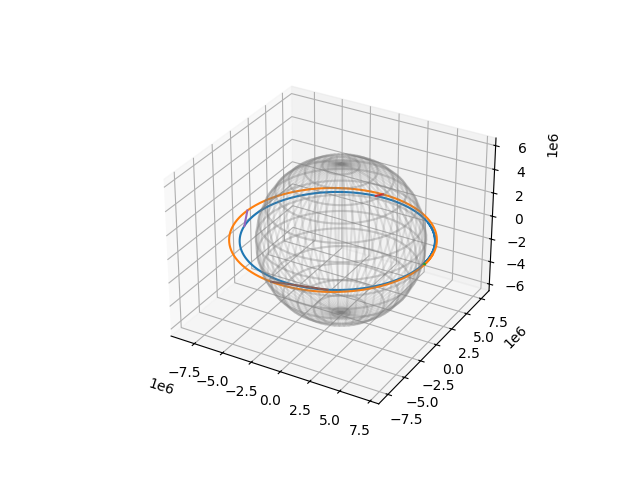
These results can be visualised by calling the eop_plot function.
Displaying the resulting plot without saving it requires a Matplotlib backend.
One example could be using the QtAgg interactive backend, which requires PyQt that can be installed via
python -m pip install PyQt6
The commands with the corresponding plot might look like this:
import matplotlib.pyplot as plt
from greopy.emitter_observer_solution_plot import eop_plot

eop_plot(emission_curve, reception_curve, light_rays)
plt.show()
 |
|---|
| Four light rays are sent from an emitter (blue) to an observer (orange) moving on elliptical curves in the equatorial plane of a spherical central mass with Earth mass. |
Community
If you would like to contribute to this package, you can read about ideas here. Since this is a young package, detailed instructions on how to contribute are still a work in progress.
Please note that this package is released with a Code of Conduct and by participating in this project you agree to abide by its terms.
License
GREOPy is available under the GNU GENERAL PUBLIC LICENSE Version 3; see the license file for more information.
How to cite GREOPy
If you would like to acknowledge this package in your work, you can do that for now by citing this zenodo DOI 10.5281/zenodo.14537865 which always points to the latest version of the released code.
Acknowledgements
This project was funded by the Deutsche Forschungsgemeinschaft (DFG, German Research Foundation) – Project-ID 434617780 – SFB 1464, and we acknowledge support by the DFG under Germany’s Excellence Strategy – EXC-2123 QuantumFrontiers – 390837967.
1 maintainer

Release files for GREOPy 1.0
For a detailed explanation of source distributions (sdists) and built distributions (wheels), please see the package formats documentation.
Source distribution (sdist)
| File | Size | Uploaded | |
|---|---|---|---|
| greopy-1.0.tar.gz | 36.3 kB | Details |
Built distribution (wheel)
| File | Interpreter | ABI | Platform | Reset |
|---|---|---|---|---|
| greopy-1.0-py3-none-any.whl | Python 3 | none | any | Details |
Total release size: 72.8 kB
Release files / greopy-1.0.tar.gz
| Download URL | greopy-1.0.tar.gz |
|---|---|
| Size | 36.3 kB |
| Tags | Source |
|
SHA-256 checksum How to use checksums |
28305e350d7bdd801ec31722dedd0b50192a54aa874b6d147464255c8e8b1105
|
|
BLAKE2b-256 checksum How to use checksums |
36f0fec4da58ae6eb7b6effdb94a1add0aca8961de04cc18cd70b34c8112ee81
|
| Upload date | |
|
Uploaded using Trusted Publishing? What is trusted publishing? |
No |
| Uploaded via |
python-httpx/0.28.1
|
Release files / greopy-1.0-py3-none-any.whl
| Download URL | greopy-1.0-py3-none-any.whl |
|---|---|
| Size | 36.5 kB |
| Tags | Python 3 |
|
SHA-256 checksum How to use checksums |
b0b8bdc656ece023e10e3db5ba5b671f31ae6a92e341e03cce9ceb560811c02c
|
|
BLAKE2b-256 checksum How to use checksums |
088b8eac5f049c3434f1252db92948c76cf3e91d91d5a6b0061a426167e1bc51
|
| Upload date | |
|
Uploaded using Trusted Publishing? What is trusted publishing? |
No |
| Uploaded via |
python-httpx/0.28.1
|














