
A synthetic IFU spectral cube generator with a theoretical rotating galaxy disk model with diffuse structures

Project description



High-fidelity simulator for synthetic IFU (Integral Field Unit) spectral cubes.
GalCubeCraft provides a compact, well-documented pipeline to build 3D spectral cubes that mimic observations of disk galaxies. It combines simple analytic galaxy models (Sérsic light profiles + exponential vertical structure), simple rotation-curve kinematics, viewing-angle projections and instrument effects (beam convolution, channel binning) to produce a physically motivated basis and test data for algorithm development, denoising, and visualization.
This README explains the science and mathematics behind the generator, how to install the package, and several practical examples for quick experimentation.
Table of contents
- What GalCubeCraft does
- Diffuse emission implementation
- Scientific background & equations
- Installation (PyPI + source)
- Quick start examples
- API reference (minimal)
- Reproducibility, limitations, and troubleshooting
- Credits & citation
What GalCubeCraft does
GalCubeCraft synthesizes spectral datacubes with dimensions $(n_s, n_y, n_x)$. Each cube contains one or more galaxy components. For each galaxy component the generator:
- Builds a 3D flux density field using a Sérsic profile in the disk plane combined with an exponential vertical profile.
- Computes an analytic circular velocity field from a compact rotation-curve model and assigns tangential velocities to voxels.
- Rotates the 3D flux and velocity fields to a chosen viewing geometry.
- Projects emission into line-of-sight velocity bins to produce a spectral cube.
- Optionally convolves each 2D channel with a telescope beam and saves cubes to
data/raw_data/<nz>x<ny>x<nx>/cube_*.npy.
The package is intentionally clear and inspectable (readable loops, compact functions), making it suitable for method development and teaching.
Diffuse emission implementation
GalCubeCraft can optionally add low-surface-brightness diffuse structure on top
of the per-galaxy disks during cube assembly. The implementation lives in
src/GalCubeCraft/core.py and is controlled through diffuse_params, which is
merged with DEFAULT_DIFFUSE_PARAMS at initialisation time. Enable or disable
the feature with diffuse_params['enabled'].
The diffuse model is built on the full output grid before velocity binning, and it uses the same galaxy centres and systemic LOS velocities as the rotated disk components. The three additive structures are:
- A central halo around the first galaxy.
- One bridge per satellite, running from the central galaxy toward the satellite.
- One tidal tail per satellite, extending away from the central galaxy.
1) Central halo
The halo is a 2D Sérsic profile in the disk plane multiplied by an exponential vertical fall-off (creating a 3D structure):
$$ S_\text{halo}(x,y,z) = S_{e,\text{halo}} \exp\left[-b_n\left(\left(\frac{R}{R_{e,\text{halo}}}\right)^{1/n_\text{halo}} - 1\right)\right] \exp\left(-\frac{|z-z_0|}{h_{z,\text{halo}}}\right), $$
where the defaults broaden the central disk by factors of halo_Re_factor and
halo_hz_factor, reduce the amplitude with halo_Se_factor, and use a
Gaussian-like Sérsic index halo_n = 0.5. The halo LOS velocity is the
central systemic velocity plus Gaussian scatter with width halo_sigma_vz.
2) Bridges
For each satellite, the bridge is a Gaussian tube along the line connecting the central galaxy to the satellite. The coordinate along that link is clipped to the active interval
$$ s \in [s_\text{start}, s_\text{end}],\qquad s_\text{start} = \texttt{bridge_start_frac},\qquad s_\text{end} = 1 - \texttt{bridge_stop_frac}. $$
This clamp is important: it keeps the bridge flux strictly inside the central
to satellite segment and prevents leakage behind the central galaxy or beyond
the satellite. The bridge width tapers smoothly from the halo end to the
satellite end using bridge_width_start_factor and
bridge_width_end_factor, with a trapezoidal fade controlled by
bridge_edge_fade. The amplitude scales with
bridge_Se_factor * min(Se_central, Se_satellite), and the LOS velocity is
linearly interpolated between the two galaxy systemic velocities with Gaussian
scatter from bridge_sigma_vz.
3) Tidal tails
Each satellite gets one curved tail extending away from the central galaxy.
The code samples a quadratic curve with tail_n_samples points, then places a
Gaussian blob at each sample position. The tail length is set by
tail_length_factor * separation, while tail_curvature sets the
perpendicular bend. The tail width scales with the satellite vertical scale
height through tail_width_factor * hz_satellite, and the amplitude fades
linearly along the tail via tail_Se_factor.
To keep tails one-sided, the implementation applies a sigmoid gate on the side
of the satellite facing away from the central galaxy. This suppresses emission
that would otherwise bleed back through the satellite toward the central. The
tail LOS velocity drifts along the curve by tail_vel_gradient and includes
Gaussian scatter from tail_sigma_vz.
4) Combination into the final cube
The diffuse flux and diffuse LOS-velocity fields are accumulated voxel by
voxel, then each spectral channel reuses the same velocity-bin masks as the
disk components. In practice, the diffuse cube is added only to the channels
whose velocity limits contain the diffuse voxel velocity. This means the halo,
bridges, and tails appear in the same final (n_vel, ny, nx) cube as the disk
emission, instead of being post-processed as a separate overlay.
If n_gals == 1, only the halo is used; bridges and tails are only built when
satellite galaxies are present.
Scientific background & equations
This section summarises the main mathematical building blocks implemented in the code: the Sérsic flux distribution, vertical exponential profile, and the analytical rotation curve used to assign tangential velocities.
Sérsic radial profile (disk plane)
The radial surface brightness (Sérsic) profile is given by
$$S_r(r) = S_e \exp\left[-b_n\left(\left(\frac{r}{R_e}\right)^{1/n} - 1\right)\right]$$
where
- $S_e$ is the flux density at the effective radius $R_e$,
- $n$ is the Sérsic index that controls the concentration,
- $b_n$ is a constant that depends on $n$ (approximated by a series expansion).
The package uses the standard series expansion for $b_n$:
$$b_n(n) \approx 2n - \tfrac{1}{3} + \frac{4}{405n} + \frac{46}{25515n^2} + \cdots$$
Vertical exponential profile
Galaxies are modeled with an exponential vertical fall-off:
$$S_z(z) = \exp\left(-\frac{|z|}{h_z}\right)$$
Combining radial and vertical profiles gives the 3D flux density used in the generator:
$$S(x,y,z) = S_e ; \exp\left[-b_n\left(\left(\frac{r}{R_e}\right)^{1/n} - 1\right)\right]; \exp\left(-\frac{|z|}{h_z}\right)$$
with $r = \sqrt{x^2 + y^2}$ in the disk plane.
Analytical rotation curve
To assign tangential velocities the implementation uses a compact empirical
approximation (implemented as milky_way_rot_curve_analytical):
$$v(R) = v_0 \times 1.022 \times \left(\frac{R}{R_0}\right)^{0.0803}$$
where $v_0$ is a characteristic velocity scale and $R_0$ is derived from the effective radius and Sérsic index (see code comments for details). This simple form reproduces the gently rising/flat behaviour of typical disk-galaxy rotation curves at the scales of interest for IFU-like synthetic data.
Beam convolution and FWHM to σ relation
When simulating instrument resolution we convolve 2D channels with an elliptical Gaussian. The conversion between FWHM and Gaussian sigma used is:
$$\sigma = \frac{\mathrm{FWHM}}{2\sqrt{2\ln 2}} \approx \frac{\mathrm{FWHM}}{2.355}$$
This relation is used when creating a Gaussian2DKernel for convolution.
Installation
pip install GalCubeCraft
Installing from source (developer mode):
git clone https://github.com/arnablahiry/GalCubeCraft.git
cd GalCubeCraft
pip install -e .
Recommended dependencies are listed in requirements.txt. A minimal set used by
the package includes:
- numpy
- scipy
- matplotlib
- astropy
- torch
If you rely on plotting or dendrograms, also ensure astrodendro is available:
pip install astrodendro
Note: for environments with GPU-accelerated PyTorch, install a matching torch
build according to your CUDA version (see https://pytorch.org).
Quick start examples
Below are short, runnable examples that demonstrate common workflows. The examples assume a Python session or script; replace package name with the one you published to PyPI if different.
1) Generate one synthetic cube and inspect shapes
from GalCubeCraft import GalCubeCraft

# Create a generator: one cube, grid 125x125, 40 spectral channels (internally oversampled)
g = GalCubeCraft(n_gals=None, n_cubes=1, resolution='all', grid_size=125, n_spectral_slices=40, seed=42)

# Run the generation pipeline and collect results
results = g.generate_cubes()

# Each element in results is a tuple (spectral_cube, params_dict)

cube, params_dict = results[0]
print('cube shape (nz, ny, nx) =', cube.shape)
print('geenration parameter keys =', list(params_dict.keys()))
Typical output:
cube.shape→ (n_velocity, ny, nx) (e.g. (40, 125, 125))params_dictcontainsaverage_vels,beam_info,pix_spatial_scale, etc.
2) Save and visualise
GalCubeCraft saves generated cubes to data/raw_data/<nz>x<ny>x<nx>/cube_*.npy by
default. The class also exposes a visualise helper that wraps the plotting
helpers in visualise.py:
g.visualise(results, idx=0, save=False)
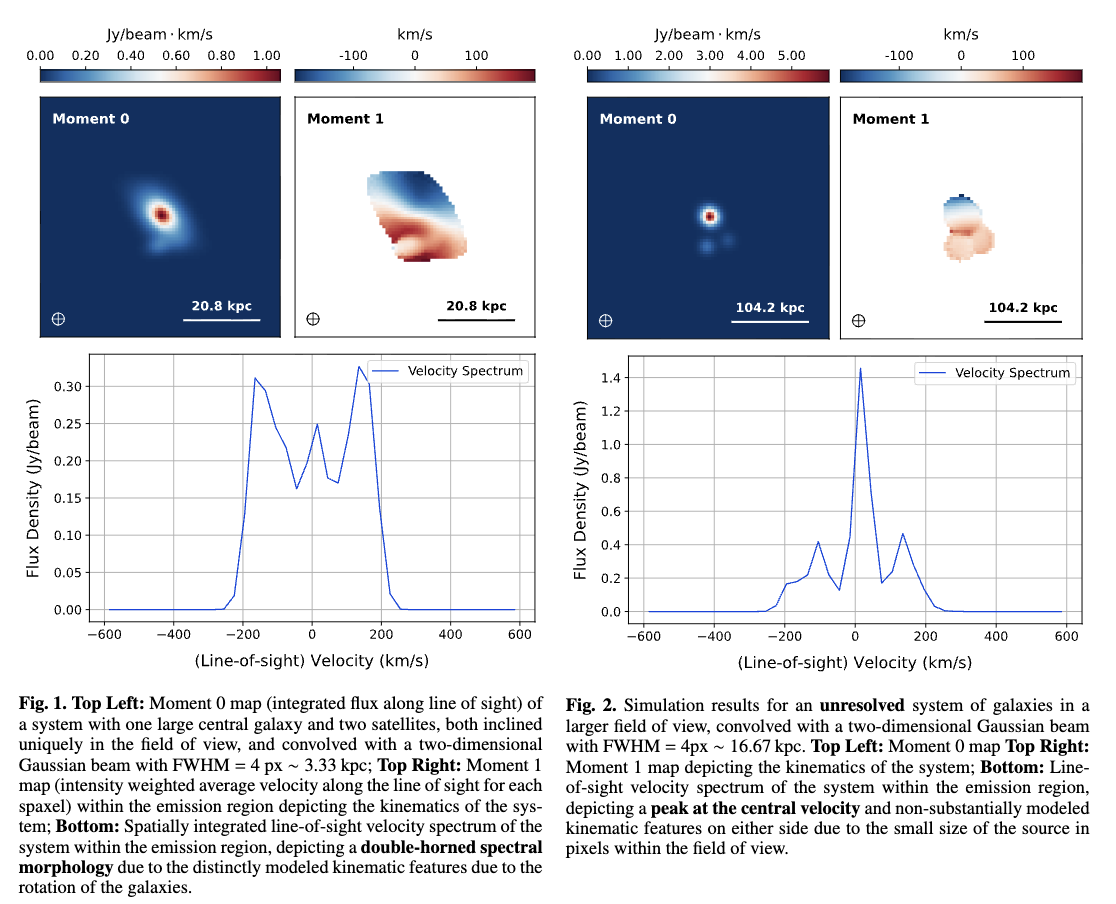
This will show moment-0 and moment-1 maps and a velocity spectrum using
matplotlib. Set save=True to write PDF figures in figures/<shape>/.
Use as a coarse dataset for transfer learning
GalCubeCraft is intentionally fast, controllable, and able to produce large numbers of cubes with varied orientations, resolutions, surface-brightness scalings and noise behaviour. For these reasons it makes a robust coarse dataset to pretrain machine-learning models before fine-tuning on smaller, scientifically complex datasets.
Recommended workflow:
- Pretrain on large GalCubeCraft datasets to learn general spectro-spatial features (correlated spectral lines, beam-smearing patterns, moment-map structure). Vary resolution, S/N, Sérsic index and component multiplicity to expose the model to a broad prior.
- Fine-tune on a much smaller but higher-fidelity dataset that explicitly includes the morphological complexities your downstream task requires — for example gravitational lensing distortions, diffuse low-surface-brightness emission, bridges and tidal tails from interacting systems, multi-component kinematics, or instrument-specific artifacts.
Why this helps:
- Reduces overfitting to small labelled sets by learning lower-level features on the synthetic data and adapting higher-level representations to the target domain during fine-tuning.
- Speeds training and improves sample efficiency when real or high-fidelity labels are scarce or expensive to create.
Practical tips:
- Freeze early convolutional layers (or set a low learning rate) during initial fine-tuning to preserve general features learned from GalCubeCraft.
- Use domain adaptation techniques (data augmentation, style transfer, or adversarial domain adaptation) to close the gap between synthetic and real observations.
- When you need morphological realism (lensing, bridges, tails, diffuse emission), either augment GalCubeCraft procedurally (apply lensing transforms, add low-surface-brightness components, overlay tidal bridges) or fine-tune on simulation/observation datasets that include such complexity.
Example tasks that benefit from this workflow: denoising, deconvolution, source detection/segmentation, kinematic parameter regression, and anomaly detection in spectral cubes.
Minimal API reference
GalCubeCraft(n_gals=None, n_cubes=1, resolution='all', offset_gals=5, beam_info=[4,4,0], grid_size=125, n_spectral_slices=40, fname=None, verbose=True, seed=None)- Construct the generator. See code docstrings for parameter meanings.
generate_cubes()→ runs the pipeline and returns a list of tuples(cube, params)visualise(data, idx, save=False, fname_save=None)→ wrapper for plotting utilities
Full API documentation (detailed user guide, class/function reference and extended examples) is currently in preparation on ReadTheDocs and will be published at https://galcubecraft.readthedocs.io when ready — coming soon.
Files of interest in the repository:
src/GalCubeCraft/core.py— main pipeline andGalCubeCraftclasssrc/GalCubeCraft/utils.py— beam, convolution and mask helperssrc/GalCubeCraft/visualise.py— plotting helpers (moment maps, spectra)
Reproducibility, limitations and edge cases
Edge cases and behaviour to be aware of:
- Small effective radii (much smaller than the beam) trigger flux-scaling to
avoid vanishing integrated flux; check
all_Seandall_Reif results look unusually bright or faint. - Very small grids or extremely fine spectral oversampling may increase memory use; the code uses modest oversampling (5x) and then bins channels.
- The generator uses a compact analytic rotation curve (not a full mass-model). For physically realistic kinematics beyond toy data, replace the rotation module with your preferred prescription.
GUI (interactive)
GalCubeCraft ships a compact Tkinter-based GUI (src/GalCubeCraft/gui.py) that
lets you interactively build a single synthetic spectral cube and inspect the
results. The GUI is designed for exploration and quick iteration: change
parameters, generate a cube in the background (without blocking the UI), and
inspect visual diagnostics. The interface is intentionally lightweight while
exposing the main knobs used by the generator.
Quick launch
Run the GUI from the package root or from the src/GalCubeCraft directory:
python -m GalCubeCraft.gui
# or
cd src/GalCubeCraft
python gui.py
What the GUI does
- Generates one spectral cube at a time from the parameters you set. This is sufficient for interactive experimentation and previewing the effects of different choices.
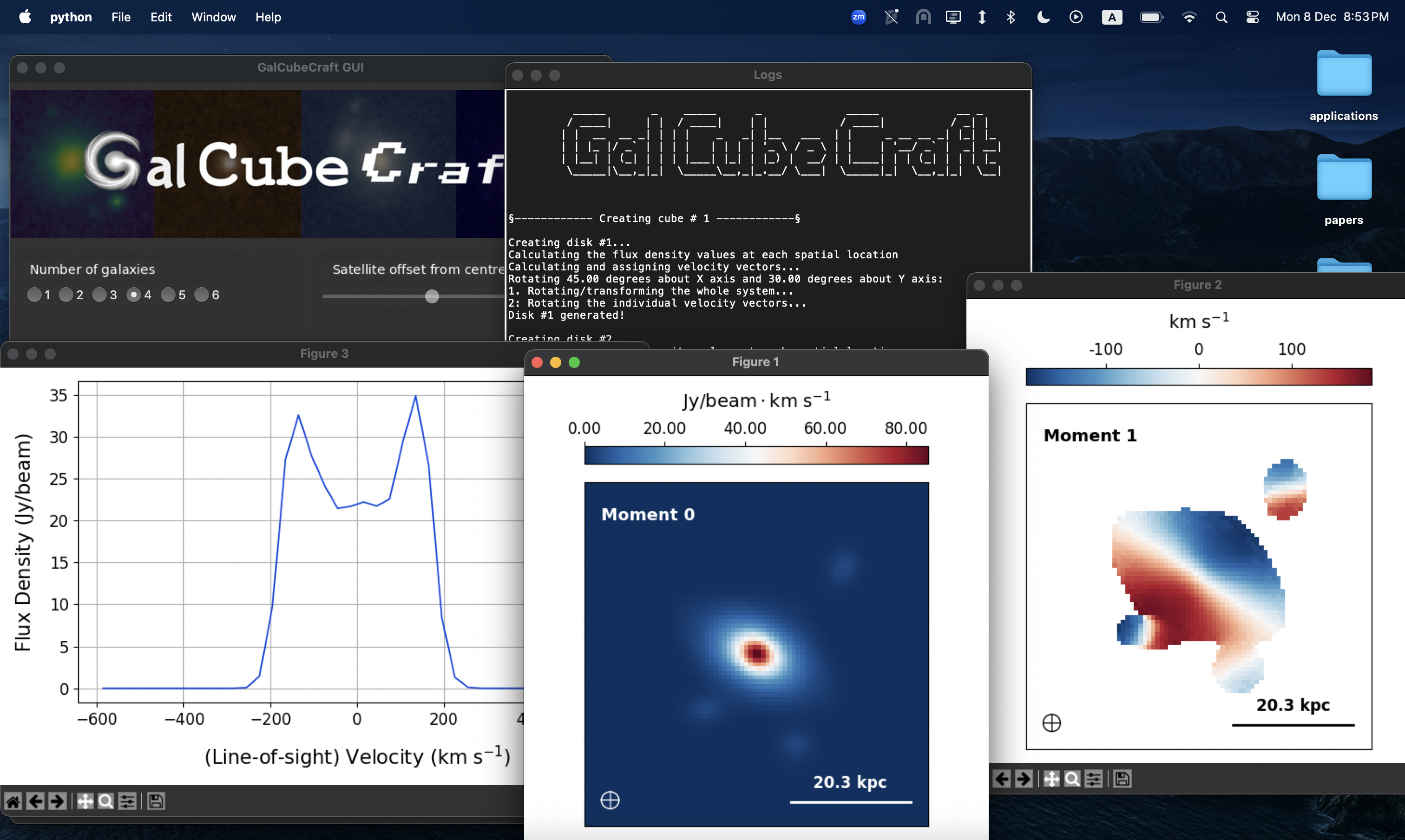
- Runs the heavy generation step in a background thread and displays logs in a small Log window so you can follow progress and any printed diagnostics.
- Provides convenience buttons to visualise results using the plotting helpers: Moment-0 (integrated intensity), Moment-1 (intensity-weighted velocity), and the integrated line-of-sight spectrum. These open interactive Matplotlib figures so you can pan/zoom as needed.
- Allows saving the generated spectral cube along with a parameters/metadata
dictionary to disk. Both NumPy
.npzarchives and Python.pklpickles are supported by the GUI save dialog.
Controls and parameters
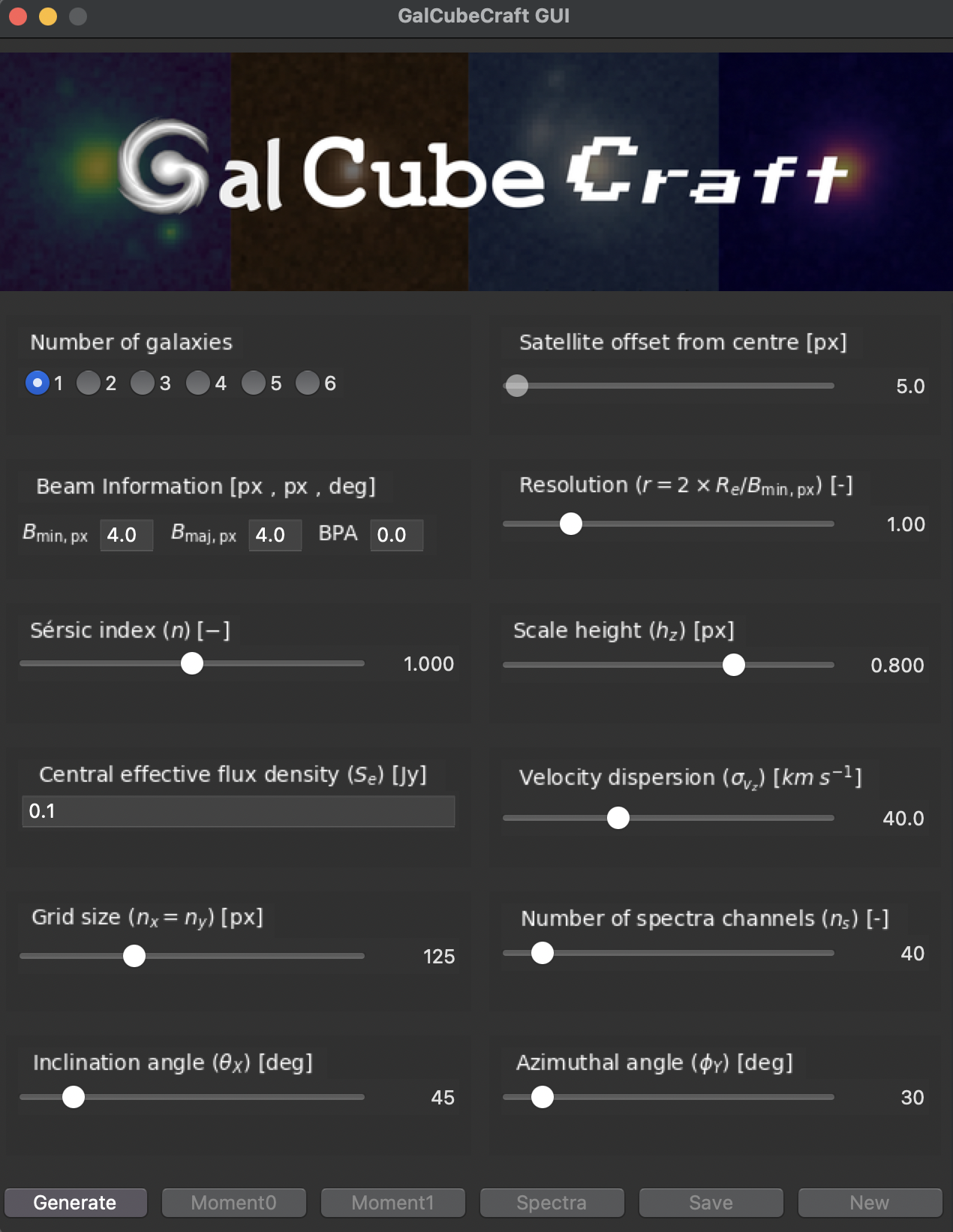
The GUI exposes the following user-adjustable parameters (each control is
directly reflected in the generator instance shown in gui.py):
- Number of galaxies (primary + satellites)
- Satellite offset (distance from primary centre, pixels)
- Beam information: minor axis (bmin, px), major axis (bmaj, px), position angle (BPA, degrees)
- Resolution parameter r (controls Re relative to beam size)
- Sérsic index n (profile concentration)
- Scale height h_z (vertical exponential scale, px)
- Central effective flux density S_e (intrinsic scaling)
- Line-of-sight velocity dispersion σ_v,z (km/s)
- Grid size (nx = ny, pixels)
- Number of spectral channels (n_s)
- Inclination angle (rotation about X, degrees)
- Azimuthal / position angle (rotation about Y, degrees)
Behaviour and UX notes
- Generation is started with the "Generate" button. While a cube is being produced the GUI disables the interactive sliders (to indicate a running state) and the Log window is shown so you can follow output.
- When generation finishes the visualisation buttons (Moment0, Moment1, Spectra) and the Save button become enabled. The "New" button clears the current generator state and re-enables controls so you can start a fresh instance.
- The GUI attempts to render LaTeX-style labels for parameter names (using Matplotlib mathtext). If rendering fails for a label it falls back to a readable plain-text label so controls remain understandable.
Visualisation
- Moment-0: integrated intensity map produced by summing the cube along the spectral axis and optionally saving the figure.
- Moment-1: intensity-weighted velocity map computed from the spectral channels and visualised with an overlaid beam marker.
- Spectrum: integrated flux vs velocity (line-of-sight spectrum).
All visualisation helpers are implemented as small functions in
src/GalCubeCraft/visualise.py and are called by the GUI to produce Matplotlib
figures. These figures are interactive; you can pan/zoom and save them using
Matplotlib's GUI controls.
Saving
- The GUI Save flow prefers to save already-generated results (so it does not
re-run the expensive generation step). You can save as a compressed NumPy
archive (
.npz) or as a pickled Python object (.pkl). Saved contents include the spectral cube array and a parameter dictionary with metadata (beam info, pixel scale, average velocities, etc.).
Future features
Planned enhancements for future releases include:
- Artificial noise injection and configurable S/N controls
- Batch generation of multiple cubes and export of training-ready datasets
- More advanced kinematic models and multi-component morphologies
- Small GUI refinements (progress bar for generation, better layout on HiDPI displays)
See the src/GalCubeCraft/gui.py source for implementation details and the
complete mapping between UI controls and generator parameters.
Troubleshooting
- Import error after pip install: check that
PYTHONPATHis not shadowing the installed package and that you're using the same Python interpreter wherepipinstalled the package (usepython -m pip install ...to be explicit). - If plotting fails, ensure GUI backend is available or use a non-interactive
backend (e.g.,
matplotlib.use('Agg')) when running headless.
Credits & citation
This package was developed as a compact educational and research tool for IFU data simulation and denoising algorithm development. If you use GalCubeCraft in published work, please cite the following paper:
Lahiry, A., Díaz-Santos, T., Starck, J.-L., Roy, N. C., Anglés-Alcázar, D., Tsagkatakis, G., & Tsakalides, P.
Deep and Sparse Denoising Benchmarks for Spectral Data Cubes of High-z Galaxies: From Simulations to ALMA Observations.
Submitted to Astronomy & Astrophysics (A&A), 2025.
License: MIT — see the LICENSE file in this repository for the full text.


Download files
Download the file for your platform. If you're not sure which to choose, learn more about installing packages.
Source Distribution
Built Distribution
Filter files by name, interpreter, ABI, and platform.
If you're not sure about the file name format, learn more about wheel file names.
Copy a direct link to the current filters
File details
Details for the file galcubecraft-1.2.1.tar.gz.
File metadata
- Download URL: galcubecraft-1.2.1.tar.gz
- Upload date:
- Size: 86.2 kB
- Tags: Source
- Uploaded using Trusted Publishing? No
- Uploaded via: twine/6.1.0 CPython/3.13.12
File hashes
| Algorithm | Hash digest | |
|---|---|---|
| SHA256 |
b4c52556d0e3997c09f881a6691ab9622b020c358d79a26092e9b43b05221085
|
|
| MD5 |
3073a8a664a878b28d41bff8e2ba926e
|
|
| BLAKE2b-256 |
f40b3b64480997957f689211bfd8d191af1b068e8465f09a54c4efdf0d0d2b49
|
File details
Details for the file galcubecraft-1.2.1-py3-none-any.whl.
File metadata
- Download URL: galcubecraft-1.2.1-py3-none-any.whl
- Upload date:
- Size: 80.6 kB
- Tags: Python 3
- Uploaded using Trusted Publishing? No
- Uploaded via: twine/6.1.0 CPython/3.13.12
File hashes
| Algorithm | Hash digest | |
|---|---|---|
| SHA256 |
dd050b858e8b91a942df8c8f88727c4ec38005b5fbc69886f36cbd517c1a949f
|
|
| MD5 |
a76d31588edb30e87a27a951ef2eaf23
|
|
| BLAKE2b-256 |
305d6bc54d72dc869c7d619f6859b754b6ec6c30f18ae5d2aaa37efb7e8d4351
|






