




Gen-EpiX: Genomic Epidemiology platform for disease X (beta version)
Gen-EpiX is a platform for visualizing and analyzing genomic epidemiology data. It has fine-grained access controls for collaboration between multiple organizations.
The platform is currently at the beta release stage and as such not yet usable for production. We are currently working to get the platform released, for use in the Netherlands as the official national platform for laboratory-based surveillance of infectious diseases. Feel free to contact us here if you are interested.
A guide for contributors can be found here
This repository contains the code for the backend and is one of several that together comprise the platform. See https://github.com/RIVM-bioinformatics/gen-epix for an overview of the repositories.
Architecture and Project Structure
Gen-EpiX is a multi-service backend. Each service runs as its own FastAPI app with a dedicated database and a consistent hexagonal layout (api/domain/services/repositories/policies/config). Core entrypoints are in run.py (service startup, ETL, tests) and etl.py (data loading). Shared functionality lives under gen_epix/fastapp, gen_epix/filter, and gen_epix/transform.
Services:
| Service | Port | Layer | Description |
|---|---|---|---|
CASEDB |
8000 | Gold | Case management and epidemiological analysis. Handles case search, filtering, signal detection, and visualization. |
SEQDB |
8001 | Silver | Genetic sequence data and phylogenetic tree computation. Enables genetic similarity searches linked to cases. |
OMOPDB |
8002 | Silver | Normalized patient/subject data compliant with OMOP Common Data Model. |
Supporting modules:
COMMONDB(port 8010): Shared resources (users, organizations, authentication). Handles fine-grained access control (ABAC/RBAC).FASTAPP: Shared FastAPI utilities and common functionality across all services.
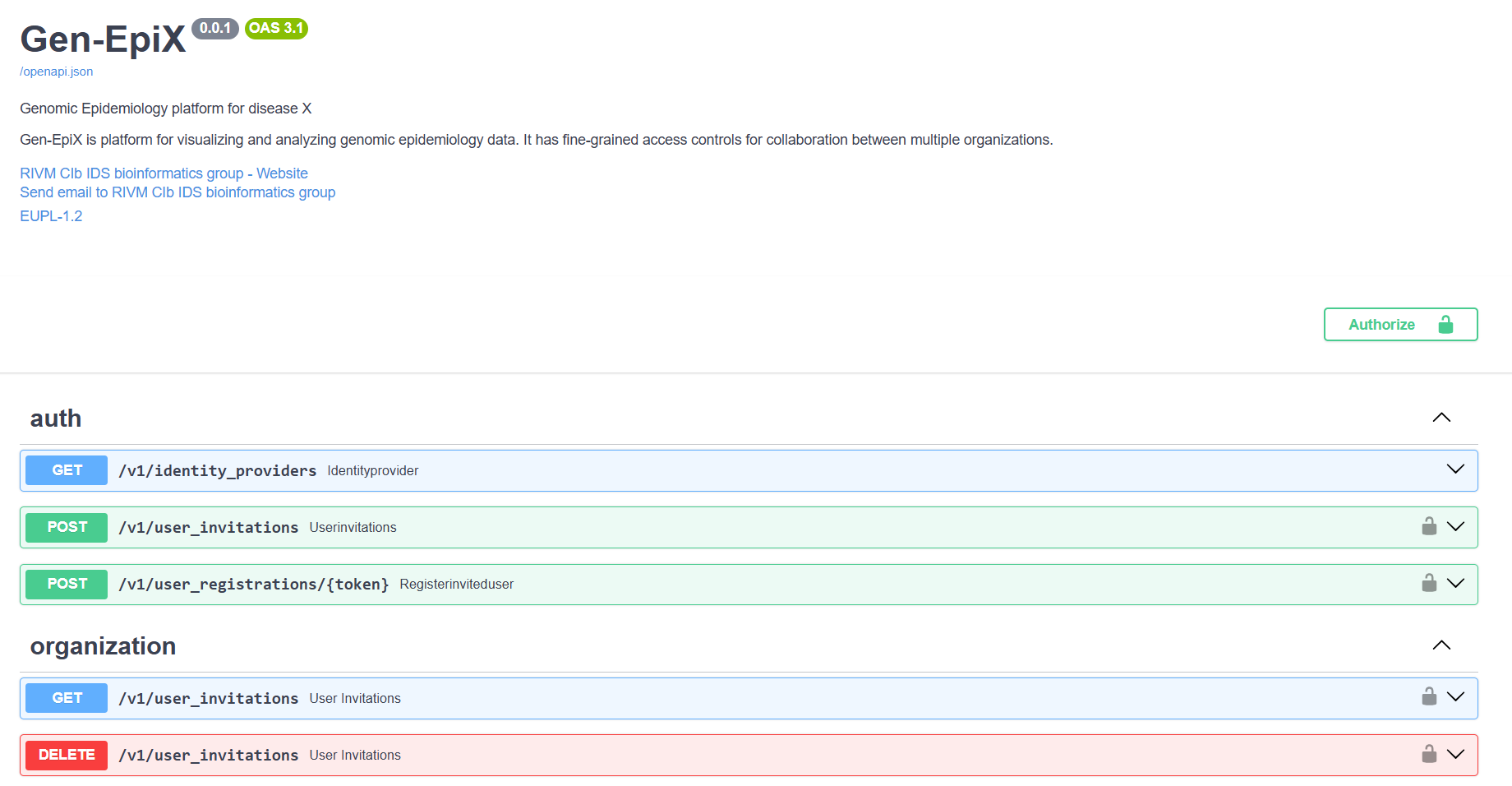
Shared API surface across services: each service mounts the COMMONDB routers (auth, rbac, organization, system) via create_fast_api → create_routers → fast_api.include_router(...), so /api/v1/organization/* and related endpoints are available on CASEDB, SEQDB, and OMOPDB.
Project tree (trimmed to the main structure):
.
├── gen_epix
│   ├── commondb/                  # shared users, orgs, and cross-service resources
│   │   ├── api/                   # FastAPI endpoints and HTTP models
│   │   ├── domain/                # business models, commands, and policies
│   │   ├── services/              # application orchestration and CRUD flows
│   │   ├── repositories/          # data access (SQLAlchemy or in-memory)
│   │   ├── policies/              # ABAC and RBAC policy logic
│   │   ├── config/                # service settings and Dynaconf config
│   │   └── app.py                 # FastAPI app object
│   ├── casedb/, omopdb/, seqdb/   # other service modules with the same layout
│   │   ├── api/
│   │   ├── domain/
│   │   ├── services/
│   │   ├── repositories/
│   │   ├── policies/
│   │   ├── config/
│   │   └── app.py
│   ├── fastapp/                   # shared FastAPI utilities and base wiring
│   ├── filter/                    # shared filtering utilities
│   └── transform/                 # shared transformation utilities
├── config/                        # global Dynaconf and identity provider configuration
├── docs/                          # documentation and assets
├── test/                          # unit, integration, and end-to-end tests
├── run.py                         # CLI entrypoint for API, ETL, and tests
└── etl.py                         # ETL entry script
Key Features
- Visualisation: Visualize cases by time, place, person and also by genome through a phylogenetic tree coupled to the cases.
- Fine-grained access: Give different organizations different access rights per disease, down to individual variables. Organizations can manage access of their own users by themselves.
- Search: Search and filter cases, including on genetic similarity.
- Signal detection: Detect, define and share sets of cases, signals and outbreaks. Detection can be manual through the web application, or through your own algorithm using the API.
- Disease X: Any disease and corresponding analysis variables can be added.
- Data: Adheres to the Medallion data architecture design pattern. The silver layer consists of normalized and standardized patient or subject data compliant with the OMOP Common Data Model, and a dedicated database for genetic sequence data and computation of phylogenetic trees. The gold layer consists of case data ready for analysis in the form of a single row of data per case.
- Tech: OpenAPI compliant API, deployable on cloud or on-premise, support for multiple authentication providers. Python/FastAPI backend and default TypeScript/React frontend available from gen-epix-web.
Deliberately not in scope
- Disease-specific knowledge: Every organization has their own variables that are important for analysis, as well as their own bioinformatics to process genetic sequence data. We therefore avoided any disease-specific code both for the generation of these data and for the analysis variables that can be defined. Only the results are stored.
- Collaboration-specific knowledge: Every collaboration or country (e.g. for public health surveillance of diseases) has their own specifics in terms of access rights and any relevant geographic regions. We therefore avoided any country-specific code, both for the type of organizations that have access, and for any geographic data.
Installation
-
Install ODBC development headers:
# Linux
sudo apt-get update
sudo apt-get install -y unixodbc-dev
-
Create and activate a conda environment:
conda create --name gen-epix python=3.14
conda activate gen-epix
-
Install dependencies*:
pip install -r requirements.txt
pip install --no-binary :all: pyodbc==5.3.*
Some hardware architectures (especially Apple M1/M2/M3 chips) require pyodbc to be compiled from source for compatibility*
When installing Gen-EpiX as a package into another project instead, use
pip install "gen-epix[server]"to run or compose an application, or plainpip install gen-epixto only call the applications through the remote clients. -
For development, add testing tools:
pip install -r dev-requirements.txt
SSL Certificate Setup
-
Install mkcert:
# Linux
sudo apt install mkcert

# macOS
brew install mkcert
-
Generate certificates:
mkcert -install
mkcert -key-file key.pem -cert-file cert.pem localhost 127.0.0.1
-
Copy the generated files:
cp key.pem cert.pem /path/to/project/cert/ -
For WSL users: Run the commands in Windows PowerShell and copy files to both the project cert directory and your WSL home directory.
(Optional) Install graphify for codebase Q&A
This repo can be explored as a knowledge graph via the graphify agent skill (see
graphify-out/ for a prebuilt graph). Install the CLI with:
pipx install graphifyy

# alternatives:
# uv tool install graphifyy
# pip install graphifyy     (may need PATH setup, see troubleshooting)
Then run /graphify in Copilot Chat, or graphify query "<question>" from a terminal, to
build or query the graph.
Usage
Starting the API
1. Activate the conda environment
conda activate gen-epix
2. Run the tests
python run.py test_all
3. Run the application
python run.py <command> <service> <idp_config> <repository_config>
command: Entry point to run (e.g.,api).service:CASEDB,SEQDB,OMOPDB, orCOMMONDB.idp_config:IDPSorMOCK.repository_config:DICT_DEMO,SA_SQLITE_DEMO, orSA_SQL.
Example
conda activate gen-epix
python run.py api casedb none dict_demo
See other examples in .vscode/launch.json
See other examples in .vscode/launch.json
 |
|---|
Implementation Details
Go here for a more in depth exploration of specific parts of the application, see the following: run.py is the single CLI entry point for the entire project. fastapp is the reusable framework that every Gen-EpiX app is built on. app creation traces every component that participates in building the COMMONDB FastAPI application.
The domain models are explained in depth here: casedb commondb omopdb omopdb mixin seqdb seqdb mixin seqdb file model seqdb attributes
Authenticated client
pip install gen-epix-api is enough to talk to a running CASEDB, SEQDB, OMOPDB or COMMONDB service.
create_client reads its settings from <APP>_* environment variables (or a .env file) and
authenticates with the OAuth2 client-credentials flow of a functional user:
from gen_epix import AppType, create_client, seqdb_command
from gen_epix.fastapp import CrudOperation

client = create_client(AppType.SEQDB)  # or "seqdb"
loci = client.handle(seqdb_command.LocusCrudCommand(operation=CrudOperation.READ_ALL))
The full guide — all settings, how tokens are fetched and renewed, using your own token, retry
policies and troubleshooting — is the documentation of the gen_epix.commondb.client_factory module:
python -c "import gen_epix.commondb.client_factory as m; help(m)".
Dependencies
Gen-EpiX relies on several Python packages to provide its functionality:
Core Dependencies
fastapi- Modern, high-performance web frameworksqlalchemy- SQL toolkit and Object-Relational Mapping (ORM) librarypydantic- Data validation and settings managementbiopython- Tools for computational molecular biology
Database Connectors
pyodbc- ODBC database adapter
Development Tools
pytest- Testing frameworkblack- Code formatterpylint- Static code analyzermypy- Static type checker
For a complete list of dependencies, refer to:
- requirements.txt - Production dependencies
- dev-requirements.txt - Development dependencies
Python Version Gen-EpiX requires Python 3.14 or higher.
Funding
This work was funded by the European Union under the EU4Health Programme (EU4H), project IDs 101102070 (UNITED4Surveillance) and 101113520 (NLWGSHERA2).

Disclaimer: Funded by the European Union. Views and opinions expressed are however those of the author(s) only and do not necessarily reflect those of the European Union or Health and Digital Executive Agency. Neither the European Union nor the granting authority can be held responsible for them.
1 maintainer

Metadata
1 maintainer
Release files for Gen-EpiX 11.0.0
For a detailed explanation of source distributions (sdists) and built distributions (wheels), please see the package formats documentation.
Source distribution (sdist)
| File | Size | Uploaded | Provenance | Actions |
|---|---|---|---|---|
| gen_epix-11.0.0.tar.gz | 817.9 kB | With provenance | Details for gen_epix-11.0.0.tar.gz |
Built distribution (wheel)
| File | Interpreter | ABI | Platform | Actions Reset |
|---|---|---|---|---|
| gen_epix-11.0.0-py3-none-any.whl | Python 3 | none | any | Details for gen_epix-11.0.0-py3-none-any.whl |
Total release size: 1.9 MB
Release files / gen_epix-11.0.0.tar.gz
| Download URL | gen_epix-11.0.0.tar.gz |
|---|---|
| Size | 817.9 kB |
| Tags | Source |
|
SHA-256 checksum How to use checksums |
d16a54b94c4cd50f5d4a49d7e3c63f898d02c3067b6ba611e18ddeb5380ec62d
|
|
BLAKE2b-256 checksum How to use checksums |
f4272f8d203290debe2e1dc54c618b745d15efcc5306333ce807e635033c5c4b
|
| Upload date | |
|
Uploaded using Trusted Publishing? What is trusted publishing? |
Yes |
| Uploaded via |
twine/7.0.0 CPython/3.13.16
|
Provenance
Provenance describes where a file came from. On PyPI, provenance is shared via attestations, which provide a verifiable record of the build or publishing details. View details, limitations and caveats.


PyPI Publish Attestation
PyPI verified that this artifact, at this checksum, originated from the publisher listed below.
Signed by GitHub Actions, verified by PyPI on Oct 29, 2026.
Transparency logRelease files / gen_epix-11.0.0-py3-none-any.whl
| Download URL | gen_epix-11.0.0-py3-none-any.whl |
|---|---|
| Size | 1.1 MB |
| Tags | Python 3 |
|
SHA-256 checksum How to use checksums |
c983a2dbf27b872b6d268d296cbaa7e8f37a23178aa19e969d4c2f8a5bcc703c
|
|
BLAKE2b-256 checksum How to use checksums |
f717ee5baf08fea50154083ce52ad82d76e2c20a494a22ac7a9cf859f5242afd
|
| Upload date | |
|
Uploaded using Trusted Publishing? What is trusted publishing? |
Yes |
| Uploaded via |
twine/7.0.0 CPython/3.13.16
|
Provenance
Provenance describes where a file came from. On PyPI, provenance is shared via attestations, which provide a verifiable record of the build or publishing details. View details, limitations and caveats.
PyPI Publish Attestation
PyPI verified that this artifact, at this checksum, originated from the publisher listed below.
Signed by GitHub Actions, verified by PyPI on Oct 29, 2026.
Transparency logSecurity for Gen-EpiX 11.0.0
Provenance
Provenance describes where a file came from. On PyPI, provenance is shared via attestations, which provide a verifiable record of the build or publishing details. View details, limitations and caveats.
Full provenance
Both files in this release have been uploaded with provenance metadata.
Attestation for gen_epix-11.0.0.tar.gz
PyPI Publish Attestation
PyPI verified that this artifact, at this checksum, originated from the publisher listed below.
Signed by GitHub Actions, verified by PyPI on Oct 29, 2026.
Transparency logA note on package security
PyPI is a repository for distributing packages, not a service for auditing them. While third-party security researchers and our staff do their best to detect and remove malicious packages, PyPI cannot guarantee the quality, security or suitability of any given package.
To learn more about protecting yourself from malicious actors, visit our package security documentation.














