
A Python package designed to provide toolkits for geospatial analysis.

Project description
GeoAnalyze
| Status | Description |
|---|---|
| PyPI |     |
| GitHub |     |
| Codecov |  |
| Read the Docs |  |
| PePy |  |
| License |  |
GeoAnalyze is a Python package designed to streamline geoprocessing by handling internal complexities and intermediate steps. Conceptualized and launched on October 10, 2024, this package is tailored for users with limited geospatial processing experience, allowing them to focus on desired outputs. Leveraging open-source geospatial Python modules, GeoAnalyze aims to empower users by providing high-level geoprocessing tools with fewer lines of code. This fast package is also useful for the users who has no access of paid GIS software packages.
Delineation Functions
The GeoAnalyze.Watershed and GeoAnalyze.Stream classes provide fast and scalable watershed delineation functions by leveraging the computational efficiency of the PyPI package
pyflwdir, without requiring a detailed understanding of it. These functions can be executed either individually or simultaneously.
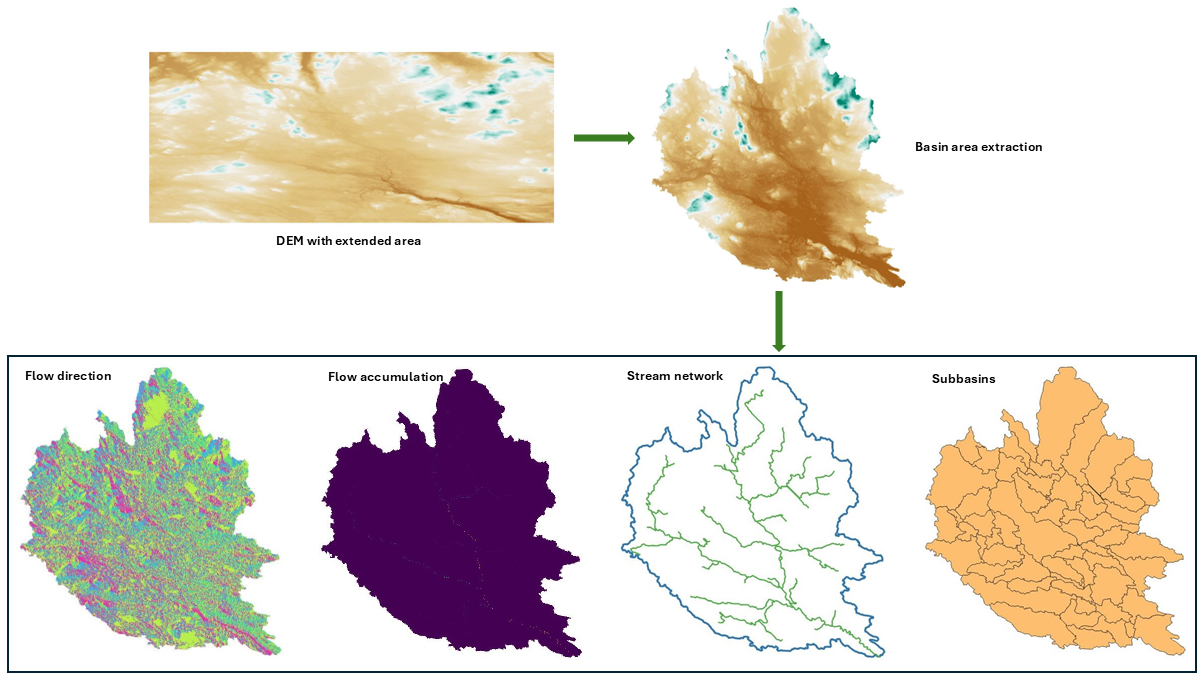
- Basin area extraction from extended Digital Elevation Model (DEM).
- Pit filling of DEM.
- Slope.
- Flow direction.
- Flow accumulation.
- Stream extraction.
- Subbaisn generation.
- Stream link.
- Main outlet and junction points.
The computational efficiency of these functions is demonstrated in the following output figure. All delineation files—including basin area, flow direction, flow accumulation, slope, stream, outlets, and subbasins—can be generated within 30 seconds from a raster containing 14 million cells.
Geoprocessing
The GeoAnalyze package leverages the existing PyPI packages, such as, rasterio,
geopandas, and shapely,
to perform geoprocessing efficiently while reducing implementation complexity.
Instead of requiring multiple lines of code to handle intermediate steps,
the GeoAnalyze.Raster and GeoAnalyze.Shape classes streamline the process by automating these operations.
This allows users to execute geoprocessing tasks more efficiently, reducing code length while ensuring accuracy and scalability.
Raster
- Rasterizing input geometries
- Rescaling raster resolution
- Clipping rasters using shapefiles
- Overlaying geometries onto rasters
- Reprojecting the Coordinate Reference System (CRS)
- Handling NoData values in rasters
- Extracting raster boundary polygons
- Reclassifying rasters values
- Counting unique raster values
- Merging raster files
Shapefile
- Vectorizing raster array
- Aggregating geometries
- Executing spatial joins on geometries
- Reprojecting CRS
- Filling polygons
- Performing column analysis
File Operations (Irrespective of Extensions)
When managing GIS files, each main file is often associated with several auxiliary files. For example, a shapefile
is commonly accompanied by .shp, .cpg, .dbf, .prj, and .shx files, which are necessary for the shapefile to function correctly.
In geoprocessing, these associated files must be handled together to prevent errors or data loss.
The GeoAnalyze.File class simplifies this process by ensuring that any operation performed
on a main file automatically includes its auxiliary files, making file management more efficient and error-free.
- Deleting files in a folder.
- Transferring files from the source folder to the destination folder.
- Renaming files in a folder.
- Copying files from the source folder and renames them in the destination folder.
- Extracting files with the same extension from a folder.
Easy Installation
To install, use pip:
pip install GeoAnalyze
Quickstart
A brief example of how to start:
>>> import GeoAnalyze
>>> file = GeoAnalyze.File()
Documentation
For detailed information, see the documentation.
Support
If this project has been helpful and you'd like to contribute to its development, consider sponsoring with a coffee! Support will help maintain, improve, and expand this open-source project, ensuring continued valuable tools for the community.

Release history Release notifications | RSS feed


Download files
Download the file for your platform. If you're not sure which to choose, learn more about installing packages.
Source Distribution
Built Distribution
Filter files by name, interpreter, ABI, and platform.
If you're not sure about the file name format, learn more about wheel file names.
Copy a direct link to the current filters
File details
Details for the file geoanalyze-1.1.0.tar.gz.
File metadata
- Download URL: geoanalyze-1.1.0.tar.gz
- Upload date:
- Size: 34.4 MB
- Tags: Source
- Uploaded using Trusted Publishing? No
- Uploaded via: twine/6.0.1 CPython/3.12.7
File hashes
| Algorithm | Hash digest | |
|---|---|---|
| SHA256 |
be67dbc32247c44dcb63e1d20235bd5dd6086f79f89a36e0f1e9fefab88d58b5
|
|
| MD5 |
8be4e5eba4f41b6a691455302b679678
|
|
| BLAKE2b-256 |
505437a7010e04da06aacf2277f6c9a7c65d0fb11d2ba4a4349cbfce187d69d9
|
File details
Details for the file geoanalyze-1.1.0-py3-none-any.whl.
File metadata
- Download URL: geoanalyze-1.1.0-py3-none-any.whl
- Upload date:
- Size: 33.0 MB
- Tags: Python 3
- Uploaded using Trusted Publishing? No
- Uploaded via: twine/6.0.1 CPython/3.12.7
File hashes
| Algorithm | Hash digest | |
|---|---|---|
| SHA256 |
9b8fbc65b0d87cf66fbf182fd91fedb20f9523590aae3e0a2a837633dfa385a2
|
|
| MD5 |
f7f03fbf2bf0661ff9af05bb19d093f7
|
|
| BLAKE2b-256 |
f7f22c175fe0f992870944781f2ef722c023d7f3f75f03e8d9df391854a10282
|






