
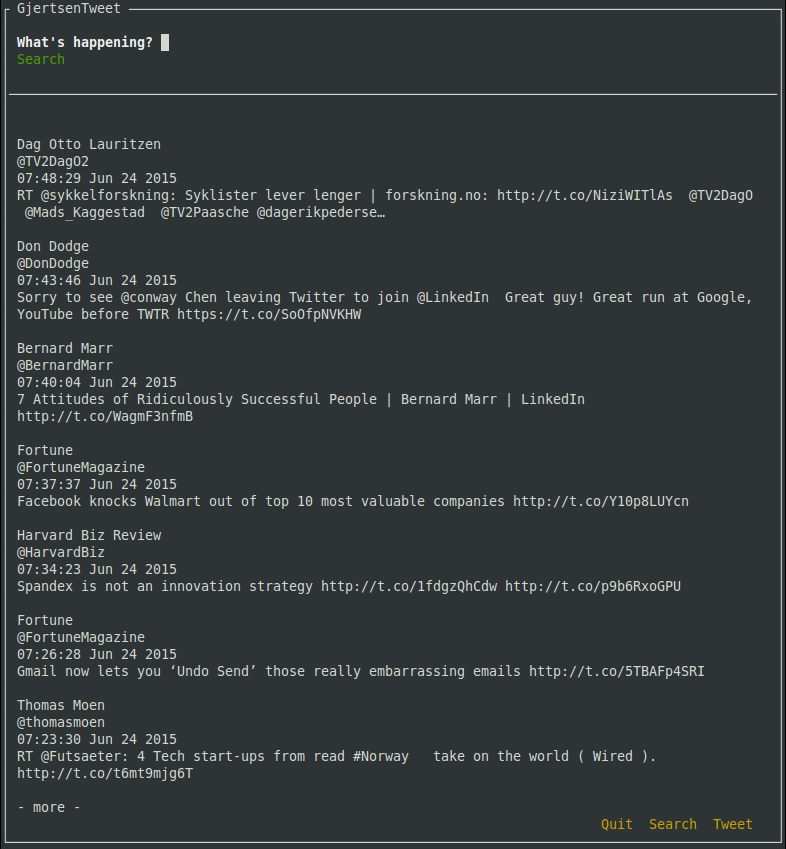
GjertsenTweet is a simple twitter client built with npyscreen. It lets you access twitter from your terminal so you can post tweets, read tweets and search for tweets.
Installation
pip install gjertsentweet
For windows user, note that you need to install curses from here http://www.lfd.uci.edu/~gohlke/pythonlibs/ if you already havent done it
Build from source
python setup.py install
or:
pip install -r requirements.txt and run client.py
Usage
Run gjertsentweet in your terminal to fire it up, commandline-arguments doesn’t exist in this app.
When launched for the first time you will be asked to open a link in your browser in order to approve the app. You will be given a pin from twitter which lets you log into your account from GjertsenTweet.
When logged in, you can simply use the arrow keys or enter to move around. Note that once you have moved down to feed, you can’t use the arrow key to move the cursor back to the tweet/search fields. To do this you will have to press one of the buttons.
The twitter feed will be updated on the fly.
Note that you have to press enter when the dialog boxes pops up in order to move the cursor down to the button/buttons
1 maintainer

Metadata
1 maintainer
Release files for GjertsenTweet 0.5.2
For a detailed explanation of source distributions (sdists) and built distributions (wheels), please see the package formats documentation.
Source distribution (sdist)
| File | Size | Uploaded | Provenance | |
|---|---|---|---|---|
| GjertsenTweet-0.5.2.tar.gz | 6.6 kB | Without provenance | Details |
Release files / GjertsenTweet-0.5.2.tar.gz
| Download URL | GjertsenTweet-0.5.2.tar.gz |
|---|---|
| Size | 6.6 kB |
| Tags | Source |
|
SHA-256 checksum How to use checksums |
3805e00cc33cc069db1dc3b9d9d2f233d3b11477799813d733b73ff77cd034c0
|
|
BLAKE2b-256 checksum How to use checksums |
2009e15df884717d4406febc197856dc40075d5a9b8df42594e034476f07e08e
|
| Upload date | |
|
Uploaded using Trusted Publishing? What is trusted publishing? |
No |
Security for GjertsenTweet 0.5.2
Provenance
Provenance describes where a file came from. On PyPI, provenance is shared via attestations, which provide a verifiable record of the build or publishing details. View details, limitations and caveats.
No provenance found
None of the files in this release were uploaded with provenance metadata.
A note on package security
PyPI is a repository for distributing packages, not a service for auditing them. While third-party security researchers and our staff do their best to detect and remove malicious packages, PyPI cannot guarantee the quality, security or suitability of any given package.
To learn more about protecting yourself from malicious actors, visit our package security documentation.














