
Python package to cluster IT support tickets based on its description/resolution remarks

Project description
GraphicalClustering
Tool to cluster IT support tickets based on its description/resolution remarks
For example, lets consider two descriptions as
- BMC portal alert on d-hw6ttk1-lvmh: /var for filesystem full
- BMC portal critical alert on d-hw6ttk1-lvmh/var for filesystem full
These two descriptions are same except the word critical present in the second description. We group such similar descriptions into one cluster by computing similarity between two descriptions.
Some of the approaches to compute similarity between two descriptions are Jaccard coefficient, Dice coefficient, etc. Dice coefficient gives twice the weight to common elements. Since we emphasize on commonality, we use Dice coefficient to compute similarity between two descriptions.
Let A and B be sets of words in two descriptions. Dice similarity, D, between A and B is defined as follows:
D = (2 ∗ |A ∩ B|)/ (|A| + |B|)
For example, if
- A = BMC portal alert on d-hw6ttk1-lvmh: /var for filesystem full
- B = BMC portal critical alert on d-hw6ttk1-lvmh: /var for filesystem full
- then |A| = 9, |B| = 10, |A ∩ B| = 9 and D = (2∗9)/ (9+10) = 0.947.
Below are the logical steps to perform Graphical clustering after identifying the similarity scores
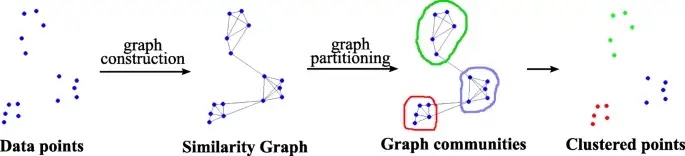
- Compute Dice similarity between every pair of clean description.
- Construct a similarity graph of clean descriptions in which nodes are clean descriptions.
- Draw an edge between two clean descriptions if they are similar. Consider two clean descriptions similar if the similarity coefficient between them is greater than a predefined threshold threshold similarity.
- Cluster clean descriptions by applying graph clustering on the similarity graph of clean descriptions. Various graph clustering techniques can be used for clustering such as cliques, connected components, graph partitioning, graph cuts, etc. We have used cliques to identify clusters of clean descriptions.
For more information about the how we evalued from the level of pseudo code into the full python package, kindly go through below articles
- https://medium.com/@nmani.1191/implementing-graphical-clustering-algorithm-from-research-paper-in-python-part-2-developing-the-ca6c1a1c8d84
- https://medium.com/@nmani.1191/how-we-addressed-the-challenges-faced-with-the-first-version-of-graphical-clustering-mvp-part-3-89d1420ec8c0
To install the module
pip install Graphical-Clustering
Read sample IT Tickets with description in order to cluster the same
import pandas as pd
input_tck_data = pd.read_csv('data/sample_data.csv')
input_text = input_tck_data['Issue Description']
Import the Graphical Clustering class and cluester the input data
from GraphicalClustering.graph_cluster import GraphicalClustering
gc_model = GraphicalClustering(input_text,2)
gc_model.generate_graph_clusters(5)
We can view the generated clusters like below

We can save the generated cluster model for predicting future tickets as well like below
import joblib
joblib.dump(gc_model, 'gc_model_v1.pkl')
We can predict the new texts using the model saved like below
loaded_gc_model = joblib.load('gc_model_v1.pkl')
result = loaded_gc_model.predict(input_text[0:5]) #For testing here I passed same input again
Pedicted outputs will be like below

Release history Release notifications | RSS feed


Download files
Download the file for your platform. If you're not sure which to choose, learn more about installing packages.
Source Distribution
Built Distribution
Filter files by name, interpreter, ABI, and platform.
If you're not sure about the file name format, learn more about wheel file names.
Copy a direct link to the current filters
File details
Details for the file Graphical_Clustering-0.0.3.tar.gz.
File metadata
- Download URL: Graphical_Clustering-0.0.3.tar.gz
- Upload date:
- Size: 9.7 kB
- Tags: Source
- Uploaded using Trusted Publishing? No
- Uploaded via: twine/4.0.2 CPython/3.9.15
File hashes
| Algorithm | Hash digest | |
|---|---|---|
| SHA256 |
804eaf9500923366fea32370debc05556a4b6ee86094d7573fc123a0c263d0c6
|
|
| MD5 |
4ab53832131f06c66851522eeff2faff
|
|
| BLAKE2b-256 |
5b70a22315a902d29112b13aa6d472d6a5b830a1fadaa9b5e5fe707f627c6ddf
|
File details
Details for the file Graphical_Clustering-0.0.3-py3-none-any.whl.
File metadata
- Download URL: Graphical_Clustering-0.0.3-py3-none-any.whl
- Upload date:
- Size: 8.5 kB
- Tags: Python 3
- Uploaded using Trusted Publishing? No
- Uploaded via: twine/4.0.2 CPython/3.9.15
File hashes
| Algorithm | Hash digest | |
|---|---|---|
| SHA256 |
03674184f17cf67d156d6eea65ac4321ee43215fd3e353b23f6783d3159d850e
|
|
| MD5 |
a6de87adfede2cf063fb7f72fe76a7ea
|
|
| BLAKE2b-256 |
f1f3b70daebb86db922d24f36209f5d3fa9673afec4338e6c1903fd150a19a69
|






