
heic2png




Turn iPhone HEIC photos into PNG (or JPEG) from the command line or from Python.
heic2png converts a file and puts the result next to it, or works as a filter in a
shell pipe. Transparency is kept, and nothing needs compiling: it is a small wrapper around
Pillow and pillow-heif
that runs anywhere Python 3.8 or newer does.
Install
pip install heic2png
Quick start
heic2png -i photo.heic                       # writes photo.png next to photo.heic
heic2png -i photo.heic -q 100 -o full.png    # keeps every color (see below)
from heic2png import HEIC2PNG

HEIC2PNG("photo.heic", quality=100).save()   # writes photo.png
About quality
The command uses quality 80 by default. For PNG output, any quality below 100 turns
the picture into a palette image of at most 256 colors (quality × 2.56). That roughly halves
the file size, but a photo loses color detail. Here is the same 2× crop of the sample photo
in tests/, converted both ways:
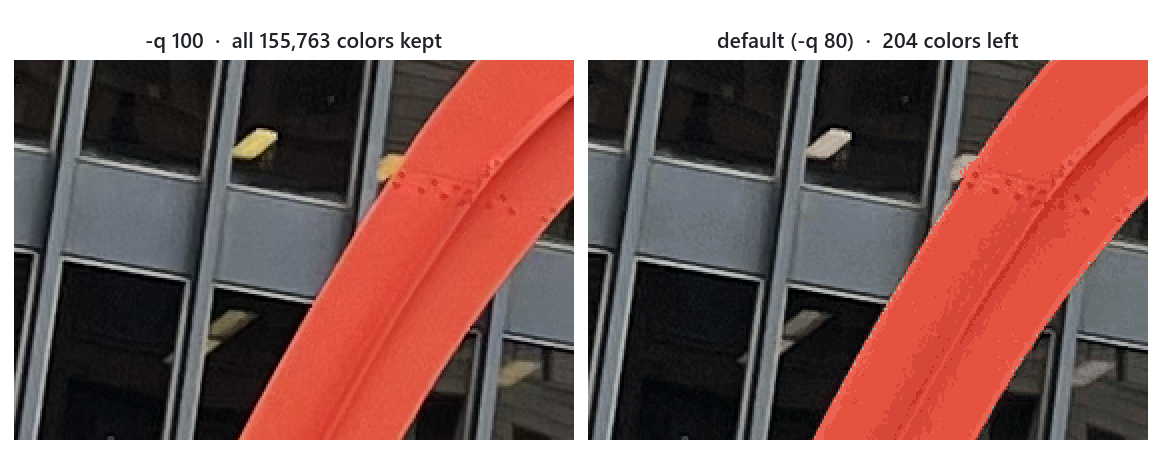
| Command | Output | Colors | Size |
|---|---|---|---|
| (the original HEIC) | 2.4 MB | ||
heic2png -i photo.heic -q 100 |
PNG | all 155,763 | 12.4 MB |
heic2png -i photo.heic |
PNG | 204 | 6.5 MB |
heic2png -i photo.heic -q 30 |
PNG | 76 | 4.8 MB |
heic2png -i photo.heic -f jpg |
JPEG | all | 2.1 MB |
- To keep every color, use
-q 100. - For a small file, use
-f jpg. JPEG keeps all colors and is smaller than any palette PNG for photos; for JPEG,-qis the usual JPEG quality. - In Python,
HEIC2PNG(path)keeps every color by default; passquality=to reduce them.
Command line
usage: heic2png [-h] [-i INPUT_PATH] [-o OUTPUT_PATH] [-q QUALITY]
                [-f {png,jpg,jpeg}] [-w] [--quiet] [-v] [--version]
| Option | What it does | Default |
|---|---|---|
-i--input-path |
Image to convert: .heic, .jpg, .jpeg or .png |
read stdin |
-o--output-path |
Where to write the result (stdout when reading stdin) | next to the input |
-q--quality |
Quality from 1 to 100, see About quality | 80 |
-f--format |
Output format: png, jpg or jpeg |
png |
-w--overwrite |
Replace the output file if it exists | off |
--quiet |
Print errors only | off |
-v--verbose |
Also print the settings used | off |
-h--version |
Print the help or the version |
-f decides the format, not the file name: write -f jpg -o photo.jpg, because
-o photo.jpg alone still writes PNG data.
heic2png -i photo.heic -o out.png                   # pick the output path
heic2png -i photo.heic -f jpg                       # writes photo.jpg
for f in *.heic; do heic2png -i "$f" -q 100; done   # every .heic in the folder
heic2png -i photo.heic -w                           # photo.png exists now: -w replaces it
Progress messages and errors go to stderr. With -v you see what will happen:
$ heic2png -i photo.heic -v
Converting image...
Conversion settings:
Input: photo.heic
Output: photo.png
Quality: 80
Format: png
Overwrite: False
Successfully saved converted image to: photo.png
The command exits with 0 on success, 1 when the conversion fails (for example
heic2png: error: Input file not found: photo.heic), 2 for invalid options and 130 on Ctrl+C.
Pipes: stdin and stdout
Without -i, heic2png reads the image from stdin; without -o, it then writes to stdout.
In this mode it prints nothing except errors, so stdout carries only image data.
cat photo.heic | heic2png > photo.png      # pipe in, pipe out
heic2png < photo.heic > photo.png          # the same with redirects
cat photo.heic | heic2png -o copy.png      # pipe in, write a file
cat photo.heic | heic2png -f jpg -q 90 > photo.jpg

# straight from the web
curl -sL https://github.com/NatLee/heic2png/raw/main/tests/calder-flamingo.heic \
  | heic2png -q 100 > flamingo.png
Python API
from heic2png import HEIC2PNG

converter = HEIC2PNG("photo.heic", quality=100)
converter.save()                                 # photo.png next to the input
converter.save("copy.png")                       # a path of your choice
converter.save("photo.jpg", extension=".jpg")    # JPEG
HEIC2PNG(image_file_path="", quality=None, overwrite=False) opens the image.
image_file_path: a path (strorPath) to a.heic,.jpg,.jpegor.pngfile, a binary file object such asio.BytesIO, or""to read stdin.quality:None(the default) keeps every color. 1–99 reduces PNG output to a palette of quality × 2.56 colors; 100 keeps every color. For JPEG output it is the JPEG quality (Nonemeans 95).overwrite: whethersave()may replace an existing file.- Raises
FileNotFoundErrorfor a missing file,ValueErrorfor a bad quality or file type, andOSErrorif the data is not an image it can read.
save(output_image_file_path=None, extension=".png") converts and writes the image, and
returns the path it wrote.
output_image_file_path: where to write. If left out, the result goes next to the input file with the new extension, or to stdout when the input was stdin or a file object.extension:".png",".jpg"or".jpeg"(the dot is optional).- Raises
FileExistsErrorif the file exists andoverwriteis off,ValueErrorfor an unsupported format, andOSErrorif writing fails.
The opened Pillow image is available as converter.image if you need it.
Converting bytes you already have in memory, such as an upload:
import io
from pathlib import Path
from heic2png import HEIC2PNG

data = Path("photo.heic").read_bytes()
HEIC2PNG(io.BytesIO(data), quality=100).save("upload.png")
Development
git clone https://github.com/NatLee/heic2png.git
cd heic2png
pip install -e ".[test]"   # the package plus pytest
pytest tests               # the tests only write to temporary folders
tox -e py                  # what CI runs: check-manifest + the tests
CI runs the tests on Python 3.8 to 3.14.
Thanks
Built on Pillow and
pillow-heif; colors are reduced with
Image.quantize().
The package layout started from example_pypi_package.
The sample photo in tests/ is Alexander Calder's Flamingo in Chicago.
MIT licensed.
1 maintainer

Metadata
1 maintainer
Release files for HEIC2PNG 1.2.2
For a detailed explanation of source distributions (sdists) and built distributions (wheels), please see the package formats documentation.
Source distribution (sdist)
| File | Size | Uploaded | Provenance | Actions |
|---|---|---|---|---|
| heic2png-1.2.2.tar.gz | 17.0 kB | Without provenance | Details for heic2png-1.2.2.tar.gz |
Built distribution (wheel)
| File | Interpreter | ABI | Platform | Actions Reset |
|---|---|---|---|---|
| heic2png-1.2.2-py3-none-any.whl | Python 3 | none | any | Details for heic2png-1.2.2-py3-none-any.whl |
Total release size: 28.6 kB
Release files / heic2png-1.2.2.tar.gz
| Download URL | heic2png-1.2.2.tar.gz |
|---|---|
| Size | 17.0 kB |
| Tags | Source |
|
SHA-256 checksum How to use checksums |
4fe3cce4a5a3af407062f82ee19e5be15f1d242a5b2f8fc0eefefef618fd8296
|
|
BLAKE2b-256 checksum How to use checksums |
822d704a73977a0629ed816ee0042d36511636e9552ea4040defc2ff89db2292
|
| Upload date | |
|
Uploaded using Trusted Publishing? What is trusted publishing? |
No |
| Uploaded via |
twine/7.0.0 CPython/3.15.1
|
Release files / heic2png-1.2.2-py3-none-any.whl
| Download URL | heic2png-1.2.2-py3-none-any.whl |
|---|---|
| Size | 11.6 kB |
| Tags | Python 3 |
|
SHA-256 checksum How to use checksums |
9e7541ec0f8346850d3c9372c43364c1272d50ed53a3661deb4e6b1f10e974af
|
|
BLAKE2b-256 checksum How to use checksums |
e36bacc5b858b9da51ef0f206838cf4cf6aa8367b8400728c4264b64629fc843
|
| Upload date | |
|
Uploaded using Trusted Publishing? What is trusted publishing? |
No |
| Uploaded via |
twine/7.0.0 CPython/3.15.1
|
Security for HEIC2PNG 1.2.2
Provenance
Provenance describes where a file came from. On PyPI, provenance is shared via attestations, which provide a verifiable record of the build or publishing details. View details, limitations and caveats.
No provenance found
None of the files in this release were uploaded with provenance metadata.
A note on package security
PyPI is a repository for distributing packages, not a service for auditing them. While third-party security researchers and our staff do their best to detect and remove malicious packages, PyPI cannot guarantee the quality, security or suitability of any given package.
To learn more about protecting yourself from malicious actors, visit our package security documentation.














