
A Python-based build system with a Makefile-like experience

Project description
HXMK (Hexcell Make)
HXMK is a python-based build system for the Hexcell Projects. It brings a Makefile like experience to a familiar and simple environment.
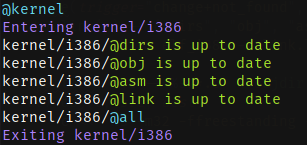
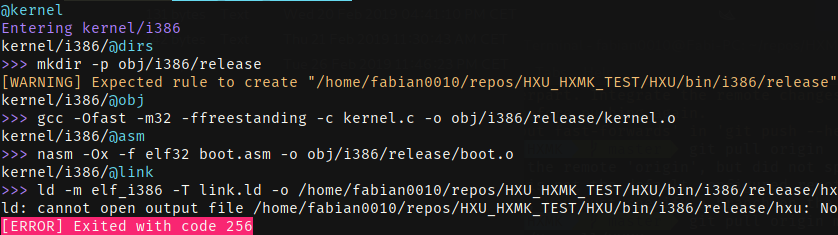
Best of all: it has nice colors
Installation
pip install HXMK
Manual (latest version)
$ git clone https://github.com/Hexcell/HXMK.git
$ cd HXMK

$ pip install .
Usage
If the project directory contains a hxmk.py file, you can do
hxmk [args|rules]
Arguments are specified like name=value and rules like name.
hxmk abc=123 somerule
In case no rule was given, HXMK will look for the rule @everything and execute it (if it exists).
No arguments or rules have to be specified be default.
hxmk # <- this is completely valid
HXMK can also be used to clean directories.
hxmk clean [args|rules]
This will look for a .clean file that contains a glob pattern on each line.
Example of a .clean file:
bin
obj
*.o
__pycache__
clean counts as a rule (although it's not an actual rule), so the rule @everything will not be run if not explicitly stated like this:
hxmk clean everything # will clean and THEN run @everything
hxmk.py
Rules
The simplest rule would look something like this:
@rule()
def everything(c):
    pass
c is an instance of the class Commander, it is used to execute commands. To do so, it overloads the lshift operator.
@rule()
def everything(c):
    c << "echo Commands are executed like this."
Rules can have dependencies. They are given through the return annotation. A rules dependencies are executed before it.
@rule()
def everything(c) -> "other":
    c << "echo What a lovely day it is today."

def other(c):
    c << "echo @everything depends on me so I go first!"
Multiple dependencies are given in a list or tuple, whichever you prefer.
@rule()
def everything(c) -> ("other", "something")
Rules have triggers, which are state if and when a rule shall be executed. The default trigger is always. trigger can be a str, but it might also be a list or tuple of multiple triggers. Some triggers require additional parameters.
@rule(trigger="not_found", dest=["bin", "obj"])
def dirs(c):
    c << "mkdir -p bin"
    c << "mkdir -p obj"
The following triggers are implemented so far:
always, always execute the rule.dependencies, execute it if one or more dependency did something, eg. its commands were executed.not_found, execute when a specific path is not found (file or folder). An additional parameterdestis required.destcan be astr,list, or atuple.changed, cache a file or list of files. Execute when either any of the specified files is not found in the cache or when any of those files have been changed. An additional parameterpathis required.pathcan be astr,list, or atuple
If not_found is used, the rule will assume that you are going to create the specified path. If that path is not found after the Rule was executed, a warning will be shown.
An example of a caching rule:
@rule(trigger=["not_found", "changed"], path=["a.cpp", "b.cpp"], dest="program")
Patterns
Patterns are Rules that are executed multiple times for multiple files. They look like this:
@pattern("src/*.c -> obj/*.o")
def somerule(c, src, dest):
    pass
(The syntax for the patterns is src -> dest.)
This basically means, every .c file in src will be turned into an .o file in obj.
The Pattern Rule will be executed for every .c file.
This could be used to compile every .c file in a directory.#
@pattern("src/*.c -> obj/*.o")
def somerule(c, src, dest):
    c << "gcc -c %s -o %s" % (src, dest)
Pattern rules are cached. Before executing, the Pattern Rule checks whether the source files have been modified since the last build and if the destination file exists already. If the destination file does not exist, the rule will be executed, else it will only be executed if the source file was modified or not found in the cache.
Builtins
All builtins are immediately available without having to import anything.
make
make(self, path, args=[], isolate=False)
make will start HXMK in a different folder. Optionally args (in the sense of CLI args) can be passed in to args.
By default all variables from the root module are readable in every module called by make. This behavior can be stopped by setting isolate to True.
# hxmk.py
somevar = "hello"
@rule()
def everything(c):
    make("other")
# other/hxmk.py
@rule()
def everything(c):
    print(somevar)
>>> @all
>>> Entering other
>>> other/@all
>>> "hello"
default
default(arg, val)
default is used to optain a value from the CLI or default to another value in case it's not found. The first argument is the name and the second one is the default value.
An example would be:
$ hxmk config=debug
config = default("config", "release")
assert config in ["debug", "release"]

# ...now config can be used
as_args
as_args(l, prefix="", suffix="")
as_args is used to use a list as CLI arguments. The first argument is a list, tuple or dict, the keyword arguments are prefix and suffix.
An example use case would be this:
...
    c << "ld ... %s" % as_args(["a.o", "b.o", "c.o"])

>>> ld ... "a.o" "b.o" "c.o"
Passing in a dict would return "key=value" for each item.
...
    c << "ld ... %s" % as_args({"a": "b", "c": "d"})

>>> ld ... "a=b" "c=d"
When passing in a dict, the prefix and suffix parameters can not be used.
glob
glob(pathname, *, recursive=False)
glob is just the glob function from pythons standard library. For more information, look at Pythons documentation on it.
It could be used in combination with as_args to link all object files.
...
    c << "ld ... %s" % as_args(glob("obj/*.o"))

>>> ld ... "main.o" "utils.o"
Goals
The main goal is to create a simple build too with the same functionality as make (+ more) while maintaining readability and sanity.
Currently, HXMK runs just fine, but there have been and will most likely be many API changes. Bugs are to be expected, if you find one, do not hesitate to create an issue.
TODO
- rules
- pattern eules
- argument parsing
- build subdirectories
- cleaning
- add docstrings and comments for every function
- full api documentation
Contributing
Any form of contribution is welcome ^^
Release history Release notifications | RSS feed


Download files
Download the file for your platform. If you're not sure which to choose, learn more about installing packages.
Source Distribution
Built Distribution
Filter files by name, interpreter, ABI, and platform.
If you're not sure about the file name format, learn more about wheel file names.
Copy a direct link to the current filters
File details
Details for the file HXMK-0.0.3.tar.gz.
File metadata
- Download URL: HXMK-0.0.3.tar.gz
- Upload date:
- Size: 9.4 kB
- Tags: Source
- Uploaded using Trusted Publishing? No
- Uploaded via: twine/1.13.0 pkginfo/1.5.0.1 requests/2.21.0 setuptools/40.8.0 requests-toolbelt/0.9.1 tqdm/4.30.0 CPython/3.7.2
File hashes
| Algorithm | Hash digest | |
|---|---|---|
| SHA256 |
da6c2df6da59a2f91a3c1771f85efa210c1d9e61c48d97d3d31264cab695eca1
|
|
| MD5 |
c41fcc241baf3d18221fac9f3856f204
|
|
| BLAKE2b-256 |
09940e793f383af61a36be61efe8c77388df31926d4f4fbdcb1b9bdc1bebc3da
|
File details
Details for the file HXMK-0.0.3-py3-none-any.whl.
File metadata
- Download URL: HXMK-0.0.3-py3-none-any.whl
- Upload date:
- Size: 15.6 kB
- Tags: Python 3
- Uploaded using Trusted Publishing? No
- Uploaded via: twine/1.13.0 pkginfo/1.5.0.1 requests/2.21.0 setuptools/40.8.0 requests-toolbelt/0.9.1 tqdm/4.30.0 CPython/3.7.2
File hashes
| Algorithm | Hash digest | |
|---|---|---|
| SHA256 |
11ce034cc12a31620d24abe9fbf1da3019e5886c2f675727babb4e5246ca05f8
|
|
| MD5 |
8a2ea48bc9f0829821cfe64891f89e6b
|
|
| BLAKE2b-256 |
669b6e2182c5a75d876ab533a86227ab0c188170958db7afdd95ef6aa7b5aab8
|






