
A python library to aid physics students in performing lab activities. Developed for the School of Physics and Astronomy at the University of Glasgow.


Project description
HallPy_Teach



Description
This package uses PyVISA to control and read instruments (power supplies, multimeters etc.) to run experiments in the Physics Honours Laboratory, initially for Hall Effect, although control of Curie Weiss law is also envisaged. This automates the data acquisition and allows easy recording of many data points in patterns or intervals defined by the user, and produces data files containing the results in numpy arrays, suitable for plotting and data analysis.
Get Started
Install the package
pip install HallPy_Teach
Import it in a Jupyter notebook or anyother notebook like python environment
import HallPy_Teach as hp
Doing an experiment There are two methods to doing experiments. Method 1 requires less hassel and allows you to setup your instruments to run the experiments via a GUI. The GUI will guide you through connecting and trouble shooting the required experiment and subsiquently the intsruments required for the selected experiemnt. Method 2 is a more manual approach, this is the less prefered option but we've stated the second method here anyway because it is the method one would follow if they design their own experiment file. The guide to setting up your own experiments can be found on the HallPy_Teach Website
Method 1
Step 1: Experiemnt & Instrument Setup
When the following code block is run you will be guided through choosing the experiment and setting up the instruments for said experiment.
import HallPy_Teach as Teach
experiment = Teach.Setup()
Step 2: Experiment Parameters & Data Collection
You cannot run Step 2 without compelting step 1
When the following code block is run you will start seeing the data being collected.
Only run this codeblock once your you've setup your experiment aparatus and you're ready to collect the data.
If the experiment requires parameters to be set, such as voltage sweep ranges and data collection intervals you will see a guide to setting the required parameter(s).
Once the data collection has started you should see the data being visualised as it comes in. Once all the data is collected you should see a prompt saying so.
data = experiment.doExperiment(experiment.expInsts)
Method 2
Read Method 1 before reading Method 2
As stated before Method 2 is added so users can run their own designed experiments. As you can see in the example below we are importing yourExperimentFile.py from which we will get the custom experiment.
import yourExperimentFile.py as yourExp
import HallPy_Teach as Teach
allInstruments = Teach.initInstruments()
yourExpInstruments = yourExp.setup(allInstruments)
data = yourExp.doExperiment(yourExpInstruments)
As stated before Method 2 exists so that you can run your own experiemnts which means that supporting good error handeling and guides for how to solve said errors is down to the author of the custom experiment. Just for the sake of reference, you can find a code block below which runs the HallEffect experiment, a experiment provided by the library, with Method 2 instead of Method 1.
Guide to push updates to the package
- Make your changes on a different branch
- Create a New Pull Request which merging your branch to main.
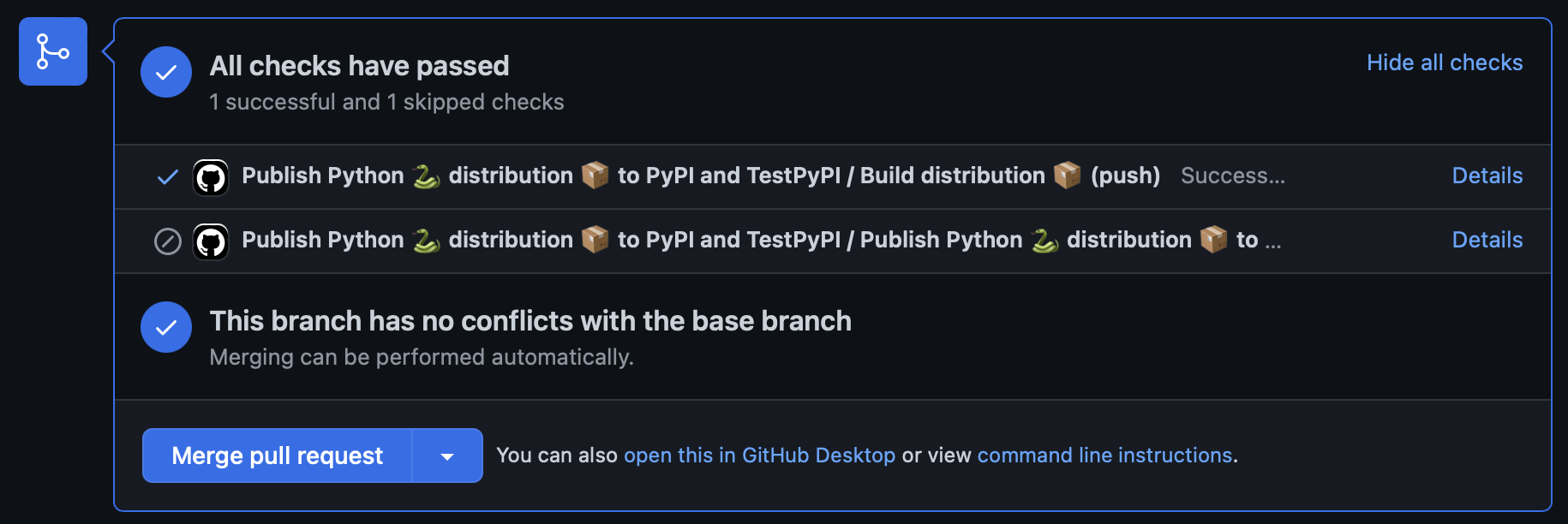
- On the pull request you will be able to see if the workflow is able to build the package
- On the pull request you will be able to see if the workflow is able to build the package
- If the workflow is successfull on the Pull Request page, feel free to merge to
mainand then create a release on the Release Page- Make sure you add a NEW tag by clicking on the choose tag button and adding a new tag. Make sure its higher than the last release which is
- If you chose an older tag, the package will build but the rest of the workflow will fail when github tries to upload the package to Pypi.
- Make sure you add a NEW tag by clicking on the choose tag button and adding a new tag. Make sure its higher than the last release which is
More information can be found on https://hallpy.fofandi.dev
Release history Release notifications | RSS feed


Download files
Download the file for your platform. If you're not sure which to choose, learn more about installing packages.
Source Distribution
Built Distribution
Filter files by name, interpreter, ABI, and platform.
If you're not sure about the file name format, learn more about wheel file names.
Copy a direct link to the current filters
File details
Details for the file HallPy_Teach-0.1.10.tar.gz.
File metadata
- Download URL: HallPy_Teach-0.1.10.tar.gz
- Upload date:
- Size: 32.3 kB
- Tags: Source
- Uploaded using Trusted Publishing? Yes
- Uploaded via: twine/4.0.2 CPython/3.11.5
File hashes
| Algorithm | Hash digest | |
|---|---|---|
| SHA256 |
8b38cf4a2e244faf80b0606393d97457c50ed0855b12de2c5afbcf8023d7e5ef
|
|
| MD5 |
6900983fc03fb5e8c14618ca6bb4ea77
|
|
| BLAKE2b-256 |
7798aadbe746f44db8f42943fc115d6ccb4d5add345faa9b62d949ea75b28d6a
|
File details
Details for the file HallPy_Teach-0.1.10-py3-none-any.whl.
File metadata
- Download URL: HallPy_Teach-0.1.10-py3-none-any.whl
- Upload date:
- Size: 34.8 kB
- Tags: Python 3
- Uploaded using Trusted Publishing? Yes
- Uploaded via: twine/4.0.2 CPython/3.11.5
File hashes
| Algorithm | Hash digest | |
|---|---|---|
| SHA256 |
21b47f4707ff3e3e3e143ce522d6066c3e3c4487a063c9c485884ecc529e3d83
|
|
| MD5 |
0781f8176e2dd51d56f67445fd1e0d9f
|
|
| BLAKE2b-256 |
1be6bd9ec94b667452700dd24a09c6ddadc1b2d6846cee1d80d16ff5ab9c130a
|






