
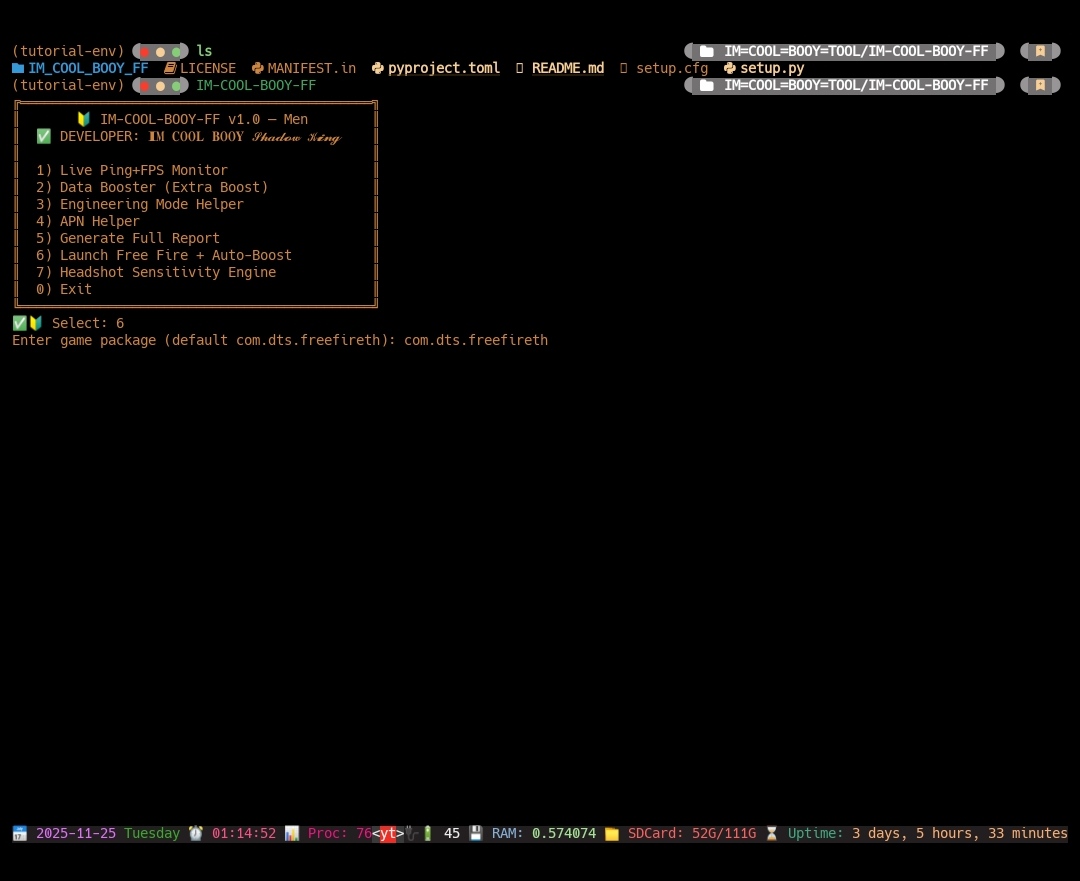
🚀 Full Booster + One-Tap Headshot Sensitivity Engine.
🔰 SL Android Official ™ 🇱🇰
👨💻 Developer: 𝐈𝐌 𝐂𝐎𝐎𝐋 𝐁𝐎𝐎𝐘 𝓢𝓱𝓪𝓭𝓸𝔀 𝓚𝓲𝓷𝓰
🚀 Overview
IM-COOL-BOOY-FF is an Android/Termux-based performance enhancement toolkit designed for Free Fire players.
It provides:
Real-time ping and FPS monitoring
Network boost & stability tools
Full data booster engine
Auto-generated headshot sensitivity settings
Game launch + auto booster mode
Device and network diagnostics
The tool works without root and uses optimized system commands + performance analytics.
🌟 Features
🔥 1. Live Ping + FPS Monitor
Real-time ping measurement
FPS analyzer using dumpsys
Moving average smoothing
Clean terminal dashboard
⚡ 2. Data Booster (Extra Boost Mode)
Ping stabilizer
DNS optimization
Network refresh
MI 9T special Qualcomm turbo booster
Automatic recovery during high-ping spikes
📶 3. Engineering Mode Helper
Instant access to Android 4636 testing menu
Useful for network changes, signal tests, and radio info
🌐 4. APN Quick Access
Opens APN settings instantly
Useful for fixing internet/APN issues
📄 5. Full System + Network Report
Generates a detailed report at:
/sdcard/Download/coolreport.txt
Includes:
Device info
Android version
SIM / network details
Signal logs
Netstats
GFXInfo FPS dump
🎮 6. Auto-Boost + Game Launcher
Launches Free Fire
Starts booster loop in background
Optimizes game latency instantly
🎯 7. One-Tap Headshot Sensitivity Engine
Automatically detects DPI and creates:
General sensitivity
Red Dot
2x / 4x scope
AWM
Free Look
Fire Button size
Perfect for one-tap headshot players.
📦 Installation
(After publishing to PyPI)
- pip install IM-COOL-BOOY-FF
Run the tool:
- IM-COOL-BOOY-FF
🛠 Requirements
Android (Termux)
Python 3.10+
No root needed
Works on all brands (Xiaomi, Samsung, Oppo, Vivo, Realme, Huawei, etc.)
⚠️ Disclaimer
This tool is created for educational and optimization purposes only. It does not modify game files or provide cheating methods. Use responsibly.
❤️ Developer
Created with passion by IM COOL BOOY – Shadow King
💠 Let me know if you want me to add this directly into your Python code or CLI help message too.!
📱 Social Media & Contact: ⤵️
➡️ Telegram Group: https://t.me/SL_Android
➡️ eveloper: https://t.me/COOLBOOY550
1 maintainer

Release files for IM-COOL-BOOY-FF 1.3.5
For a detailed explanation of source distributions (sdists) and built distributions (wheels), please see the package formats documentation.
Source distribution (sdist)
| File | Size | Uploaded | |
|---|---|---|---|
| im_cool_booy_ff-1.3.5.tar.gz | 90.0 kB | Details |
Built distribution (wheel)
| File | Interpreter | ABI | Platform | Reset |
|---|---|---|---|---|
| im_cool_booy_ff-1.3.5-py3-none-any.whl | Python 3 | none | any | Details |
Total release size: 180.4 kB
Release files / im_cool_booy_ff-1.3.5.tar.gz
| Download URL | im_cool_booy_ff-1.3.5.tar.gz |
|---|---|
| Size | 90.0 kB |
| Tags | Source |
|
SHA-256 checksum How to use checksums |
087daeec0e635acb73105513e2d2b4e6d9f1b310958d040d08b74a51cfefa271
|
|
BLAKE2b-256 checksum How to use checksums |
270063b91dd674ab93568926c8cdc905b17314c953e1a69083f15d9713f0b18a
|
| Upload date | |
|
Uploaded using Trusted Publishing? What is trusted publishing? |
No |
| Uploaded via |
twine/6.1.0 CPython/3.12.12
|
Release files / im_cool_booy_ff-1.3.5-py3-none-any.whl
| Download URL | im_cool_booy_ff-1.3.5-py3-none-any.whl |
|---|---|
| Size | 90.4 kB |
| Tags | Python 3 |
|
SHA-256 checksum How to use checksums |
b62df474116e5d4336b20840a985e0f5e7f808aebf74a9045760bdb2e5d33312
|
|
BLAKE2b-256 checksum How to use checksums |
b492219afd2a9462be6d62cc2ab5a6ab86d5be86b6cf63b7b438c2553e156ba7
|
| Upload date | |
|
Uploaded using Trusted Publishing? What is trusted publishing? |
No |
| Uploaded via |
twine/6.1.0 CPython/3.12.12
|













