
IM COOL BOOY GIF TOOL
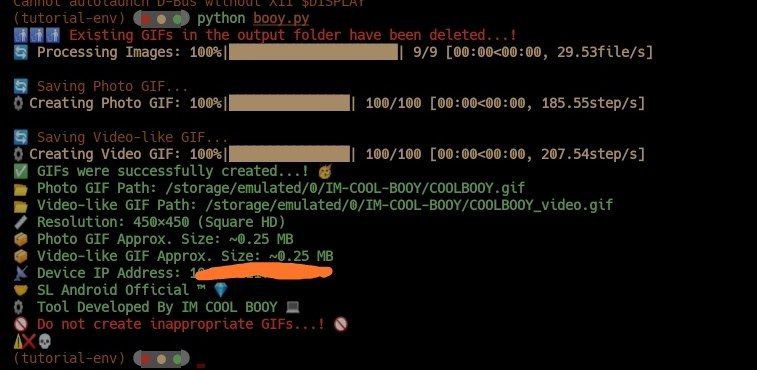
IM COOL BOOY GIF TOOL is a powerful and easy-to-use Python tool designed to help you process images, add custom text, and create GIFs from image collections, all while maintaining HD resolution.
Developed by SL Android Official ™ | IM COOL BOOY, this tool offers you a seamless and efficient way to enhance your image and GIF creation process.
🖐 Features
- Resize Images to HD Resolution: Enhance your images by resizing them to high-definition resolution, ensuring crisp and clear visuals.
- Generate Photo GIFs: Easily create GIFs from multiple images, ideal for displaying photo collections in an animated format.
- Generate Video-like GIFs: Create smoother, video-like GIFs by animating a sequence of images, providing a cinematic experience.
- Supports Multiple Image Formats: The tool supports various image formats like PNG, JPG, JPEG, BMP, WEBP, TIFF, ICO, RAW, HEIF, HEIC, AVIF, EXR, SVG, PSD, INDD and more.
🧪 Installation
To get started with IM COOL BOOY GIF TOOL, install it using pip:
pip install IM-COOL-BOOY-GIF

Then simply run:

IM-COOL-BOOY-GIF

---

📸 Usage

1. Create a folder named Download in your sdcard.


2. Place the photos you want to include in the GIF into that folder.


3. Run the command IM-COOL-BOOY-GIF.


4. A folder named IM-COOL-BOOY will be created in your sdcard, and your GIF will be saved there.


---

🤝 Contribution

Contributions are always welcome...!
If you'd like to improve IM COOL BOOY GIF TOOL, feel free to submit a pull request or open an issue.
Bug fixes, feature ideas, or suggestions are all appreciated.!


---

🧾 License

This project is licensed under a modified MIT License – free to use, modify, and distribute, but **commercial use is not allowed**. See the [LICENSE](./LICENSE) file for more details.


---

IM COOL BOOY GIF TOOL makes it easy to create GIFs from your images in an improved way.
Want HD resizing or amazing animated GIFs..? This tool will meet your needs.!

---

Thank You.! 🌷 | SL Android Official ™ | IM COOL BOOY

## Programming Language

- **Language**: Python
- **Version**: 3.12

## Built With

- Python 3.12 – Main programming language
- Termux – For running the tool in a mobile Linux-like environment
1 maintainer

Release files for IM-COOL-BOOY-GIF 1.2.2
For a detailed explanation of source distributions (sdists) and built distributions (wheels), please see the package formats documentation.
Source distribution (sdist)
| File | Size | Uploaded | |
|---|---|---|---|
| im_cool_booy_gif-1.2.2.tar.gz | 6.3 kB | Details |
Built distribution (wheel)
| File | Interpreter | ABI | Platform | Reset |
|---|---|---|---|---|
| im_cool_booy_gif-1.2.2-py3-none-any.whl | Python 3 | none | any | Details |
Total release size: 13.3 kB
Release files / im_cool_booy_gif-1.2.2.tar.gz
| Download URL | im_cool_booy_gif-1.2.2.tar.gz |
|---|---|
| Size | 6.3 kB |
| Tags | Source |
|
SHA-256 checksum How to use checksums |
be6baf6582b65e0c48f150b0c7f6c686cb0f6a6bc6bd7b88ebfa39426284d1ed
|
|
BLAKE2b-256 checksum How to use checksums |
383768c4bb27d40ebf3b43b7053416e71ec64c0fbc6af33ef82878cb0b09f4a7
|
| Upload date | |
|
Uploaded using Trusted Publishing? What is trusted publishing? |
No |
| Uploaded via |
twine/6.1.0 CPython/3.12.10
|
Release files / im_cool_booy_gif-1.2.2-py3-none-any.whl
| Download URL | im_cool_booy_gif-1.2.2-py3-none-any.whl |
|---|---|
| Size | 7.1 kB |
| Tags | Python 3 |
|
SHA-256 checksum How to use checksums |
09fb428d2a258c3e1b81cbca45ebe3318748756b3807f0bebdf9bbdc7b41e38b
|
|
BLAKE2b-256 checksum How to use checksums |
8f1ff365339614da5caedb737d8af519388e95531eac7c608e5c56edeef67118
|
| Upload date | |
|
Uploaded using Trusted Publishing? What is trusted publishing? |
No |
| Uploaded via |
twine/6.1.0 CPython/3.12.10
|













