
GMAIL SECURITY ANALYZER TOOL

Project description
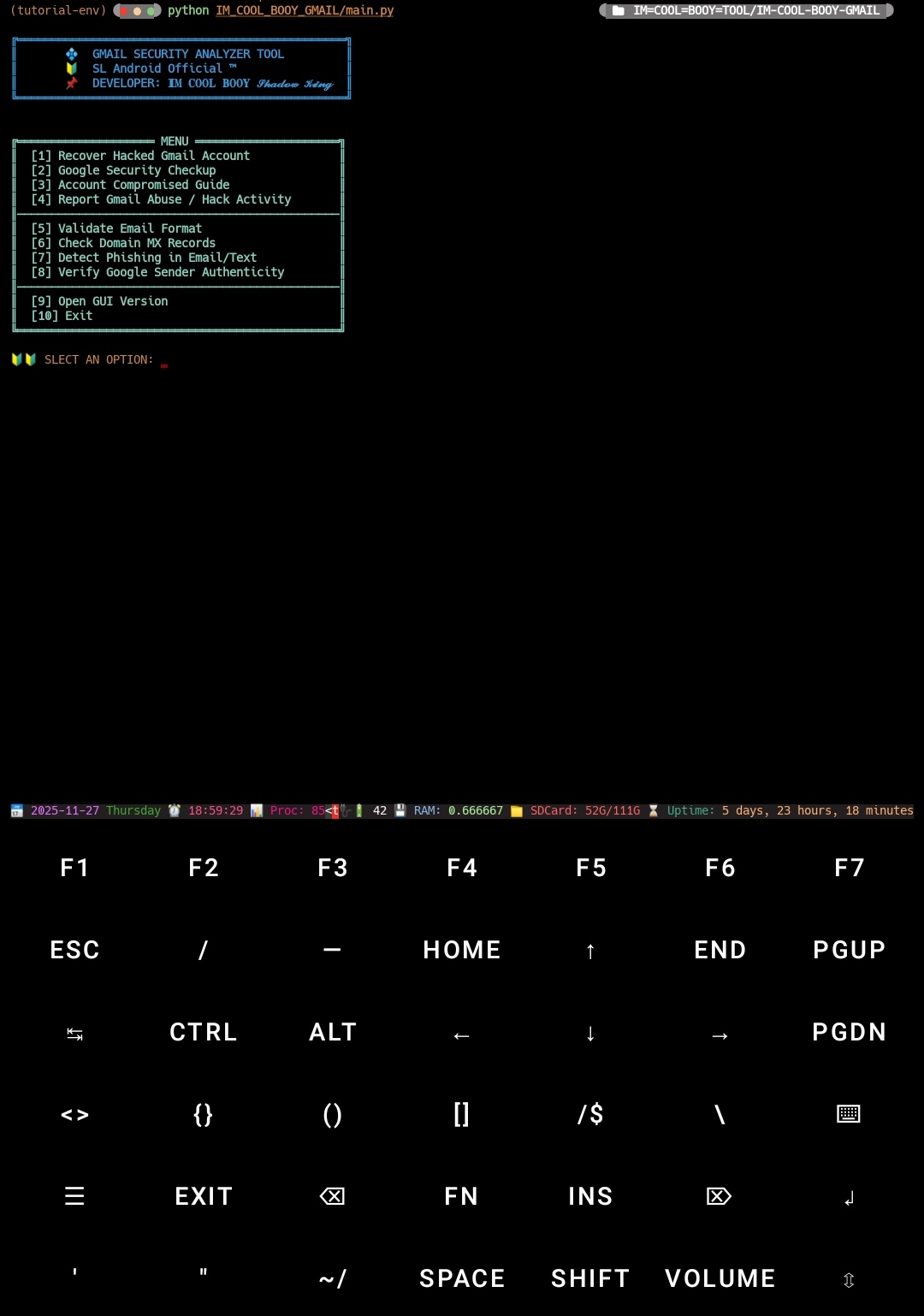
♻️ GMAIL SECURITY ANALYZER TOOL
🔰 SL Android Official ™ 🇱🇰
👨💻 Developer: 𝐈𝐌 𝐂𝐎𝐎𝐋 𝐁𝐎𝐎𝐘 𝓢𝓱𝓪𝓭𝓸𝔀 𝓚𝓲𝓷𝓰
🔥 Gmail Security Reporter — FULL TOOL CLI
A safe and powerful Gmail security assistant built for Android Termux & PC. This tool does not perform hacking — it only helps users protect their Gmail accounts safely and recover hacked accounts using official Google methods.
Python CLI mode Termux, Windows, Linux, Android support.


🎉 Tool Features
Feature Status
• Gmail hacked recovery ✅
• Google security checkup ✅
• Account compromised guide ✅
• Report abuse / hacked activity ✅
• CLI interface ✅
• Username & Public Social Scan ✅
🎉 All Functions Now Included in One Tool.
✔️ Hacked Gmail recovery
✔️ Google security check
✔️ Fake Google email detector
✔️ Scam/phishing analyzer
✔️ Email format validator
✔️ Domain MX checker
✔️ Username & Public Social Scan
⚡ Gmail Security & Recovery Toolkit — Option Descriptions
🔐 [1] Recover Hacked Gmail Account
Quickly guide users through Google’s official account‑recovery system.
This option explains:
✔ Identity verification
✔ Last valid password check
✔ Trusted device confirmation
✔ Recovery email/phone verification
✔ Securing device access
Perfect for users who suspect their account has been hijacked.
🛡 [2] Google Security Checkup
Launches Google’s full security audit panel to review:
Login attempts from unknown locations
Signed‑in devices
Third‑party apps with sensitive permissions
Recovery methods (email/phone)
This option ensures the account is fully locked down and protected.
🚨 [3] Account Compromised Guide
A complete walkthrough explaining how to identify a compromised Gmail account. Includes:
Warning signs of hacking
Suspicious activity detection
Immediate actions to take
Long‑term security recommendations
🎭 [4] Username Generator & Public Social Scan
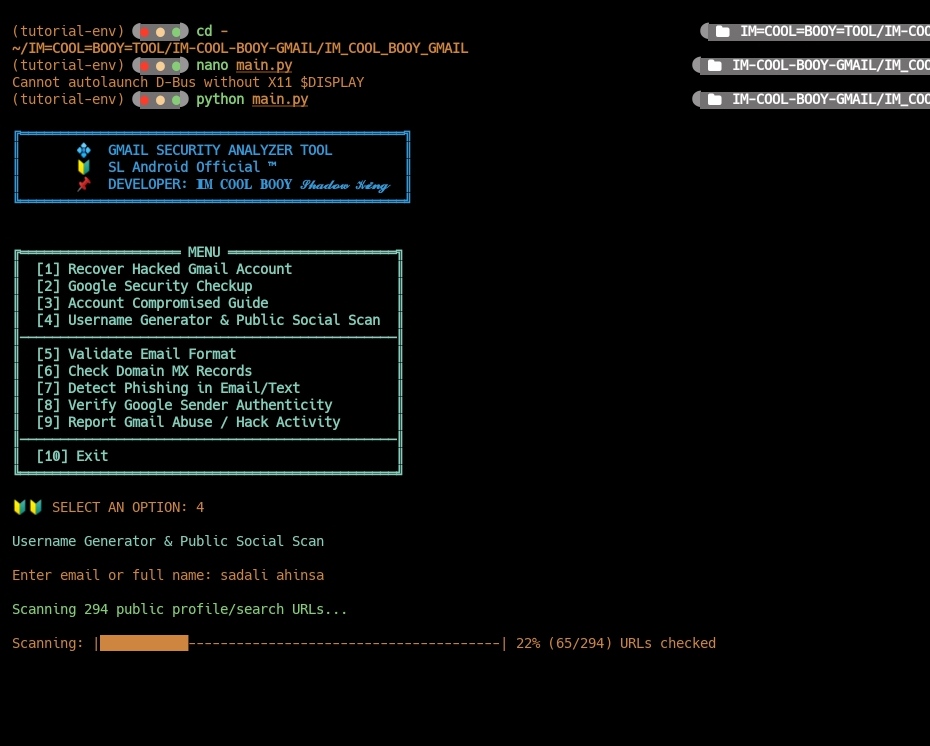
Generates fresh, creative usernames and checks where the username is publicly exposed. Useful for:
✔ Privacy protection
✔ Rebranding
✔ Preventing impersonation
✔ Identity consistency check
✉️ [5] Validate Email Format
A smart validator that checks whether an email follows the correct RFC‑based email format. Quick way to detect fake or mistyped emails.
Example supported format: username@domain.com
🌐 [6] Check Domain MX Records
Inspects the domain’s MX (Mail Exchange) DNS records to confirm mail server authenticity. Helps detect:
Fake domains used for phishing
Misconfigured email servers
Untrustworthy organizations pretending to be Google
🕵️♂️ [7] Detect Phishing in Email/Text
AI‑powered analysis of suspicious messages.
Scans for:
✔ Malicious or shortened URLs
✔ Scam keywords and patterns
✔ Spoofed sender names
✔ High‑risk triggers commonly used by attackers
This option acts as a mini security expert inside your script.
✅ [8] Verify Google Sender Authenticity
Checks whether a message claiming to be from Google is truly legitimate. Analyzes indicators like:
SPF validation
DKIM signature
DMARC policy compliance
Header authenticity clues
Provides a clear “Real or Fake” verdict.
🚔 [9] Report Gmail Abuse / Hack Activity
Guides the user to report malicious Gmail activity directly to Google’s official abuse system. Covers:
Hacking attempts
Account hijacking
Impersonation
Spam or phishing
Unauthorized account access Includes direct reporting links + clear instructions.
🔚 [10] Exit
Safely closes the toolkit and terminates the script.
🛠️ Installation
1. Install Python (Android Termux or PC)
Python 3.10+ required.
2. Install dependencies
pip install dnspython
(Other modules like webbrowser, os, time, re, sys, and tkinter are built‑in for most systems.)
🚀 Usage
01 pip install IM-COOL-BOOY-GMAIL
02 IM-COOL-BOOY-GMAIL
📌 Notes
- This tool is 100% safe — no hacking, no brute‑forcing.
- Works on Android Termux, Windows, and Linux.
- All recovery and checking systems redirect to official Google pages only.
📌 License
MIT License © 2025 𝐈𝐌 𝐂𝐎𝐎𝐋 𝐁𝐎𝐎𝐘 𝓢𝓱𝓪𝓭𝓸𝔀 𝓚𝓲𝓷𝓰
Release history Release notifications | RSS feed

Download files
Download the file for your platform. If you're not sure which to choose, learn more about installing packages.
Source Distribution
Built Distribution
Filter files by name, interpreter, ABI, and platform.
If you're not sure about the file name format, learn more about wheel file names.
Copy a direct link to the current filters
File details
Details for the file im_cool_booy_gmail-1.1.1.tar.gz.
File metadata
- Download URL: im_cool_booy_gmail-1.1.1.tar.gz
- Upload date:
- Size: 8.7 kB
- Tags: Source
- Uploaded using Trusted Publishing? No
- Uploaded via: twine/6.1.0 CPython/3.12.12
File hashes
| Algorithm | Hash digest | |
|---|---|---|
| SHA256 |
7ffab0dbd037a59397e89f9ace7365b5af2423dd2c7c7f4eefa9155ebfaeff6a
|
|
| MD5 |
b9544395733ade88292633be159e7158
|
|
| BLAKE2b-256 |
b69e8005aede3bbdadd325b937f479bb0d9ea20542e5b90f1d16898b406c6132
|
File details
Details for the file im_cool_booy_gmail-1.1.1-py3-none-any.whl.
File metadata
- Download URL: im_cool_booy_gmail-1.1.1-py3-none-any.whl
- Upload date:
- Size: 9.4 kB
- Tags: Python 3
- Uploaded using Trusted Publishing? No
- Uploaded via: twine/6.1.0 CPython/3.12.12
File hashes
| Algorithm | Hash digest | |
|---|---|---|
| SHA256 |
27eac91804b3b56bf539623c1199fa599f8293039d309403704a2e318d606f23
|
|
| MD5 |
e51365d617f2b15b1e92ab4fff71a563
|
|
| BLAKE2b-256 |
12a50eba031132670313786053979aa48a35205b1f3cb0119852aa07ef8fd6b2
|






