
NGROK Auto Installer & Manager

🔰 SL Android Official ™ 🇱🇰
💻 Developer: 𝐈𝐌 𝐂𝐎𝐎𝐋 𝐁𝐎𝐎𝐘 𝓢𝓱𝓪𝓭𝓸𝔀 𝓚𝓲𝓷𝓰

Description:
This Python script is designed for Termux and Linux systems to automatically install Ngrok, manage Ngrok tokens, start tunnels, and update Ngrok. The script provides a user-friendly menu with a colored CLI interface for better usability.

🔗 How to Get Your Ngrok Token
-
Visit the official Ngrok website: (https://dashboard.ngrok.com)
-
Sign up for a free account or log in if you already have one.
-
After logging in, go to the "Auth" or "Your Authtoken" section.
-
Copy your authtoken string.
-
Paste this token into the Enter New Ngrok Token option in the script menu.
Note: The token is required to authenticate your tunnels and access free or paid Ngrok services.
📝 Main Menu Options & Effects

1️⃣ Install NGROK
-
Effect when selected:
-
Detects your system OS and CPU architecture.
-
Downloads the correct Ngrok binary for your device.
-
Extracts and makes the binary executable.
-
After this, you can run Ngrok tunnels (
tcporhttp) from the script.
-
-
Outcome: Ngrok becomes ready to use for creating tunnels without manual installation.
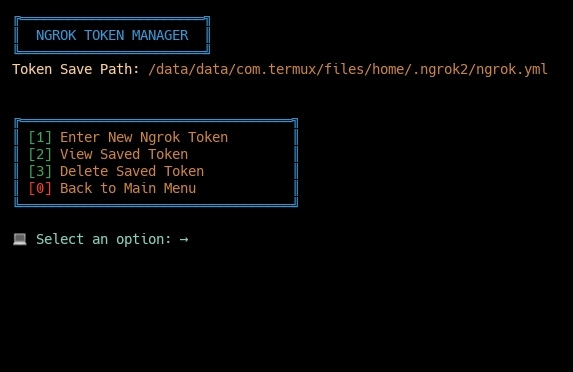
2️⃣ Ngrok Token Manager
-
Effect when selected:
- Provides options to enter, view, or delete your Ngrok token.
1) Enter New Ngrok Token
-
Prompts for token input.
-
Validates the token via Ngrok CLI.
-
Saves the token internally for future tunnel usage.
-
Outcome: You can now create authenticated Ngrok tunnels.
2) View Saved Token
-
Displays the currently saved token.
-
Outcome: Confirms which token is active.
3) Delete Saved Token
-
Deletes the stored token.
-
Outcome: Script no longer has an active token; Ngrok tunnels won't work until a new token is set.
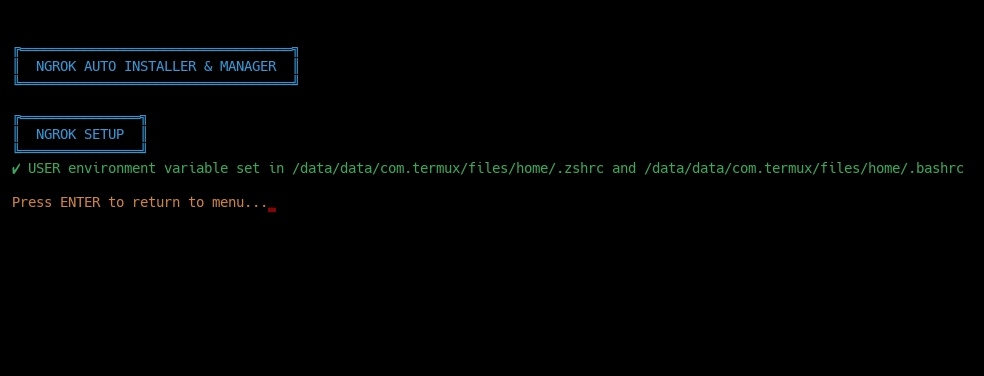
3️⃣ Ngrok Setup
-
Effect when selected:
- Automatically sets the
USERenvironment variable in shell sessions.
- Automatically sets the
-
Outcome: Future scripts or commands using this variable run smoothly in Termux.
4️⃣ Check Ngrok Version
-
Effect when selected:
- Runs Ngrok to display its current version.
-
Outcome: You can verify which Ngrok version is installed.
5️⃣ Update Ngrok
-
Effect when selected:
-
Detects system architecture.
-
Downloads the latest Ngrok binary.
-
Replaces the existing binary with the updated version.
-
-
Outcome: Always have the latest Ngrok features and fixes.
⚡ Important Note Before Starting a Tunnel
• Before you start a TCP or HTTP tunnel using this script:
-
Ensure the service you want to expose is running on your local machine.
-
For example:
-
If you want to start an HTTP tunnel on port 8080, make sure your web server is active on
localhost:8080. -
If you want to start a TCP tunnel on port 3306, ensure your database or service is listening on that port.
-
-
-
Do not start a tunnel on a port that is already in use.
- Ngrok cannot bind to a port that is occupied by another service.
-
Check your firewall or security settings.
- Make sure your firewall allows connections to the port you want to expose.
-
Why this is important:
-
Ngrok tunnels only forward traffic to an active host port.
-
If the port is not active or the service is not running, the tunnel will appear to work but no traffic will reach your service.
-
6️⃣ Start TCP Tunnel
-
Effect when selected:
-
Prompts for a local TCP port.
-
Opens a public TCP tunnel to that port.
-
-
Outcome: Any service on that port becomes accessible from the internet.
7️⃣ Start HTTP Tunnel
-
Effect when selected:
-
Prompts for a local HTTP port.
-
Opens a public HTTP tunnel to that port.
-
-
Outcome: Local web servers or applications become accessible from the internet.
8️⃣ Exit
-
Effect when selected:
-
Prints a goodbye message.
-
Ends the script.
-
-
Outcome: Script terminates safely and returns control to the terminal.
📦 Requirements
This tool uses only Python’s built-in modules:
-
os -
platform -
urllib.request -
zipfile -
sys -
time -
subprocess
✔ No external pip modules are required.
✔ Works on Python 3.8+ (recommended: 3.10+)
⚡ install
pip install IM-COOL-BOOY-NGROK
IM-COOL-BOOY-NGROK
📌 License
MIT License © 2025 𝐈𝐌 𝐂𝐎𝐎𝐋 𝐁𝐎𝐎𝐘 𝓢𝓱𝓪𝓭𝓸𝔀 𝓚𝓲𝓷𝓰

1 maintainer

Release files for IM-COOL-BOOY-NGROK 1.1.1
For a detailed explanation of source distributions (sdists) and built distributions (wheels), please see the package formats documentation.
Source distribution (sdist)
| File | Size | Uploaded | |
|---|---|---|---|
| im_cool_booy_ngrok-1.1.1.tar.gz | 159.6 kB | Details |
Built distribution (wheel)
| File | Interpreter | ABI | Platform | Reset |
|---|---|---|---|---|
| im_cool_booy_ngrok-1.1.1-py3-none-any.whl | Python 3 | none | any | Details |
Total release size: 320.1 kB
Release files / im_cool_booy_ngrok-1.1.1.tar.gz
| Download URL | im_cool_booy_ngrok-1.1.1.tar.gz |
|---|---|
| Size | 159.6 kB |
| Tags | Source |
|
SHA-256 checksum How to use checksums |
6b2a6197ad001153793d2ecbbb9179c1304045be67f10ef59a9d246159c6a7d2
|
|
BLAKE2b-256 checksum How to use checksums |
212a2ccee754b886ef42973dafbf012768c1a7a6159825d9f7318eeb6d57da3a
|
| Upload date | |
|
Uploaded using Trusted Publishing? What is trusted publishing? |
No |
| Uploaded via |
twine/6.1.0 CPython/3.12.12
|
Release files / im_cool_booy_ngrok-1.1.1-py3-none-any.whl
| Download URL | im_cool_booy_ngrok-1.1.1-py3-none-any.whl |
|---|---|
| Size | 160.5 kB |
| Tags | Python 3 |
|
SHA-256 checksum How to use checksums |
b2597664cf92378278a8f78809bd8205a126588ac94b9110d12d15ff58a8b999
|
|
BLAKE2b-256 checksum How to use checksums |
ef7a14fbd184d69b6a396d92f34d8acad2d718751cbe72dee379fae1ef1bf99c
|
| Upload date | |
|
Uploaded using Trusted Publishing? What is trusted publishing? |
No |
| Uploaded via |
twine/6.1.0 CPython/3.12.12
|













