
🔰 SL Android Official ™ 🇱🇰 👨💻 Developed by: IM COOL BOOY
IM-COOL-BOOY-QR is a powerful and easy-to-use Python tool for generating and decoding QR codes. Whether you’re a developer, tech enthusiast, or just someone needing a QR solution — this tool has got you covered.!
✨ Features
✅ QR Code Generation – Create QR codes from URLs, text, or other data types.
✅ QR Code Decoding – Decode QR code images and extract the embedded content.
✅ Simple CLI – Use directly from the command line.
✅ Python Library Support – Integrate easily into your own Python projects.
✅ Color Customization – Choose your favorite QR code and background colors.
✅ Logo Embedding – Add a logo to the center of your QR code.
✅ Text Under QR – Add custom text below your QR code.
⚙️ Optional Arguments
⬇️ Installation
• pip install colorama
• pip install qrcode
• pip install argparse
• pip install Pillow
💠 Use pip to install IM-COOL-BOOY-QR:⤵️
• pip install IM-COOL-BOOY-QR
💠 Check usage:⤵️
IM-COOL-BOOY-QR -h
🧪 Example Command
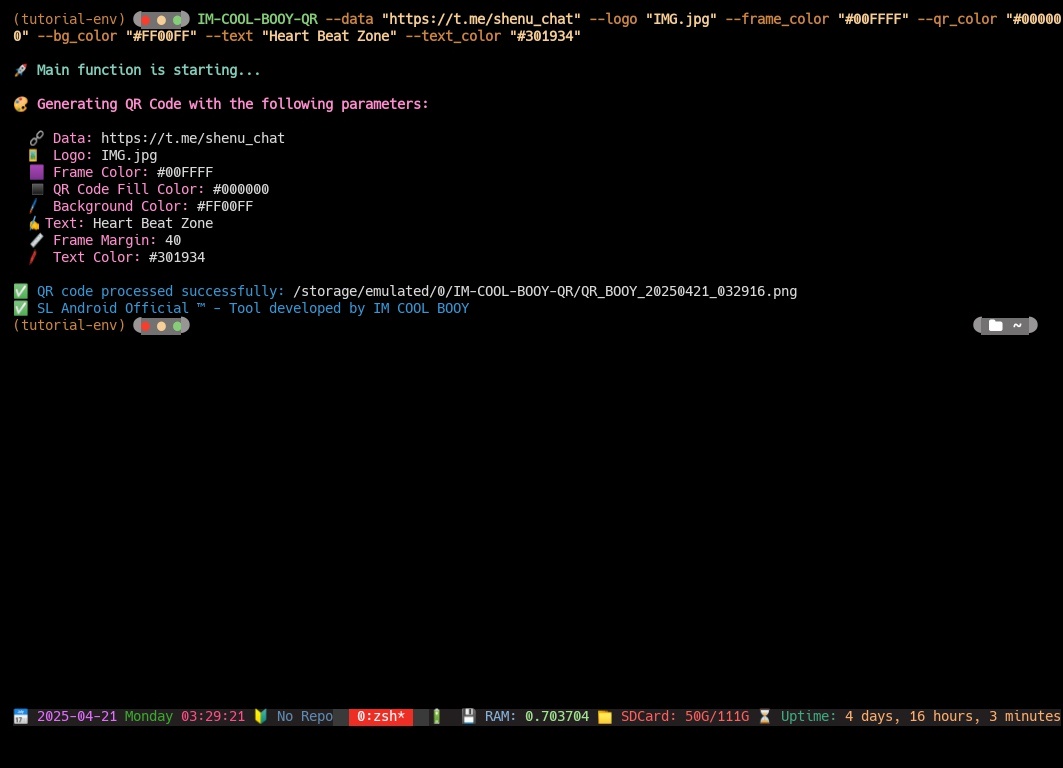
IM-COOL-BOOY-QR --data "https://t.me/SL_Android" --logo "IMG.jpg" --frame_color "#00FFFF" --qr_color "#000000" --bg_color "#FF00FF" --text "SL_Android" --text_color "#301934"
📄 License
• Licensed under the MIT License. See the LICENSE file for details.
💠 Logo Image Location Requirement
To embed a logo in the center of your QR code, place the desired image inside your Termux $HOME directory. The tool will automatically look for a file named logo.png (or any specified filename) in that location when generating the QR code.
💠 Instructions:⤵️
1️⃣ Save your logo image to the $HOME directory in Termux.
💠 Example command:⤵️
• mv your_logo_image.webp $HOME/logo.png
2️⃣ Run the QR tool. If no custom logo path is provided, it will automatically use:
• $HOME/logo.png
3️⃣ You can also manually specify a custom path:
• IM-COOL-BOOY-QR --data "https://t.me/SL_Android" --logo "IMG.jpg" --frame_color "#00FFFF" --qr_color "#000000" --bg_color "#FF00FF" --text "SL_Android" --text_color "#301934"
• By default, if no --logo argument is given, the tool will attempt to use $HOME/logo.png as the embedded logo.
💠 Let me know if you want me to add this directly into your Python code or CLI help message too.!
📱 Social Media & Contact: ⤵️
➡️ Telegram Group: https://t.me/SL_Android
➡️ Developer: https://t.me/COOLBOOY550
💠 SL Android Official™ 🇱🇰 | Powered by IM COOL BOOY
1 maintainer

Release files for IM-COOL-BOOY-QR 1.2.0
For a detailed explanation of source distributions (sdists) and built distributions (wheels), please see the package formats documentation.
Source distribution (sdist)
| File | Size | Uploaded | |
|---|---|---|---|
| im_cool_booy_qr-1.2.0.tar.gz | 6.1 kB | Details |
Built distribution (wheel)
| File | Interpreter | ABI | Platform | Reset |
|---|---|---|---|---|
| im_cool_booy_qr-1.2.0-py3-none-any.whl | Python 3 | none | any | Details |
Total release size: 12.5 kB
Release files / im_cool_booy_qr-1.2.0.tar.gz
| Download URL | im_cool_booy_qr-1.2.0.tar.gz |
|---|---|
| Size | 6.1 kB |
| Tags | Source |
|
SHA-256 checksum How to use checksums |
c2aa5dd63018d1d4d848f4a729eec44e35630d9c68ece74a0d22757c37f77594
|
|
BLAKE2b-256 checksum How to use checksums |
c9a9ce9dea1e21e2e09f015064cad6f0e6848dffba070ce3122ce06fd5a8e836
|
| Upload date | |
|
Uploaded using Trusted Publishing? What is trusted publishing? |
No |
| Uploaded via |
twine/6.1.0 CPython/3.12.10
|
Release files / im_cool_booy_qr-1.2.0-py3-none-any.whl
| Download URL | im_cool_booy_qr-1.2.0-py3-none-any.whl |
|---|---|
| Size | 6.3 kB |
| Tags | Python 3 |
|
SHA-256 checksum How to use checksums |
a607745cf4a2f4fb0ec29432ca37f32fa564240920d2f4967237f129af557410
|
|
BLAKE2b-256 checksum How to use checksums |
2bb30bcc6a09cdc12fecaccdda958337f662bb5fdfdf4c331bdac3e2abd710da
|
| Upload date | |
|
Uploaded using Trusted Publishing? What is trusted publishing? |
No |
| Uploaded via |
twine/6.1.0 CPython/3.12.10
|













