







What is COMPASS?
COMPASS (formally the Infrastructure Continuous Ordinance Mapping for Planning and Siting Systems, or “INFRA-COMPASS”) is an innovative software tool that harnesses the power of Large Language Models (LLMs) to automate the compilation and continued maintenance of an inventory of state and local codes and ordinances pertaining to energy infrastructure.
At a high level, COMPASS does two things: it retrieves the right ordinance documents for each jurisdiction you ask about, and then extracts structured data from those documents into a versioned database that downstream users can query as a CSV, Excel workbook, or GeoPackage.
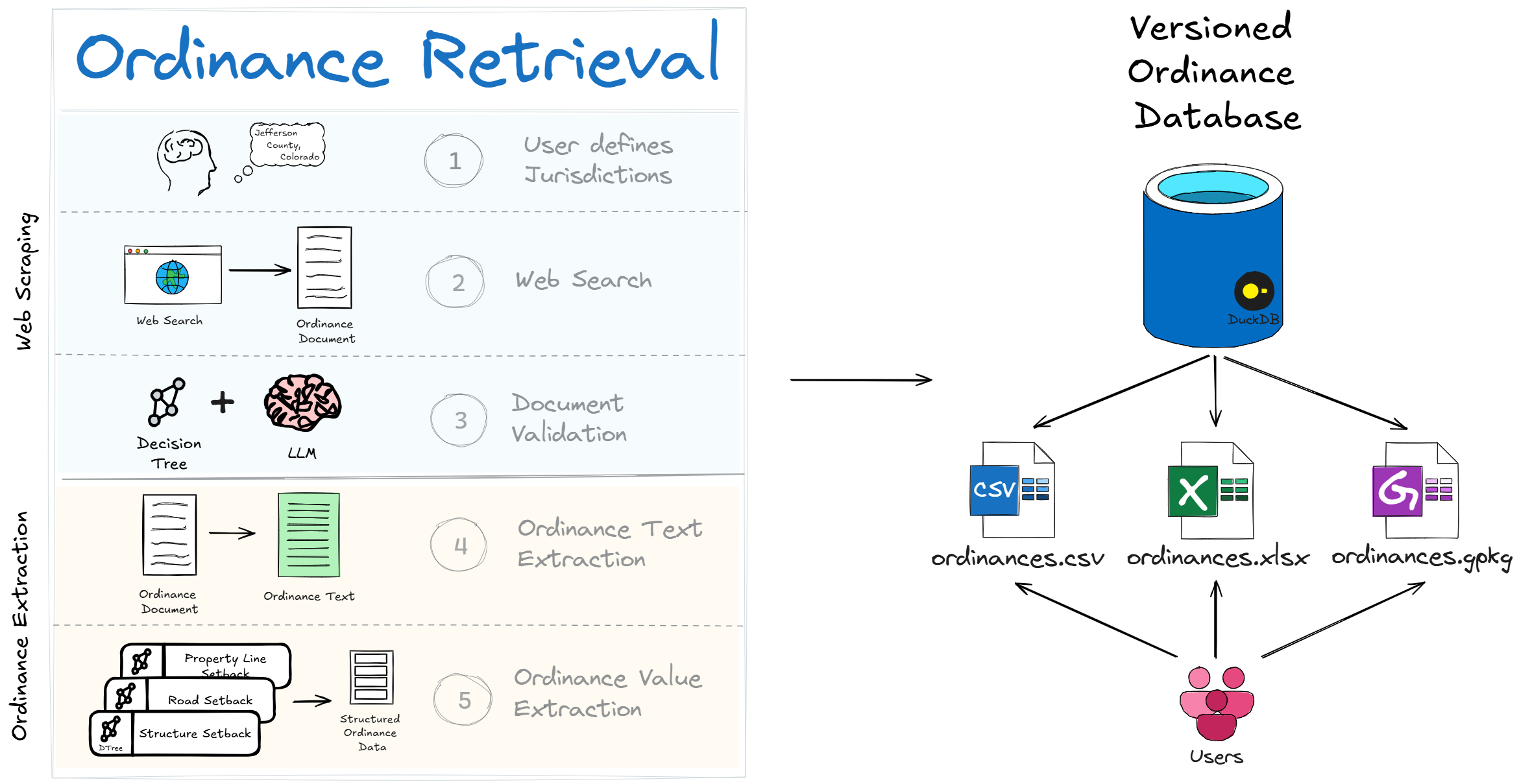
What makes COMPASS different from simply asking ChatGPT for ordinance data is the architecture around the LLM call:
Structured, downstream-ready output — consistent CSV rows with stable column names, units, and feature labels that drop straight into siting and capacity-modeling tools like reV, GIS workflows, or any pipeline that needs setbacks, height limits, and noise thresholds as numbers rather than prose.
Hallucination guardrails — cleaned text is checked against the source and dropped if it drifts too far, so fabricated values never reach the database.
Source-URL traceability — every record carries a URL back to the original ordinance document, so any value can be audited or spot-checked.
Cost control — cheap heuristic filters reject obviously irrelevant text before any LLM call runs, making it tractable to extract data across hundreds of jurisdictions.
Read more about the tool in the documentation, or check out summaries of the validation results in the validation report.
Where is the extracted ordinance data?
The National Laboratories of the Rockies (NLR) typically runs the COMPASS pipeline annually and publishes refreshed datasets to OpenEI. The latest published ordinance datasets are available here:
Installing COMPASS
The quickest way to install COMPASS for users is from PyPI:
pip install infra-compassIf you would like to install and run COMPASS from source, we recommend using pixi:
git clone git@github.com:NatLabRockies/COMPASS.git; cd COMPASS
pixi run compass
For detailed instructions and troubleshooting, see the installation documentation.
Quickstart
To run a quick COMPASS demo, set up a personal OpenAI API key and run:
pixi run openai-solar-demo <your API key>This will run a full extraction pipeline for two counties using gpt-4o-mini (costs ~$0.45). For more information on configuring a COMPASS run, see the execution basics example.
Development
Please see the Development Guidelines if you wish to contribute code to this repository.
2 maintainers


Metadata
2 maintainers
Release files for INFRA-COMPASS 0.27.0
For a detailed explanation of source distributions (sdists) and built distributions (wheels), please see the package formats documentation.
Source distribution (sdist)
| File | Size | Uploaded | |
|---|---|---|---|
| infra_compass-0.27.0.tar.gz | 1.1 MB | Details |
Built distribution (wheel)
| File | Interpreter | ABI | Platform | Reset |
|---|---|---|---|---|
| infra_compass-0.27.0-py3-none-any.whl | Python 3 | none | any | Details |
Total release size: 2.2 MB
Release files / infra_compass-0.27.0.tar.gz
| Download URL | infra_compass-0.27.0.tar.gz |
|---|---|
| Size | 1.1 MB |
| Tags | Source |
|
SHA-256 checksum How to use checksums |
2a6f396745db0885b0b3f0dc4c31918c05366cf04f691b6c25f61dca4e98c699
|
|
BLAKE2b-256 checksum How to use checksums |
e03fdff4c6007902cc2cb93cc7fde09066290479d73c13807260bb9c67b507b3
|
| Upload date | |
|
Uploaded using Trusted Publishing? What is trusted publishing? |
Yes |
| Uploaded via |
twine/7.0.0 CPython/3.13.14
|
Provenance
Provenance describes where a file came from. On PyPI, provenance is shared via attestations, which provide a verifiable record of the build or publishing details. View details, limitations and caveats.


PyPI Publish Attestation
PyPI verified that this artifact, at this checksum, originated from the publisher listed below.
Signed by GitHub Actions, verified by PyPI on Aug 20, 2026.
Transparency logRelease files / infra_compass-0.27.0-py3-none-any.whl
| Download URL | infra_compass-0.27.0-py3-none-any.whl |
|---|---|
| Size | 1.1 MB |
| Tags | Python 3 |
|
SHA-256 checksum How to use checksums |
0faa2623680abae926a6e7a4665ab0a2bf1ba556af22325719ce7ec5415cc5cc
|
|
BLAKE2b-256 checksum How to use checksums |
6c5a16c4ad6e7db69b04fe17ef53aecae9dbb3eac88aab9313437d896214305b
|
| Upload date | |
|
Uploaded using Trusted Publishing? What is trusted publishing? |
Yes |
| Uploaded via |
twine/7.0.0 CPython/3.13.14
|
Provenance
Provenance describes where a file came from. On PyPI, provenance is shared via attestations, which provide a verifiable record of the build or publishing details. View details, limitations and caveats.
PyPI Publish Attestation
PyPI verified that this artifact, at this checksum, originated from the publisher listed below.
Signed by GitHub Actions, verified by PyPI on Aug 20, 2026.
Transparency log













